

Nice one! Thanks very much.SimRaceway tracks:
- Madina al Bahar v1.0
- Tropical Island v0.80 (wip)
- Giza (beta update v0.86)
- Paradise Bay v1.30
- Troyton v1.10
- Longstone Pass v1.0


This is the wrong way to do it. The solution is very simple, place the name of the skin paint mesh in here the car paint meshes box.
View attachment 1384198
material:whatever the material name of the skin is
Small mistake on my part. I forgot to add the updated models files for the Pyyer extensions. If you use them, please replace the existing files with these ones. The full Istanbul track mod includes these already for anyone just downloading the update I posted above.My Istanbul track has been updated to a new version. Use the link in the quote to get the update. I believe you can simply extract and overwrite your existing files when it asks, but the safest route would be to delete your existing track folder first and start fresh. Try the overwrite method first and if you have any issues, just start fresh. Also remember to extract the files for the Pyyer extensions if you own\use them.
Thanks to @rickety35235 for pointing out these issues that needed fixed.
-- Fixed the incorrect point on pit road where the pit speed limiter would kick in. It should now start right at the pit line not well before it like it did before.
-- Fixed the drs zones activation point to align with the placement of the drs markers. Previously, drs kicked in way before the markers.
-- Added a 50 pit layout as per a request from Low Fuel Motorsports so they can use the track in their online races. The 50 pit layout may or may not work for offline races. The way the pit spots needed placed may not work right in an offline race. You can try it and see what happens. If you have no interest in the 50 pit layout, feel free to delete it from the track folder to save a little disk space.

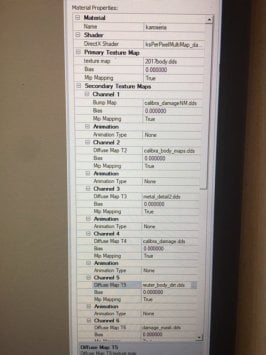
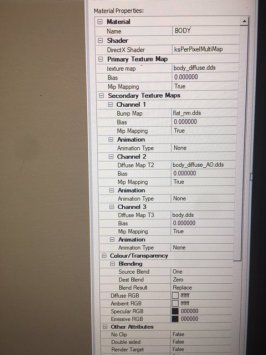
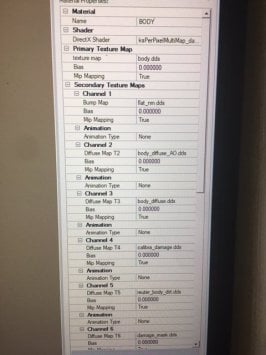
No that's not what I meant, you put in the name of the material not the texture file name. This will create a more optimised LOD_D than the other method. This one:Both of these seem to have the same effect, thanks.
EDIT: Scratch that, placing the skin paint mesh name (in the FLM09's case, "carpaint.dds") with the "material:x" command in that field does NOT work - LOD D is still completely black when I do that. Only Frank's initial suggestion seems to properly generate LOD D.
Cheers, this is great. This Material, for those who aren't aware, is found by clicking on various parts of the car in CM Showroom. And, if "Body" Material isn't enough, you can comma in multiple materials - I added "material:Tyre, material:Rims". Works a treat - a really decent looking LOD D. Thanks again.No that's not what I meant, you put in the name of the material not the texture file name. This will create a more optimised LOD_D than the other method. This one:
View attachment 1384371
So for the Calibra you would use material:BODY and another car you might use material:EXT_Car_Paint, just whatever the material for the specific car is called. Sorry if I didn't explain it properly

nice project, I just check Blaze patreon for the base model, but nothing about the Mazda 6, where I can find it? pleasethe only reason to start (entry-level) modding :-D recreating my own car :-) base-model is from Blaze, added some parts from other cars (intercooler, skirts) and modfied them to fit the car. I know its not perfect, I know it´s not nice borrow other meshes.. but it´s my personal beginning, learning and only for personal use :-)
does anybody know good tutorial (maybe in german) for blender? there are tons of vids arount the web..
View attachment 1384232View attachment 1384233View attachment 1384234


It’s just a beta state. there’s a second mps out there, but encryptednice project, I just check Blaze patreon for the base model, but nothing about the Mazda 6, where I can find it? please
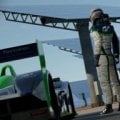



Just trying out the VRC Apha 2024 in a single player championship. For some reason, I was not able to hide the halo or even make it transparent. Also, at the beginning of the race, half the field smashedi into the pit wall almost crashing my PC, even after retarting the race several times. Such a shame, wonderful car to drive. Appreciate any ideas/advice/experience anyone might have on the two issues described above. Much thanks! P.S. Clean reinstalling the mod doesn't seem to help...
Just trying out the VRC Apha 2024 in a single player championship. For some reason, I was not able to hide the halo or even make it transparent. Also, at the beginning of the race, half the field smashedi into the pit wall almost crashing my PC, even after retarting the race several times. Such a shame, wonderful car to drive. Appreciate any ideas/advice/experience anyone might have on the two issues described above. Much thanks! P.S. Clean reinstalling the mod doesn't seem to help...


My oppinion is from a couple cars i bought this week. Simdream have improved a lot, they offer cars not stolen from other modders anymore, though they seem to work with a few other groups and share data (RTT - who is making excellent f1 mods). some are conversions (i dont know if the newer mods are), but so are some on gtplanet, most people here are haters of them so will ridicule everything they do on pure principle and wont even try their mods. I try not to buy mods, if you want to try some 2024 built simdream mods for free, im sure telegram, reddit and kemono will help youI think you should ask kpcart. I have not purchased simdream product. I only asked kpcart for context and clarification of his opinion.





Barcelona 1994 v1.01
View attachment 1381434
Circuit de Barcelona-Catalunya with 1994 layout.
Conversion from rFactor.
-CSP recommended
-40 pit/start
-AI, cam
Credits & Thanks;
rFactor Track by F1-S-R (ASR)
-Thank you for giving me permission
AC Converted by @shi (shin956)
logo.png and Sections file by @Fanapryde
Animated flagmen by Alessandro Micali (ASR Formula) (Original by doublezero)
Crowds texture by @Kniker97
cameraman and some textures by kunos
Download (MEGA)
Enjoy.
Converted upon request by Patreon member Connor - Timonike.
;;;;;;;;;;;;;;;;;;;;;;;;;;;;;;;;;;;;
v1.01 changelog;
Added Sections file by Fanapryde. (Thanks)
Fixed tire chicane. (Thanks Tibi for the report.)
Updated ai_hints.ini and ext_config.ini.
Requests are currently not being accepted.
https://www.patreon.com/posts/important-notice-108110777
Rome ePrix Season9 v1.01
View attachment 1383408
The Circuito cittadino dell'EUR was a street circuit located in the EUR neighborhood in Rome, Italy. On 3 February 2021, a new and longer layout was announced for the circuit, which is 3.385 km (2.103 mi) in length and features 19 turns. (Wikipedia)
Conversion from rFactor2.
-CSP recommended
-26 pit/start
-AI, cam
NOTE; If you are using Sol and the track screen is dark, rename ext_config_for_sol.ini to ext_config.ini in the extension folder.
Credits & Thanks;
rFactor2 Original Track by Garitt Gibsn and Errol Prefet
-Thank you for giving me permission
AC Converted by @shi (shin956)
logo.png and sections file by @Fanapryde
Crowds texture by @Kniker97
marshall, cameraman and some textures by kunos
Download (MEGA)
v1.01 Updated file only
Enjoy.
Converted upon request by Patreon member Leo_J.
;;;;;;;;;;;;;;;;;;;;;;;;;;;;;;;;;;;;;;;;;;;;;;;;;;;;;;;;;;;;
v1.01 changelog;
-Added logo.png and sections file by Fanapryde. (Thanks)
Requests are currently not being accepted.
https://www.patreon.com/posts/important-notice-108110777
 ).
). www.overtake.gg
@Masscot : I know you shared (a while ago though, can't remember when exactly) a separate "Internal (or interior) Glass.dds which has enhanced object mirror effect. I still have that specific file. Question: How to implement so that the effect takes place? Must I copy this .dds file in every single skin map for instance? Would be good to know how to do this as so I could obtain the above internal windshield for (every single) car i use? Thank you in advance (Oh, BTW, I use CSP 0.2.5 - preview but not using Content Manager (Am on Vanilla + CSP only).When I saw that you said you'd changed the windscreen I was hoping that you'd changed the mapping so that the texture isn't mirrored down the middle. When a dirty/smudged windscreen dds is swapped in (to replace the default 'frosted shower screen' version) there's an obvious vertical mirror line down the middle, instead of the dds stretching across the whole windscreen.
@JK1977 is this something you could update to the internal glass please? Also, the side windows don't map the texture at all well - even with a dirty/smudged glass dds applied they have a very uniform texture that just looks like the default 'shower screen'. It looks like the texture mapping needs correcting for the windscreen and for the side windows.
View attachment 1384068
 modsfire.com


will be interesting to see if it works better than DS4Windows that i currently use for the PS4 controller, after looking at it, its only for the horrible PS5 controllerNow sure if anyone is aware https://controller.dl.playstation.net/controller/lang/en/2100004.html
View attachment 1384453
Hopefully we can get an update with the adaptive Triggers cause i have an issue with the CSP settings



Improving the Sistene Chapel, thank you!Might not interest everyone, but something I did for myself for my rj_lemans_1967 track. I changed some of the front straight windows to be semi transparent. If you want to try it, download the attached file and extract it by dragging the contents folder into the root 'assettocorsa' directory. Then copy the code below to the bottom of the track's ext_config file.
;;;;; WINDOWS ;;;;;
[SHADER_REPLACEMENT_...]
ACTIVE = 1
MATERIALS = B_PITSGLASS
RESOURCE_0 = txDiffuse
RESOURCE_FILE_0 = content\tracks\rj_lemans_1967\extension\textures\b_pitsglass_alb2.dds
PROP_... = ksSpecularEXP, 120
BLEND_MODE = ALPHA_TEST
[SHADER_REPLACEMENT_...]
ACTIVE = 1
MATERIALS = B_PITSGLASSNOTX
RESOURCE_0 = txDiffuse
RESOURCE_FILE_0 = content\tracks\rj_lemans_1967\extension\textures\b_pitsglass_alb.dds
PROP_... = ksSpecularEXP, 120
BLEND_MODE = ALPHA_TEST
[SHADER_REPLACEMENT_...]
ACTIVE = 1
MATERIALS = VT_BLDWINA
RESOURCE_0 = txDiffuse
RESOURCE_FILE_0 = content\tracks\rj_lemans_1967\extension\textures\lmwina.dds
BLEND_MODE = ALPHA_TEST
[SHADER_REPLACEMENT_...]
ACTIVE=1
DESCRIPTION= missing double sided
MESHES = b_ShedPaddockD_SUB0
CULL_MODE= OFF
[MATERIAL_ADJUSTMENT_...]
ACTIVE=1
VISIBILITY_LEVEL=1
DESCRIPTION=pits windows glow
MATERIALS=B_PITSGLASSNOTX
KEY_0=ksEmissive
VALUE_0=255,205,120,0.010
VALUE_0_OFF=0
CONDITION=NIGHT_SMOOTH_RAIN
View attachment 1384470
 www.gtplanet.net


Not sure if you're talking about the internal windows or the wing mirror textures, but:@Masscot : I know you shared (a while ago though, can't remember when exactly) a separate "Internal (or interior) Glass.dds which has enhanced object mirror effect. I still have that specific file. Question: How to implement so that the effect takes place? Must I copy this .dds file in every single skin map for instance? Would be good to know how to do this as so I could obtain the above internal windshield for (every single) car i use? Thank you in advance (Oh, BTW, I use CSP 0.2.5 - preview but not using Content Manager (Am on Vanilla + CSP only).
Small little update for both versions. No need to download the whole track again. Just download the attachment below that matches the version of the track you use, extract it and overwrite when it asks. If you use the Pyyer F1 extensions, don't forget to also extract the files from the 'Files_for_Pyyer_F1_mods' folder. Both full versions include these updates for future downloads.HungaroringACC
My version of the ts_hungaroringACCv03 track made to look the way I prefer. There are two versions you can try so please don't skip reading the rest of this post. Both are standalone versions so they won't mess with the original tracks and can easily be deleted if you don't care for my changes.
rj_hungaroringACC: My version of the ts_hungaroringACCv03 track with too many changes to describe. I would suggest starting with this track to make sure you like the changes. If you do then I would delete this and download the track below.
Link: rj_hungaroringACC
rj_hungaroring: A standalone version of Fenryr's fn_hungaroring v1.3 track made to look like the above rj_hungaroringACC track. Fenryr's version is far superior to what I did with the separate GT and F1 layouts, the compatibility with Pyyer's F1 extensions and other numerous improvements he made. I would highly suggest you use this version instead of mine, but that's your choice.
Now for the confusing part and I hope language barriers don't make this hard to understand. The changes I made to the rj_hungaroring track kind of messed up Pyyer's F1 extensions. If you want to use the F1 extensions from Pyyer, I included the changed files needed in order for them too work properly. First you will want to install Pyyer's extensions into the rj_hungaroring track folder. Then extract all the files in the 'Files_for_Pyyer_F1_mods' folder from the download package and overwrite when it asks.
Link: rj_hungaroring
Credits:
Original track: Tom Steel, Junshen Wu and Fenryr. Apologies to anyone else who may have been involved.
Sections file: @Quikslvr
AC_Crew files: @Kurt Woods
Crowd file: @ludwig6666
AI File: Thockard
Additional replay camera and one alternative lighting.ini file: @Gregz0r
Config changes, night lights setup and additional replay cameras: @CrisT86
Track skins:
There are a bunch of track skins you can use or delete if you don't need them. The Grass Dry, Grass Greenish and Grass Lush skins are self explanatory. The Seasonal Trees skin will change the tree textures to give a more seasonal accurate look. I.E., bare in the winter, semi leafless in the late fall, etc. The AC_Crew skins will change the pitlane crew objects to have series specific sponsors.
Notes:
-- As always, any shader value I changed from it's original value gets placed in the Shader Stuff section of the ext_config file. You can edit them to get a look you prefer.
View attachment 1347451


It's possible you're looking for the pack by @vilau, on the Touge Union discord, in Featured Mods.I remember a long time ago I downloaded a sound pack from a discord, a miscellaneous sound pack that replaced a bunch of sfx files for stuff like curbs, crashes, grass, etc, with way better sounds from gran turismo. I lost it when I had to reinstall the game, and now I can't find it anywhere for the life of me. it doesn't seem to be in the message history of any discord I'm in anymore and I cant find it on google either. I'm hoping someone on here has it, and can send it to me. this ISN'T the one by MIke on Racedepartment/Overtake btw.