Assetto Corsa PC Mods General DiscussionPC 

  • Thread starter Thread starter daan
  • 156,680 comments
  • 50,733,259 views
Thanks.
I did that.
I tried to set the Controller Script on Default Controller and Script on Pure Gamme and also the combination of Pure and Pure Gamma.
Both came back with the same result.
Everything got a black layer on it. The Sky was even totally black.
works fine here with Pure Gamma
20240825-235251-zandvoort2023-asr_1991_dallara_191.png
 
24H
open the ext_config file for these skins and add the following line


[INCLUDE:cf/RSS_Mercer/Mercer_Endu_Covers.ini]
That is an old way of doing it. the car was updated and includes several configs. You can take a look in the stock skins for all the uses.
[INCLUDE: rss/rss_gtm_mercer_v8/enduro_off.ini]
[INCLUDE: rss/rss_gtm_mercer_v8/enduro.ini]
[INCLUDE: rss/rss_gtm_mercer_v8/glass_yellow.ini]

These are the ones I know of right off the top of my head.
 
X90
I believe not, if you're referring to RacingSounds' version. I mentioned it to him a few months ago, along with a few other things, in a feedback post but I believe he's moved on.

Here's my notes (from May):

  • The big thing still to address, I think, is that it's very easy to fall through the map when crashing. I'd say it happened about 5 times between practice, quali and the race. It happens near the pit exit, in the banked corner, and out of the final corner as well. I think the boundaries could use another pass to make sure no cars can fall through - it happened often enough that it was notable.
  • The DRS is enabled throughout the track - so no DRS zones have been set. As this is a pretty famous open-wheeler circuit, I think it might be worth the time to make them.
  • The pit lane entry is inaccurate - where the line and board say the pit lane starts is not where it occurs in game. It happens about 20 meters after.
  • The Flag LED boards throughout the track show a Red flag after the checkered flag, rather than a checkered flag pattern. It threw a few people off in quali.
  • Finally, the AI is not up to par - they are slow, crash often and can't exit the pits in Practice and Quali sessions. It definitely needs a rework - perhaps you could ask Parri for some help, as he made an excellent AI rewrite of ACTK's version (the one this is based off of).
If you could have a look at any of this stuff, it'd be appreciated - but I'm not sure your work on other tracks crosses into these areas.

You are credited on my version of the track, so I figured I'd mention it. As it stands, your update to the ACTK rFactor version with Parri's AI is feature complete, has competitive, safe AI, and is near-flawless - but doesn't have the big boy T3.

Cheers.
1.) That one would have to wait for @RacingSounds to fix. I'm not sure exactly how to fix holes in the road mesh. Honestly, i've never run across one of those holes and I race on this track a lot.
2.) Fixed today, although it seems the ai doesn't respond correctly to the second DRS zone. As far as I know, it's not something I did because it works correctly for human drivers.
3.) I just fixed this on Istanbul (update for that coming soon), although Istanbul's problem was in the opposite direction. The pit limiter kicked in too soon. It's a simple fix by extending the 'PIT' mesh to the actual pit line. It should probably be done by @RacingSounds though since he would be the one who would have to update his track download with a new version.
4.) This may have got fixed today with the change I made to the digital lights settings so they don't flash green.
5.) I think my raceday layout includes a different ai than the base track. It works great for me, although i'm not an alien driver so it might be too slow for most people. I know I can't keep up even at 95% ai strength.
 
Last edited:
So I've been looking into the dreaded LOD situation now that SimplyGon expects us to bankrupt ourselves.

I've been doing so because my AC is essentially forcing LOD D onto older cars that don't have LODs at all, like the Oreca FLM09 from IER. Thus, when far enough away from the car (not far at all, unfortunately), the car will completely disappear. See this pic at the start line of Crescent Valley - they will stay in this "disappeared" state until you get right up to them.


Screenshot_oreca_flm09_asrl_autosport_speedway_26-7-124-0-15-17.png


I've altered every CSP setting related to LODs in Graphics Adjustments possible, no change. I'd prefer in these cases to just not have LODs at all and just eat the performance cost at the beginning of a race of ~22 LODA cars on screen, but I can't seem to force that behavior.

So I bit the bullet and downloaded the stupid PolygonCruncher trial that Ilja now recommends, and while it works at a very rudimentary level, it doesn't seem to account for paint for any of the cars I've tried. So, when LODs change for these cars, the skin will essentially go away and show the "blank" version of the skin. I suppose that's better - except for LOD D doesn't seem to account for any shading at all, it's completely black. Copy/pasting LOD B and renaming it as LOD C/D doesn't work either.

I'm in over my head here, anyone who knows more about this stuff I'd appreciate it. I have this trial for a week (plus a few more with other accounts) and would love to get LODs for all the older cars that need them - as it seems this is now a universal CSP problem.


EDIT: Jerryrigged just one LOD to stretch almost out of sight with lods.ini in the data.acd, but this is obviously a patchwork solution.
 
Last edited:
Just to practice, after a long time inactive.
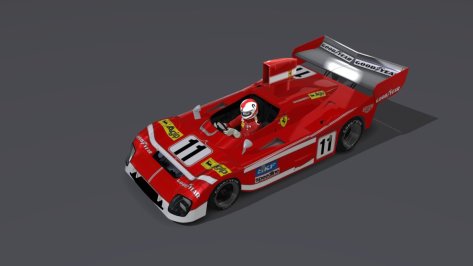
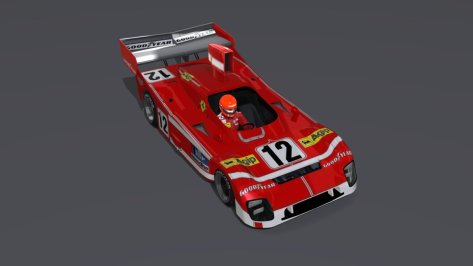
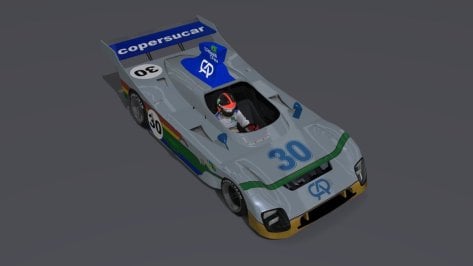
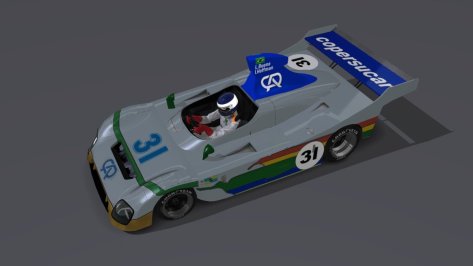
If there were a "parallel universe" in racing, Ferrari should never have left the World Endurance Championship in the mid-70s, and who knows, if the Brazilian Formula One team had been more successful at the beginning of its work in F1, it could have also developed a car for the World Endurance Championship.

  • Ferrari 312T.P76 - V12
  • Copersucar Fittipaldi FD76 LM - Ford V8
 

Attachments

  • __custom_showroom_1724650583.jpg
    __custom_showroom_1724650583.jpg
    56.2 KB · Views: 36
  • __custom_showroom_1724650610.jpg
    __custom_showroom_1724650610.jpg
    54.2 KB · Views: 37
  • __custom_showroom_1724650648.jpg
    __custom_showroom_1724650648.jpg
    48.5 KB · Views: 33
  • __custom_showroom_1724650678.jpg
    __custom_showroom_1724650678.jpg
    53.6 KB · Views: 35
X90
So I've been looking into the dreaded LOD situation now that SimplyGon expects us to bankrupt ourselves.

I've been doing so because my AC is essentially forcing LOD D onto older cars that don't have LODs at all, like the Oreca FLM09 from IER. Thus, when far enough away from the car (not far at all, unfortunately), the car will completely disappear. See this pic at the start line of Crescent Valley - they will stay in this "disappeared" state until you get right up to them.


View attachment 1384121


I've altered every CSP setting related to LODs in Graphics Adjustments possible, no change. I'd prefer in these cases to just not have LODs at all and just eat the performance cost at the beginning of a race of ~22 LODA cars on screen, but I can't seem to force that behavior.

So I bit the bullet and downloaded the stupid PolygonCruncher trial that Ilja now recommends, and while it works at a very rudimentary level, it doesn't seem to account for paint for any of the cars I've tried. So, when LODs change for these cars, the skin will essentially go away and show the "blank" version of the skin. I suppose that's better - except for LOD D doesn't seem to account for any shading at all, it's completely black. Copy/pasting LOD B and renaming it as LOD C/D doesn't work either.

I'm in over my head here, anyone who knows more about this stuff I'd appreciate it. I have this trial for a week (plus a few more with other accounts) and would love to get LODs for all the older cars that need them - as it seems this is now a universal CSP problem.


EDIT: Jerryrigged just one LOD to stretch almost out of sight with lods.ini in the data.acd, but this is obviously a patchwork solution.
The problem with the totally black LOD D for some cars already existed with Simplygon and has nothing to do with PolygonCruncher.
When you press the "Generate LODS" button in CM you will get the warning:
Potential issue detected: • Couldn’t find any car paint meshes.
All cars with this warning will get a totally black LOD D and that already happened with Simplygon.

But of course there's a way to avoid this. For those cars you have to click on the option "MERGE AS BLACK" and remove the entry "!$CarPaint," for LOD D. The only negative aspect is, that the resulting LOD D will have more meshes, than with this entry. But there's no other solution and it's still better for the performance of the game to have a LOD D with some more meshes than to have no LOD D.
Just test it.

You can try my preset "Frank1.cmpreset", that I use to generate LODs for those cars. This preset also generates working wipers and wings for LOD B and LOD C.
 

Attachments

Last edited:
The problem with the totally black LOD D for some cars already existed with Simplygon and has nothing to do with PolygonCruncher.
When you press the "Generate LODS" button in CM you will get the warning:
Potential issue detected: • Couldn’t find any car paint meshes.
All cars with this warning will get a totally black LOD D and that already happened with Simplygon.

But of course there's a way to avoid this. For those cars you have to click on the option "MERGE AS BLACK" and remove the entry "!$CarPaint," for LOD D. The only negative aspect is, that the resulting LOD D will have more meshes, than with this entry. But there's no other solution and it's still better for the performance of the game to have a LOD D with some more meshes than to have no LOD D.
Just test it.

You can try my preset "Frank1.cmpreset", that I use to generate LODs for those cars. This preset also generates working wipers and wings for LOD B and LOD C.
Excuse my absolute ignorance on this topic, but how do you install this preset and how do you use it once installed in CM?
 
Thanks.
I did that.
I tried to set the Controller Script on Default Controller and Script on Pure Gamme and also the combination of Pure and Pure Gamma.
Both came back with the same result.
Everything got a black layer on it. The Sky was even totally black.

View attachment 1384066View attachment 1384067
if the sky is black, something is not installed properly. In such cases always open the CSP Lua Debug app ingame and see if there is a red dot. If so, go to that tab and expand the error and post the screenshot

If there is no red dot, try to reset your CSP settings completely!
Goto /Documents/Assetto Corsa/cfg/ rename the "extension" folder to something different. Restart CM. It will create a new "extension" folder. You can restore it later.
 
Last edited:
The problem with the totally black LOD D for some cars already existed with Simplygon and has nothing to do with PolygonCruncher.
When you press the "Generate LODS" button in CM you will get the warning:
Potential issue detected: • Couldn’t find any car paint meshes.
All cars with this warning will get a totally black LOD D and that already happened with Simplygon.

But of course there's a way to avoid this. For those cars you have to click on the option "MERGE AS BLACK" and remove the entry "!$CarPaint," for LOD D. The only negative aspect is, that the resulting LOD D will have more meshes, than with this entry. But there's no other solution and it's still better for the performance of the game to have a LOD D with some more meshes than to have no LOD D.
Just test it.

You can try my preset "Frank1.cmpreset", that I use to generate LODs for those cars. This preset also generates working wipers and wings for LOD B and LOD C.
Just what I was looking for, thanks. This is all very useful. The "Merge as Black" flag removal was right on the money.

I am still getting the skins popping in and out at very close distance, though. Is there any way to fix that? Maybe in "Priorities"?

Screenshot_oreca_flm09_asrl_autosport_speedway_26-7-124-3-36-38.png


Notice that most of the cars ahead of the yellow and red car are white. That's the "stock" skin - and my skin pack is full of different color liveries. The skins will show properly at very close range - but get 25m or so away, and they pop back to white.

I assume one of the lower LODs I've generated is not hooking into the skins somehow. Perhaps it's being "removed" by one of the tags in the "To Remove" section?
 
Last edited:
if the sky is black, something is not installed properly. In such cases always open the CSP Lua Debug app ingame and see if there is a red dot. If so, go to that tab and expand the error and post the screenshot

If there is no red dot, try to reset your CSP settings completely!
Goto /Documents/Assetto Corsa/cfg/ rename the "extension" folder to something different. Restart CM. It will create a new "extension" folder. You can restore it later.
Hi Peter,
thanks for replying.
I have two error messages.
I tried to reset the CSP settings anyway to no avail.

1.JPG
2.JPG
 
Excuse my absolute ignorance on this topic, but how do you install this preset and how do you use it once installed in CM?
In "Content Manager" you have to select "CONTENT" on the top and then "cars". Select the car you want to edit and click on " Generate LODS" at the bottom. In the window, that opens you click on "Save preset" under "Configuration preset:" and copy my preset "Frank1.cmpreset" to the folder "Presets/Car LODs Generation". In the final step, you select my preset "Frank1" instead of "Default". Now you can generate the LODs with my preset.

Screenshot1.jpg

Screenshot2.jpg

X90
Just what I was looking for, thanks. This is all very useful. The "Merge as Black" flag removal was right on the money.

I am still getting the skins popping in and out at very close distance, though. Is there any way to fix that? Maybe in "Priorities"?

View attachment 1384161

Notice that most of the cars ahead of the yellow and red car are white. That's the "stock" skin - and my skin pack is full of different color liveries. The skins will show properly at very close range - but get 25m or so away, and they pop back to white.

I assume one of the lower LODs I've generated is not hooking into the skins somehow. Perhaps it's being "removed" by one of the tags in the "To Remove" section?
I have no idea why this happens. If the skins are shown correctly for all LODs in the CM showroom, it should also work ingame.
 
Last edited:
In "Content Manager" you have to select "CONTENT" on the top and then "cars". Select the car you want to edit and click on " Generate LODS" at the bottom. In the window, that opens you click on "Save preset" under "Configuration preset:" and copy my preset "Frank1.cmpreset" to the folder "Presets/Car LODs Generation". In the final step, you select my preset "Frank1" instead of "Default". Now you can generate the LODs with my preset.

View attachment 1384187
View attachment 1384185

I have no idea why this happens. If the skins are shown correctly for all LODs in the CM showroom, it should also work ingame.
Thanks. Mine is still looking for Simplygon to be installed so I guess this only works if you had it installed before.
 
Thanks. Mine is still looking for Simplygon to be installed so I guess this only works if you had it installed before.
I use the latest version 0.8.2686.39678 of content manager, that asked me to install "Polygon Cruncher 14" to generate LODs.
And this works without a problem with my preset, that I already saved in Simplygon days. And I don't really see a difference to the LODs I generated with Simplygon.
 
Wasn't there a viper somebody on here said they were going to release weeks ago? did I miss it?
I guess you're talking about this one:


You can upgrade it to v1.6 in Content Manager and then add Mascot's improvements


The problem I have is it has no tyre sounds for me. Don't know why though
 
But of course there's a way to avoid this. For those cars you have to click on the option "MERGE AS BLACK" and remove the entry "!$CarPaint," for LOD D. The only negative aspect is, that the resulting LOD D will have more meshes, than with this entry. But there's no other solution and it's still better for the performance of the game to have a LOD D with some more meshes than to have no LOD D.
Just test it.
This is the wrong way to do it. The solution is very simple, place the name of the skin paint mesh in here the car paint meshes box.

1724673063645.png


material:whatever the material name of the skin is
 
Last edited:
Jidé 1600 S - Valvoline Classic Livery

Here's a classic version of the Valvoline livery for this little monster, touchy at times under braking, and with surprising FFB behaviour (fictional of course).

Have been reading some livery-creators had some issues with compressed-files which can distort the image somewhat - and would tend to agree as I only use GIMP, and not some supa-dupa paid Image editing software.

To that end, the default skin-file is an uncompressed 2K file, with a 4K alternative for high-end PC spec users - so now you have a choice.

Also enclosed is a simple CM showroom preview-preset.

jide_1600_s__Valvoline#28.png


DOWNLOAD

Happy racing!

ps. don't forget to delete whichever skin-file is not in use...
 
Last edited:
Sorry folks, for anyone that downloaded v2.5, please download again to v2.5.1. We found a corrupt AI file that should now be fixed.
The post quoted has been edited.
Thx for this amazing version, finally one that's believable.
But... just a small detail that would make a big difference: Pleeeaaase give the drainage grid in the pit lane texture! Every time I cross it it kills the immersion for a moment and I just can't get over it... call me monk ;-)

Cheers!
 
UPDATE/HOTFIXES

-many stickers adjusted/re-positioned

-kart-o-mania sticker added to the front


No more updates for this one in my opinion this is now good to go.

drag and drop to install

Screenshot (635).png
 
Last edited:
Hi Peter,
thanks for replying.
I have two error messages.
I tried to reset the CSP settings anyway to no avail.

View attachment 1384168View attachment 1384169
which CSP do you use? actually it seems it is not properly installed!
Try to delete the dwrite.dll in AC root folder and install it again. If you have a CSP preview, install it manually by extracting the dwrite.dll and the extension folder to AC root folder.
 
which CSP do you use? actually it seems it is not properly installed!
Try to delete the dwrite.dll in AC root folder and install it again. If you have a CSP preview, install it manually by extracting the dwrite.dll and the extension folder to AC root folder.
I think I found what the bottleneck was.
I was running the 0.1.79 version.
Deleted that one and installed the 0.2.4 version.
Now it looks like it should!

Thanks for the help, appreciate it!
 
the only reason to start (entry-level) modding :-D recreating my own car :-) base-model is from Blaze, added some parts from other cars (intercooler, skirts) and modfied them to fit the car. I know its not perfect, I know it´s not nice borrow other meshes.. but it´s my personal beginning, learning and only for personal use :-)

does anybody know good tutorial (maybe in german) for blender? there are tons of vids arount the web..
Screenshot_blz_mazda_6_mps1_ddm_gt6_r246_26-7-124-17-9-36.jpg
Screenshot_blz_mazda_6_mps1_ddm_gt6_r246_26-7-124-17-8-34.jpg
DJI_0126-Bearbeitet.jpg
 
Last edited:
Istanbul Park 2021

Istanbul Park 2021

I completed most of my updates for the istanbul_park track done by Enver Bozkaya (SRTR), ACU, OSRW & the AC Reboot Team. All credit for the track go to those guys, not me. I had intended it to be a mod for the original track, but the list of changes grew bigger than expected so I decided to keep it a standalone track. I know some people hate that and some like it, but I think it was necessary.

I do intend to keep tweaking things moving forward, but I think the track is in a good enough place now for people to enjoy. I would still like to get a better look for the inner grass and I have to figure out a better setup for the main straight windows. I'd like them to be transparent, but can't seem to figure out why they are so dark.

If you are using any of my past test versions, please delete the old track folder first.

List of changes from the past test versions:

-- Changed the track name to Istanbul Park 2021 since I based a lot of my changes around an F1 2021 video.
-- Grass tweaks, still not where I want it.
-- Time of day and lap number displays for the start gantry.
-- A few more trees added to dead space areas.
-- Fixed a reversed sponsor banner on one of the bridges. Let me know if I missed any other ones please.
-- Collision physics to some of the tyrewalls that were missing them.
-- I prefer the kerb cones as non-moveable objects, so by default they are pass thru objects. If you prefer them to be moveable, there is a track skin named MoveableKerbCones that you can enable so they move again.
-- Support for Pyyer's F1 Classics and Bring it Back extensions. Please read the included Directions text file so you know how to install what's needed for his extensions. It's pretty simple. Install my track. Install his extensions into my track folder. Install the contents of the 'Files_for_Pyyer_extensions' folder and overwrite when it asks. I tested each extension and didn't see any issues, but please let me know if I screwed up any of them.

As always, feedback for improvements is welcome as well as pointing out any mistakes I made.
My Istanbul track has been updated to a new version. Use the link in the quote to get the update. I believe you can simply extract and overwrite your existing files when it asks, but the safest route would be to delete your existing track folder first and start fresh. Try the overwrite method first and if you have any issues, just start fresh. Also remember to extract the files for the Pyyer extensions if you own\use them.

Thanks to @rickety35235 for pointing out these issues that needed fixed.

-- Fixed the incorrect point on pit road where the pit speed limiter would kick in. It should now start right at the pit line not well before it like it did before.
-- Fixed the drs zones activation point to align with the placement of the drs markers. Previously, drs kicked in way before the markers.
-- Added a 50 pit layout as per a request from Low Fuel Motorsports so they can use the track in their online races. The 50 pit layout may or may not work for offline races. The way the pit spots needed placed may not work right in an offline race. You can try it and see what happens. If you have no interest in the 50 pit layout, feel free to delete it from the track folder to save a little disk space.
 
Last edited:
Sharing a mod? Host it on GTPlanet Downloads. Free, public hosting for files up to 10GB in size.
Back