- 2,303

- Germany
Press ALT+4 to start the engine.beautiful car!
but strange, i can not move the car. anyone hav the same problem? any suggestions?
thank you!
Last edited:
Press ALT+4 to start the engine.beautiful car!
but strange, i can not move the car. anyone hav the same problem? any suggestions?
thank you!
It has engine start/stop.beautiful car!
but strange, i can not move the car. anyone hav the same problem? any suggestions?
thank you!
Remove any non racing tiresI did add a set of semis but still i see no rain tyres option.
thank you guys!It has engine start/stop.
If you assign extra D, press that button.
Or alt+numpad(+).
My next VRC update is for the 1999 Indy Road car
![]()
just added it in an update. A few of the items were named different and the front wing has less things on it. Both are now up ready for download.Is the Oval car not the same beside suspension and setting?
Yes it's working now. Thank u guys!Remove any non racing tires
small update:Hello, here is updated version of McLaren MP4/21 (2 of them) from CTDP (ACFL conversion)
ver 1.0
-fixed kn5 shaders
-real camera angles (all F1 & F6)
-realistic car performance
-driver suits and helmets by IcebergXD from RD
-sound by kudos_kudos from RD
ver 1.03 (3.10.2023)
increased car reflection,new chrome and better shader for helmets
View attachment 1285060View attachment 1285056View attachment 1285057
in the next update:
-more realistic physics
-better skins(maybe)
-suspension change(maybe)
link:
https://www.mediafire.com/file/mga8oc8rj04dh73/AssettoCorsa_MP4_21_ReWork_CTDP-ACFL.zip/file
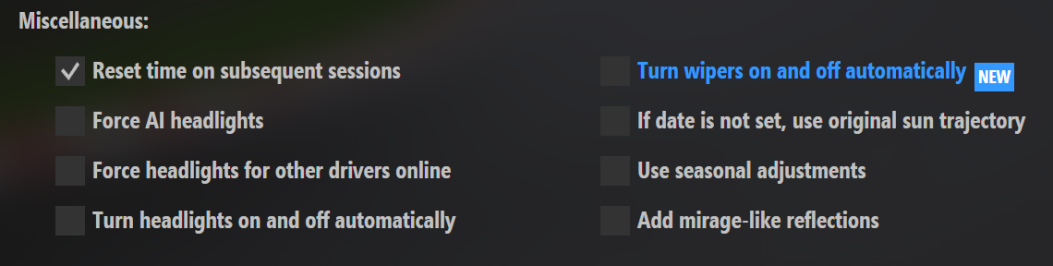
This just means, that your car will do the automatic headlight switching like the AI. So this setting should be ok. The problem is, that the AI are switching in not necessary situations. I never experienced this. But it seems other people have this problem. But this option is just for auto control your own headlights.@Peter Boese
Maybe these lines at
Documents\Assetto Corsa\cfg\extension\weather_fx.ini
have something to do with the ai headlights problem?
[MISCELLANEOUS]
SWITCH_HEADLIGHTS_WITH_AI=1
Hi Peter, thanks for looking into this frustrating issue.This just means, that your car will do the automatic headlight switching like the AI. So this setting should be ok. The problem is, that the AI are switching in not necessary situations. I never experienced this. But it seems other people have this problem. But this option is just for auto control your own headlights.
then CSP or AC is forcing them to go on. Need to dig in deeperHi Peter, thanks for looking into this frustrating issue.
Just to clarify a few things based on my own experience in case this helps you or Ilja to identify and fix the problem:
- the basic problem is that my car's headlights sometimes automatically turn on at the start of a daylight session.
- if I am racing AI during this session, then AI will also start with their headlights on.
- if my headlights remain off, then AI headlights will also be off, as would be expected.
- turning my headlights off will NOT make the AI turn theirs off too, which means the AI keep their headlights on for the whole session (which not only looks silly during the day, but also eats performance).
- headlights on happens randomly at the start of the track session, it never switches during a session already underway.
- a session can start normally (with headlights off) for several restarts, then for no apparent reason the same session on the same track with the same car using the same clear daylight weather will commence with my (and any AI) headlights turned on.
- daylight sessions can sometimes start on a new track with headlights on from the very first session, it does not require several 'normal' sessions before the problem manifests, although this scenario can also happen.
- once a session starts with headlights on then it seems any number of restarts will not 'reset' the headlights and turn them off at the start. Restarting CM or restarting the PC is sometimes needed to clear this.
- the problem manifests with any car on any track with any daylight weather, it is not dependent on a particular car/track/weather combo.
- I have tried all combinations of WeatherFX headlight settings to no avail.
- Ambient light is always above the 'headlights on' trigger points in the Pure settings when this problem happens, it is NOT due to ambient light levels.
- I use Pure with unaltered Pure PPF but I know other who use Sol having this same, or similar, issue.
- I use the latest public CSP preview and Pure 0.203 (I've not applied your most recent update yet)
I think that covers it, but if anyone else has anything to add, please comment.
Is Ilja currently aware of the issue?
Hi Peter, thanks for looking into this frustrating issue.
Just to clarify a few things based on my own experience in case this helps you or Ilja to identify and fix the problem:
- the basic problem is that my car's headlights sometimes automatically turn on at the start of a daylight session.
- if I am racing AI during this session, then AI will also start with their headlights on.
- if my headlights remain off, then AI headlights will also be off, as would be expected.
- turning my headlights off will NOT make the AI turn theirs off too, which means the AI keep their headlights on for the whole session (which not only looks silly during the day, but also eats performance).
- headlights on happens randomly at the start of the track session, it never switches during a daylight session already underway (unless darkness subsequently falls).
- a session can start normally (with headlights off) for several restarts, then for no apparent reason the same session on the same track with the same car using the same clear daylight weather will commence with my (and any AI) headlights turned on.
- daylight sessions can sometimes start on a new track with headlights on from the very first session, it does not require several 'normal' sessions before the problem manifests, although this scenario can also happen.
- once a session starts with headlights on then it seems any number of restarts will not 'reset' the headlights and turn them off at the start. Restarting CM or restarting the PC is sometimes needed to clear this.
- the problem manifests with any car on any track with any daylight weather, it is not dependent on a particular car/track/weather combo.
- I have tried all combinations of WeatherFX headlight settings to no avail.
- Ambient light is always above the 'headlights on' trigger points in the Pure settings when this problem happens, it is NOT due to ambient light levels.
- I use Pure with unaltered Pure PPF but I know other who use Sol having this same, or similar, issue.
- I use the latest public CSP preview and Pure 0.203 (I've not applied your most recent update yet)
I think that covers it, but if anyone else has anything to add, please comment.
Is Ilja currently aware of the issue?
Sorry for this stupid question (and no offense here) but what happens if you tick / untick the option for automatic headlights under weatherfx?then CSP or AC is forcing them to go on. Need to dig in deeper
Sadly, nothing at all, it was the first thing I checked when the problem first occurred.Sorry for this stupid question (and no offense here) but what happens if you tick / untick the option for automatic headlights under weatherfx?
Had that same problem 2 months ago, after thinkering with every option available just as Masscot did, i just unchecked the automatic headights and bam, now everything works.Sorry for this stupid question (and no offense here) but what happens if you tick / untick the option for automatic headlights under weatherfx?
Does it come with tyre walls at the chicanes? 🤣[WIP] F1 1996 MONZA TRACKSKIN BY JV82
For Monza88 by Rainmaker87
I found this 1988 version really amazing to edit.
1996 was very similar in terms of billboards (and their positions).
So much work to do! 🤪
View attachment 1285012
View attachment 1285013
View attachment 1285014
View attachment 1285015
View attachment 1285016
Hi Peter,This just means, that your car will do the automatic headlight switching like the AI. So this setting should be ok. The problem is, that the AI are switching in not necessary situations. I never experienced this. But it seems other people have this problem. But this option is just for auto control your own headlights.
This can be adjusted in pure config based on ambient light. In the second tab of the pure config@Peter Boese further to earlier discussions, Pure 0.203 Preview loads a lot quicker than the previous version when first joining the track (hurrah!), but that bug where headlights get turned on during the day (for me and for AI drivers) is still present. I know of at least one Sol user who has the same issue, so it might be a CSP rather than a direct Pure/Sol issue (or some conflict between the two), but any idea what might be causing it? It's extremely disruptive as it's quite hard to clear. I can toggle my own headlights but AI keep theirs on during the day when it happens, which not only looks daft but also kills performance.
It makes no difference, ambient light is always well above the trigger point for lights activation when the issue occurs.This can be adjusted in pure config based on ambient light. In the second tab of the pure config
Sorry for this stupid question (and no offense here) but what happens if you tick / untick the option for automatic headlights under weatherfx?
Could you please try this file:Glad that worked out for you but these are my current settings and the problem persists.
View attachment 1285120