Checked that and also added AI spine in the kn5 just in case if that was it. Still not working just tells me AI spline might be broken when it crashes. Timing objects are correctly named.be sure to drive at least 3 full laps, also verify proper name and location of timer blocks


no idea what "added AI spine in the kn5" even means... its not even a "thing" you can do.Checked that and also added AI spine in the kn5 just in case if that was it. Still not working just tells me AI spline might be broken when it crashes. Timing objects are correctly named.
Weird, i was sure I had included rain... guess not.RainFX for Milbantos -- just add this code to the track's ext_config.ini file.
I saw it in a camera video but i figured it out it wasn't that there was another file that was causing it to crash.no idea what "added AI spine in the kn5" even means... its not even a "thing" you can do.

The screens i showed are from the new current default wfx and from the upcoming Pure LCS wfx.Just to double-check - these screens are from your upcoming July preview version, which is not released yet? Since you wrote PureLCS wfx? I thought it would be named pure Gamma?
Yes, thats much better in the new Pure LCS and also with the upcoming Pure LCS, i added a never existing feature in Pure:A slight fogging with distance can add a nice depth effect, but the way it makes distant mountains turn a bright duck-egg blue in Assetto Corsa has always looked ridiculous.

Use another ppfilter I guess? And lower the exposure with PGDN might help in some situation then.Thanks! It looked pretty much the same with these settings too, so I guess I just generally hate how LCS looks in bright sunlight.
Back to Pure, then.


I tried all the LCS filters I could find on Overtake, some were much better than the Default filter but went too far in the opposite direction or were way too heavy on FPS. I'll just keep waiting for now, I'm anxious to see what Peter is able to do with Pure LCS.Use another ppfilter I guess? And lower the exposure with PGDN might help in some situation then.

try the free phizm lcs filter on overtake, i found that to work and look the best with default weather. Pure weather lcs looks best without downloaded filters, none of them have made a good pure lcs filter yet. every paid patreon filter looks trash in default or pure, do not give one cent to those guys that leach of Iljas and Peters work.I tried all the LCS filters I could find on Overtake, some were much better than the Default filter but went too far in the opposite direction or were way too heavy on FPS. I'll just keep waiting for now, I'm anxious to see what Peter is able to do with Pure LCS.
I tried Phizm LCS, but for me looked a bit like watching everything through faint smoke. Performance with it was good (which can't be said about Vision Reality LCS), but I didn't like that gray tint over everything.try the free phizm lcs filter on overtake, i found that to work and look the best with default weather. Pure weather lcs looks best without downloaded filters, none of them have made a good pure lcs filter yet. every paid patreon filter looks trash in default or pure, do not give one cent to those guys that leach of Iljas and Peters work.


 www.overtake.gg


You are not the only person. I have tried LCS with different filters and even one I tried to make myself and have yet to see the colors, lighting, shadows, etc. look anything like what the world looks like outside my window. With the old gamma mode, the game looks more like the world I see every day.I don't know if I'm the only person to think this, but, after having seen many comparisons between LCS vs Gamma, I have to say that I notice very few differences, even in some circumstances I prefer the non-LCS version.
I say this because in my opinion it is not worth wasting time and resources to develop on the LCS model, especially after the level of quality that has been achieved with PURE, and with AC EVO which is arriving.
Anyway, all in my opinion.

i see the opposite, gamma looks more game like. LCS looks more real, the filters are the problem with what you are seeing.You are not the only person. I have tried LCS with different filters and even one I tried to make myself and have yet to see the colors, lighting, shadows, etc. look anything like what the world looks like outside my window. With the old gamma mode, the game looks more like the world I see every day.
what grey tint are you talking about ? it looks very natural like this. maybe reinstall AC, your settings must be messed upI tried Phizm LCS, but for me looked a bit like watching everything through faint smoke. Performance with it was good (which can't be said about Vision Reality LCS), but I didn't like that gray tint over everything.
If you say so, but i'll trust my eyes instead. It's not filter related.i see the opposite, gamma looks more game like. LCS looks more real, the filters are the problem with what you are seeing.


Anyone able to tell me where I can find/buy the mod "eatc_bmw_220i?
Thanks all
 sharemods.com

I'm not reinstalling AC just because I don't like the look of one PPF.what grey tint are you talking about ? it looks very natural like this. maybe reinstall AC, your settings must be messed up


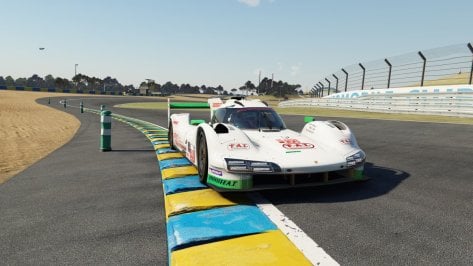
Did you also change the Xbox banner in Tertre Rouge?sx LeMans v2.8 - 15 June 2024
-added 2024 banners and ads
-use 24h layout and activate 2024 skin
on MediaFire or GoogleDrive
View attachment 1365085

 modsfire.com
A bit more contrast wouldn't hurt, though:
View attachment 1365089
No wonder it seemed a bit low contrast, all the other PPFs I have use contrast=1 or even more, this Phizm LCS uses 0.9.
I think I could love this just by increasing that.
EDIT: Yep, just increasing contrast from 90% to 93% made a world of difference. 👍
 These are non-edited captures directly out of the box.