Assetto Corsa PC Mods General DiscussionPC 

  • Thread starter Thread starter daan
  • 150,478 comments
  • 45,768,433 views

Screenshot (933).png
 
Last edited:
I have a big problem: during the race the pc, suddenly, increases the fps and the graphics are accelerated. How can I solve it?
Pc specs? Csp version? Did you ever had this issue before? Give us more info, if not is quite impossible even try to help you man.
 
Pc specs? Csp version? Did you ever had this issue before? Give us more info, if not is quite impossible even try to help you man.
Yes, I have had this problem before.
2014 PC Specs:
OS: Windows 7
Core: I3-3717U with 1.8 Ghz CPU
Video Cards: HD Graphics 4000
Ram: 4 GB
I have installed CSP 0.2.12p1
It is definitely not a gaming PC

I did try this safety car app and the rolling start mod from that other Patreon guy, all sounds great but for both I never could get them to work properly.

Maybe this:

With previous versions I didn't have this problem. Maybe it's a bug of version 1.9, serious bug
 
Yes, I have had this problem before.
2014 PC Specs:
OS: Windows 7
Core: I3-3717U with 1.8 Ghz CPU
Video Cards: HD Graphics 4000
Ram: 4 GB
I have installed CSP 0.2.12p1
It is definitely not a gaming PC


With previous versions I didn't have this problem. Maybe it's a bug of version 1.9, serious bug
You answered your own question: it's not a gaming PC. So when the system bottlenecks (due to the CPU, GPU, or HDD/SSD), you experience slowdowns followed by sudden spikes in performance. That's normal for a machine that can’t handle the workload.
There’s really no solution for this, man. It could be a specific CSP bug, but honestly, I have no idea how you're even running Windows with only 4GB of RAM.
 

View attachment 1457934
There is an issue with your livery, i just fixed it myself, but other guys maybe won't understand the issue. Livery's name is wrong. For the rest, great work!
 
There is an issue with your livery, i just fixed it myself, but other guys maybe won't understand the issue. Livery's name is wrong. For the rest, great work!
Its probably best to actually tell me what is specifically wrong, you mean the .dds file is the wrong name? you mean the ui_skin.json is wrong?
 
@RMi_wood your little config trick did work for rainmaker's Phoenix... Mostly (still see a couple of bright trees but idc anymore) !

View attachment 1457852
I haven't had much time to follow closely. What did @RMi_wood do to Phoenix 1991 track? Was there some kind of issue on the Rainmaker's version? Just to keep my 1991 F1 season updated. Cheers guys, keep up the good work.
 
Quick on the fly update

- number 4 thickened to match real life

- number 4 added to the tailgate

- spelling error in skin_ui.json corrected

please re download if you want to

 
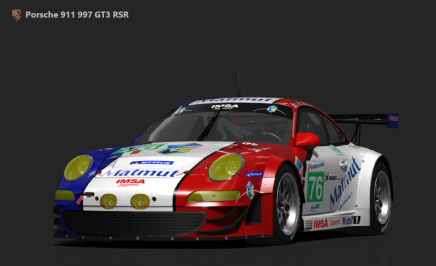
Hey guys, I'm looking for a mod/mods for the Porsche 911 997 GT3 RSR, I know there are lots of versions for this car, but the one I'm looking for I think was being re-made/updated by someone here in the forum, I'm pretty sure it had a few different variations with all the correct Le Mans and ALMS skins from 2006-2011 (or something like that). The main thing I remember, is that it was the only mod that had the Position Lights working correctly on the side of the car, it was basically an updated version of the mod with those names: porsche_997gt3rsr_evo, porsche_997gt3rsr_evo1, porsche_997gt3rsr_evo2, porsche_997gt3rsr_2 and so on...

If anyone could help me find the mod it would be much appreciated, thank you.
 

Attachments

  • Screenshot 2025-06-15 163401.png
    Screenshot 2025-06-15 163401.png
    66.4 KB · Views: 11
Yes, I have had this problem before.
2014 PC Specs:
OS: Windows 7
Core: I3-3717U with 1.8 Ghz CPU
Video Cards: HD Graphics 4000
Ram: 4 GB
I have installed CSP 0.2.12p1
It is definitely not a gaming PC


With previous versions I didn't have this problem. Maybe it's a bug of version 1.9, serious bug
Try downloading MSI Afterburner and locking the FPS in Riva Tuner at 30fps. This may mitigate CPU/GPU throttling and stabilize frametime and performance.
 
Sorry, I realized I wasn't detailed in my explanation. The DDS file of car's livery is called 'car_body_ao.dds, which is not correct for the 155. The correct one is '155_BODY.dds'

Having the wrong name, the livery was not loaded and the car appeared white

Just that, thanks for your work, as always!
Its probably best to actually tell me what is specifically wrong, you mean the .dds file is the wrong name? you mean the ui_skin.json is wrong?
 
Last edited:
Sorry, I realized I wasn't detailed in my explanation. The DDS file of car's livery is called 'car_body_ao.dds, which is not correct for the 155. The correct one is '155_BODY.dds'

Having the wrong name, the livery was not loaded and the car appeared white

Just that, thanks for your work, as always!
incorrect.......sort of.......but not really 😂

the car_body_ao.dds works perfectly well on my version from garage actk i beleive you have a different version

easy always puts AO skins and changes how it works on Cyril Cherry car's and i prefer the way garage actk does it

basically you have a choice

manually add the AO and call it car_body_AO.dds OR have no AO at all and call it 155_BODY.dds, with the 155_BODY.dds this adds AO regardless

the first skin i done was named 155_BODY.dds by accident and as a result it has an AO already and half an AO ontop which i put on (i wondered why it looked so dark) but for me its not a major issue so i left it

I have had this issue before with his peugeot 405, i totally forgot about it until today

I have put a note on the download page incase anyone else comes across the same issue as you


thanks for letting me no i am glad yopu sorted it and are enjoying the skin


@Perico Lospa you actually were not correct..............and there was me thinking you were perfect
 
Last edited:
I haven't had much time to follow closely. What did @RMi_wood do to Phoenix 1991 track? Was there some kind of issue on the Rainmaker's version? Just to keep my 1991 F1 season updated. Cheers guys, keep up the good work.
Rainmaker's version, on my end, had overly bright and saturated trees - which were quite bothersome. Couldn't find a fix (changing values in 3dsimed did **** all) until rmi posted his ext_config line :)
 
New fast_lane.ai to be able to use Camtool in Backwoods (track by Ctoretto).


:: Track is Backwoods by CToretto:https://www.patreon.com/posts/backwoods-track-102349892
:: fast_lane.ai file should be in the ai folder of the track: https://www.mediafire.com/file/d1teaqr2m9skakg/fast_lane.ai
:: Camtool preset:https://www.mediafire.com/file/sa2pezl814u5foh/ct_backwoods_-ATR1.json/file

Hi does anyone know Why my gpu load is 140 % in Asseto Corsa with content Manager although I am just in the Garage with my car ? Not Even startet ? ( 4080 super and 7800x3d) and the pc is getting way Louder than in any other Games I guess the pc Fan is going Crazy. I am Bit scared to damage my gpu xD
 
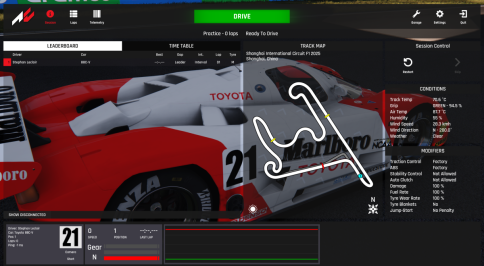
A lot of tracks stopped working with the new CSP.

For example this Shanghai track. Cars crash right after the race start. Any ideas?

Works perfectly with 0.179.


It's annoying because ACU Sepang (and its variations) all have had this crazy pitstop issue for years. If you create a 20 lap race with one mandatory pitstop (by manipulating the cars fuel load as I do with my seasons), and when the ai cars pit around 9th - 11th lap, they'll lose one full lap from their lap counter. After pitting the leading car is suddenly 1 minute behind you because of that lost lap. I've tested all variations of that ACU Sepang and they all have this same unique issue. Never seen it on any other track.
 
Last edited:
Hi does anyone know Why my gpu load is 140 % in Asseto Corsa with content Manager although I am just in the Garage with my car ? Not Even startet ? ( 4080 super and 7800x3d) and the pc is getting way Louder than in any other Games I guess the pc Fan is going Crazy. I am Bit scared to damage my gpu xD
I don't know what's going on with AC lately either, I always get the 'Nvidia drivers failed to initialise' message when launching a session - mind you I don't have any overlays active and the drivers are up to date. And, ofc, only AC throws this message - as I can play an endurance race on LMU without a peep lol
 
Last edited:
Okay, okay, okay; as my prestige, honor and mental acuity are being called into question, let's clear this up...

When Red_Manuel pointed that there was a mistake in the livery name, I saw that the "skinname" in ui_skin.json said "1995 Campionato Italiano Super Turismo," so I assumed that was the mistake, and suggested that the correct spelling was Superturismo... (And to add fuel to the fire, CrisT86 mistakenly thought that I was saying that writing it all together was incorrect, when I meant precisely the opposite...)

That should count as half a hit, right? 😁
 
Last edited:
Hi does anyone know Why my gpu load is 140 % in Asseto Corsa with content Manager although I am just in the Garage with my car ? Not Even startet ? ( 4080 super and 7800x3d) and the pc is getting way Louder than in any other Games I guess the pc Fan is going Crazy. I am Bit scared to damage my gpu xD
What Nvidia drives are you using. I had same issue with some new drivers. For me 566.xx driver works ok.
 
Okay, okay, okay; as my prestige, honor and mental acuity are being called into question, let's clear this up...

When Red_Manuel pointed that there was a mistake in the livery name, I saw that the "skinname" in ui_skin.json said "1995 Campionato Italiano Super Turismo," so I assumed that was the mistake, and suggested that the correct spelling was Superturismo... (And to add fuel to the fire, CrisT86 mistakenly thought that I was saying that writing it all together was incorrect, when I meant precisely the opposite...)

That should count as half a hit, right? 😁
Nope, mine was a confirmation of your info (probably my message was not so clear). Anyway no big issue ;)
 
A lot of tracks stopped working with the new CSP.

For example this Shanghai track. Cars crash right after the race start. Any ideas?

Works perfectly with 0.179.


It's annoying because ACU Sepang (and its variations) all have had this crazy pitstop issue for years. If you create a 20 lap race with one mandatory pitstop (by manipulating the cars fuel load as I do with my seasons), and when the ai cars pit around 9th - 11th lap, they'll lose one full lap from their lap counter. After pitting the leading car is suddenly 1 minute behind you because of that lost lap. I've tested all variations of that ACU Sepang and they all have this same unique issue. Never seen it on any other track.
Works #1 on my side, CSP 0.2.12-preview1

1750066808118.png
1750066808118.png
 
Sharing a mod? Host it on GTPlanet Downloads. Free, public hosting for files up to 10GB in size.
Back