

can you tell me where to download the car? I'm curious to hear the sound☝️ Voices of sanity and reason.
The "borrowed" V8 SFX for the P60B40 in my AC library comes from Velo's Morgan Aero Supersport, on recommendation from OldRebel. The thing sounds truly possessed. I don't believe the Morgan ever used the p60b40 tho, it was M62's all the way down, even in the GT3.


ACL TransAm by Bazza at Rt Bathurst. These cars brake for no reason when going downhill through The Esses at Mount Panorama, between turns 16-17.
I’ve already checked hints and (bingo!) there was a danger hint on that sector.
I removed the hint but cars keep lifting or braking too much for a couple of seconds with no danger, no traffic ahead, and no real reason to slow down.
Best part is that I'm using a mixed grid with other mods and Bazza's are the only cars doing this.
Things I've tried: copy/paste an ai.ini from a "good" car to these cars, checked other files (tyre grips, inertia, brakes, drivetrain)... Nothing changed.
Any help or insight would be greatly appreciated.


Which car and to which position on track exactly does this happen? I'm watching an ACL car right now and it just slows down everywhere🫠.
The whole aihints.ini needs a rework... But i just had a look at the payloads and the fastlane was made with a modern car. Can tell with the brake pedal being fully engaged for waaaaaay too long before any medium corner, your ACL cars are never gonna be able to deal with this fastlane properly, as they get payloads to slow down too early and too strongly.
You may be able to override it with super high HINTS and BRAKEHINTS in the aihints.ini files (at 1.15 they would absolutly ignore the brakes) but it might render the track super tricky for other types of cars.
Was the fastlane even good in the first place? Might be worth a couple of hours to setup a new one
Hello, I own the WTCR pack by Tommy 78, version 1.5, but the problem I'm having is that the AI cars are slow and handle poorly during races. Is there a good quality WTCR mod, or is there a way to fix the AI of these cars?
Thanks


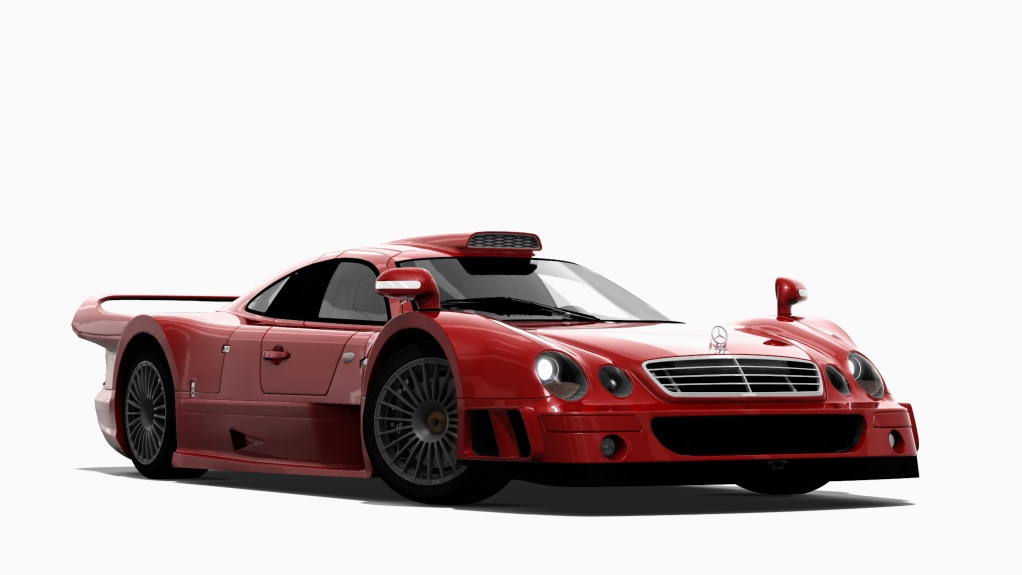


Velo has moved his entire operation to Facebook, so that's a bit of challenge.can you tell me where to download the car? I'm curious to hear the sound


Hello, I own the WTCR pack by Tommy 78, version 1.5, but the problem I'm having is that the AI cars are slow and handle poorly during races. Is there a good quality WTCR mod, or is there a way to fix the AI of these cars?
Thanks






That will be that Garryreal fellow. he claims with his ppfs that AC has never looked more real, yet they dont look any where as good as standard pure. you can test them and skyboxes with a quick reddit search... definitely not worth spending any money on.Yeah, Pure skyboxes always looked a bit weird to me (both in photo mode and while racing), compared to other games that use similar skydome panoramic setups, but I've always chalked it up to the game being old and I don't really think it could be much better than what is right now and I don't want this to be taken as criticism towards Pure, which I adore to this day.
Selling alternative skyboxes on patreon is rather "intriguing" to say the least.

Goto "CSP/Settings/Graphics/Adjustments" pagehow to disable or modify the effect where the image darkens with G-forces?
(on high impacts its a cool effect , but I also seem to be blacking out whenever I run over a curb... so I want it less sensitive or off but can't find the setting)

Hello,I've tested the three latest versions of CSP: 0.3.140 and 110, and also the latest 0.2.xxx, but the problem persists.I'd like to find a solution before resorting to a complete reinstall.Hi, which CSP version do you have ? I (and others) had issues in the end of quick races with the last builds (0.3.0xx), looks like you would have to wait until all cars have crossed the line before quitting otherwise your result is not taken into account. I'm not sure what is the solution, I tried with de activating ai cool down lap in ai options of CSP, but not sure it helps really.


Circuito d'Italia v1.01Circuito d'Italia v1.01

A fictional track composed of parts of the most famous Italian tracks in one super circuit,
combining Mugello, Imola, Monza and Vallelunga into one great 'Circuit of Italy'
features:
- CSP v1.76+ required (likely) rain, grass, all the things
- 30 pit/grid with AI
- a genuine 'al dente' feel
credits:
- original 3d model by @Protar
- converted on request by the author for Assetto Corsa by @RMi_wood
- 3d modeling clean up, TSO trucks, grass, trees, grids, grandstands by @pugsang
- cameras, lighting by @racealot
- default replay camera by @shi
- background terrain by @pk3r72owns
- Italian adverts by @Masscot
- sections.ini and logo by @Fanapryde
- shader and config support by @slider666
- beta testing and feedback by @twobegreen, @Breathe, @Mike08
v1.01 changelog:
- deleted some non needed meshes including old skybox
- corrected an incorrect double entry in sufaces.ini
- small lights adjustment
- corrected lights color on ambulance
- new VAO patch
- skin added to brighten the advertisements, saved in BC7 format
:: DOWNLOAD v1.0 ::
:: DOWNLOAD v1.01 ::

I’m good for now. I don’t think there’s any better than Peter’s work.That will be that Garryreal fellow. he claims with his ppfs that AC has never looked more real, yet they dont look any where as good as standard pure. you can test them and skyboxes with a quick reddit search... definitely not worth spending any money on.


Could you send a link please?996 GT3 RSR GEN 11

Many thanks, this is something I had in mind looking at my replays of last tests with F1 '88 Monza and I'm happy that you confirm it with more details ! Iirc @Apocalypse211 mentionned also 40-50% aggression to be the maximum value to give in general. I'll polish the app, but also my F1' 88 grid accordingly.@ancient_3 : by the way my bug explains how AIcaution and aggressionlevel are definitly connected. You can have a very low AICaution (0.7) as long as the aggressionlevel is not too high (60% max, 45% seems to be a perfect value). The closer you get to 100% aggression, the less an ai car would move out of the car ahead's way. Should give you polishing leads for the blue flag behavior.
Yep! Aside, if an AI is already in a side by side situation the Aggression level suddendly makes sense above 60%. I've been playing with it a lot with my behavior tweaks, it works wonders. on the opposite, it doesn't work wonders BEFORE a braking🙃.Many thanks, this is something I had in mind looking at my replays of last tests with F1 '88 Monza and I'm happy that you confirm it with more details ! Iirc @Apocalypse211 mentionned also 40-50% aggression to be the maximum value to give in general. I'll polish the app, but also my F1' 88 grid accordingly.
A bit off topic but that may interest you too, I just made some bench tests on 40 laps on Monza '88 to look at how AI managed tyre wear and fuel level in terms of lap times. The good news is that I can confirm that they are taken into account as AI lap times evolves correctly with time (given the known bug in fuel management). The bad news for AI tweakers is that you may have to take this into account when modifying AI lines and hints as I saw in a test with ks Huracan GT3 in ks Monza that they were more or less able to deal with the first chicane according to fuel level and tyre wear (they still brake at the same point but slips more due to full tank or weared tyres)
I'll tell you honestly, it will be you the firstWould be interresting to find how correlated to AI inputs the tyre hint is?
I had a look on Assettocorsa.net about tyres and AC. I instantly regretted it.
But, on the braver hand, sounds freaking easy to script a safe behavior :
--@class ac.StateWheelPhysics : ClassBase---
@field brakeTorque number---
@field handbrakeTorque number---
@field electricTorque number---
@field feedbackTorque number---
@field angularInertia number---
@field shaftVelocity number---
@field shaftInertia number---
@field tyreCarcassTemperature number @Only available with custom physics tyres.---
@field roadTemperature number
@Can vary from AC road temperature in shadows if option is enabled.
---@field discCoreTemperature number @Can vary from AC road temperature in shadows if option is enabled.
First one between the 2 of us that integrates it gives the code to the other one, my todo list is already full 😂
 )
)

Welcome to the GTP holiday season tradition!!@admins Whoever integrated the snowman emoji and its associated nightmare should be put to death and brought to Satan for his last judgment.


Don´t know if I understood this question right but you may just click on "Coche Base" at the GT4 car and set it to "make independent"?Hi everyone! I hope you're all doing well. Once again, I need your eternal wisdom. The cars in the two screenshots I've attached appear to be from the same family, and I want to separate them so I can display the race car with my other GT4 cars. Is there a way to do this? Thanks everyone!
View attachment 1495500View attachment 1495501
There is an option to make them Independent… in the options at the bottom… Brand, I think.Hi everyone! I hope you're all doing well. Once again, I need your eternal wisdom. The cars in the two screenshots I've attached appear to be from the same family, and I want to separate them so I can display the race car with my other GT4 cars. Is there a way to do this? Thanks everyone!
View attachment 1495500View attachment 1495501


Press Coche Base & set it to independent or whatever it is in your language.Hi everyone! I hope you're all doing well. Once again, I need your eternal wisdom. The cars in the two screenshots I've attached appear to be from the same family, and I want to separate them so I can display the race car with my other GT4 cars. Is there a way to do this? Thanks everyone!
View attachment 1495500View attachment 1495501


Yeah, as if the way we have to add .txt to files just to share them here didn't give you enough 1990s bulletin board vibes, along come those godawful flash animated rope lights to hammer the point home.@admins Whoever integrated the snowman emoji and its associated nightmare should be put to death and brought to Satan for his last judgment.

..Nostalgia won't be what it used to be.Yeah, as if the way we have to add .txt to files just to share them here didn't give you enough 1990s bulletin board vibes, along come those godawful flash animated rope lights to hammer the point home.
Nostalgia isn't what it used to be.


