- 49

- United Kingdom


It's cause utter frikkin' chaos. I'm not blaming the track maker but there's something about this track (and Zolder, and maybe more out there) that triggers a black screen (for some hardware configs) as soon as you enter the track. The black screen is on the Rift AND on my monitor. After that it affects ALL tracks with the same issue. Reinstalling display drivers has fixed this in the past and but not today, and the Rift display now isn't working at all in any Rift apps (or even menus/home screen).Bad news about the Rift - the trial mountain track has screwed your monitor and audio up too? for everything or just AC? I was about to try it out, but might hold off.

Remember that weird black screen issue with Zolder a few weeks ago? I've just had it triggered by an early test version of a scratch-built Trial Mountain from the AC Mods forum .
If anyone wants to try the track AT THEIR OWN RISK it's here
**WARNING**
Edit: deleted, as it has caused BIG problems for me.
**WARNING**
I'm still trying to get the image back in my Rift. Reinstalling GPU drivers hasn't solved it like with Zolder.
Very weird. It only seems to affect a tiny number of users.
Here's a thought (unless you already tried it) but I find the best way to reinstall GPU drivers is by completely removing the old ones first, then reinstalling. Guru3D has a great tool to help with this. https://www.guru3d.com/files-details/display-driver-uninstaller-download.html
Boot into Safe Mode, remove the old drivers with DDU, then reboot back into normal Windows and install the new drivers.


It's cause utter frikkin' chaos. I'm not blaming the track maker but there's something about this track (and Zolder, and maybe more out there) that triggers a black screen (for some hardware configs) as soon as you enter the track. The black screen is on the Rift AND on my monitor. .../...


It's cause utter frikkin' chaos. I'm not blaming the track maker but there's something about this track (and Zolder, and maybe more out there) that triggers a black screen (for some hardware configs) as soon as you enter the track. The black screen is on the Rift AND on my monitor. After that it affects ALL tracks with the same issue. Reinstalling display drivers has fixed this in the past and but not today, and the Rift display now isn't working at all in any Rift apps (or even menus/home screen).
I had the thought that the Rift display was being sent to my extended desktop (I don't want this extended desktop but it's a necessary evil if you use HDMI to an amp - Windows, even in 2020, cannot treat this purely as an audio source, it has to attach display properties to it, which is utter frikkin' madness), but that is a duplicate of my main display, not an extension. I tried unplugging HDMI from my amp and connecting it to my PC with an optical cable but a). it'll only send 2.1 for some reason and b). Content Manager acts like optical is disconnected so it's greyed out and can't be selected in the CM audio settings, even though it's up and running (albeit in 2.1 at the moment).
I just unplugged the optical connection, reconnected HDMI exactly as it was previously and the HDMI connection to the amp isn't even recognised now, I just get messages that's it's disconnected.
It's incredibly frustrating.
Must be a different issue, as my Rift is not working at all. Currently downloading/reinstalling Oculus software to try and fix it.It's probably unrelated - but I'm also having a bug at the moment where my display goes black, but this is caused by the SOL time of day, on an interior camera I can see nothing except black screen, but on f5 or f7 free cams, I can see everything fine. In the daytime cockpit cam works, but after about 11pm or so in game the screen is black for every internal camera.
So yeah, at the moment I can only drive at night with a chase cam :/ - like I say probably unrelated, but can you try using an f7 camera and moving it, in case the game is actually running, but it's just glitching out with lighting.


Must be a different issue, as my Rift is not working at all. Currently downloading/reinstalling Oculus software to try and fix it.
BTW, ref AI at Willow Springs, if this is holding the project up @LiquidSkyMan loves to do AI and is very good at it.
The 'monument' track is one of your WiPs too, isn't it?

WHAT? I made sure there was no one!
edit: try this: 4DbZRYJuUPamD5hybrTEcvr_ko_BYooW0P9zZWTl9Po


Thanks Gzerod!
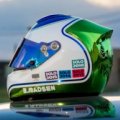
I'm afraid the one with googles is exactly what I'm after..
The Lexus RCF GT3 ACC v1.5 from @ELEMENT1999 has been released, by the way.
download link:https://sharemods.com/1trqngmnhp2c/Lexus_RCF_GT3_ACC_v1.5.7z.html
View attachment 911517
v1.5 updated
-add aux lights
-more detail for digital instruments
-adjust some physics
-fix some bugs
-numberplate can use alpha texture to hide
-only sprint and endurance vesion in showroom
Must use custom shader patch!!!!! Above v0.1.48
Note:If there are two speed displays on the instrument,back to the pit and come out again
Yeah my driver models are real hacks. I think I need to use Max to do them properly as something goes awry when I use 3DsimEd or Blender

You have to extract the kn5 and then make sure the interior glass material is transparent.
Ok Beezer, how or where can I check the interior glass material in the car file?


nothing major anymore. Just SCCA/NASA regional stuff sadly.. They did however film Ford v. Ferrari there which was cool, but, again not likely that the money will ever be put into any track upgrades going forth... the original owner of the track died and it seems like the family has no idea what they're doing as far maintaining it. Anyway, Streets of Willow is used a LOT for car testing but ironically is in even worse condition than the big track. you go off at Streets of Willow and you're ripping the lowest body panel off the car at the very least. Big willow you go off however, and you might find yourself flying over 400ft in the air.
View attachment 911419

It was never designed as a major track. Back in the day, Willow was a lot cheaper to rent for testing than Riverside (most of the SoCal races were on unrentable properties--Pomona, Santa Barbara, Torrey Pines, El Segundo, Hansen Dam--and Paramount Ranch was too dangerous). Willow was certainly not designed for spectators. Most of the races were for bikers and their friends. I was going to shoot a TV commercial there once, but it was too barren, so for 5X the cost I had to go to Laguna and its picturesque setting.

I found this a while ago and imo it´s even more usefull:
https://www.techpowerup.com/nvcleanstall/
It´s portable, it search and download newest driver, have selectable features to install (I personally only install "minimum", so no telemetry data is send to NVidia), unattented, clean install with automatic reboot if needed, ...
All there and quick and easy to work with.
But I personally don´t think it is a NVidia driver thingy. Remembering my experiences with that Zolder track (pascalwb) version, reinstall, even clean one with this tool, didn´t helped. As I´m lying for a few weeks now in bed, I tried to remember what I done sequently and what at the end could have helped, realizing thats not only a specific track problem.
I´ve tried meanwhile a lot different things, starting different tracks, disabling UAV flag, disabling all different kind of CSP features (Particles, Grass and many more, one after one, but also most of them together), imo nothing helped.
- I reinstalled NVidia without fixing prob
- removed or reset my extra AC driver profile, too.
- changed to a different PP filter (in my case to Natural as somebody else here adviced it)
- removed Sol
- removed CSP
- installed newest CSP again
- installed newest Sol again
- downgraded CSP first and updated it to newest again
- after gettting a different track visible (don´t start that Zolder track again), change PP filter back to the filter you used before
- don´t start that track anymore untill that underlying problem isn´t solved
This is all typed from my tablet, while still laying in bed, thats why I can´t make any screenshots, or test and verify it now.
But rethinking this all, in my conclusion this should be a CSP, Sol problem. Also because I worked on that Zolder version 2-3 weeks before without any visual probs.
Maybe downgrading CSP, Sol to a version from a month ago helps?
Afterwards updating them one after one till this happens again to narrow down the exact update what causes this behaviour and try to fix that?
After trying that sunday for hours and hours to get it working again, I was so tired and happy, that I ended up there. It worked sometimes meanwhile, but I was curious and started Zolder again, wich causes some dark grey, black screen again and I had to start the whole process from scratch.
And yeah it´s like @Masscot mentioned very, very frustrating and you´re getting increasingly nervous as it affects all tracks after getting dark track screen once ...
That´s why I wrote this monster pamphlet.
Maybe it helps ... hope so ... 👍


It's a good point even if I don't use this car, thank you for this attention !After tinkering with the rev lights of the F1 GTR Longtail (Legion), i had enough so i'll leave it to you; try and sync the rev lights with the powerband (goes up to 7.5k rpm)
link: https://mega.nz/file/ASIF2AQZ






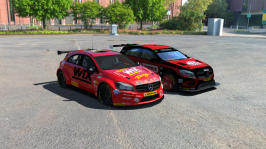
I don't know this mod. Where is it from?would this not be a better option (the one on the left) for the BTCC A45 ? needs a bit of bop to be inline with others
quick google will find the newer A45
Hi i'm the builder of the track, are you also making one? if so mine's kinda pointless as it's a one man band kinda gig.
The balcony building lines up with it's exact location on google maps so not sure what more you want XD
View attachment 911495
A fairground never hurt anybody either leave the ferris wheel alone!
View attachment 911496
Also @Masscot can you do some balloons for this? as the track really does have nothing going for it visually, except a lot of sand.
 WSIR could use a ferris wheel or 5. Just I am a nut for realism. Time to convince them to get a ferris wheel I suppose..

Singapore never look this good before. And those moving helicopters - what kind of magic is this??Hi
The first plan was only integrate day and night, but plan changed somehow..
singapore_2020 1.0
Marina bay street circuit
This track requires stFlow shader and ksPerPixelMultiMap emissive shader.
stFlow shader
https://www.racedepartment.com/downloads/stflow-shader.23999/
PerPixelMultiMap with Emissive map
https://www.racedepartment.com/downloads/perpixelmultimap-with-emissive-map.22791/
If play is heavy, I'd like you to turn off some lights material and animations.
I didn't understand adjustment because appearance has changed a lot at new CSP version.
I'm testing by using __sol_ACC ppfilter with very strong glare changes.
View attachment 911474 View attachment 911475 View attachment 911476 View attachment 911477 View attachment 911478 View attachment 911479
http://www.mediafire.com/file/6wn37uzw10mdhow/singapore_2020_1_0.7z/file
Hi
The first plan was only integrate day and night, but plan changed somehow..
singapore_2020 1.0
Marina bay street circuit
This track requires stFlow shader and ksPerPixelMultiMap emissive shader.
stFlow shader
https://www.racedepartment.com/downloads/stflow-shader.23999/
PerPixelMultiMap with Emissive map
https://www.racedepartment.com/downloads/perpixelmultimap-with-emissive-map.22791/
If play is heavy, I'd like you to turn off some lights material and animations.
I didn't understand adjustment because appearance has changed a lot at new CSP version.
I'm testing by using __sol_ACC ppfilter with very strong glare changes.
View attachment 911474 View attachment 911475 View attachment 911476 View attachment 911477 View attachment 911478 View attachment 911479
http://www.mediafire.com/file/6wn37uzw10mdhow/singapore_2020_1_0.7z/file
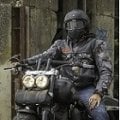
I don't know this mod. Where is it from?
EDIT:
found it.
Time to show a bit of my latest work

replied to wrong post :/Are those from ACC?
Time to show a bit of my latest work