Assetto Corsa PC Mods General DiscussionPC 

  • Thread starter Thread starter daan
  • 157,618 comments
  • 51,503,317 views
I added the 1.1, I think the UI was blank. No maker's mark at all.
If there's a newer/better base let me have it and I'll transfer the new files across - assuming the track datums and orientation are the same.
A newer version might be better optimised.
Here's the starting point (my way of archiving things with direct links to the original post or topic and version sometimes pays)

 
question: is there a list of all the updates that rainmaker has done on the 1988s or shall i just keep using the search bar :lol: :lol:
Nah but seriously these constant updates literally are coming left right and centre here lol.
 
I added the 1.1, I think the UI was blank. No maker's mark at all.
If there's a newer/better base let me have it and I'll transfer the new files across - assuming the track datums and orientation are the same.
A newer version might be better optimised.

Here's the starting point (my way of archiving things with direct links to the original post or topic and version sometimes pays)

Hmm I also have 1.3 but with 6 layouts, 3 are identical to first 3 afaik but have 28 pits.
 
@Masscot Hit me up when you finish what you are doing with Cadwell Park so I can get you my updated skins. I settled on these 4 versions. I think they cover a wide range of looks to suit people's preferences. You can include any one you prefer or all of them.

cp1.jpg

cp2.jpg

cp3.jpg

cp4.jpg
 
I got a load of stuff from them as i liked the content, cool old Brazilian stuff ripped from AMS.
Its also not expensive, once you get it in your currency.
If you don't like it then don't get it, certainly morally I don't care what they get up to or who they credit, i liked their stuff I got it and it looks and plays great.
No one can make your decision for you, certainly not morally.
My AC collection would be worse off if i didn't have their stuff put it that way.
If any of that stuff was uploaded for free here would you take it?
If so why would £1.50 suddenly make you question the ethics of people?
It's not about quality but about mod piracy.
 
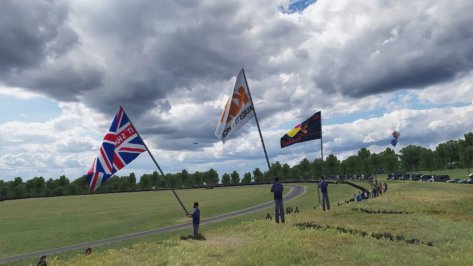
Added animated choppers, blimp, airliners and flaring balloons to Cadwell Park, plus the recent grass skins posted here.
Saved it as a new track 'Cadwell Park 2022' to preserve the original. I'm not claiming ownership of this, it's just much easier for me (and for you) if I upload the full track after all this stuff is added, as lots of things have changed.

View attachment 1178616 View attachment 1178617 View attachment 1178618


(Dear drive-by mod trawler from the future: no, I won't reupload it, the link probably died years ago, this is almost certainly your very first post, and it's highly unlikely you even said 'please')
Cadwell Park 2022 updated to 1.4m. New download link.
Basic details as earlier today but I've added 12 animated flag-waving chaps dotted around the track, new RainFX, new UK-centric balloon skins, and some other tweaks to UI, chopper positions, and other minor stuff.
18 pits. If anyone wants to merge in the 28-pit layouts and update this version then fill your boots.
Thanks to doublezero for the flag animation and @norms and @gunnar333 (and others) for help getting them nailed to a little man and stuff and things.

Screenshot_fiat_coupe_20v_turbo_2000_cadwell_park_2022_30-7-122-15-57-53.jpg

 
Last edited:
Matching the 24h race here is:

SPA-FRANCORCHAMPS 1988 update 2.0
v2.0
  • updates by DaBaeda: GrassFX, rock texture, new asphalt and logo textures, cams, added RainFX bx KevinK2
  • updates by CrisT86: night lights, cams, working pit and start lights, vao patch
  • raised pitboxes to 30
  • shader adjustments
  • new loading screens

bgr00.jpg

bgr02.jpg

bgr03.jpg
 
Cadwell Park 2022 updated to 1.4m. New download link.
Basic details as earlier today but I've added 12 animated flag-waving chaps dotted around the track, new RainFX, new UK-centric balloon skins, and some other tweaks to UI, chopper positions, and other minor stuff.
18 pits. If anyone wants to merge in the 28-pit layouts and update this version then fill your boots.
Thanks to doublezero for the flag animation and @norms and @gunnar333 (and others) for help getting them nailed to a little man and stuff and things.

View attachment 1178732

not that matters that much, but it's missing the credits to the first extension creator, and I see a lot of what I did is still there.
It was one of the first config I created back in the days when there only few of us creating track (lights) configs.

EDIT: not pointing my finger at you mate, I'm just considering one of the things we discussed here a few days back, when someone adds something to someone's previous work and it becomes his work, a common behaviour in the mod scene
 
Last edited:
not that matters that much, but it's missing the credits to the first extension creator, and I see a lot of what I did is still there.
It was one of the first config I created back in the days when there only few of us creating track (lights) configs.

EDIT: not pointing my finger at you mate, I'm just considering one of the things we discussed here a few days back, when someone adds something to someone's previous work and it becomes his work, a common behaviour in the mod scene
Not sure what's happened there mate, I've only added to the config, not removed anything apart from replacing the RainFX section.
I'm not even sure where the base track came from as the UI was empty - I copied Jim's, Digga's etc names over from another version someone sent me.
How mad is it that someone would take the effort to remove a credit from a config? Seems more trouble than its worth.
If you have some wording I'll add it in to my 'master' so it'll be in any future updates, if that's OK?
I guess I should add my name to the config too now, there's a lot that I added.
Nah... can't be bothered, lol. :)
 
Last edited:
.../...
I guess I should add my name to the config too now, there's a lot that I added.
Nah... can't be bothered, lol. :)
Hm, I think you should, or at least in a readme file inside the track folder. Easier to keep track of add-ons, changes etc...

@Blamer
I have Cadwell (cadwell_park) v1.3 installed with as author (in the ui) Jim Lloyd/Terra21/Digga...
The ext_config.ini is a v1.0 by RMi. I guess this is the one you worked on, but I also don't have your name mentioned...🤔
 
Last edited:
Hm, I think you should, or at least in a readme file inside the track folder. Easier to keep track of add-ons, changes etc...
I tend to put a couple of words next to the version number so it's instantly obvious when updating via CM drag 'n' drop (cars and tracks).
 
I tend to put a couple of words next to the version number so it's instantly obvious when updating via CM drag 'n' drop (cars and tracks).
I noticed that, but in most cases they don't (or just partly) show because there's not enough 'room' to see the complete text in CM's author line.
 
Not sure what's happened there mate, I've only added to the config, not removed anything apart from replacing the RainFX section.
I'm not even sure where the base track came from as the UI was empty - I copied Jim's, Digga's etc names over from another version someone sent me.
How mad is it that someone would take the effort to remove a credit from a config? Seems more trouble than its worth.
If you have some wording I'll add it in to my 'master' so it'll be in any future updates, if that's OK?
I guess I should add my name to the config too now, there's a lot that I added.
Nah... can't be bothered, lol. :)
No problem, I don't care. I just know someone, sometime, instead of adding his name to the credits, just removed mine.
I've seen it happening many times, even for configs I had commissioned by well known groups.

Again, there were few of us who were creating tracks configs back in the days, we know who we are and we made those configs with more rough tools (you couldn't identify a material/mesh via CSP in game) and it took a lot of times creating each of those.
Cadwell was one of the first tracks I built a config for, my 1.0 version is dated 2018.09.03, I just found it in a pack I had deployed, it even contained an extra kn5.

Of course it's not your fault Masscot and I have too much respect for your work and I know you have the same respect for everyone else's too
 

Attachments

I noticed that, but in most cases they don't (or just partly) show because there's not enough 'room' to see the complete text in CM's author line.
I think it displays in full when updating the track.
 
Guys, this one is kind of my fault. @Masscot used the configs from the skins I posted yesterday. I gave proper credit in my post. He might have thought the configs came with the track by default and didn't need mentioning.
It could have more green. less yellow green.
For me the last variant and less yellow.

View attachment 1178750
That's one thing that makes doing track skins tough. Finding colors that are going to fit for everyone. It also doesn't help that i'm no photoshop expert so even when I see a problem, i'm never sure how to solve it. All I know is on my system I don't see a heavy yellow tint but that could be because I use a cooler color tone on my monitor or a filter with less whitebalance. I tried to match a few pictures of the real track I found on the net and got pretty close I thought. I will look over them again just to be sure. Thanks for the feedback.

EDIT: After a little testing, turns out some of the yellow green issues have nothing to do with the skins. It's the seasonal adjustment settings for the trees and grass. I might be able to solve it through the config instead of having to try and redo the skins.
 
Last edited:
This is not an official add-on by RSS. Don't ask absolutely nothing to them.

(V1) W13 ADD-ON PACK FOR RSS FH22_S


Installation has changed now. There is a .txt file with the code. Follow this:

1. Clean the old steering wheel add-on. Open the .rar file of the car and go to extension folder. Drag it to the folder in the AC folders. This way the ext_config.ini from the extension folder is the original one.

2. Go to the skin folder of the Mercedes livery (rss_formula_hybrid_22_s/skins/44_Hamilton etc...) and paste the ext_config.ini that comes in the add-on there.

This is it. If you want to use it for all the cars use the ext_config.ini that comes in the extension folder and paste the code of the add-on there, aswell as the kn5 files in the same folder.

What's in?
  • Steering wheel add-on v2 -> Compatible with v2 now.
  • NEW: Halo boomerang flap -> Including a shader (that I took from Synapse W09 Mercedes halo) to make the real carbon fiber.
If it doesn't match with the livery is not my fault. Edit the livery at your own.


The add-on will evolve as it's my 3d model. I'm opened to any kind of suggestion of this or any other piece of any car you want in, or any bug from this.


Download links:

If you have some adware warning, use adblock.


Thanks to Synapse for the Steering wheel and the halo carbon fiber shader. He's one of the best modders out there
 
Last edited:
Strange file in HunaroringACC

I've backtracked in the forum to find the post where I downloaded this, but can't find it. There's a strange file in the download zip with a couple of strange characters. It's the same size as the core KN5 file. I installed this update without the strange file, and it works fine.

The zip file is ts_hungaroringACC_updated.zip

1659230798252.png
 
Just a question for some of the more learned ones with Content Manager I had an issue on a server I was running it was a 24 hours time sped up to cover a 90 minute race and one person had night when everyone else was day and vice versa when everyone was night he was day.
Today I setup a sever and the time was set to 1pm and it was night time when I went in. I unchecked weather fx in the shaders patch and the time was right. Am I missing something in CM?
 
Sharing a mod? Host it on GTPlanet Downloads. Free, public hosting for files up to 10GB in size.
Back