Assetto Corsa PC Mods General DiscussionPC 

  • Thread starter Thread starter daan
  • 149,764 comments
  • 45,398,180 views
24H
View attachment 1316537

anyone knows which showroom or map this is?
That is

Homespace Paddock [rize_homespace11_fm6] free by​

RiZe

40b0soh67e8ydqr5zmhbjut3rxpq


DOWNLOAD
 
Anyone know if any of the Nascar content from the shutdown facebook group is available anywhere? Xfinity, COT, ect.
The one I know of is the Assetto Corsa Nascar Mod group? Not shut down. Have a wide range of cars.
 
@saXXXon in CM, under settings --> content manager ---> showroom --> there is a setting you may tick that the car is always centered (not on my rig so I only can remember vague). It´s below where you can choose in between CSP previews yes or no.
Yeah its the 101creative 0.8
option did not do anything (was already on) tried both on and off. so weird.
 
I didn't say drag&drop and choosing "Clean install" is same as what you suggested, I said drag& drop in CM and choosing "Update" is the same as what you suggested (copying over manually to the content dir and overwriting existing files)...
Except that any files added like skins wont be erased when prompted to overwrite, unless the name of said new skins is the same as updated skins
 
Thanks for the updates - any chance the driver scale and posture could be looked at? He steers with his thumb knuckle in VR. :)

View attachment 1316610
@Greg_ST try subbing these files in. They should work much better in VR (or for anyone with the driver visible).
New steer.ksanim and shift.ksanim, new driver scale and position (feet on pedals, hands on steering wheel), hand/steering wheel synch fixed, shift timing tweaked.
The shifting animation is a couple of inches high, but if the shifter shaft could be extended or a taller cylindrical knob put on it to suit the hand, it'd be an easy fix.
The driver's seat could ideally move forward a few inches too.


1704405068949.png
 
Last edited:
You use CSP previews? Do the following: extract the data.acd with CM, delete the data.acd then and try again.
Yes i do :)

Tried, did not help.

And it looks correct in the option menu

1704406424975.png


But if i press the bottom right and generate.

1704406482260.png

What you talking about Willis?
 
@Greg_ST try subbing these files in. They should work much better in VR (or for anyone with the driver visible).
New steer.ksanim and shift.ksanim, new driver scale and position (feet on pedals, hands on steering wheel), hand/steering wheel synch fixed, shift timing tweaked.
The shifting animation is a couple of inches high, but if the shifter shaft could be extended or a taller cylindrical knob put on it to suit the hand, it'd be an easy fix.
The driver's seat could ideally move forward a few inches too.


View attachment 1316643
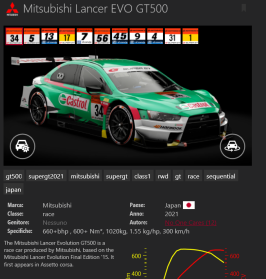
Great :-)...is it possible to correct the steering also for the Mitsubishi Gt500? A thousand thanks
 
What needs correcting? I didn't keep that car.
Ah sorry... anyway I was talking about the car in image1. As you can see in the image2, hands do not fit on the steering wheel when you turn it to 90 degrees.
 

Attachments

  • Screenshot 2024-01-04 233449.png
    Screenshot 2024-01-04 233449.png
    71.4 KB · Views: 20
  • Screenshot 2024-01-04 233312.png
    Screenshot 2024-01-04 233312.png
    272.5 KB · Views: 20
Ah sorry... anyway I was talking about the car in image1. As you can see in the image2, hands do not fit on the steering wheel when you turn it to 90 degrees.
Without the car it's hard to be sure, but if you mean the hands aren't in synch with the rotation of the steering wheel, then I strongly suspect that steer lock is incorrect, as @Greg_ST 's McLaren F1 had exactly the same problem (he probably doesn't drive with the driver/wheel visible, or uses chase cam).
Look in data/driver3d.ini and swap this field in (or just change LOCK=360 in STEER_ANIMATION)

Code:
[STEER_ANIMATION]
NAME=steer.ksanim
LOCK=360

That should work. It usually does 99% of the time... but not always.
 
Last edited:
Two questions.

1.) Is anyone else seeing the ai cars flip over when going over a kerb with the recently updated versions of the VRC Touring Pack cars? I tried to run a race at Brands Hatch with them and the ai cars were flipping over when going over the kerbs.

2.) Can anyone who fools around with car mods figure out for me why the ai cars for amr_v8_vantage_gt3_sprint_acc mod can not take a high speed turn without completely losing grip and sliding off track? I can not put this car in a field on a track like Nords or Brands Hatch because they cannot hold the high speed turns. I've been trying to figure out why for months now with no luck and i've finally given up and hope someone can help.
 
Without the car it's hard to be sure, but if you mean the hands aren't in synch with the rotation of the steering wheel, then I strongly suspect that steer lock is incorrect, as @Greg_ST 's McLaren F1 had exactly the same problem (he probably doesn't drive with the driver/wheel visible, or uses chase cam).
Look in data/driver3d.ini and swap this field in (or just change LOCK=360 in STEER_ANIMATION)

Code:
[STEER_ANIMATION]
NAME=steer.ksanim
LOCK=360

That should work. It usually does 99% of the time... but not always.
Thank you very much, I solved it with your precious suggestion. Too kind
 
Made some progress on the GT4s again:
Today I have something about the 570s for you
20240105-003017-McLaren_570S_GT4.png


I remade the Door anim, so the piston is now included and it looks way more natural
20240102-204620-McLaren_570S_GT4.png


In addition to that i reworked the dashboard, so every light should do someting now😄
20240104-213832-McLaren_570S_GT4.png

A little extra is the odometer:
It shows the distance you travelled with the car in general.
Journey shows the distance of the current session and trip is an odometer that resets after every pit stop.
20240104-233045-McLaren_570S_GT4.png

20240104-195747-McLaren_570S_GT4.png
 
That's what we managed to invent/create.
Nothing 100% detailed, but for now it's functional.

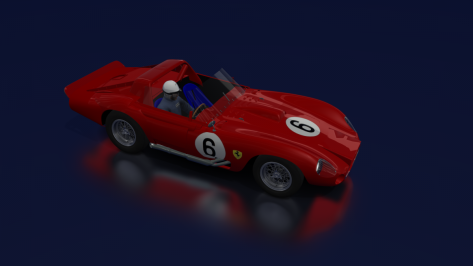
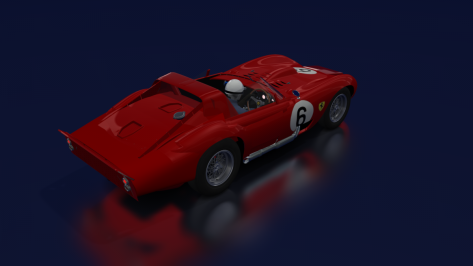
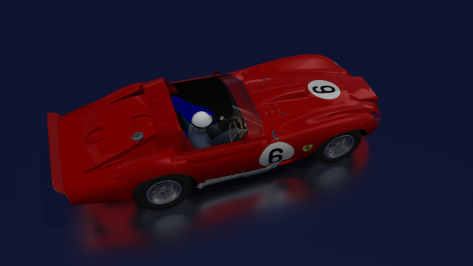
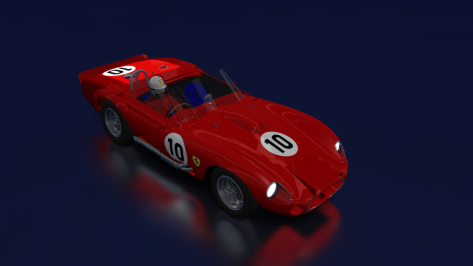
The versions of the Ferrari 330TR/LM - Fantuzzi design

Number 6 (1962 - Olivier Gendebien - Phil Hill)

Number 10 (1963 – Pedro Rodriguez – Roger Penske)

Now let's test it on the track (BoP).
 

Attachments

  • __custom_showroom_1704413330.png
    __custom_showroom_1704413330.png
    73.3 KB · Views: 26
  • __custom_showroom_1704413347.png
    __custom_showroom_1704413347.png
    79.3 KB · Views: 24
  • __custom_showroom_1704413355.png
    __custom_showroom_1704413355.png
    82.1 KB · Views: 22
  • __custom_showroom_1704413725.png
    __custom_showroom_1704413725.png
    79.6 KB · Views: 21
  • __custom_showroom_1704413740.png
    __custom_showroom_1704413740.png
    87 KB · Views: 23
Except that any files added like skins wont be erased when prompted to overwrite, unless the name of said new skins is the same as updated skins
I don't see your point really... I know the update package will not contain my custom skins and thus if I do an Update via CM it will indeed retain my extra skins (and a Clean install will not retain them). But you suggested to copy over the content of the install package manually (not using CM) , and I say it is the same result as Update via CM.

The point I'm trying to make is this:
If it is a full package but some files are removed , and you manually copy over the files from the update archive into your content folder, the removed files (which the author deleted) will remain in your mod folder and not be deleted...
If it is an incremental package (just some extra files), then a Clean install will break the mod (so would deleting the folder manually and copying the archived content to your content folder).

You do not know what case you are dealing with unless you first examine and compare the downloaded archive content to what you have already in your content from a previous version, to be sure what it the right course of action.
It is time consuming and not logical that the author leaves this for all who downloads their update to figure out for themselves (or finding out through trial and error and having to resort to a backup in case a clean install was not the way to go, like Masscot suggests)

An auther should imho always with the release of the update mention whether a clean install is
a) mandatory (in case deleted files compared to his prev version.)
b) not needed (in case full package and no files were deleted compared to his prev version.)
c) prohibited (in case not a full package but only extra+changed files - eg. altered data.acd file or altered ini files)

Don't you all agree with this?? (I sure hope so , and that I'm not the only one who sees the logic in that...)
 
I don't see your point really... I know the update package will not contain my custom skins and thus if I do an Update via CM it will indeed retain my extra skins (and a Clean install will not retain them). But you suggested to copy over the content of the install package manually (not using CM) , and I say it is the same result as Update via CM.

The point I'm trying to make is this:
If it is a full package but some files are removed , and you manually copy over the files from the update archive into your content folder, the removed files (which the author deleted) will remain in your mod folder and not be deleted...
If it is an incremental package (just some extra files), then a Clean install will break the mod (so would deleting the folder manually and copying the archived content to your content folder).

You do not know what case you are dealing with unless you first examine and compare the downloaded archive content to what you have already in your content from a previous version, to be sure what it the right course of action.
It is time consuming and not logical that the author leaves this for all who downloads their update to figure out for themselves (or finding out through trial and error and having to resort to a backup in case a clean install was not the way to go, like Masscot suggests)

An auther should imho always with the release of the update mention whether a clean install is
a) mandatory (in case deleted files compared to his prev version.)
b) not needed (in case full package and no files were deleted compared to his prev version.)
c) prohibited (in case not a full package but only extra+changed files - eg. altered data.acd file or altered ini files)

Don't you all agree with this?? (I sure hope so , and that I'm not the only one who sees the logic in that...)


I think I only had a problem twice, with almost 2000 cars installed and the associated updates, nearly all with cm drag n' drop.
 
Progress report:
__custom_showroom_1704432148.jpg

But a little problem driving me nutz. Maybe someone knows the solution.

As you can see the rear wiper stays attached to the trunk in CSP showroom. Ingame or in showroom it doesnt. I cant figure out why it acts that way.
Made some progress on the GT4s again:
Hey Max, nicely done.
Just a reminder, the Aston needs some setup fixing. I cant even save the brake balance settings, which is kind of annoying. If not at the todo-list already, please add. :cheers:
 
sorry I don't seem to be able to find the answer, with CSP 1.75 walk around mode, after exiting the car what keys should I use to walk around the track? I tried the arrows and they did not work, mouse only allows for rotating the view. Thanks.
 
Two questions.

1.) Is anyone else seeing the ai cars flip over when going over a kerb with the recently updated versions of the VRC Touring Pack cars? I tried to run a race at Brands Hatch with them and the ai cars were flipping over when going over the kerbs.
Yes. I had the odd car flip over at Druids. Something very not right somewhere and that's as far as my faultfinding skills can take me.
 
@Greg_ST try subbing these files in. They should work much better in VR (or for anyone with the driver visible).
New steer.ksanim and shift.ksanim, new driver scale and position (feet on pedals, hands on steering wheel), hand/steering wheel synch fixed, shift timing tweaked.
The shifting animation is a couple of inches high, but if the shifter shaft could be extended or a taller cylindrical knob put on it to suit the hand, it'd be an easy fix.
The driver's seat could ideally move forward a few inches too.


View attachment 1316643
I thought that this would happen because of the car re-scale, but I didn't give much attention
The same goes for the wheel rotation lock, I keep the same rotation from the "car.ini" "STEER_LOCK=250" to the "driver3d.ini"
[STEER_ANIMATION]
LOCK=250

Anyways, thank you for the help
the IA only reach 2nd gear :-( any ideas?
I Tested the car two days ago with AI but I forgot to put the Mclaren as AI to see if it works norma
I will check this too
 
sorry I don't seem to be able to find the answer, with CSP 1.75 walk around mode, after exiting the car what keys should I use to walk around the track? I tried the arrows and they did not work, mouse only allows for rotating the view. Thanks.
Edit: Incorrect. Pardon. Here's the good stuff from @rnoir ::

"W,A,S,D" to walk, "shift" to sprint, "ctrl" to duck and "space" to jump.
 
Last edited:
sorry I don't seem to be able to find the answer, with CSP 1.75 walk around mode, after exiting the car what keys should I use to walk around the track? I tried the arrows and they did not work, mouse only allows for rotating the view. Thanks.
"W,A,S,D" to walk, "shift" to sprint, "ctrl" to duck and "space" to jump.
 
Good morning
By uploading this mod here, I managed to improve it a little, adding cleaners.
There is an error message in lodb, but it loads normally on the track.
As it is an old mod, I don't think it will offend anyone,
I believe it is a sequential change, but it is not like that in this mod.
As I don't know how to create 3D objects, it would be perfect if someone with knowledge created a gearbox, eliminating the paddles...
Any suggestions are appreciated..


__custom_showroom_1704461368.jpg

Lamborghini Gallardo GT2
by Velo, Nicolas Moraes, Assetto Garage

 
Last edited:
Currently in the process of attempting to do same but keeping them simple for the time being... And a bunch of stock colours which are easier to do of course.

View attachment 1307437 View attachment 1307438

Who would have thought that a spag-bowl could look like this.

View attachment 1307439
Work remains WIP and really hope to deliver before Xmas.
Happy New Year everyone!!! the livery-project is running behind schedule a little, but steady progress continues as I battle the crappy mapping for this mod. Here's a few fictional liveries that made the cut so far - final touches, decals, colours, etc, to go...

alitalia_1.jpg

deNarvaez_2.jpg

agip_1.jpg

elf_1.jpg

gulf_4.jpg

irwin_1.jpg

liquimoly_1.jpg

monster_4.jpg

milwaukee_2.jpg

panasonic_2.jpg

pennzoil_3.jpg

shell_2.jpg

tagheuer_1.jpg

valvoline_1.jpg

winfield_3.jpg

martini_4.jpg


Aiming to complete x18 liveries - so that we could have a 24-car-grid (plus x6 liveries from @MisterWaffles).

Feedback welcome...
Happy racing!

apple_2.jpg

jagermeinster_1.jpg
 
Last edited:
Sharing a mod? Host it on GTPlanet Downloads. Free, public hosting for files up to 10GB in size.
Back