You're right, that cut>delete part doesn't make sense, it must be easier for him to remember or something. Once you understand the broad idea of how it works, you can optimise the proces to your own liking. The main thing you need to "learn" is the list of files he mentions: Mirrors, lods, lights, if it's there, sometimes.. hahaha, I really do love the accent. Anyway, I also like how this video includes the last 3 task (adjusting the width, ride height and tire radius).Thanks for the video, but the beginning part confuses me. He cuts the first selection of files from the one data folder and pastes them to a new folder. Then he deletes all but two files. So what was the point in cutting all of the other files, unless I missed a step somewhere along the line that explained why he cut the ones he deleted. I'll keep watching and hopefully see what I misunderstood.
@Alguecool Without a tutorial I think using the ai app may be above my pay grade. I wouldn't even know where to begin. Maybe I can find a tutorial somewhere on the net that explains everything. Thanks...
Same as @Tummie555, a good swappy swap.
OR you can use it in a hotlap ride (on a track it has trouble with, for exemple), make the Ai drive (ctrl + G, then ctrl +C, something like that), open the AI app (should be accessible by default with the developper's enable) and craft the AI yourself by looking how it behave with your changes.
I can't find my bookmark about it, but I do remember @Smurth making a very good tutorial about what does what. I actually updated many cars' broken AI thanks to it.
On another note, a bit of update on my stupid Piper project.
Yep, stupid, because I have a few low-res pictures of it, litterally just ONE pic of the interior, and the "new" model still in use (as of 2007, lawl) is quite different to his ancestor in fact. I even tried to ask on some Piper's fan groups for any help regarding the size of the car, or just some datas : nothing. So, appart for the famous height of 30inches, I have no scale figure. sounds like FUN.
Anyway, it's still going well as of now.
View attachment 1337092
And a little size comparaison. It looked way too low to me when I was doing it and when putted next to a 40inches GT40, well... It actually look right. Which makes it even more amazing (and even HARDER to get a driver to fit in it).
View attachment 1337093View attachment 1337094
I changed tactic this time, I exported it quickly on CM to compare it to others and get a driver to fit right, probably trying a few drives to get something correct out of it once I got it running, but don't get fooled : textures are at a bare minimum, many stuff missing (like the front spoiler) and no interior yet. And with one picture in stock, it's gonna be the main trouble, I tell you
So, still a lot of work before anything viable, but I wouldn't mind some advices/point of view about the size thing. whatcha think ?
Not gonna lie, your BBS wheels looks wrong on that Ford GT1, the spokes are suppose to be offset from each other not paralleling each other. And the spokes are supposed to be stretched to the tip of the rim.View attachment 1337088
After completing the original rims I was thinking of including these too. Can anyone tell me what the exact model is? (See picture below).
View attachment 1337089
Not gonna lie, your BBS wheels looks wrong on that Ford GT1, the spokes are suppose to be offset from each other not paralleling each other. And the spokes are supposed to be stretched to the tip of the rim.
View attachment 1337142View attachment 1337143
The closes ones I could find in decent quality and accurately is FSR's GT3 on the right.
View attachment 1337144
Also to answer your question, I believe you're talking about these other BBS wheels on Be_modding's Ford GT3, not sure about the exact model of wheel, but it's there.
I used this exact pic (modified on photoshop for the perspective) to shape the front haha.Mind blown! Looks fantastic.
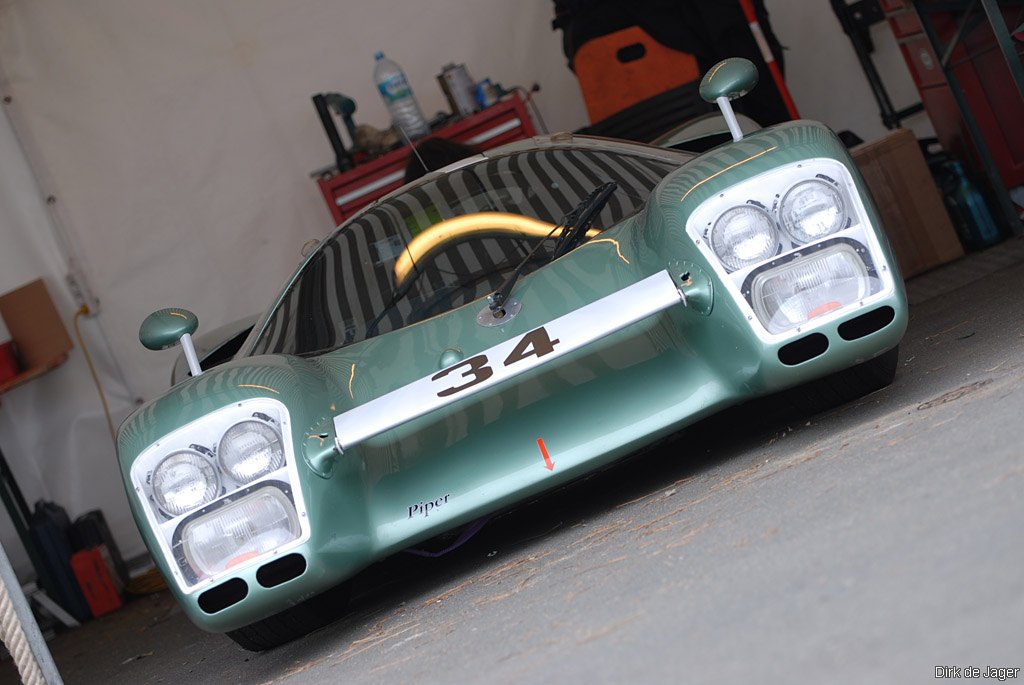
I think that height looks about right and the size in general. Some of the WSC cars we looked at the size of over and over thinking "that can't be right" but they do add up (apart from the GS is definitely oversized!). This looks appropriately smaller than the GT40. No idea how the driver fit in, he must have been lying back like in a bathtub.
The part that looks a bit strange to me is the size of the light pods but, again, that's likely just because it's so different to the other cars of its era, we those two horizontal lights instead of one stacked on the other. I had originally thought that bottom rectangular light at the front was the same one as the GT40s use for their main lights.
![]()
The other part is the shape of the front 'splitter' or fender or whatever that area between the front lights is (the bit with the red arrow on the above photo). On your model that looks to have a curve to it, whereas it seems pretty straight on any pics I can find.
Have you tried reaching out to any of the owners of the real/replica ones?
Either way, looks great - top work and thanks for the preview pics.
Try unpacking data.acd of each car, copy the ai.ini file of the car that works well, and paste it into the one that doesn't. If the physics of the better car haven't changed much, it may get you into the "ballpark". Don't be afraid to play with the numbers to see what they do to the ai.Question for the car modding experts. I have two versions of the same car from two different mod makers. The one has a better model and more skins, but the ai just doesn't work. On high speed turns, it will completely miss the turn and slide off track. On the other, the ai works great but the model is inferior and only has 3 car skins.
I would like to somehow make the ai work on the good mod like it does on the inferior mod. I was thinking I could steal some of the files from the data file on the mod that has the good ai, but i'm not sure what files I should copy or if this would even work. Obviously I would need the ai.ini file, but what other files would make sense to copy. I probably can't copy everything because of mesh name differences, but would anyone know what other files I could copy over that wouldn't cause any issues with mesh name differences that might solve the ai problem?
Thanks for any advice...
You are right. I must have looked away from the video for a brief moment on the part about copying the remaining files from the original cut and paste part to the new car's data folder. I managed to finish a first go at this and on a positive note, the car still drives so I guess I followed all of the steps. Now I just have to see what the ai does with this car and if they still miss the same turns as before. Thanks for the help...You're right, that cut>delete part doesn't make sense, it must be easier for him to remember or something. Once you understand the broad idea of how it works, you can optimise the proces to your own liking. The main thing you need to "learn" is the list of files he mentions: Mirrors, lods, lights, if it's there, sometimes.. hahaha, I really do love the accent. Anyway, I also like how this video includes the last 3 task (adjusting the width, ride height and tire radius).
p.s. The cutting part is needed btw. The files he doesn't cut, are all copied to the new car. If those files were left behind, you would be overwriting model-specific data-files later in the proces. There's just no reason for him to delete them in the "new folder".
Thanks for the reply, I will try these also.I do not have those problems with the AI. I have AI lines + Hints from End 2022. Just try them please:
![]()
rt_bathurst
MediaFire is a simple to use free service that lets you put all your photos, documents, music, and video in a single place so you can access them anywhere and share them everywhere.www.mediafire.com
No matter which lines i would also suggest reduce the AI agression at Barthurst.
__________________________________________________________
Aditionally i will add new AI + Hints for the WWT_Raceway Roadtrack.
I discovered the track after creating a Championship for the great VRC TA2 cars. Unfortunately the AI was too slow and always crashing at start. So a friend was so kind to work on better AI files.
![]()
wwt_raceway_race
MediaFire is a simple to use free service that lets you put all your photos, documents, music, and video in a single place so you can access them anywhere and share them everywhere.www.mediafire.com
Sure, but you always need to take care of new "wrong" things. Today it is 7zip, tomorrow it is another app or compression formats. So at the end you are running a weak virus and trojan software and then you make manual holes in the system. So it is always better to get rid of it. Its not only false reporting, it can cause much higher CPU consumption. Why all other antivirus apps work better?You can easily add exception like 7zip and whatnot to it.
I think that's a wise approach with the particularly rare vintage cars, when they made only a few of them in a shed in rural Britain (or Italy) there's never two identical copies.Trying to get an "average" somehow correct![]()
Well here is the 1983 F1 Assetto Corsa season. With mandatory pitstops. The races are from 15 laps (Hockenheim, Monza, Imola) to 25 laps (Paul Ricard) to 30 laps (Long Beach).
Racing time varies from 25 to 35 minutes.
Every single car will pit during every race. Every cars' fuel consumption and fuel capacity has been altered. You will NOT need any applications or Content Manager settings anywhere. Driver skills, car performances and everything required for pitstops are all set and ready without any adjustments.
You will have to pit as well. This increases the excitement of the races tremendously as tactics come to play.
I achieved very realistic results and logical pit times for the ai. I tested two full seasons and literally parked my car in front of the pitlane of each track and wrote down all ai cars' pitting laps and altered their consumption based on the results. There can be some sort of random variation between the races how the ai will pit. In some tracks (rarely) another team car can pit twice and the other driver just once. But 90% of the time it's just one pitstop per car. But the randomness just increases the element of surprise. You will notice, for example, that the naturally aspirated Williams cars usually pit later in the race.
I didn't include ai engine failures to this season as the ai cars retire in the middle of the track and it creates mayhems. But there ARE retirements and crashes and that's exactly why I prefer driving the seasons with these cars. Retirements and crashes were a big part of the "Turbo era" of F1. The SimDream aren't well liked in the AC community and in their default form they're useless but their physics are based on Kunos Lotus 98T and with these changes and corrections I have enjoyed the seasons tremendously.
Turbo is cockpit adjustable. Use 100% for the qualifying and 70% for the races. 80% is pushing it and you're risking an engine failure. Before the race start go to pit settings and adjust the pitting tactics preset (refueling). When you enter the pit the refueling will be automatic.
Top cars are Brabham and Renault (their boost is a bit higher so they're faster on straights).
Top ai drivers are Piquet the eventual champion of 1983 (ai level 100) and Prost (ai level 100). Watson, Lauda, Rosberg, Tambay can score an occasional win but Prost and Piquet (Renault/Brabham) are the teams and drivers to beat.
The user is driving Rene Arnoux (Ferrari) but of course this can be easily changed to your liking.
I have removed all other tyremodels but supersoft (because the cars weren't competitive during the races with standard race tyres). I also slowed down the refueling process. Sure it's not realistic to race with QF tires but beggars can't be choosers. With race tyres those cars were SLOW, believe me. Now they're extremely competitive. I also fixed all wrong driver names, nationalities and driver pictures in the skins folder (they were mostly wrong on SimDream package).
Monaco 1983 was a rain race so there's rain in the season (SOL) if you have that pay mod. There's also another download link for the clear weather season if you don't have rain.
Tracks:
Jacarepagua (20 laps)
Long Beach (30 laps)
Paul Ricard 1988 (25 laps)
Imola 1988 (15 laps)
Monaco 1988 (20 laps)
Spa 1988 (15 laps)
Detroit 1988 (20 laps)
Montreal 1982 (20 laps)
Silverstone 1975 (25 laps)
Hockenheim 1988 (15 laps)
Oesterreichring (20 laps)
Monza 1988 (15 laps)
Brands Hatch 1990's (25 laps) the only vintage Brands I have found. Great ai.
Kyalami 1967-1985 (25 laps)
All in correct order and tested. Zandvoort is missing on purpose. There is a vintage Zandvoort AC track and we rigorously tested that track but no matter what, these cars will not work with it. They crash everywhere and drive like maniacs. All other races should have very accurate layout and the cars work nicely most of the time. Osterreichring can be a mayhem race but then again many races of this era were.
Remember to adjust the pitstop preset during practice or qualifying. When you enter the pitstop it's all automatic.
You can be on pole at some races but Renault/Brabham race pace is very tough to match. But not impossible. Should be a tight competition for the championship. At least it is for me. Have fun!
All download links in the video description. I don't want to share the SimDream cars as they're a pay mod. There's only the dl link for the car changes that have to be overwritten.
PM me if you need them. I might know where they are available for free.
Click CC for subtitles "ON".
Maybe it has been moved here?Someone knows what happens with this "The Assetto Corsa rally wiki" thread on RD? It was a well put together guide.![]()
dankeschönHere comes Sebastian Vettel !! for cim_2007_bmw_sauber
Für unser Freund D4huebner13
Added Kubica's skin just had to rename files to have the #10 on the nose
![]()
File on MEGA
mega.nz
Let's have fun on Indianapolis 💪
Thx, I've missed that migration to a separate site!
Nice to see you backTry unpacking data.acd of each car, copy the ai.ini file of the car that works well, and paste it into the one that doesn't. If the physics of the better car haven't changed much, it may get you into the "ballpark". Don't be afraid to play with the numbers to see what they do to the ai.
On another note, for those complaining about this or that car not working on a certain track, keep in mind this file is created by the car modder, and can vary greatly. A track's ai is only as good as the ai built into the car.
Oh, and hello all, it's been a while.
here you are ... (checked and my copy of the Kunos 787B has working sounds and wiper, so good to go)787B
Hi Mate,
I wanted to say thank you for this championship well executed (as well as the others), I tried it out today and I loved it. The Jaca racetrack was not working for me, maybe the AC Timer on the track is not well positioned, as It was not registering my lap time. Then on Long Beach, I had so much fun with the AI and the pit stops, I cannot wait for the weekend to do more of them.
Thanks !