Assetto Corsa PC Mods General DiscussionPC 

  • Thread starter Thread starter daan
  • 152,038 comments
  • 46,495,019 views
Now, i think i 've been patient enough
screenshot-2024-10-12-at-15-07-32-438-cooper-jaguar-t38-1955-cooper-t38-mk-ii-1955-engin%E2%80%A6-png.1396585

I second this, I also believe you have been patient enough, this ageless beauty belongs to AC. Bring it on. :cheers:
 
Guys, could you try my conversion of acc Kyalami track. Big thanks to LaChub for Ai
View attachment 1396033

Thx for sharing this version.
Imo, there´s still a lot to do. A lot of trees are floating around and some of them really very high and obviously.
1728739630126.png

1728739672283.png


Power cables could be thinner, like in my screenshot above.
Power stands and some fences misses double side, too.
Terrains and mountains could blend better together, like in my first screenshot.
Imo a lot of buildings and other assets have wrong normals.

Pit building looks strange:
1728740037049.png

It should imo look more like this:
1728740194539.png


Some of these things can be done with config, but others unfortunately not.
The terrains blending is easy to change:
1728740395856.png


I can share my config changes, if you like, but before you´ve to fix the other things. :)
Unfortunately, my time is very limited lately, but I´ll try to help with hints if wanted and needed.
 
Ford Mondeo skin (Czech Republic) but what exactly the series was called i have no idea.

All i no is "RASINO" is a Ford main dealer in Czech Republic

car: https://mega.nz/file/sNAWkBCJ#OQ35pRlAh26mOZKANyWMG9TQpRkU9gByhhTP9PpN4Z4


CM drag and drop no AO (apart from front splitter and bumper insert) due to removing side repeaters and rear badge and rear plate to match real life. Of course the car i was skinning from is a early Mondeo but there is not 1 of them in the game worth skinning so i chose this. Had to make a few stickers from scratch on this one, 2 from scratch and 1 modified.

4k

Screenshot (737).png


35857717415_d4ebc02259_b.jpg
 
Last edited:
You probably know that already but in the pure config, under the AI tab, you can decide whether the headlights are Pure or CSP controlled, as well as to get them working on different lighting conditions, either cubemap or ambient ent luminance.

The CSP Headlights control is in "Weather FX" settings, "turn headlights on and off automatically". I use this option checked in CSP and the "hEADLIGHTS DEFAULT" in Pure config without any issues.
Thank you @Tetri and @andrevr for your input. After going back and forth with the options in CSP and the Pure Config lights are working properly again :) I changed so many times I've become a bit confused as to what I have changed, but I think it was the the setting under the AI tab in Pure config. I must have changed something when playing with Pure settings a while back.

@Marneus_boss I now have "Force Ai headlights" and "Turn headlights on and off automatically" checked in CSP Weather FX, and "Headlights Pure" selected in the AI tab of the Pure config and it's all sorted. Strangely if I change to "Headlights Default" my headlights and the AI both come on again, despite this setting working for Tetri.

 
Happy heads-up.
@GzeroD has posted his 1958 Vanwall GP in GTPlanet Downloads :)
The car that Stirling Moss drove, to lose the drivers championship, by being a gentleman and a legend.
Was indeed a real Gentleman.
On the other hand, while nowadays the F1 is the highest you can achieve in car racing world wide, think in the 50’s it was more diverse. Like winning the rally of Montecarlo, 24h le Mans, Targa Florio, Indy, Mille Miglia and other famous races, did have the same prestige. As most of the F1 drivers also did drive lot of other type of race classes, like Sir Stirling Moss.

Btw thanks for the notification on the Vanwall.
 
Last edited:
Glence Hill - v1.01

1728752318597.png

"Glence Hill is a small fictional club style circuit set along the Scottish coast"


features:
  • 16 pit/grid with AI
  • 2 cameras
  • CSP RainFX, VAO and otherFX™
  • some horses

credits:
  • original 3d model by @frasie, converted with permission to Assetto Corsa by @RMi_wood
  • new trees, physical road mesh and MUCH 3d rework by @pugsang (thanks bro!)
  • logo by @Fanapryde
  • beta testing by the above and @Breathe, @Masscot, @TITI, @erentuzci,


:: DOWNLOAD ::
Glence Hill - v1.01

changelog:
  • transparent fence fixed
  • start lights better visuals
  • floating skidmarks corrected / deleted
  • wheels on truck now touch the ground
  • tweaked VAO patch fix for visual glitch (no VAO is applied)

Original post updated for download ::here::
 
Last edited:
I am trying to move the position of an element, a track marshal, further away from the racing line from where track creator has placed them. I can make meshes disappear with a entry into the tracks ext_config.ini file so I thought I would try doing the same to move a mesh, without having to involve kn5 files and apps I am not familiar with, like 3dSIMED.

I came up with the idea of asking ChatGPT instead of sifting through the web for hours. What I got looked very plausible to me. And yes I can hear people laughing at me!

Sadly nothing is working yet. I’m not sure if ChatGPT got this info from somewhere creditable, or if came up with the idea on a whim based on other working ideas it found?


ChatGPT suggested:


[MODEL_REPLACEMENT_...]
NAME=YourMeshNameHere
POSITION= x, y, z ; These values shift the object in 3D space
ROTATION= x, y, z ; This rotates the object around its origin
SCALE= x, y, z ; This scales the object (optional)


and an example to raise it by 2 metres:

[MODEL_REPLACEMENT_BANNER_01]
NAME=BANNER_01
POSITION=0, 2, 0


I have tried a few combinations, based on ChatGPT suggestions, but nothing is working yet. Any idea if this is possible?

Other code variations i have tried were along the lines of:

[MESH_ADJUSTMENT_1]
ACTIVE = 1
MESHES = comipiste027_WC_MARSHAL0302
IS_RENDERABLE = 1
POSITIION = 0, 10, 5

and also

[MODEL_REPLACEMENT_...]
ACTIVE = 1
[REPLACEMENT_0]
NAME = comipiste027_WC_MARSHAL0302
POSITION = 0, 10, 5
ROTATION = 0, 0, 0
 
I am trying to move the position of an element, a track marshal, further away from the racing line from where track creator has placed them. I can make meshes disappear with a entry into the tracks ext_config.ini file so I thought I would try doing the same to move a mesh, without having to involve kn5 files and apps I am not familiar with, like 3dSIMED.

I came up with the idea of asking ChatGPT instead of sifting through the web for hours. What I got looked very plausible to me. And yes I can hear people laughing at me!

Sadly nothing is working yet. I’m not sure if ChatGPT got this info from somewhere creditable, or if came up with the idea on a whim based on other working ideas it found?


ChatGPT suggested:


[MODEL_REPLACEMENT_...]
NAME=YourMeshNameHere
POSITION= x, y, z ; These values shift the object in 3D space
ROTATION= x, y, z ; This rotates the object around its origin
SCALE= x, y, z ; This scales the object (optional)


and an example to raise it by 2 metres:

[MODEL_REPLACEMENT_BANNER_01]
NAME=BANNER_01
POSITION=0, 2, 0


I have tried a few combinations, based on ChatGPT suggestions, but nothing is working yet. Any idea if this is possible?

Other code variations i have tried were along the lines of:

[MESH_ADJUSTMENT_1]
ACTIVE = 1
MESHES = comipiste027_WC_MARSHAL0302
IS_RENDERABLE = 1
POSITIION = 0, 10, 5

and also

[MODEL_REPLACEMENT_...]
ACTIVE = 1
[REPLACEMENT_0]
NAME = comipiste027_WC_MARSHAL0302
POSITION = 0, 10, 5
ROTATION = 0, 0, 0
these positions would be from 0,0,0 of the whole model, i think, not the distance you want to move them.
BTW, did they dissappear when you tried these variations?
 
Thx for sharing this version.
Imo, there´s still a lot to do. A lot of trees are floating around and some of them really very high and obviously.
View attachment 1396587
View attachment 1396588

Power cables could be thinner, like in my screenshot above.
Power stands and some fences misses double side, too.
Terrains and mountains could blend better together, like in my first screenshot.
Imo a lot of buildings and other assets have wrong normals.

Pit building looks strange:
View attachment 1396591
It should imo look more like this:
View attachment 1396592

Some of these things can be done with config, but others unfortunately not.
The terrains blending is easy to change:
View attachment 1396593

I can share my config changes, if you like, but before you´ve to fix the other things. :)
Unfortunately, my time is very limited lately, but I´ll try to help with hints if wanted and needed.
Ok i will check it!

Corrected!
Screenshot_htrs_lada_vesta_sp_vv_kyalami_12-9-124-21-39-2.jpg


22222222222222jpg.jpg
 
Last edited:
these positions would be from 0,0,0 of the whole model, i think, not the distance you want to move them.
BTW, did they dissappear when you tried these variations?
@RMi_wood Sadly no change. I also tried entering values just a little different to what I wrote down as the co-oridinates of the mesh as detailedin the object inspector in the hope that might make it move to a random nearby position, but no effect.
 
@RMi_wood Sadly no change. I also tried entering values just a little different to what I wrote down as the co-oridinates of the mesh as detailedin the object inspector in the hope that might make it move to a random nearby position, but no effect.
I could be wrong, but as far as i know there's no way to move meshes inside of a kn5 via ext_config unless you added that specific object into another KN5.
 
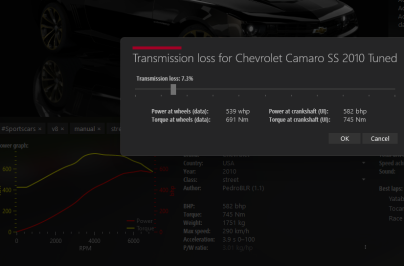
Hi everyone, asking for help, how can I reduce 22 hp to the power at the wheels, but with the others values unaltered? its supossed to be a V8 Supercharged engine ( Camaro ZL1 from 2013) I modified the power.lut file but this change the torque values, that from a dynotest set this 691NM like real
 

Attachments

  • camaro.png
    camaro.png
    36.1 KB · Views: 27
Glence Hill - v1.01

changelog:
  • transparent fence fixed
  • start lights better visuals
  • floating skidmarks corrected / deleted
  • wheels on truck now touch the ground
  • tweaked VAO patch fix for visual glitch (no VAO is applied)

Original post updated for download ::here::
Cool track thanks!

Makes me wish for a historic Ingilston track someday, there is a decent looking GPL version which gives me a good excuse to install that game.
 
guys question about my late problem with CM
i reinstall the track with fresh clean installation everything working fine but !!!!! when i disconnect
and try reconnecting when i get the red screen
its like something recording in the track file .like some error and then the next time its doesn't recognize. maybe i got something wrong with CM?
Thanks for the help!
 
Cool track thanks!

Makes me wish for a historic Ingilston track someday, there is a decent looking GPL version which gives me a good excuse to install that game.
Ingliston 1994...kinda decent...
 
Hi, i have a problem, with some tracks like prunieres embrun by superstage, the grass looks radioactive with pure lcs, didnt happen with gamma. Also, when i do screenshots with the game, it cant be seen on the screenshots (second pic). Any idea why it could be? @Peter Boese

1728779566907.png


Screenshot_lf_hyundai_i20_rally1_ss_prunieres_C13AEGIS_12-9-124-1-54-28.jpg


Edit: happens with gamma too, even if its way less visible. First screenshot made with windows, second in the game, both with gamma.
Sin título.png

Screenshot_iku_djm_mcrae_r4_ss_prunieres_C13AEGIS_13-9-124-2-39-26.jpg
 
Last edited:
Hi Guys

Here is my update for the Kunos default ks_brands_hatch track.

This track standard already looks pretty good, I didn't want to change much but rather improve.

Hopefully you guys will enjoy this one :)

Installation:

- Download my update and install (manual install)

- My extension file includes new lighting and a shader replacement for 3D tree branches, if you already have a extension file with rainfx etc you can simply add my settings to your file.

- Select CF1_Brands_Hatch in Content Manager to activate skins

CM_Brands_Hatch_Circuit.png


P.S. If you don't know how to install these textures or extension, please send me a DM and I would be more than happy to assist :)

Update details v1.0:

  • New asph5 texture and upscaled
  • Reworked all tarmac-detail textures and upscaled
  • Reworked all race groove textures
  • Reworked all tire markings and skid marks
  • Reworked all asphalt cracks and markings
  • Reworked all main feature tree's, added curves, small hue adjustment, some sharpness, aslo added noise (noise is similiar to grain, adds a bit more texture and highlights colors) upscaled too
  • Reworked all smaller tree's and upscaled
  • Reworked all bushes and upscaled
  • Reworked treeline texture and upscaled
  • Reworked all grass textures and upscaled
  • Hill side texture reworked and upscaled
  • Landscape texture reworked
  • Reworked all 3D branch leaves, adjusted each texture alpha, hue, contrast, brightness and tones
  • Removed shadows from 3D tree's, blends in better with feature tree's and no more dark/light shadows
  • Reworked bark textures and upscaled
  • All brick textures reworked and upscaled
  • All concrete textures reworked and upscaled
  • House/building textures reworked and upscaled
  • All amco and safety walls reworked and upscaled
  • All fence kits reworked and upscaled
  • Pitlane textures reworked and upscaled
  • All wood plank textures reworked and upscaled
  • Reworked all curb and run off textures, upscaled too
  • Reworked all rumble strips and upscaled
  • Reworked tent canvas texture and upscaled
  • Reworked grandstand textures and upscaled
  • Reworked window texture and replaced glass texture (building last corner) upscaled too
  • Reworked all banners and logos
  • Added missing or blank banners with Brands Hatch banners
  • Reworked pit building texture
  • Added tint to pit building window textures
  • Replaced radio brands banner with Brands Hatch banner (Pit building)
  • Added Brands Hatch banner to pitlane garages
  • New BRSCC ambulance skin added
  • New track side marshal skin
  • Reworked marshal huts
  • All bridge textures reworked and upscaled
  • New day lighting: Glow, fog , smog, color etc. (not night lighting)
  • Maybe more :)

Screenshot_vrc_pt_2024_ferrenzo_ks_brands_hatch_13-9-124-0-24-12.jpg
Screenshot_vrc_pt_2024_ferrenzo_ks_brands_hatch_13-9-124-0-27-56.jpg
Screenshot_vrc_pt_2024_ferrenzo_ks_brands_hatch_13-9-124-0-31-25.jpg
Screenshot_vrc_pt_2024_ferrenzo_ks_brands_hatch_13-9-124-0-19-22.jpg
Screenshot_vrc_pt_2024_ferrenzo_ks_brands_hatch_13-9-124-0-22-5.jpg

Screenshot_ferrari_355_challenge_ks_brands_hatch_13-9-124-3-52-35.jpg

BRSCC.jpg


Last edited:
Hi, i have a problem, with some tracks like prunieres embrun by superstage, the grass looks radioactive with pure lcs, didnt happen with gamma. Also, when i do screenshots with the game, it cant be seen on the screenshots (second pic). Any idea why it could be? @Peter Boese

View attachment 1396780

View attachment 1396782


Edit: happens with gamma too, even if its way less visible. First screenshot made with windows, second in the game, both with gamma.
View attachment 1396783
View attachment 1396784
Could be related to the track config and the grass shader settings. So gamma will not really show exaggerated values. So maybe the person who did the config was boosting values and now in LCS you really see it. Maybe just have a look into the config file and find the settings for that material the grass is put on.

Otherwise maybe go to Pure Discord server and report it there. Also try different ppfilters and plain Pure LCS Config settings...
 
Last edited:
I had automatic updates disabled for Content Manager, and yet just now upon opening, I've been notified that CM has been updated (0.8.2686.39678). Is it just me? :ill:
 
I could be wrong, but as far as i know there's no way to move meshes inside of a kn5 via ext_config unless you added that specific object into another KN5.
Thanks Cris, I'm always hoping someone come up with a way. The code ChatGPT suggested certainly looked viable, but I assume it was just trying it's luck too.
 
Thanks Cris, I'm always hoping someone come up with a way. The code ChatGPT suggested certainly looked viable, but I assume it was just trying it's luck too.
ChatGPT is a valuable help, but not everytime give right info (or better, not everytime everything works as expected). But it worth a try when you have no idea on how to proceed.
 
Nobody had answered me before but, is there any way to play in an online server mixing friends with AI?
I don't have any code knowledges but I believe that in this game it should be easy to apply, at least thinking about almost all traks have an AI line, but it's surprising how nowadays we only could play in an online server with people, so if we are 2 or 3 friends, all empty grid slots could keep simply empty and not fill it with AI cars.
 
Sharing a mod? Host it on GTPlanet Downloads. Free, public hosting for files up to 10GB in size.
Back