Assetto Corsa PC Mods General DiscussionPC 

  • Thread starter Thread starter daan
  • 156,268 comments
  • 50,357,863 views

Update v2 - Link Updated in the same free Patreon Post

  • Material-based code implementation: .kn5 model is no longer required.
  • UI Configuration: Adjust brightness and pebble size (larger/smaller) directly from the interface.
  • Smoothness Toggle: Enable higher polygon counts via UI for smoother pebbles (reduces total pebble amount).
  • Enhanced Physics: Added new animations to allow pebble rebounding.

@Masscot @Perico Lospa I'm tagging you two since you provided the most feedback.For some reason, the actual color and brightness of the marble weren't rendering correctly. I tweaked the material to allow sunlight to cast on it.Let me know if it still doesn't blend well.
Well done :cheers:
I noticed that 2D marbles are very difficult to see.

Changing to 0.05 made the trick. Thanks a lot! 😁

I think U missed a zero 🤔 for me it's 0.005.
I made some other tweeks:
  • lowered the marble size to 0.6
  • lowered the shininess to 0.05.
 
... I think U missed a zero 🤔 for me it's 0.005...
You're right, sorry... 😅

Regarding the marbles sounds, I have no idea what rubber marbles sound like when they hit a car (let's see if any of the resident pilots around here can clarify), but I've done some research and came across this page of royalty-free sound effects https://pixabay.com/es/sound-effects/search/gum ball/ and while playing around with the search box, I found a sound I think it should be something similar what we are looking for... (erase the .txt)

I don't know if it would be possible to work on achieving several sounds and get a decent sampling from the attached file, or another sound from that website that you think is better, there are hundreds to choose...
 

Attachments

Last edited:
You're right, sorry... 😅

Regarding the marbles sounds, I have no idea what rubber marbles sound like when they hit a car (let's see if any of the resident pilots around here can clarify), but I've done some research and came across this page of royalty-free sound effects https://pixabay.com/es/sound-effects/search/gum ball/ and while playing around with the search box, I found a sound I think it should be something similar what we are looking for... (erase the .txt)

I don't know if it would be possible to work on achieving several sounds and get a decent sampling from the attached file, or another sound from that website that you think is better, there are hundreds to choose...
The audio is a tricky one, perhaps more subjective than any visual tweaks (I too have reduced the default size of the marbles, for example). I definitely think something with more of a rubbery and bass-heavy sound is more appropriate than the default 'pings', but creating a brand new suite of sounds from scratch might be too big of a task. That's why I was quite encouraged by my quick test with simply tweaking the existing samples by increasing the bass and reducing the treble, as that would be relatively quick and easy to implement and (for me) definitely gave a good enough result.
 
Last edited:
Screenshot_clio197_track_ks_brands_hatch_29-5-126-19-48-54.webp


Full Course Yellow - Safety Car App (no car required in Grid)​

In AC a yellow flag does nothing. This app turns it into a proper Full Course Yellow: if the yellow lasts longer than N seconds, a safety car is deployed to neutralise the race, bunch the field up and hand it back at the restart — just like the real categories.

There are already many apps that manages the yellow flag behaviour. This one is different since it spawn the Safety Car without requiring adding it to the race grid.

It is a free app, and it always will be.


What it does:

  • 🟡 Detects a sustained yellow and triggers the FCY (configurable threshold, or manual/hotkey trigger).
  • 🚗 Safety car = follows the racing line, flashing beacons via emissive.
  • 🤖 The AI queue up behind the safety car and never overtake it — hard-enforced, not just a top-speed hint they'd exceed.
  • 🏁 You must hold position too: overtake the safety car (or a moving car) and a "GIVE THE POSITION BACK" countdown starts; ignore it → black flag + forced pit. Crashed cars can still be passed.
  • 🛣️ Two modes: the safety car exits and returns via the pit lane (uses pit_lane.ai) or deploys ahead of the race leader.
  • 📺 On-screen flag instructions (catch the SC / hold X km/h / do not overtake / green flag…).
  • ⚙️ Fully configurable: speed, cornering grip, give-back time, lights, wheels, rules.

 
Didn’t you not use TinyWindows?
I must admit a couple of months ago I did have the same problem. Finally the only solution was to reinstall Win11 pro completely and now everything is running fine.

BTW for all those guys who are claiming that Win11 LTSC is lean and gives you a better performance! That is placebo, it contains also a lot of garbage processes. Further some connectivity is not working, as I could not connect my Apple earbuds and I never could get my VR headset active. While back into Win11 pro, earbuds and VR headset connectivity was fluidly without any problems. The only advantage is the long life support.
AtlasOS ... but that was already the case when it was running smooth...

windows update history does not show any update...
I suspect something running in background (from CSP or CM) , but can't put my finger on it.
 
Last edited:
AtlasOS ... but that was already the case when it was running smooth...

windows update history does not show any update...
I suspect something running in background (from CSP or CM) , but can't put my finger on it.
i am also using atlas but for me its working fine. i only have a non ac issue rn
 
View attachment 1547762

Full Course Yellow - Safety Car App (no car required in Grid)​

In AC a yellow flag does nothing. This app turns it into a proper Full Course Yellow: if the yellow lasts longer than N seconds, a safety car is deployed to neutralise the race, bunch the field up and hand it back at the restart — just like the real categories.

There are already many apps that manages the yellow flag behaviour. This one is different since it spawn the Safety Car without requiring adding it to the race grid.

It is a free app, and it always will be.


What it does:

  • 🟡 Detects a sustained yellow and triggers the FCY (configurable threshold, or manual/hotkey trigger).
  • 🚗 Safety car = follows the racing line, flashing beacons via emissive.
  • 🤖 The AI queue up behind the safety car and never overtake it — hard-enforced, not just a top-speed hint they'd exceed.
  • 🏁 You must hold position too: overtake the safety car (or a moving car) and a "GIVE THE POSITION BACK" countdown starts; ignore it → black flag + forced pit. Crashed cars can still be passed.
  • 🛣️ Two modes: the safety car exits and returns via the pit lane (uses pit_lane.ai) or deploys ahead of the race leader.
  • 📺 On-screen flag instructions (catch the SC / hold X km/h / do not overtake / green flag…).
  • ⚙️ Fully configurable: speed, cornering grip, give-back time, lights, wheels, rules.

I'm being pretentious, but I'd like something like a moving start. Does that exist?
 
I'm being pretentious, but I'd like something like a moving start. Does that exist?
Like Fall Guy said, there's an app created by Nuzzi called Rolling Start App. For me it's working fine (despite sometimes AI makes some passes just at the beginning of the formation lap that don't matter a lot) and you can adjust how fast you want the grid. I show you an example in one of my videos:
 
Last edited:
Any sound engineer in the room...? Music producer...? No one...? 😙
I have been both of the above in a life long long ago, but don't let that tarnish my reputation.

Anyway.... I've lowered the pitch of all the sounds and taken all the top end out of them, so give these a try.


Just unpack and copy the enclosed SFX folder into the Marbles LUA app folder. Back up the original folder first in case you don't like these!

EDIT: Latest Version is now v4.

https://mega.nz/file/h39llTpZ#3nuFj5s66cTw9MYg_SkENESMiItKSHTc35HYmCcyOrw
 
Last edited:
about rolling start in general ,i feel all apps have the same issue, cars follow behind and not side by side and as a result by the time the last car start the race, the first is already half lap ahead ,the race is no more competitive and less immersive .hopefully someone one day will crack the code and create a proper one
 
Last edited:
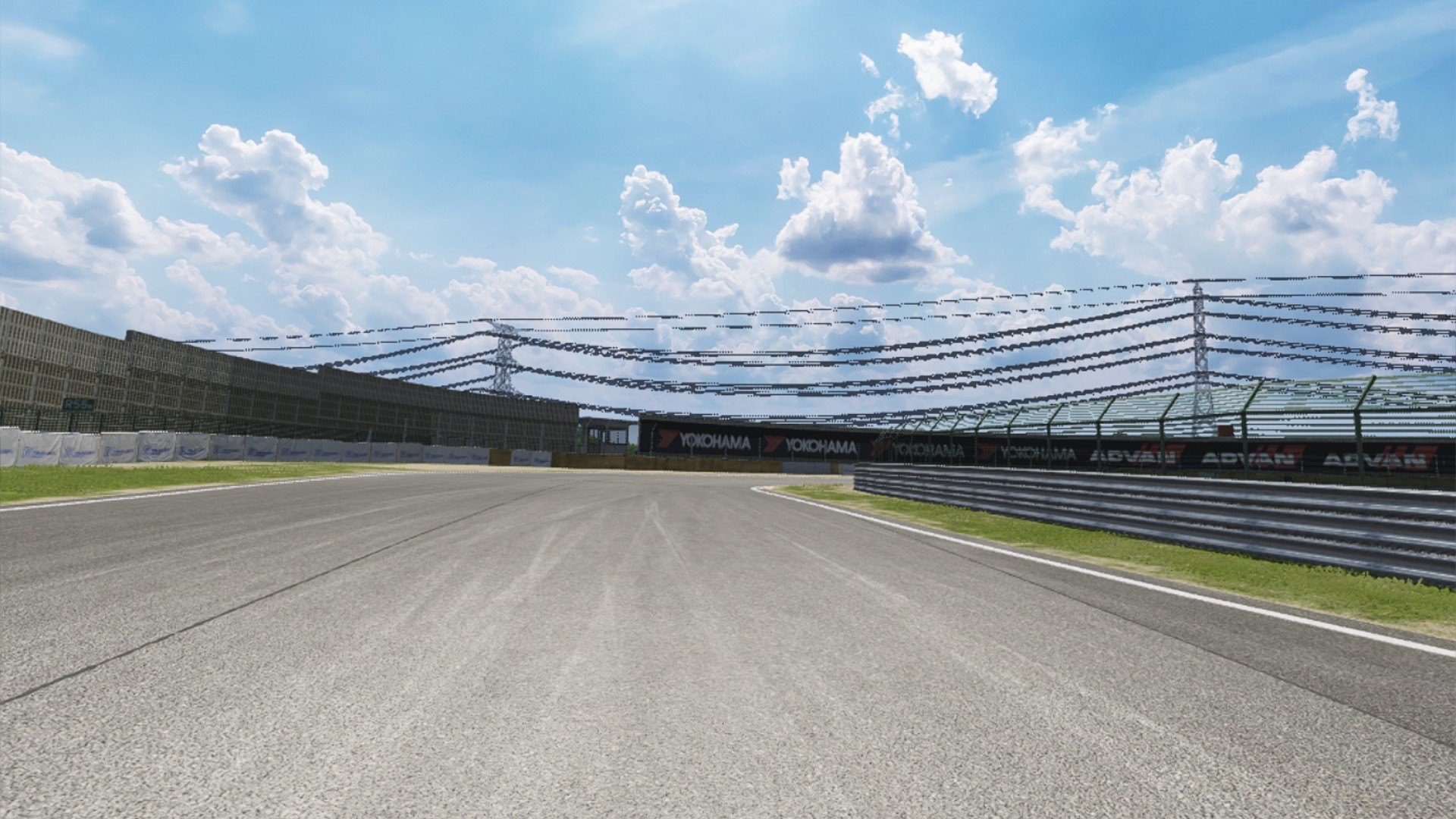
Tsukuba Circuit - 1994 JTCC v1.0

Screenshot_ks_abarth500_assetto_corse_ddm_gts_tsukuba_30-5-126-15-14-36.webp

Layout Add-on with billboards set up for the 1994 RACE DE NIPPON JTCC R13 and 14.
Add a new layout.

-CSP required

How to install:
Drag and drop into the folder name: ddm_gts_tsukuba

Credits & Thanks;
Tsukuba Circuit by ДЯДЯ ДИМА

Layout Add-ons by shin956
Crowds texture by Kniker97

Recommend: Cable Updated Extension by Mascot

Enjoy.
 
I have been both of the above in a life long long ago, but don't let that tarnish my reputation.

Anyway.... I've lowered the pitch of all the sounds and taken all the top end out of them, so give these a try.


Just unpack and copy the enclosed SFX folder into the Marbles LUA app folder. Back up the original folder first in case you don't like these! I haven't tried them yet, so forgive me if they sound wrong. I think they'll be OK though.

EDIT: The SFX all sound a little too quiet now. Give me a little bit of time and I'll fix that.

EDIT: I've increased the volume in this batch (now v3).

Huge improvement mate, great job. Number 8 seems to be missing though?
(and you've also included the __MACOSX folder)
 
shi
Tsukuba Circuit - 1994 JTCC v1.0
...

Recommend: Cable Updated Extension by Mascot

Enjoy.
I think we might have overcomplicated the fix for jagged cables back then.
Much the same improvement can now be achieved at Tsukuba (and on other tracks, with track-appropriate material/mesh referencing) with the simpler config...
Code:
[SHADER_REPLACEMENT_...]
DESCRIPTION = fix for thick powerlines, fence meshes etc
MATERIALS = Material #449
MESHES =
IS_TRANSPARENT=1
BLEND_MODE=ALPHA_BLEND
PROP_... = ksAlphaRef, 0.3
... without the need for adding the cable DDS.
 
Ooops. V4 with #8 included coming right up...
Nice!, great addition... The only thing, to lower the volume inside the cockpit, as configured by default is too high. Thanks!
... I think we might have overcomplicated the fix for jagged cables back then.
Much the same improvement can now be achieved... with the simpler config...
Another message to include in Favorites... Thanks too! 😄

To learn a bit more: besides the power lines, it looks like the thickness of fences wire can be also adjusted; is the 0.3 in "PROP_... = ksAlphaRef, 0.3" what controls the thickness of the wires/cables?
 
Last edited:
To learn a bit more: besides the power lines, it looks like the thickness of fences wire can be also adjusted; is the 0.3 in "PROP_... = ksAlphaRef, 0.3" what controls the thickness of the wires/cables?
It's perceived thickness, not physical, by applying some transparency to the fence mesh (or cables). They not only appear finer as a result, the semi-transparency also provides really effective antialising which smooths the overall look and can eliminate Moire pattern interference on fence meshes, especially when viewed acutely.
You can alter the ksAlphaRef up and down in 0.1 steps to get different strengths of transparency.
 
AtlasOS ... but that was already the case when it was running smooth...

windows update history does not show any update...
I suspect something running in background (from CSP or CM) , but can't put my finger on it.
If watching Chris YT about AtlasOS he is very clear about the lack of safety. Think right now the best way is to check if something is going on, by using sysinternal process explorer.
But you also check by using all the online virusscanners as been posted in my topic at: https://www.gtplanet.net/forum/threads/small-writing-on-ac-security.436304/ sure one of the online virus scan will catch something.


Last edited:
Ok so I've decided to turn to this forum in hopes someone can help me find this. This image comes Brownninja97's Spotter Preview presets on Overtake . I've been searching everywhere I can for this particular mod, I asked Brownninja97 and he said he found it from NoGripRacing which unfortunately shut down a few years ago. Does anyone have this mod or know where to find it?
I've been trying to complete my collection of cars ran by Eva Racing and acquire as many GT300s as possible and this one seems to be my white whale (although I've also been unable to find skins based on the Eva Racing Audi RS3 TCR or mods based on the Eva Racing Formula Drift/D1GP cars).
This here is the Toyota Corolla Axio GT300 that ran from 2010 to 2011 (under Eva Racing, the car itself dates back to 2009). If anyone knows where to find this particular mod, even if it's dated or not very good, I'd be eternally thankful for helping find something that's eluded me for years now. (If anyone knows where to find the Eva Racing TCR or drift cars that'd also be nice but my main thing is the GT300).
34508.webp
 
Ok so I've decided to turn to this forum in hopes someone can help me find this. This image comes Brownninja97's Spotter Preview presets on Overtake . I've been searching everywhere I can for this particular mod, I asked Brownninja97 and he said he found it from NoGripRacing which unfortunately shut down a few years ago. Does anyone have this mod or know where to find it?
I've been trying to complete my collection of cars ran by Eva Racing and acquire as many GT300s as possible and this one seems to be my white whale (although I've also been unable to find skins based on the Eva Racing Audi RS3 TCR or mods based on the Eva Racing Formula Drift/D1GP cars).
This here is the Toyota Corolla Axio GT300 that ran from 2010 to 2011 (under Eva Racing, the car itself dates back to 2009). If anyone knows where to find this particular mod, even if it's dated or not very good, I'd be eternally thankful for helping find something that's eluded me for years now. (If anyone knows where to find the Eva Racing TCR or drift cars that'd also be nice but my main thing is the GT300).
View attachment 1547862
Believe it's lost media, Unless you can find someone that still has their GTR2 mod list from like 2018? It was never ported to anything but GTR2 and if it was ported to AC it was never publicly posted anywhere.

(I know cause i actively helped working on it back when it was being made)
 
Last edited:

Update v2 - Link Updated in the same free Patreon Post

  • Material-based code implementation: .kn5 model is no longer required.
  • UI Configuration: Adjust brightness and pebble size (larger/smaller) directly from the interface.
  • Smoothness Toggle: Enable higher polygon counts via UI for smoother pebbles (reduces total pebble amount).
  • Enhanced Physics: Added new animations to allow pebble rebounding.

@Masscot @Perico Lospa I'm tagging you two since you provided the most feedback.For some reason, the actual color and brightness of the marble weren't rendering correctly. I tweaked the material to allow sunlight to cast on it.Let me know if it still doesn't blend well.
I downloaded the v2 version zip from Patreon, but still the marbles look pure black for me...
and in the zip the manifest file still says version 0.1.0 ...
1782841690069.webp

So is the zip file containing an old version still or am I doing something wrong?
 
I downloaded the v2 version zip from Patreon, but still the marbles look pure black for me...
and in the zip the manifest file still says version 0.1.0 ...
View attachment 1547903
So is the zip file containing an old version still or am I doing something wrong?
Sometimes, when trying to fix something, people forget about such little things.:)
 
Sometimes, when trying to fix something, people forget about such little things.:)
ok , but the main point is : it doesn't seem to be fixed...updated original post to show how I see them marbles...

ps: I scanned my PC and no viruses. (btw that vid on Atlas was 3 years old and about the Win10 version ...
I run a current Win11 AtlasOS ...
Today again I can run AC butter smooth... do not know still what was happening yesterday, maybe the heat (my room is now much cooler then yesterday).
 
... I downloaded the v2 version zip from Patreon, but still the marbles look pure black for me...
I assume you've tried tweaking the settings, right?, especially the one that controls the brightness...

However, keep in mind that under certain track lighting conditions, the marbles barely reflect any light and appear completely black.
 
Last edited:
Sharing a mod? Host it on GTPlanet Downloads. Free, public hosting for files up to 10GB in size.

Latest Posts

Back