Assetto Corsa PC Mods General DiscussionPC 

  • Thread starter Thread starter daan
  • 157,036 comments
  • 50,933,451 views
Do you have both?
Here's mine:

[LIGHT_SERIES_0]
ACTIVE = 1
DESCRIPTION = Floodlight Emitter
MATERIALS = bulb
RANGE = 120
RANGE_GRADIENT_OFFSET = 0.35
SPOT = 200
SPOT_SHARPNESS = 0.5
FADE_AT = 1000
FADE_SMOOTH = 30
COLOR = 1, 0.82, 0.698, 10
CONDITION = NIGHT_SMOOTH
DIRECTION = NORMAL

[MATERIAL_ADJUSTMENT_0]
ACTIVE = 1
DESCRIPTION = Floodlight Glow
MATERIALS = light_flood
KEY_0 = ksEmissive
VALUE_0 = 255,230,200,0.3
VALUE_0_OFF = 0, 0, 0
KEY_1 = ksAlphaRef
VALUE_1 = -193
VALUE_1_OFF = 0, 0, 0
CONDITION = NIGHT_SMOOTH
RANGE = 45
 
Here's mine:

[LIGHT_SERIES_0]
ACTIVE = 1
DESCRIPTION = Floodlight Emitter
MATERIALS = bulb
RANGE = 120
RANGE_GRADIENT_OFFSET = 0.35
SPOT = 200
SPOT_SHARPNESS = 0.5
FADE_AT = 1000
FADE_SMOOTH = 30
COLOR = 1, 0.82, 0.698, 10
CONDITION = NIGHT_SMOOTH
DIRECTION = NORMAL

[MATERIAL_ADJUSTMENT_0]
ACTIVE = 1
DESCRIPTION = Floodlight Glow
MATERIALS = light_flood
KEY_0 = ksEmissive
VALUE_0 = 255,230,200,0.3
VALUE_0_OFF = 0, 0, 0
KEY_1 = ksAlphaRef
VALUE_1 = -193
VALUE_1_OFF = 0, 0, 0
CONDITION = NIGHT_SMOOTH
RANGE = 45
Could be those wrong RGB values are automatically converted now:
255,230,200,0.3
Actually the base of those rgb values is 1.0 and not 255, and so you need to convert them to the 1.0 base and set the multiplier (the 4th value) to a higher value.
 
I have modified kerbs2026.kn5 for the pyyer zandvoort f1 extension to fix some overexposed kerbs: https://www.gtplanet.net/forum/downloads/zandvoort-1-11-kerb-fix-for-pyyer-extension-f1-2026.7788/
Captura de pantalla 2026-08-22 163345.webp
Captura de pantalla 2026-08-22 163724.webp
 
Could be those wrong RGB values are automatically converted now:
255,230,200,0.3
Actually the base of those rgb values is 1.0 and not 255, and so you need to convert them to the 1.0 base and set the multiplier (the 4th value) to a higher value.
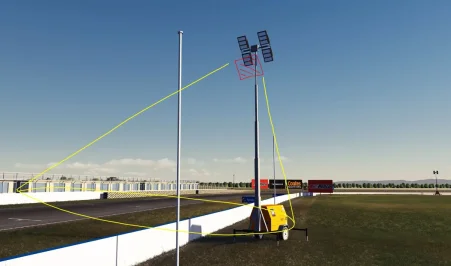
Hi Peter, I've just tried all sorts of variations of values taken from other tracks in the 'loaded' folder and I simply can't figure it out. I've tried converting to a base of 1.0, and the opposite, big values, small values, calling meshes rather than the material. It's such a strange issue! It was working under SOL, but not after upgrading everything and activating PURE LCS (as per your video tutorial on YT). It 'feels' like it could be related to my 3d mesh plane (it's flagged as renderable=false in the SDK).

I drew this diagram, the red box is how my 3D plane object 'emitter' is aligned, pointing outwards with a 60 degree tilt.
 

Attachments

  • temp1.webp
    temp1.webp
    71.8 KB · Views: 1
I'm surprised nobody's spotted this, but the Jaguar E-type Le Mans (not the Lightweight) from the GTC Legends pack has an AI shift point that's higher than the rev limiter, meaning the AI can't move. It wants to shift at 6700, but the limiter is 6500.

A very easy thing to fix, but it would be weird if I'm the first to notice.
 
@Pilot3331 Finally got round to driving the DPI cars you've released, and have to say, they are all fantastic. Is there a way to get the rev LED's on the MOTEC panels on the dash to work for that little bit of extra immersion?
I have been driving them at Monza by @racinjoe013, which is also a brilliant update to the original track.
Excellent work guys.
 
I'm surprised nobody's spotted this, but the Jaguar E-type Le Mans (not the Lightweight) from the GTC Legends pack has an AI shift point that's higher than the rev limiter, meaning the AI can't move. It wants to shift at 6700, but the limiter is 6500.

A very easy thing to fix, but it would be weird if I'm the first to notice.

Have you definitely got the last patch installed (manually)?

I know it's fixed internally (and has been reported before) but not sure if it was in the last release.

CSP/CM had an auto fix for this on any car though, I'm wondering if there's a bug with that in its latest version.
 
Hi Peter, I've just tried all sorts of variations of values taken from other tracks in the 'loaded' folder and I simply can't figure it out. I've tried converting to a base of 1.0, and the opposite, big values, small values, calling meshes rather than the material. It's such a strange issue! It was working under SOL, but not after upgrading everything and activating PURE LCS (as per your video tutorial on YT). It 'feels' like it could be related to my 3d mesh plane (it's flagged as renderable=false in the SDK).

I drew this diagram, the red box is how my 3D plane object 'emitter' is aligned, pointing outwards with a 60 degree tilt.
Maybe it works already, but the basic thing with Pure is you have a much higher daylight. So if you change to night it still doesn’t work?
 
@Pilot3331 Finally got round to driving the DPI cars you've released, and have to say, they are all fantastic. Is there a way to get the rev LED's on the MOTEC panels on the dash to work for that little bit of extra immersion?
I have been driving them at Monza by @racinjoe013, which is also a brilliant update to the original track.
Excellent work guys.
Hi. Thanks for feedback. This suggestion makes sense, who knows what next update will bring. 😉
 
Hi. I don't remember saying that these mods are mine :)
But i will happily help if i can. Usually people who use adblock software had problems downloading before. Can You please tell a bit more information what kind of problem.
Im talking about the mods on your web . Nothing appears when I'm try to download .
 
A curiosity, I was on holiday in Trentino, on Mount Bondone, my hotel was right along the Kunos Trento-Bondone track, so I spent days driving the same roads I always drove in the game. It's strange how much wider the road is in reality, how many buildings are missing, the details, how much different the vegetation is. I redid it on AC as soon as I got home and you can see how many years and technology have passed...
I think that rendition of Trento-Bondone was originally made for netKar Pro, or maybe Marangoni Hill Climb Simulator; anyway, it's almost as old as Gran Turismo 4 and, you're right, it's indeed wider in real life (did it a couple of times at speeds I'm not proud to have reached, the descent after the top is absurdly fast!)
 
Released : Chevrolet Corvette ZR-1.R (C4-R)

(Version1)

Author:F302

3D Model Car : GT7

Texture Update : F302 (rework)

Skins: F302

3d work: F302

hope u enjoy the Car

ps : send feedback ,bugs ,missing things

tested on CSP 0.3.0-preview440 (include VR)

PP filer PURELIFE EVO GT,SKY GT

have fun!


https://mega.nz/file/gGtEzBaR#_NbyQVfEB9GV59qChMLYjQzSZutzSOwJ7jQRHsMhRZQ

20260822-160549-industrial-f302_corvette_c4r.webp
20260822-220725-industrial-f302_corvette_c4r-accum.webp
20260822-160606-industrial-f302_corvette_c4r.webp
 
I think that rendition of Trento-Bondone was originally made for netKar Pro, or maybe Marangoni Hill Climb Simulator; anyway, it's almost as old as Gran Turismo 4 and, you're right, it's indeed wider in real life (did it a couple of times at speeds I'm not proud to have reached, the descent after the top is absurdly fast!)
Ciao Pez! Thanks for the clarification, I'm glad you noticed these differences too, it's a shame because it would have been a lot of fun if it was remade with new technologies. 😉
 
Here's mine:

[LIGHT_SERIES_0]
ACTIVE = 1
DESCRIPTION = Floodlight Emitter
MATERIALS = bulb
RANGE = 120
RANGE_GRADIENT_OFFSET = 0.35
SPOT = 200
SPOT_SHARPNESS = 0.5
FADE_AT = 1000
FADE_SMOOTH = 30
COLOR = 1, 0.82, 0.698, 10
CONDITION = NIGHT_SMOOTH
DIRECTION = NORMAL

[MATERIAL_ADJUSTMENT_0]
ACTIVE = 1
DESCRIPTION = Floodlight Glow
MATERIALS = light_flood
KEY_0 = ksEmissive
VALUE_0 = 255,230,200,0.3
VALUE_0_OFF = 0, 0, 0
KEY_1 = ksAlphaRef
VALUE_1 = -193
VALUE_1_OFF = 0, 0, 0
CONDITION = NIGHT_SMOOTH
RANGE = 45
Am I wrong or did you enter two different materials? Maybe one is the mesh?
 
Sharing a mod? Host it on GTPlanet Downloads. Free, public hosting for files up to 10GB in size.
Back