
- 52

- Austria
In manifest.ini change in this line from 0 to 1Do you know how can I disable it? at every session it starts automatically..
[CORE]
LAZY = 1
In manifest.ini change in this line from 0 to 1Do you know how can I disable it? at every session it starts automatically..


The HSS Maserati on Watkins Glen 1960's (Sergio Loro - high road mesh) which is a bit more harsh.Ok thats good to hear... specially since Asetek is using Simucube hardware, should be similar.
No i dont use the FFB Clip app.
would you mind posting (or DM) me your Simucube and AC settings?
i did a quick test with FFB Tweaks Disabled and the issue is gone on the kunos Maserati...
did you try the HSS Maserati i linked?


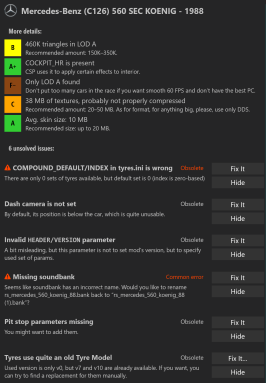
Anyone else getting all of these errors?First of all a Cozy and Happy New Year to all of you.
Release:
--------
View attachment 1315870
Google Drive: Sign-in
Access Google Drive with a Google account (for personal use) or Google Workspace account (for business use).drive.usercontent.google.com

Ok thats good to hear... specially since Asetek is using Simucube hardware, should be similar.
No i dont use the FFB Clip app.
would you mind posting (or DM) me your Simucube and AC settings?
i did a quick test with FFB Tweaks Disabled and the issue is gone on the kunos Maserati...
did you try the HSS Maserati i linked?
In addition of the FFB Clip, I use also this one : https://www.racedepartment.com/downloads/ffb-anti-clip.65648/The HSS Maserati on Watkins Glen 1960's (Sergio Loro - high road mesh) which is a bit more harsh.
Nothing out of the ordinary there either.
I'll DM you screenshots of my Simucube settings.
AC Settings ? which exactly ? I never use vanilla AC...
I'd recommend using this though:
https://www.racedepartment.com/downloads/ffbclip-app.7910/


let's hope because the car is aesthetically perfectAnyone able to fix this nonsense? The car looks good apart from phantom wheels and alt-reality physics.
I thought ffb-clip apps weren't meant for DDWs, or even needed? I remember reading it somewhere.In addition of the FFB Clip, I use also this one : https://www.racedepartment.com/downloads/ffb-anti-clip.65648/

Just a quick fix for the BMW CSL. I swapped in the rear geometry of the Kunos BMW M3 for the time being. It works fine now.Anyone able to fix this nonsense? The car looks good apart from phantom wheels and alt-reality physics.



does this work in the same way as FFB Clip?In addition of the FFB Clip, I use also this one : https://www.racedepartment.com/downloads/ffb-anti-clip.65648/
i thought the same, but apparently its still of good use, i remember that ffbclip features a dd mode, where you can set the target NM.I thought ffb-clip apps weren't meant for DDWs, or even needed? I remember reading it somewhere.
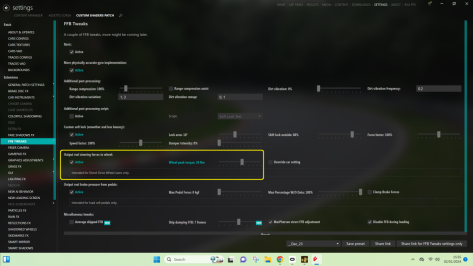
I just output the real forces to my DDW here:
View attachment 1316039
The whole kit and kaboodle. All of it. However, where you source the cars is a different story.
Do we have the full grid to recreate the Leman 2023? Partial grid? What is available?


Anyone able to fix this nonsense? The car looks good apart from phantom wheels and alt-reality physics.
CC: alexlockoutlet's hope because the car is aesthetically perfect
Good to know, has anyone listed the content anywhere? Any advice on how to gather the content? Do you have the whole “kit and kaboodle”?The whole kit and kaboodle. All of it. However, where you source the cars is a different story.
Fanatec Podium DD1does this work in the same way as FFB Clip?
i thought the same, but apparently its still of good use, i remember that ffbclip features a dd mode, where you can set the target NM.
what wheelbase are you using?
Thanks for this, feels much better now.CC: alexlockout
So, research led me to this, which means Yuki wasn't far off.
View attachment 1316045
But he had two trailing control arms (represented by AC wishbones), and nothing to act as a strut, like in the real car.
For his 2800 CS, Velo, as you'd expect, did his homework much better, and provided a much better idea of what the setup should look like. The cars are very similar in dimensions, so I kept the wishbone and hub mounting points the same, but used the (much) softer road car spring rates and damping.
I also moved the connecting point of the front strut and the front lower wishbone, because -9.5 degrees of castor is excessive, even for a road-going luxury-ish Bimmer. Now -5.9 which is still slow but feels OK.
Lastly, I took 25mm out of that nose-in-the-air stance. You'll need to: CM Showroom, Align using data, and Update Model, if you're concerned about the previews looking correct.
Feedback would be appreciated, and if it's good, I can try to reach Yuki to pass the suggestions back up the line.
Just remove the .txt, make a backup of the original data.acd, and drop it in.

Google is your friendGood to know, has anyone listed the content anywhere? Any advice on how to gather the content? Do you have the whole “kit and kaboodle”?


EXACTLY THIS! i was looking for.Here you go.

Hmm... I play with the steering wheel hidden, so didn't notice that. Having unhidden it, the two are perfectly synced...Fanatec Podium DD1
Thanks for this, feels much better now.
The steering wheel rotates around twice as fast as it should, and isn't in synch with our own steering wheels. Is this something you could also correct please?

Everything seems to be fine with the mod.Hi Joe, I dont know why but with your update the grass at my end becomes like this weird thin something , its not dense as it was before.. View attachment 1316002


STEER_LOCK=792 degrees, (this is the steering angle in one direction only) the total rotation angle will be 1584 degrees. so if your steering wheel has a total rotation angle of 900 degrees (the standard for most steering wheels), then on machines where STEER_LOCK=more than 450 degrees, there will always be a desynchronization between the real steering wheel and the steering wheel in the game. therefore, the setting you specified must be enabled. that's the right decision.The car has a 792=degree lock, and if I change that it scales the effect, but doesn't fix it. Can I suggest you try that setting?
Probably a good starting pointGood to know, has anyone listed the content anywhere? Any advice on how to gather the content? Do you have the whole “kit and kaboodle”?
 www.racedepartment.com
www.racedepartment.com
www.racedepartment.com

The old ffb clip was made by a friend of mine, and he uses it for DDWs too.I thought ffb-clip apps weren't meant for DDWs, or even needed? I remember reading it somewhere.
I just output the real forces to my DDW here:
View attachment 1316039

TheRacingRats on Discord have LMH/LMDh cars
Do we have the full grid to recreate the Leman 2023? Partial grid? What is available?


This channel is a good source of grids. I didn't test this one, though:
Do we have the full grid to recreate the Leman 2023? Partial grid? What is available?
my suggestions would be these, though I haven't done any testing concerning BOP:Good to know, has anyone listed the content anywhere? Any advice on how to gather the content? Do you have the whole “kit and kaboodle”?


great.... weird, but at least racinjoe idea to put highland.dds in extension folder made the grass reappear. But I dont know what the problem is, I re copied one older version of his Bilsterberg that is in Breathes list, that works ok, but as soon as I copy over his new update the grass goes crazy. Have to look into it, but thank anyway. Good to know that its something on my end.


I updated the package to fix the incorrect path but if you want to fix it yourself, just open up the ext_config file and search for highlands.dds.great.... weird, but at least racinjoe idea to put highland.dds in extension folder made the grass reappear. But I dont know what the problem is, I re copied one older version of his Bilsterberg that is in Breathes list, that works ok, but as soon as I copy over his new update the grass goes crazy. Have to look into it, but thank anyway. Good to know that its something on my end.

Pretty sure I've always had that ticked, but did change PCs a few weeks ago.Hmm... I play with the steering wheel hidden, so didn't notice that. Having unhidden it, the two are perfectly synced...
But I also have the "Auto adjust scale to match car's steer lock" turned on. If I turn that off, I see the behaviour you've described.
The car has a 792=degree lock, and if I change that it scales the effect, but doesn't fix it. Can I suggest you try that setting?
View attachment 1316055
Else someone smarter than me will need to step up.


Since you were able to fix the problem and it seems you know what you are doing, there is another BMW with the same issue.CC: alexlockout
So, research led me to this, which means Yuki wasn't far off.
View attachment 1316045
But he had two trailing control arms (represented by AC wishbones), and nothing to act as a strut, like in the real car.
For his 2800 CS, Velo, as you'd expect, did his homework much better, and provided a much better idea of what the setup should look like. The cars are very similar in dimensions, so I kept the wishbone and hub mounting points the same, but used the (much) softer road car spring rates and damping.
I also moved the connecting point of the front strut and the front lower wishbone, because -9.5 degrees of castor is excessive, even for a road-going luxury-ish Bimmer. Now -5.9 which is still slow but feels OK.
Lastly, I took 25mm out of that nose-in-the-air stance. You'll need to: CM Showroom, Align using data, and Update Model, if you're concerned about the previews looking correct.
Feedback would be appreciated, and if it's good, I can try to reach Yuki to pass the suggestions back up the line.
Just remove the .txt, make a backup of the original data.acd, and drop it in.


