Assetto Corsa PC Mods General DiscussionPC 

  • Thread starter Thread starter daan
  • 157,268 comments
  • 51,147,899 views
HINT: these features have an optional-addon-value (i.e. outward-sliders), which compliments the feature-value, EG. Opponent's Strength, Aggression & Wind - thus making a varied (or range) value of that particular feature, EG. Strength-range from <92 through to 98.5%.
@racealot, yeah, definitely know about that, but thanks. The problem is with the lop-sided outer values. It's so lopsided that the outer limit ends up on an entirely different setting's slider slot. I still haven't fixed it. Fanapryde said he received an update and it was fixed. But I'm not sure I received that update and I still have the issue. @Fanapryde, can you share a screenshot of where I would know if I have the update you received?

wait a goddamn minute! Teddie!!! I didn't know you were back!? welcome!
HEY HEY, my friend!!! Glad to be back, man. I posted a mushy-love-love message a while back when I returned from my hiatus to all you guys, (I think a few weeks ago) but I think it got moved and no one really saw it. Great to see you, bro!
 
Does anyone have interest in an update to the 1999 Dodge Viper GTS ACR? I went through it recently, updated some textures, some parts of the model and remapped it to add stripes. I can make sure it's working and upload if anyone wants.

1708200978672.png
 
I've done my testing back in April 2023, comparing my old system to my current. (Both stock)

Old System: Ryzen 2200g, 8GB 2666mhz, GTX 1060 6GB
Current System: Ryzen 5700X, 32GB 3200mhz, RTX 3070

With the old system, I was able to get a max of 30 cars (Both modded and kunos cars) on any track that supported big grids. I mainly tested 30 Porsche 911 GT3 Cups around Le Mans and it worked with no issues, maybe a bit of stuttering here and there, but nothing distracting from the overall experience. I've tried a bunch of Nvidia control panel stuff, Lowing graphics; which were already pretty low, but it made little to no difference. The only thing that I can recommend doing (If you want to) is to change your power option to 'High performance' in your windows control panel. This managed to squeeze a tiny bit more performance out of it, this usually works with low end stuff. I've tried it with the current PC, but there's no difference.

With the current system, I can run 80-85 cars easily at the full Nordschleife 108. The PC couldn't take much more when I put it at 90 cars lol, but I was (and still) super happy with the results. Now I can run full Daytona, Le Mans and even VLN/NLS grids with modded cars, HOWEVER...

View attachment 1328935

The Ai doesn't know how to take corners properly around this configuration and It ends up in a blood bath full of carnage at the following corners: Hohenrain, Flugplatz, Sometimes Adenauer Forest, etc. No matter how much you nerf the Ai in the menu, they'll find a way to screw up. If you want my honest opinion, upgrading your specs is the way to go about it.
I love racing with large grids, which tracks have the largest grids? I have a vintage LeMans with 54 slots, a vintage Spa with 128, a vintage Daytona with 84... that's about it. Would love more tracks with huge grids for endurace fests.
 
Last edited:
I love racing with large grids, which tracks have the largest grids? I have a vintage LeMans with 54 slots, a vintage Spa with 128, a vintage Daytona with 84... that's about it. Would love more tracks with huge grids for endurace fests.
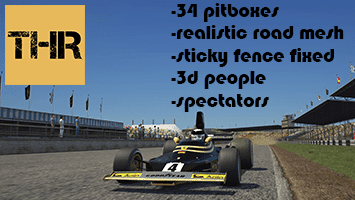
You can have 60 in Dubai autodrome (rt_dubai) , 60 in THR_Daytona, 62 on Kunos Barcelona but with OSRW addon, there is a long beach with 58, and plenty others with 43+
 
Last edited:
I love racing with large grids, which tracks have the largest grids? I have a vintage LeMans with 54 slots, a vintage Spa with 128, a vintage Daytona with 84... that's about it. Would love more tracks with huge grids for endurace fests.
Nordschleife Endurance + Endurance Cup layout with 108 pits

More pit boxes for Kunos tracks by OSRW
 
Last edited:
hi,

I love the CJR Ford Bronco Raptor (from here) but it has some parts that are see-through from cockpit view (as result you can see the track/ground through the model ,in an unrealistic way - really an immersion-breaker).

I adding this in ext_config.ini :

[SHADER_REPLACEMENT_...]
MESHES = blackpart, int, BRONCO, Mesh001
CULL_MODE = DOUBLESIDED

but that doesn't fix it... anyone can find a working solution?
 
WTCC 1987 (Tribute Race07)

Includes :

-Alfa Romeo 75 turbo Evoluzione (3D From Race07)
View attachment 1328991
-BMW M3 E30 (3D Base Kunos)
View attachment 1328992
-Volvo 240 Turbo (3D From Race07)
View attachment 1328993

Animation Wipers.

Extension for extra shaders, turn signal, light

Skins

Lods B - C

Downloads:


Yiehaaah, I can't wait to drive it. Thank you for your work and time in making this happen, it must have been hard.

Thank you
 
umb
New updates are available for AC | VRC Formula Alpha 2023.
View attachment 1328936

I already have this car, is this a free download or a new purchase ? how do you update without having to repurchase ?
 
Last edited:
Love the mod but could you swap pits so that the stalls start by the exit and not right on entry? Besides that this is absolutely fantastic.
Thank you.
Do you mean reversing the position of the pit box?
Do you have any real life videos or pictures that show this?
If I can find a real life video or photo that shows the pit box position, I will change it.
 
shi
Thank you.
Do you mean reversing the position of the pit box?
Do you have any real life videos or pictures that show this?
If I can find a real life video or photo that shows the pit box position, I will change it.

This is the best i can get of the pit lane. Looks like stalls might start after 6 to 8 stalls. It's hard to tell though. Didn't realize how much further into the pits the stalls are now compared to back then.
 
Sorry; to be able to compare, I think it would also be important to comment if you play with monitor/s or VR, and in what resolution... Thanks.
I forgot to mention I never own a VR, so no VR for both configs and both run one singular monitor. The old systems monitor was an old 2008 24in HP 1080p 60hz display and the current one has a 32in LG Ultra 1440p 165hz.
 
Hey, how do you turn down the brightness of the gauges when the lights are switched on? I wanted to do some night driving but they are crazy bright..

Capture01.JPG
 
Hi Peter,

The language is definitely not a problem for me and your "Tool Tip" is already quite good, it's more than I'm struggling to understand the logic and how to setup a timed plan in the fine details.

For instance, how do you change/choose the duration of every step? by default every step seems to last 5 minutes. I also don't understand how the tiime scale seems to affect the steps of the plan. I've noticed for example that the more I accelerate the time, to for example simulate almost a full day, the more each step in the plan lasts longer. Rather than cloning the same steps multiple times to make one particular weather conditions can I not have just one step and set it to last, I don't know, 15 minutes for example? It seems to me that at the moment you are forced to add a lot of steps with no easy way to control the total duration of your plan through the day and no easy way to say for example, in the morning it will be this weather, then at noon it will change to this, then at sunset it will be this, etc.

I've also noticed that if I mixed multiple steps in the plan with weather involving dry conditions and rain sometimes the rain doesn't trigger. I can see the weather changing (i.e. the clouds and lighting change) as expected when entering that particular step in the plan but the rain is not there.


I'm probably missing how the logic actually works and so doing it wrong but while Sol Planner was definitely less powerful I personally find that it was easier to work with.

Again no hard feelings at all Peter, I absolutely love your work and so love Pure. I just need some guidance to learn I guess ;)
Esp the timed mode works this way:

The slots are always managed in realtime (the time you live in)! a slot has always the duration which it shows. So if the duration is 5 min, it will always take 5 min, no matter what time multiplier is chosen. Thats the logic of this mode. Also the slots are not dependent of the simtime. So if you play the plan, it is independent of the sim time. This mode is typically used for short races, where you say you want to change the weather in fixed time intervals.

To change the duration just grab the duration time and move it:
1708249745377.png


If you want to link simtime and slot time, just use the Stamp mode. There the slots are bound to a precise simtime. And if you change the time multiplier, those are automatically shorter.

In the upcoming Pure i fixed a lot of bug with weather data generation and fading.
 
Sharing a mod? Host it on GTPlanet Downloads. Free, public hosting for files up to 10GB in size.
Back