

- 688

- @home
And it’s blurry.Who said 3D Trees? 🤨
View attachment 1329332
Spectacular what can be achieved with 2D "Cardboard Style" plants, and this assuming that the tones of the vegetation are not the most realistic... 😙

Last edited:
And it’s blurry.Who said 3D Trees? 🤨
View attachment 1329332
Spectacular what can be achieved with 2D "Cardboard Style" plants, and this assuming that the tones of the vegetation are not the most realistic... 😙


On purpose for the pic. That's the photographic "bokeh effect". (Please to read the last two words with posh intonation.)And it’s blurry.


Eh I wouldn't say that. You have your driver in the desired position and hit save ? Sorry pal, best I can do is move it a couple of cm until you repeat it two times.something that worked perfectly well for years


Good point, that always annoyed.Eh I wouldn't say that. You have your driver in the desired position and hit save ? Sorry pal, best I can do is move it a couple of cm until you repeat it two times.
One of the few funky CM things.


Here you go>has someone the link for "legion_nascar_circa_1990" i searched everywhere but didnt find it


Thanks Peter, will give it a try but I'm pretty sure that it will do the trick (i.e. I had missed the duration adjust).Esp the timed mode works this way:
The slots are always managed in realtime (the time you live in)! a slot has always the duration which it shows. So if the duration is 5 min, it will always take 5 min, no matter what time multiplier is chosen. Thats the logic of this mode. Also the slots are not dependent of the simtime. So if you play the plan, it is independent of the sim time. This mode is typically used for short races, where you say you want to change the weather in fixed time intervals.
To change the duration just grab the duration time and move it:View attachment 1329096
If you want to link simtime and slot time, just use the Stamp mode. There the slots are bound to a precise simtime. And if you change the time multiplier, those are automatically shorter.
In the upcoming Pure i fixed a lot of bug with weather data generation and fading.


It generaly does this when using extended physic and there is no tyre.lut in the filesI'm going to need to re-download this stuff - I tried giving it a run over the weekend, and the cars load, but just stay planted when I get in gear and hit the throttle. Might be that I didn't do a clean installation, so going to give that a try.

We have the same specs, with 2k resolution I'm near 120fps with al the other setting to the max.Just after a sense check
What FPS would you expect in AC for the following?
4070TI Super
i7 12700KF
32gb
1440 75hz Tripples
Just under full settings
Say on RT Bathurst or typical Kunos track with say 24 GT3 cars
I did have a 3070 in there but I’ve had little performance increase
RT Bathurst only getting 70-80 FPS


Easier way no?Oh boy.
Short answer : there is no easy way (at least, known to me).
Long answer :
create a copy of the car.
Extract car's kn5 into 3Ds or Blender or same, then follow this (for blender only):
- delete all the nulls (keep object transformation for attacheds so nothing moves), as they will most likely be broken in the process
- right click - snap - cursor to world origin
- select ALL meshes at once
- right click - set origin - origin to 3D cursor
- Resize your car
- redo ALL the nulls necessary (remember : always Z forward from the move axis)
- redo ALL the animation necessary (same as above)
- export whole car in FBX (size 0.01, Z forward)
Then, redo the car, car's shaders and animations with ks-Editor.
Change every data's info about size for the correct one (inertia, wheel base, suspension, etc)
You'll probably need to change driver's position in CM, also.
Test the result. There will be bugs. Correct the bugs, re-test until satisfaction.
Then do as above for the 3 other LODs and the collider. The good news is : barely no nulls to recreate this time
Conclusion : If Ilja manage to create an easy "re-size car" fonction in CM, I officially declare him as a god.


That’s what I expected, something is not rightWe have the same specs, with 2k resolution I'm near 120fps with al the other setting to the max.
In 4k resolution I'm about 70/75fps only, but the graphic card sound like an F18 hahahaja


If that works also for the animations and the nulls, it's golden! Nice!I'll just mention what I did (Porsche 936) and do regularly for 3dsimedI reduced the size by (%3) on all axes, because compared to photos from the time, I believe this Porsche was a little bigger than it should have been.
After reducing, I used the "plugin export" command, to save in ".kn5".
I opened the "Content Manager" and it was just as I had imagined before doing the process.
Just as an illustration, comparing with the Porsche 936/77 (original far left), then comes 936/77 (reduced by 3%) and some other cars from 1977.
In another print the Porsche 936/78 compared to other cars from 1978.
Anytime I tried like this it basically said me no. I probably missed something in the way, if it is supposed to work. Thanks for the info, tho!Easier way no?
Create an empty, move every objects and empty inside that empty.
Resize that empty
select all empties and object inside it, and drag them out while maintaining alt +shift so that it keeps transformation
then A to select everything and do CTRL A and reset scale so that everything says scale 1.0
like that you don't break the hierarchy like WHEEL_LF and co, and you just need to redo the animations
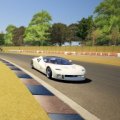


looks great.Dodge Viper GTS ACR 1999 update: https://mega.nz/file/Gs010JJB#w2Ou7Dq4X29vquWbQhb2dyv-YcQiIQ3aZK66yY1I_y4
Model smoothed and resized, new UV maps, textures and shader settings, new skins with stripes and a redone LOD (there's just one as the model is not performance heavy).
Car should work fine in either vanilla or CSP versions of AC although shaders were set for vanilla. If someone wants to do a proper ext_config then please feel free, personally I object to having to re-specify shader settings via a config to correct the awful overrides that CSP makes by default (and that can't be opted out of). If anyone wants to make any other changes then go right ahead.

My fav example of this is Riudecanyes:Who said 3D Trees? 🤨
View attachment 1329332
Spectacular what can be achieved with 2D "Cardboard Style" plants, and this assuming that the tones of the vegetation are not the most realistic... 😙
Look what ppf are you using, many of them are FPS killer.That’s what I expected, something is not right


3D trees should be banned (unless very well implemented as there are a couple of tracks where they look nice and have almost no impact on FPS)Look what ppf are you using, many of them are FPS killer.
In my opinión, NVRealism is the best one. 3D Threes also make the graphic card suffering a lot.


Definitely it should be the new quality standard in terms of rally stages modding.
yeah the 21th february afternoon@kakauiyt has been cooking. Coming soon.
View attachment 1329517View attachment 1329518View attachment 1329519View attachment 1329522


How is the interior on that compared to the one by RTM?Still no tips on who the original author may be? If I google the (very specific) foldername (morgan_aero_ss_ver3-1), the only result is my own question in this thread. I would like to search more active, but all I have to go on is: author = ?
Anyway, if no tips arise before friday, I will just post the update and take it down whenever the situation changes and ask me to do so.
View attachment 1329494
How is the interior on that compared to the one by RTM?
Yeah, for me the standard is this and the stages from jcrr, superstage and AFM.Definitely it should be the new quality standard in terms of rally stages modding.
Yes the folder is rtm_morgan_aero_ss. No clue about posting updates etc I just install and race. lolThat looks remarkebly similar to the base version I found! I'll download the RTM model and compare the mesh-names and materials used. Allthough the RTM mode usually have folder names starting with rtm_xxx
In my previous post I put up a lot of interior pics to compare the before/after update. How do I link that.. here:https://www.gtplanet.net/forum/threads/assetto-corsa-pc-mods-general-discussion.307899/post-14196102
If it indeed is the RTM mod.. are they still around? Can we post updates of their mods? Or does it mean trouble?


How is the interior on that compared to the one by RTM?
Yes!Are the cars floating in the hairpin?





