
UPDATE: Kazunori Yamauchi has addressed this issue via Twitter, confirming that it will be fixed in the next game update to be released on February 18th:
Be fixed in the next update. Sorry for the inconvenience over. RT @co2_uk: This Gran Turismo 5 Bug Can Kill Your Game
Thank you, Kazunori, for the communications and quickly addressing the issue. Until the game update is available, everyone should still check their game save file to insure they will not be affected by the bug before then.
UPDATE 2: This bug was fixed in Gran Turismo 5 update v1.06.
Over the past few weeks, many Gran Turismo 5 players around the web have reported a very serious bug in the game’s save file: once it reaches 4165KB in size, it can no longer be used. When the game attempts to load the file, the following (somewhat misleading) PS3 error message will be displayed:
“Insufficient free space on hard disk drive (HDD). At least 32MB required. Please exit the game and free up some space. 0x00000015 [217]”
As of writing, it is unknown if there is any way to get around this error message, reduce the file’s size, or recover your data. Until Polyphony Digital resolves this issue in a future update, follow these guidelines to minimize its impact upon your own game progress.
Check Your Game’s Save File’s Size
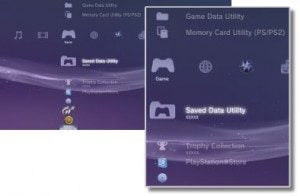 To see if your game save may be at risk, check its file size in your PlayStation 3’s XMB. Under the “Game” menu, select the “Saved Data Utility” and look for Gran Turismo 5 in the list of files that appear. You should see the file size listed immediately underneath the logo. If it’s anywhere near 4165KB, you will be affected by the bug very soon and should pay special attention to the following advice in this post.
While you’re in that menu, take this opportunity to back up your game save file. Just plug a USB “thumb drive”, external USB hard drive, or other memory card into your PlayStation 3, hit the “Triangle” button on the controller, select “Copy”, and choose the device you want it backed up to. This won’t prevent the bug from affecting you, but it may help you recover your data later.
Slow Down the Growth of Your Save File
As mentioned above, this bug cannot be avoided by anyone – your GT5 game save file will only get larger as you continue to play. Simply loading up the game will cause it to increase by at least a few KB or so, and other more significant actions, such as buying new cars or parts, will make it grow even faster. However, the most serious threat to your game’s save file is browsing through “museum cards”.
Viewing museum cards can increase your file size by as much as several hundred KB or more. They are automatically gifted to you on a daily basis by the game, but this is not what causes your save file to grow by such a large amount – you must actually browse through them to significantly increase the size of the file. Presumably, the actual content of the cards is being stored or cached within the save file when you read them, resulting in accelerated growth.
If your file is closing in on the 4165KB threshold, I strongly advise you to avoid loading the museum cards. Indeed, it would be wise for everyone to avoid the museum feature until we have confirmation this bug has been resolved.
It should also be noted this issue applies only to the game save file – not the “game data” installed to the hard disk. As such, though downloading a program from Gran Turismo TV or saving a race replay may increase your game save file by a tiny amount, their actual content is stored elsewhere and is not a concern.
Will This Be Fixed?
It is not known if Polyphony Digital is yet aware of this issue, or if it will be corrected in the next GT5 update coming February 18th. Many other PlayStation 3 titles have save files which far exceed 4167KB in size, so it is not clear why this particular game is affected – hopefully it will be an easy fix for Kazunori Yamauchi’s team. Even if players avoid the museum card feature, it will only be a short matter of time before this issue becomes an even larger problem for more people in the coming weeks and months.
To help raise awareness of this bug, I encourage you to pass a link to this page around and contact PlayStation Support. For reference, here’s a few links to discussions by players who have already been affected by this issue, both here in the GTPlanet Forums and abroad. Let’s hope this gets resolved soon.
- Error Message 0x00000015[217] (“Not enough disk space…”) – GTRP.de
- Fatal Bug! – GTPlanet Forums
- Insufficient free space error – GTPlanet Forums
- Not enough memory? – Official PlayStation Community Forums
- Insufficient disk space? What the… – GameFAQs Forums
See more articles on GT5 Bugs.





I just had this happen to me. Mar 8, 2011. After patch 1.08 for gt5 (to stop the ssr7 glitch) and ps3 system update 3.60 installed. wtf!!!!!!!!!!!! I cant even back up my game because 3.60 took that ability out because now they are forcing you to buy ps plus memberships. F!!!
@K L btw…..
I would like to point out that the Museum is disabled until the patch is fixed.
I don’t see how any one can reach that many KB. It could be that save file that was hacked before the fix, using another person’s save file would be my guess.
Thanks. Always nice when people who don’t know what they’re talking about chime in.
Probably their best band aid yet. Better to just omit it completely if it is a problem.
Yohdawg shows up for class but appears to have problems with reading and comprehension……
Fast repair
Update?
There’s a new news release regarding this issue that can be viewed on GT5 in the menu. It says that the museum feature is unavailable until the next update.
Actually I did read the original article and *gasped* I had also read every post as well before your accusation of not knowing anything. My issue(s) are that they have continued to let things slip that should not have been an issue in the first place.
my gt5 is being MEGA slow! its unbelievable how slow its being! i installed the latest update and about 2 3 weeks later, its suddenly barely working?! constantly freezing, taking a good 5 minutes to load up the game, keeps disconnecting me when i go to go online, could this be part of this aswell?
im ok
Days 5000
File Size 680kb
Level 35
and 29
total cars 180
so yea im ok till the update comes -_-
I know that these file sizes seem large for a lot of people but it makes me wonder more about PDs lack of beta testers and trouble shooters. How could something like this seriously slip by?
Does the team actually have employees playing their own game that they have failed to spot so many errors? If the dev team isn’t even playing their golden egg then that’s got to say something about how they feel about it.
Patch it along with the other mess that has yet to be fixed. Shame on you PD…
+1
How can such an important game be so unfinished and I d even say unproduced ?
In 10 years from now, we ll learn that GT5’s developpment was a total mess, just like it happens with some movies…
Sorry, but it’s hard to see how beta testing would necessarily uncover this. I do software development for a living, and this is a bug that obviously requires a weird, and difficult, and very long-term, set of circumstances to uncover. As noted above, I have over 800 different cars, I am level 29 A-spec and level 40 B-spec, and I am not even at 2000KB let alone over 4000KB.
How do you propose this would’ve been caught? It’s easy to say that testers should regularly document what they do each session, and note the filesize … but even if they do that, and find out that museum viewing bloats filesizes, unless they test museum viewing over a period of months, they will only know they have a problem with a slightly bloated save file, not that such a larger save file cannot be opened by the game. They would only bother to test larger filesize loading if they thought there might be a problem with it, and if they thought that, it would’ve been fixed before release, or in one of the early updates.
And they already said it will be patched this Friday: did you not read the first few lines of the story?
Shame on you for not knowing what you’re talking about, and for not reading the whole post.
@Sam
you COULD say unproduced… if you didn’t know that the definition of “produced” is made or manufactured, and adding the prefix “un” would mean it isn’t made or manufactured. that Gran Turismo 5 exists means, by default (and should go without saying), that it has been produced.
its cancer for playstation!!!
I 813 different cars (815 cars total), so I was worried … but my saved game is not even 2000KB, leta alone over 4000KB.
I’ve only used the museum a couple of times.
Thank you for the info Jordan.
Unsual , considering i have a afrika save game that is 387mb i hope this gets sorted.
anyone know features of the update to come (besides this fix and the b-spec feature thingy-majigger)?
I had this error message once, shortly after the first update.
Removed all of the GT5 data except my savegame, and reinstalled. Message was gone and the game worked fine again.
Mine is 866kb, but I have stopped playing the game for now, until it is patched. Plus I need a break off GT5, so playing GT PSP instead.
Thanks to all at PD for responding to this, and apparently many more requests with the next update.
Props for putting the haters in their place.
what do you mean: haters?
he meant 90% of people on the web. :) (don’t take it seriously, it’s actually 85%) lol
Mine is at 8333kb, mine is fine, although i back up regularly.
Mine is around 5000kb and mine is fine too. i back up like everyday.
mine is 909 KB, can you tell how you play GT5 to get this big amount of KB?
Mine is at 7526MB! And includes 5 updates for the chromeline cars, does that mean I’m ok? It’s always worked but I’ve never checked the file size until now.
Ignore that, I was looking in the wrong place. :(
is it alright if its 735KB
OMG several posts with the same thing, how will the mods cope
“Many other PlayStation 3 titles have save files which far exceed 4167KB in size, so it is not clear why this particular game is affected”
Because it has nowt to do with other PS3 titles…
Anyway, good that it’s being fixed and that the community has alerted people to it with a workaround.
i only have 700kb. what you guys do in order to get over 4000kb?
I want to ask same question..
1911
896
waffles
Pink elephants and garbage can lids, with sprinkles on top, with a side of road rash, medium rare.
yeah true.. “days” is the amount of how much your used car garage updates. means, every 2 race in A spec or B spec or even online, your used car lot updates 1/3 so yeah.. Days is not the real “days” in the calendar. anyways, I am really looking forward for the next update on friday which will include the gear ratio tuning!
Doesn’t sound too good. I’m not too sure how large my save file is, I’ll be checking in a bit.
99% done with almost 800 cars and my game save is only at 1336KB but I’ve never once opened the museum :) Nice to see PD on top of things, it only took 5 tries! haha.
Jerome
Thank you so much for this can’t wait to play gt5 again. Been a boring week playing forza 3. Thanks to all who brought this bug into the fold. Thank you Jordan sir for responding to my emails. Gtplanet you are the best.
Hi Jordan, Kaz has confirmed that this will be fixed, and custom gear ratios added in the Feb 18 update. There are a few threads confirming the tweets.
Good that PD atleast listens to customer feedback.
Yes and this go to everyone who always try to police people to not criticise them and give some feedback to what is wrong.
I remember reading about this bug back in early January. Glad it will be fixed in the next patch, but the custom gear ratio’s is a huge plus for me!! It’s about time!
I have about 56% done, with 100 cars (exactly).
I’ve only checked the museum once.
And I currently have about 576 kb.
I guess I’ve got a long way to go before my save dies.
And it’s also been backed up on a usb just last week
:)
I have around 5000kb which is 5mb. My save is still fine. Play it all day most days. Maybe its just a glitch with some people. Ive been at like 5000kbs since like December. I collect Museum Cards. All most have all of them
Yep. sure. whatever.
Sorry to say this but its not a bug.
I happen to me.
Used my PS3 for some family video with the new STORE app to see if it improved the quality.
Whith this I ended with 14mb free space on the HDD.
Loaded GT5 for a day play and got that message.
Then I thought weird, but possible.
The game can alloc 32mb for whatever reason.
Didn’t damage the save or whatever in the game.
Thanks. Always nice when people who don’t know what they’re talking about chime in.
I hate when I happen to me.
I know it will be my turn soon… 3657kb
well KAZ has acknowledged the save file issue on his twitter…
google translation
“February 18, fixed by the update. Card is due to get news online and museums. RT @ suzuki_eiji: @ Kaz_Yamauchi heard during boot error exceeds the value of saving a certain amount of data. What will improve in the next update”
By the way guys, my total “play time” is 1129 days. At 1st, i thought it’s weird but no it is not because I realized in GT4, every time you `SAVE`that counts as 1 day . so in a day, if you play 3 hours at the morning and 3 hours at the evening and the automatic save made 10 saves in each of that 3 hours, you will end up adding `20 days“ of your total play time in just 6 hours of gameplay. Basically if you have 1000+ or whatever playtime, that is normal. That symbolizes how many saves you had done.
no days are not counted by the number of saves. every time your used car dealership has a new set of six “just in” cars, a day has gone by in GT5. im past day 2500.
I have 677 KB in my saved utility and my game progress is 72% . My A spec is level 30 and B spec is level 11.
I play GT5 everyday since November 24th. I think i’m in the safe level about the bug. I dont really go to the museum card just twice along time ago.
I am at level 38 A-spec and level 39 B-spec, have 350 cars, 99% done the game, gold everything and my save game is at 877kb. You have nothing to worry about :P
Uh oh, this is scary. Will backup immediately to avoid X_X
Thanks GTplanet
I was checking my Museum cards regularly a while back but have since stopped. I’m in work so can’t check the size of my (USB back-upped) save so I’m hoping I’m ok. After playing GT5 solidly since it came out I’d be furious if I did lose all my save data and no amount of “stop bashing Kaz & PD” would assuage my anger. THIS NEEDS SORTING ASAP PD. If you’d be so kind.
happens
@ HKSRACER: why are you so negative? If you don’t care about the GT5 news just do not comment and keep it to yourself! Grow up.
Seriusly, I’m tired of people who always try to defend PD and Yama, If I want to comment I have all the rights to comment and I have all the rights to criticise them, we are talking about Gran Turismo one of the most important racing videogame series in the world, and now Yama/PD smoked up thier brains, they are destroing GT, they want to transform it in an damn rpg, A-spec career in GT5 is all about grinding, now this kinda no-sense kinda virus bug, this is insane. They are no more the good old Poliphony Digital. Sorry but you cannot pretend people to accept this, and be “inspired” as they say..
RPM is right. Polyphony was changing the style of Gran Turismo a bit since the style can’t always be old school. Why do you think PD made the bug on purpose? That’s just nonsense. Kazunori is probably talking about one of the other 99 game ideas he came up with back then. No need to be so belligerent.
I don’t usually go to the “Museum Cards” I just tried before, like 3 times a long time ago. it doesnt make sense and yeah this news is like a “Headlines” this is pretty scary but I’m good because my file size is only 670 ish Kb :) Still, I backed up my file in my lovely usb.
This is shocking and alerting but thanks to GTPlanet :)
BTW, I have like 7 Replays saved! omg, should I delete those? those are my best lap times in Nurburgring.. Hmmm.. This Bug should be fixed ASAP.
Replays do not count toward the game save file size.
I have over 100 replays and over 400 pictures in GT, so it does not effect save data in any way for sure! Keep saving replays :)))
Least I’m 500Mb so far so Im safe till the patch :)
Wow, this would be of help if I hadn’t gotten the YLOD. D:
theres a lot of glitches in gt5. it says i have 346 days of game play…..how is that possible when the game’s only been out since around christmas??…lol and they should really fix the dupliating thing, makes the game too easy
In game days…
LOL play GT5 too much, ruin your system
Just unbelievable. PD and Sony are just some new company experimenting on things like rookies. What a shame, and great from Jordan for having the balls to post something to make these clowns notice their epic and recent failures for once.
A friend of mine had that same error, somehow triggered by Black Ops. His PS3 won’t install 3.56 now and he cannot get online. Sony says $100 to fix it because it is out of warranty. Hopefully this isn’t happening to others who get this error. Apparently it screws something up in the system software.
Not the same thing. This just makes your save wortless.
@savage, yes, and no. Imagine if there was no downloadable content, like on GT4. if this bug existed under that scenario it would be terminal. I know computer software can be huge beasts and bugs are almost enivitable, but I can’t help feeling that the developers are getting sloppy because they can say ” we can fix it if we have to with a patch”.
Thanks Jordan, love the Bomb with a GT logo on it! If that doesn’t attract PD’s attention I don’t know what will! Fingers crossed.
Signed: Hun200kmh, a Museum Collector with a game save exceeding 2.4 MB. Luckily, others got there first and were kind enough to warn the community or else … Kaboummm in a few weeks myself!
what do you even do in the museum? i just clicked it once and instantly god bored.
I understand, but I’m an art lover ;-)
I seriously wish people would leave the seriously tired cynical comments at home. It’s tiring to read through comments only to come across someone talking about PD and Kaz failing at something else, really does it make you feel better about yourself to be this pessimistic and cynical? Any way I’m about to check my game save size as I back up mine at regular intervals, I think it was about 567kb last time I checked. Reaching 4K will take a while, considering you will have to open every museum car, buy all the cars, read all the car info, race on every course in all layouts. Sounds like you really need to view everything in order to really increase your file size in a hurry.
LOL cynical. Ok let’s remove the article becouse someone think is better not to talk and let people loose their savedata, yep this is the way. It’s really too cynical say they are unprofessional… LOL
No not everything, you can make file size too big and kill GT5 by ONLY checking out museum multiple times.
Boy are you going to have a long miserable life if you really think repeatedly complaining about it is ever going to change it….
@awn.. really? Kaz confirmed fix. You fail.
UHHHH, yah, I wasn’t talking about the fix, or you. Comprehension fail……
My name say it all……lol
Mine is only 568kb or something, so I’m not too concerned.
How on Earth was this not discovered sooner though?? I guess people really haven’t bothered with the museum cards.
I really hate this unprofessianal attitude from PD and Yama, they are just living in another dimension now, life death cycles, corrupted save data, wonder what’s coming up next.. Sorry PD this is simply unacceptable, you are going to loose your reputation forever.
Thank you Jordan for posting this as news! Hopefully it will bring more awareness and Sony/PD will get wind of it and fix this very severe bug in GT5.
damn, this scared the bejesus outta me. i thought that jordan meant that this is a server glitch, whew. Last time i duped a car i think i was at like 317kb er sumthin like dat. im safe, for now at least.
Is this bug something related to your life and death cycle? You and your crazy ideas! I cannot believe someone can risk to loose the game data just because you are experimenting BS in the game, you have to fix this unbelievable bug AS SOON AS POSSIBLE, no excuses.
PD reputation is falling dawn so fast in these days… I simply cannot believe what’s happening now. I hope February will give us some fresh air. no BS no life/death, no deep thinking, just fix these ***** bugs and take a break, because you really need it Kaz.
That is the most rational explanation for why this is happening I have heard.
How would the Data recovery in the GT5 options menu relate to this bug? would it help in recovery if you received the error?
I could be wrong, but I think the problem with that is you can’t start the game in order to use it.
Im at 2195 days and at 986kb
713 days, 1051 K.
I’m at 1101 Days, 710KB, so I don’t have to worry much.
Meh, I’ll just hire Bomberman.
Speaking of bombs……
Thanks for the heads up about this Jordan.
Just sent a link to a few of my GT5-Ing friends.
Yes indeed thanks to Jordan, imagine how it would be without gtplanet make the whole world know about these insane bugs… I hope those crazy japanese developers will fix that ASAP
mine is 923kb!!
Yeah, I’m at 1051 (Levels 30A/12B). I have nearly 200 cars, and was checking my museum about once a week. I wonder if Online adds greatly to it (I’ve raced Online about 5 times)?
Over 90%! wow, I am only on about 70%. Oh well, just means I have a lot more racing to go, fine with me :)
What are the odds this is a hangover from GT1 where the game wasn’t designed to read files over 4MB (as they were never gonna get that big on GT1-4) and nobody bothered to update it, or realise savefiles would reach these sizes in GT5?
700-odd days and mine’s around 800kb.
I had to re install the game because it kept crashing. Reminds me of a pc.
I have a feeling this will be spread across many blogs as the end of the world.
I would check our friends kotaku if I could stand the interface.
I can not stand the new interface of that group of blogs. And i’ve thought that Gizmodo’s content quality has been on a decline too. Although, i bet if i can get used to the new interface i’d like it more.
that was unrelated
Nice to see I’m not the only person who doesn’t like Kotaku’s new look.
This is a worry, and I hope PD find a fix for it. I won’t be looking at those museum cards again anytime soon.
I’ve also stopped going on Kotaku. Content has really decreased in quality and new interface just made decision easier.
Yeah Gawker sites were pretty much a daily stop for me until they changed the interface, I don’t go to them anymore.
Not only are they ugly and confusing but because of my adblocking measures they either only partially load or take forever to load.
Heck, I disliked the old interface Kotaku had…every page took 30-90 seconds to load. Made surfing the site insufferable.
Hehe, I only got broadband because GT5 was coming. Before that it was 56k dialup. Up untill 4 months ago I would have thought 30-90 seconds was a unusually fast day…..
GT5 burned my 60Gb fat model!!!!!!
My ex-wife burned my steak, and now she’s fat.
What’s that have to do with this article?
my 60 g fat ps3 broke after 3 ours game play…. :(
Sounds like the HD was on it’s way out to begin with, and GT just gave it the final push. Would’ve happened soon anyway.
Ive been using old motorstorm 80Gb with cardslots. I keep it on all day and all night for grinding on BSpec endurance. It sounds like a hairdryer but its all good still
I’ve only had the game since Christmas day, and I’m already at 2080kb, 400cars, 98% complete.
I was working hard on collecting the museum cards though, so I was speeding the process up quite a bit.
Patiently, patiently, patiently waiting for my wife to stop watching her British house flipping show so I can boot up the PS3 and check the file size. Grrrrrr.
2047 Days, 98% and I’m only at 507 KB.
Pretty much the same story here except i’ve been at it from release day, and my file is about 200kb larger. Better leave the museum alone for a bit…..
If it is fixed next friday then +1 for PD.
wow hopefully they fix this soon but I dont know how you can get to 4165kb mine is only at 759kb and I have over 250 cars and around 93% done with the game
I have never even touched the Museum at all and went straight to the races. I’m already at 449KB and in pretty good shape!
I have 909 KB, 93% of the game complete, 75% trophies, 300 cars, playing every day, buyed all parts for all cars, visiting museum and waching gran turismo TV, playing online every day … something tells me this glich is due to something else.. maybe duping cars or somethin..
PS. I wached ALL my museum cards.. have alot, alot of them!