thanks i tryHave you tried mine? https://www.racedepartment.com/downloads/solstice.25136/
It works on all properly made tracks. I'm also currently tweaking it for CSP 1.75 & Sol 2.1. The update will come soon.

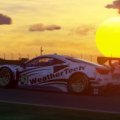

I assume you use a single monitor (not vr or triple). In that case, it seems to me that the best option is to use 2d SOL clouds, which have a good quality-FPS ratio. ILJA's default clouds are not bad at all and are less demanding on the PC, but you will miss out on all the good lighting features of SOL. To me, the truth, the 3d clouds of SOL do not finish convincing me. Although I must clarify that I have not yet installed SOL 2.1. In any case, 3d clouds do have a point in their favor and that is that they are reflected in the bodies of the cars, which makes them very good for taking pictures or videos (2d clouds are not reflected). Bottom line: for running, I use 2d SOL clouds. To watch replays, videos, and photos, I use SOL 3d clouds.
 . I liked the looks of Ilja's tweaked clouds so i will be using that. Again, thanks for your help!
That Zhuhai by SGAN Studios is just a complete copy of @VheEth 's 0.6 from what I can tell?
. @VheEth Can you publish a link of your Zhuhai please? 
 .
.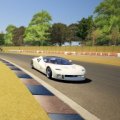

Here is what I am working with. It is the URD PX1 Aura

Thanks for your reply. I use Sol 2.0.2 too just to clarify. I just tested it and i seem to get a smoother gameplay (higher fps at the same time) when i use sol 3d clouds for some reason?????? You are right by saying sol clouds are not convincing because they do look like glorified 2d clouds
You just hit the +quote button for all the posts you want to reply to and them add them with one click on "insert quotes".I haven't tried that track yet but i have searched the internet and couldn't find VheEth version. So i gave up looking for it 3 months ago
Edit: Sorry to the admins for posting twice i don't know how to quote 2 posts in one single post



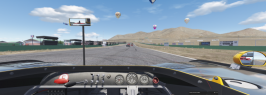
Does anyone have experience with the BLM Lights app. In the version of Yas Marina posted by Fanapryde a few pages back the lighting at night is really dim and only works well when I put the track lights at 200% using the BLM Lights app.
Is there a way to make that setting a default? Doing it every time resets the weather for some reason and makes the car lights really dim as well. Does the BLM app make a separate config? If anyone can shed some light on this it will be really helpful.
I had a similar, but different version of the track and the lighting was fine, but when I tried this recently posted version, I had the same dimness issue with the lights, didn't matter how long I waited, they were just so dim, but I noticed the difference was the light multiplier or something that was 0.3 instead of the original 0.9, so once I changed it back to that, lighting was fine.Can you post a screenshot of the dim lights? I believe that version might be using my config, which has the lights set to "slow heating", meaning it takes a minute or two to get them up to full brightness; this is meant for the day to night transition so if you´re starting out at night you just have to wait a moment to get them going.
Also, yes blm makes a separate config and i think it overrides the default one so saving that should set them to whatever you like.
I'm not sure of the exact issue, but looking at the car in the CM showroom, it looks like that's just the way the model is, there are a few different parts on each window so I guess you either need to accept the way they are or edit the model/hide them with a config.



where u got that c8r?View attachment 1013111
Ningbo International Circuit : https://mega.nz/file/UQgQyS5a#FJUfhHCMtXOKIkDhphxhCVeOR0EuSddPXVSHeQMX98U
Twin Motegi : https://www.unitedracingdesign.net/product-page/ac-tochigi-tacing-ring
Zhejiang : https://sharemods.com/g4sechx17y73/zhejiang_racing.7z.html

was it encrypted to hide that fact (as is the want of many modders latelyThat Zhuhai by SGAN Studios is just a complete copy of @VheEth 's 0.6 from what I can tell?
 )
)
You just hit the +quote button for all the posts you want to reply to and them add them with one click on "insert quotes".
That Zhuhai by SGAN Studios is just a complete copy of @VheEth 's 0.6 from what I can tell?

Guys just a quick question: can you point me in the right direction on how to create a light config for tracks for some night activities, please? Any tutorial or guide, please?. I want to add lights to a track but I don't know how to do...

At first glance it appeared identical to @VheEth 's 0.6 release. I have looked again and all they have done is change some UI information and added a Renault themed? skin.Thank you 👍
It says "mod edited by SGAN". You have probably noticed that but isn't editing a mod unallowed without giving credits?


At first glance it appeared identical to @VheEth 's 0.6 release. I have looked again and all they have done is change some UI information and added a Renault themed? skin.
"You have probably noticed that but isn't editing a mod unallowed without giving credits?"
I'm assuming you mean is it frowned upon without credits, then usually it is yeah. No credits for @VheEth at all, readme.txt removed which included all credits and updates and also outstanding issues. I personally don't care who edits anything I have done, but it would be nice if credits were kept. This was mainly VheEth's work, I helped with optimisation. A lot of people have notice that he has not provided updates for quite a while and links are not working. I'm not saying this is why, but maybe SGAN have contributed to that? Pathetic really to be honest, a skin release would have been more than enough it seems. Of-course it's all a grey area anyway so it's just pissing in the wind effectively
EDIT:
A link to the original 0.6 version of the track, obviously without the Renault skin from above:
https://anonfiles.com/J7v9F671p1/zhuhai_beta_06_rar

Can you post a screenshot of the dim lights? I believe that version might be using my config, which has the lights set to "slow heating", meaning it takes a minute or two to get them up to full brightness; this is meant for the day to night transition so if you´re starting out at night you just have to wait a moment to get them going.
Also, yes blm makes a separate config and i think it overrides the default one so saving that should set them to whatever you like.

Does anybody know why I'm getting this? Tried everything and i'm still getting this. I'm only getting this on the countach tried removing the lods and everything but still the same.
View attachment 1013127
Edit looks like body_shadow fixed the issue not sure how i deleted it.

In that case, I think it's working as you intended. I was actually trying to recreate the f1 race so I wanted the full night lights to switch on instantly rather than transitioning. Are there any changes I could do to override the slow heating function?
you could open the config and replace every light that has the condition "night_somthing_heating" (I forgot what it's called) with night smooth or something else, or just wait a minute while you setup your car lol
Lovely looking skin, could you also put the normal WEC logos on the number plate to have the non-Le Mans liveries of the Super Season as well? I hope that's not too difficult to do

Hi dears,
last weekend we had italian GT series at Pergusa.
the track is really amazing but version available for AC is very outdated.
Somebody have created a new updated version of this track?
thx in advance
check on board video of 488 last Sunday at Pergusa
I would appreciate the files to fix it
I'm not sure of the exact issue, but looking at the car in the CM showroom, it looks like that's just the way the model is, there are a few different parts on each window so I guess you either need to accept the way they are or edit the model/hide them with a config.


Laptops are most venerable on that front, with their tiny air-fan outlets clogged most of the time.