- 506

- Italy
They most certainly do. I used to be staff there, they've got people checking that stuff all the time. They have people digging into these mods too and comparing them to cars/tracks from other games to see if they share any assets (which means they're ripped from another game). It's pretty crazy the detective work that goes on with that stuff. And from what I was told, most of the requests they get to remove mods are from other video game developers and not from car manufacturers or track builders/owners. To the manufacturers it's free advertising, to the game devs it's theft of something they built.



RD hosting them and locking them behind their site and only members can access them and they then sell advertising space is sailing close to the wind... IMO....
I know you won't agree brandon...
 dude if making a free account that takes 10 seconds is locking.. good grief. "Only members", you're making it sound like this 'membership' requires you to cough up money, you don't.
 ) tutorial will help more people to start modding the cars they like the most and then share their works to the community of Assetto Corsa. The more we are, the more cars we are able to rework. This is my first tutorial, so I hope it's easy to understand.
 for the inspiration to create this tutorial
ASSETTO CORSA MODDING TUTORIAL:
— creating INTERNAL GLASS (to have raindrops and windshield reflections on the dashboard)
— creating DAMAGE GLASS (to have cracks on the external windows and glasses)
— creating WIPER ANIMATION (to have working wipers in game for rain)
I hope this quick (it's an understatement
A thank you to all the AC fans here on

So regarding shadders, SOL and BLM cars & lights. I just deleted and then reinstalled AC (I sort of wish I would have thought to back up my cars and tracks folders but on the other hand I feel kind of good like I cleaned out my closet or something) Anyway, I'm sure I can answer my own question with some research but can anyone tell me if I need BLM cars & lights? Or do I just use shadders and sol? Also, do I delete default weather and just use sol exclusively? The reason I'm asking is that one of the issues I was having before was when I clicked on real conditions in CM, sometimes it would show a SOL weather and other times a default weather.


One exception:Forget all about BLM cars and lights, all of it. That was then, this is now with SOL and shaders. All you need is SOL and the latest shader. All your track lighting and KN5's go in AC/extension/config/tracks. Your issue with with CM again sounds like a missconfig with an existing mod (BLM) or something else. Since you have CM, SOL and shaders are now drag and drop / install.
Just go straight AC/Sol/shader and your good.


Hello, I know this is completely offtopic, but is there away i can BUY all those nice mods from RSS and URD? Because it only works with Paypal, adn I don't have a PP account because you need a credit card to create one. As I'm not even 18 y/o, I can't simply create one (I don't even have a bank account). Would there be any way? Maybe someone sends me the files and I send him a Paysafe/ Steam card or so?
Yeah real detectives over there....
The bloody PCars rips have 'slightly mad' window banners etc.
You are making out like without RD they can't get these rips to people....
ANYONE making mods that are using car branding WITHOUT a license, are doing stuff that is dodgy.
Not saying I think it is a bad thing personally, but that is a fact.
RD hosting them and locking them behind their site and only members can access them and they then sell advertising space is sailing close to the wind... IMO....
I know you won't agree brandon...
 But then I've never gotten myself banned from a forum so I can't exactly sympathize.

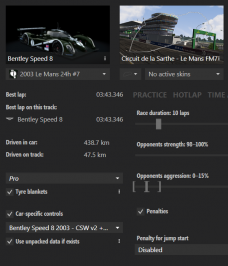
Does anyone have an idea how to fix the broken mirrors in the new VRC Bentley Speed 8 mod?
The mod maker is aware of the issue and will look into fixing it with a later update but I would like to learn the cause of the issue and how to fix it myself.
Changes to the mirror.ini have no influence on the issue.
The mirrors also are not recognized at all by the BLM car app (no mirror adjustments are possible at all).
I could not find any other reference to mirror adjustments. Is it a wrongly assigned texture in the kn5 file perhaps (this is unfortunately inaccessible :-( so I cannot check).
View attachment 820904
Open the file mirrors.ini and check the correct name of the mirror object with CM Showroom. In this example, left mirror.
Right mirror object name: Plane.067
Check now:
View attachment 820906
Et voilà!


Et voilà!

That will make me install the car again...
Here you will find a Le Mans 24h setup for the Bentley Speed 8 that is much more suited than the default setup of the car

...But I have no clue how to proceed...
Just go straight AC/Sol/shader and your good.
One exception:
BLM car is VERY useful to properly adjust mirrors the fastest and most efficient way if you use the extended mirrors with teh shader patch (smart mirrors).
In early builds a separate shader patch mirror app was floating around the discord but the BLM car app makes mirror adjustments much easier.
I highly recommend to keep using the BLM car app.


Start/finish is the same yes.For track geo tag purposes, is Eifel Betonschleife the same as Nurburgring? Anyone?
Thanks, that is what I did, but did not solve the issue, hence my question.[MIRROR_0]
NAME=Plane.011
[MIRROR_1]
NAME=Plane.067
this is what worked for me(just replaced MIRROR_L and MIRROR_R with the correct object names), hope this helps. Thanks delpinsky for the solution
Thanks, now I have to figure out where I should add this file
Thanks, that is what I did, but did not solve the issue, hence my question.
Tried again, but I still have two mirrors with low res, not adjustable in any direction...
If you do not, you can change what ever you want in the data folder, AC will always prioritize the "data.acd" file over an unpacked data folder when loading into a session.


Don't bother repacking the data folder, just delete the original data.acd after unpacking.Aha, that is a lot easier, indeed.
I had the mirrors.ini right, but I forgot to (re)pack data, which probably was the issue, because now the mirrors are good and adjustable.
Thanks 👍


For track geo tag purposes, is Eifel Betonschleife the same as Nurburgring? Anyone?
Edit: I couldn't get the geo tags through CM for some reason so I had to enter them manually.
If anyone is interested with the same problem I had, it's 50° 13′ 21″ N, 7° 3′ 51″ E
Does anyone have some DTM cars as a MEGA link?