Fanapryde
In Memoriam
- 5,682

- Belgium
Ah OK, I thought you wanted to make a missing graph.Thank you. I meant, what tool do modders use to make that graph, check the "power.lut" values etc? I found this:
https://acstuff.ru/u/torque-helper/ 🤔🤷♂️😁
Ah OK, I thought you wanted to make a missing graph.Thank you. I meant, what tool do modders use to make that graph, check the "power.lut" values etc? I found this:
https://acstuff.ru/u/torque-helper/ 🤔🤷♂️😁
I tried to use https://acstuff.ru/u/torque-helper/Ah OK, I thought you wanted to make a missing graph.
Yeah the torque helper can be tricky, make sure the values in "power.lut" are WHEEL TORQUE in Nm and then try setting the "Transmission Loss" value to -15% or something like that. Of course you can also just use Content Manager and create the graphs within CM and account for transmission loss that way and it'll even calculate BHP and crank torque while you adjust the transmission loss slider.I tried to use https://acstuff.ru/u/torque-helper/
the "power.lut" and "engine.ini" files are copied, but the torque-power curve values are different from those stated ... 😅🤷♂️
Hi @Arturi , I just see this, this car was released? thanx in advance
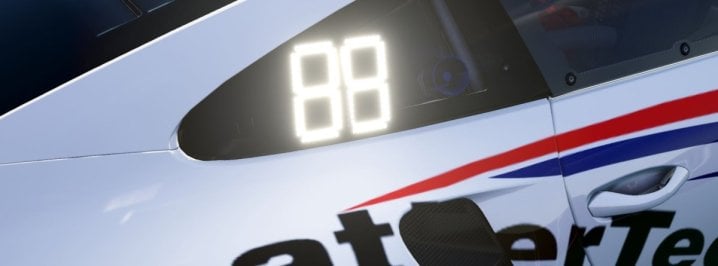
Did you unpack the data file and look around at those files? Check the lights.ini file. There may be something in there referencing the color and blinking of the side panel numbers. I must be using an older version of the cars because on the bayro_egt, my side number lights are red and I don't think they blink. And I should know because it's one of the cars I drive most often.Regarding the flashing/toggling of car's position panel with annoying white 88 ON URD GT3 and GTE cars.
So, every three seconds, the panel on the car that displays it's race position FLASHES bright white double-eights for a few seconds, then goes back to car position. Every three seconds. And the white flash is ridiculously bright, lighting up the pitlane (even in bright sunlight). Seems to do this on some of the recent URD cars (M8, C8 and RSR).
Anyone know how to stop that flashing? I poked for an hour, commenting things out in ext-config.ini, looked for a lua script... nothing.
Oops. It's only with the URD C8R and RSR. I'll look at copying the Bayro panel code to the the RSR... I did look through the data dir, nothing. Found a digital_panel.ini in cars/data but not for the RSR. Hmm, copy that one from the Bayro...Did you unpack the data file and look around at those files? Check the lights.ini file. There may be something in there referencing the color and blinking of the side panel numbers. I must be using an older version of the cars because on the bayro_egt, my side number lights are red and I don't think they blink. And I should know because it's one of the cars I drive most often.
If you find anything, I don't know if you can add something to the cars ext_config file to alter what's in the packed data file. Or you can just edit and repack the data file I guess. I'm always afraid to alter things in the data file and repack for some reason.
What did you Google?Can anyone share good setting for oculus quest 2, tested it yeterday but i was really dissapointed, ac looks like first gran turismo lol , it hurts my eyes since been playing 4k for years. Googled it but didn't find any good settings for it anyway :-(
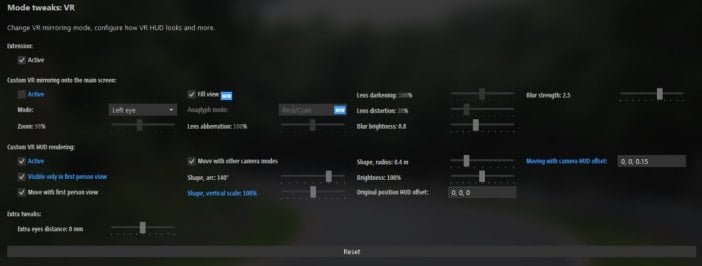
This is shot through the right side eyepiece and it is the F50 v1.1 linked in the video description. Just checked again, CSP wipers are configured in extension\config\cars\loaded\ferrari_f50gt_96.ini and I also made sure it doesn't use the ksanim by renaming the file.Is that the view through the right-side eyepiece, and is that the updated F50 with the CSP wiper? The previous version's wiper looks fine for me in both eyes, it's CSP wipers that are the issue.
It'd be interesting if other VR users could comment about what they're seeing with the latest F50, and what headset they're using. Might depend on HMD, SteamVR vs Oculus, resolution, or a gazillion other things of course.
Did you mean Legion's F50? Can't find one from Velo. Legion's F50 doesn't have a CSP wiper config but the baked animation looks ok for me on version 20200605.I have a problem with Velos 50s Ferrari wiper. It shoots up in the air then back down near the end of the wiper. I have the Oculus S. I guess it’s a CSP problem. You can see it in the replay as well. If I use a flat screen all is fine.
@Frank25 could you send me the configs for the cars you listed? I tested the ks_mazda_mx5_cup which has a wiper config in cars/loaded and this looks fine for me as well. I don't have any wiper configs for the other cars you mentioned.With my Oculus Rift CV1 the right eye is broken for me as shown in your picture, too. This happens with all cars with CSP wipers updates (e.g. ks_mazda_miata, lotus_elise_sc, bmw_1m, bmw_z4, ks_nissan_370z, ks_mazda_mx5_nd, ks_mazda_mx5_cup).
Is there an option to completely deactivate the CSP wipers option? At the moment I do this in the extension.ini of each car with CSP wipers.
Lightning and thunder has not been implemented in latest pure 0.58 yet.So with Pure, I noticed the clouds are no longer dark grey and there's no more lightning / thunder effects. When I enable SOL instead, they reappear. Is there a way to change this?
Do you use SteamVR or Oculus?This is shot through the right side eyepiece and it is the F50 v1.1 linked in the video description. Just checked again, CSP wipers are configured in extension\config\cars\loaded\ferrari_f50gt_96.ini and I also made sure it doesn't use the ksanim by renaming the file.
Did you mean Legion's F50? Can't find one from Velo. Legion's F50 doesn't have a CSP wiper config but the baked animation looks ok for me on version 20200605.
@Frank25 could you send me the configs for the cars you listed? I tested the ks_mazda_mx5_cup which has a wiper config in cars/loaded and this looks fine for me as well. I don't have any wiper configs for the other cars you mentioned.
Oculus setting for quest 2 , found few tip but nothing really usefulWhat did you Google?
So, here's the link to version 1.1 with a customized SOL version of the filter. Wasn't that easy to make it work properly because of missing AE and a weird glare problem @ moonrise and moonset. Thanks again & have fun with it!I can confirm it plays nice with Sol after a brightness adjustment for anyone that doesn't have Pure yet. Don't let the name fool you. Just download it and give it a try.
Just changing shader types and properties so it looks better from the outside. I use the bonnet camera so I don't care about mirrors/instrumentation/steering animations/wipers etc.did your rework involve any of the interior at all?
check here first and make sure you have this selectedOops. It's only with the URD C8R and RSR. I'll look at copying the Bayro panel code to the the RSR... I did look through the data dir, nothing. Found a digital_panel.ini in cars/data but not for the RSR. Hmm, copy that one from the Bayro...
i had the same problem with caRadar app, and still don't know how to fix itI have no idea where my Helicorsa app is gone. It's disappeared altogether from the sidebar ingame also.
Still ticked enabled in the AC apps window from CM menu...
So, here's the link to version 1.1 with a customized SOL version of the filter. Wasn't that easy to make it work properly because of missing AE and a weird glare problem @ moonrise and moonset. Thanks again & have fun with it!
View attachment 1107974
PureLIFE PPFilter-Pack for PURE and SOL 1.1
Features:
• optimized for PURE 0.58 & SOL 2.2
• clean and realistic look
• works very well with any daytime and any weather condition
• lightweight with low performance impact
• works standalone - no PURE config adjustments needed
History:
Version 0.8 (01/18/2022):
• initial release
Version 1.0 (01/20/2022)
• optimized Overcast and Nighttime
• several small fixes
• NEW: added "PureLIFE_AE" Filter with auto exposure. Make it a bit more "fancy" without losing the realistic look. (TEST IT!)
Version 1.1 (01/24/2022)
• optimized saturation and gamma
• some other small tweaks
• NEW: added "PureLIFE_for_SOL" Filter that brings the advantages of PureLIFE to SOL. The initial filter wasn't performing that bad with SOL (thanks to "racinjoe013" for the notice) but to make it work with all weather and daytime conditions without auto exposure I had to rework the glare, gamma and some HDR settings because of a strange behavior on moonrise and moonset. This filter is still beta, please report if you find some issues.
• after including the SOL-filter it was necessary to rename the filters to separate them from the "Pure"-category. In the PPFilter app you'll find them now on the top as "_PureLIFE"
• NOTICE: no further improvements of PureLIFE_AE because auto exposure isn't supported in the release version of Pure.
IMPORTANT: because of the name change in version 1.1 you need to remove the old ppfilters manually. Go to Steam folder -> steamapps -> common -> assettocorsa -> system -> cfg -> ppfilters and delete "pureLIFE.ini" and "pureLIFE_AE.ini".
PureLIFE PPFilter-Pack for Assetto Corsa
Hey mates. This is my first PPFILTER-Pack and it was originally created for Peter Boese's weather simulation Pure. If you want to get access to the Pure Development Preview (and you should), you can get it here on Patreon and support Peter for...www.racedepartment.com
I'm using the Oculus Rift rendering. My settings are attached to my previous post.Do you use SteamVR or Oculus?
Yeah the torque helper can be tricky, make sure the values in "power.lut" are WHEEL TORQUE in Nm and then try setting the "Transmission Loss" value to -15% or something like that. Of course you can also just use Content Manager and create the graphs within CM and account for transmission loss that way and it'll even calculate BHP and crank torque while you adjust the transmission loss slider.
Also on a different note, has anyone seen this? I just tried it with some fiddling on PCH with 2-way traffic and while it seems to use AI Flood which I've never been a huge fan of it sure seams like it works!
Yes, TAA is enabled. Sample Spread 10%.I really like the look of Life_AE, tried it yesterday (older version) with Pure and it looks stunnnig! Especially when combining it with ReShade. In the video you linked here, have you used additional TAA (ExtraFX)? Since I can´t see any ghosting around the car.
Just as a FYI, I have the same issue as @Masscot so it is very unlikely to be specific to his VR settings. except if someone with a different VR hardware can say that they do not have the issue for a specific car.@Masscot can you provide me your VR settings with a CM link in private message that I provide to ilja ?
I'm waiting for the return of ilja, I'll let you know if it has been fixed for the next versionJust as a FYI, I have the same issue as @Masscot so it is very unlikely to be specific to his VR settings. except if someone with a different VR hardware can say that they do not have the issue for a specific car.
I am using a CV1.
Thank you for trying to help.