- 2,595

- Germany
Maybe humidity fog caused by humidity + temperature?Hey guys, what's causing this white shadow, and how can I fix it? It only appears in certain conditions, like rain.
View attachment 1468067
Maybe humidity fog caused by humidity + temperature?Hey guys, what's causing this white shadow, and how can I fix it? It only appears in certain conditions, like rain.
View attachment 1468067


If you talk about the white reflection on the pines, is due to the ksSpecular which should be set closer to 0. Personally i set alway to 0 because by living sorrounded by trees, i never ever saw trees reflecting lights like a mirror...Hey guys, what's causing this white shadow, and how can I fix it? It only appears in certain conditions, like rain.
View attachment 1468067


I'm not an expert but it's either because those materials are not using the ksTree shader and are called out in the ext_config.ini RainFX settings. The trees should either be 'Rough Material'. It looks like those are 'Smooth' or 'Puddle' material. That material may be shared with another material called out in RainFX. It's either that or the ksSpecular setting. Does it also do it during sunrise/sunset?Hey guys, what's causing this white shadow, and how can I fix it? It only appears in certain conditions, like rain.
View attachment 1468067
Here's a preview of Horsma Raceway.
View attachment 1468070
View attachment 1468071
View attachment 1468072
View attachment 1468073


Maybe humidity fog caused by humidity + temperature?
I always keep it at zero too, in fact I don't understand... 🤷♂️ksSpecular
You may not be an expert, but I think you're spot onI'm not an expert but it's either because those materials are not using the ksTree shader and are called out in the ext_config.ini RainFX settings. The trees should either be 'Rough Material'. It looks like those are 'Smooth' or 'Puddle' material. That material may be shared with another material called out in RainFX. It's either that or the ksSpecular setting. Does it also do it during sunrise/sunset?

Have you tried the FIA Flag App by Nuzzy ? the description on his Patreon mentions an AI behavior for outlapping:But besides the lack of blue flag/outlap AI (which is a major thing) it also has crazy stupid AI decisisions sometimes.
Glad to helpI always keep it at zero too, in fact I don't understand... 🤷♂️
You may not be an expert, but I think you're spot on
It only does it in rainy weather, so it might be what you say.
Another thing I don't understand: most trees don't cast shadows. I imagine it's always due to the original texture, so there's nothing you can do about it, right?
Thanks


Thank you so much, much better now, I'm really happy with how it's coming out 🤩👍Glad to help
Yes, you can add this to the ext_config.ini
[SHADER_REPLACEMENT_...]
ACTIVE=1
DESCRIPTION= Shadow Casting
MATERIALS= "material here"
CAST_SHADOWS = 1


If you deactivate the "groundfog" shader in Pure Config Shaders tab is it gone. Could be it has some problems with the depthmap there.Hey guys, what's causing this white shadow, and how can I fix it? It only appears in certain conditions, like rain.
View attachment 1468067
Here's a preview of Horsma Raceway.
View attachment 1468070
View attachment 1468071
View attachment 1468072
View attachment 1468073
Thanks! Glad that it worked finally for you.@Fall Guy managed to get a good preview, car is in the other direction but the lighting is PERFECT, just like yours!!
View attachment 1468185
I solved it by inserting this line suggested to me by @CrisT86 :If you deactivate the "groundfog" shader in Pure Config Shaders tab is it gone. Could be it has some problems with the depthmap there.


Please help me. I asked the same question a few years ago, but nothing I did solved it, so I'm asking again. This problem only occurs on the left wheel of a gtsupreme's JGTC GT300 car. See, it's still "alive". The other side is fine. I am hoping for some working solution.
Please help me. I asked the same question a few years ago, but nothing I did solved it, so I'm asking again. This problem only occurs on the left wheel of a gtsupreme's JGTC GT300 car. See, it's still "alive". The other side is fine. I am hoping for some working solution.


If you are making your own objects, in blender they have to be on the green line, the Y axis. this way they auto touch the ground.Does anyone knows (@leBluem @RMi_wood) why things placed with TrackDecoration latest version flyes over the asphalt and if there's something that i can do to make them touch the ground properly? Thanks
View attachment 1468037View attachment 1468038
i was talking about the objects that are includeed, in that case RMi ambulance, which were floating no matter what i tried to place them on the ground with all the four wheels. I had to manually adjust it, even they are not perfectIf you are making your own objects, in blender they have to be on the green line, the Y axis. this way they auto touch the ground.
Saves faffing.
If its not your own object and to you blender is for smoothie's, do it RMi's way.
View attachment 1468283
Yeah you'd have to go into blender and do what i wrote above. I discovered this and that was my fix. I guess if your putting a lot down a bit of work in blender would save in the long run.i was talking about the objects that are includeed, in that case RMi ambulance, which were floating no matter what i tried to place them on the ground with all the four wheels. I had to manually adjust it, even they are not perfect
Do you mean PostProcessing in general?Hi there,
I have PURE 2.61 installed (HighRes) and it already provides me with some outstanding graphics and FPS (capped @120 No V-Sync) on 2160p (4K) resolution. Now question: Is using a PP filter a "must" for complementing PURE? Tried on (Natural) and FPS dives to ~84-85. Quite an difference in FPS, but visually not that much. Are you folks using PP filters in conjunction with PURE? What are the benefits?
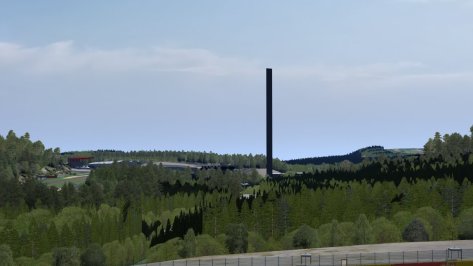
Hi. Does somebody know what this black thing is at Fenryr's 0.9 version of Spa? I guess it is not supposed to be there, at least not in this shape anyway. Could see it only from a bit further away, not when i was getting closer to it.

I'm absolutely not an expert on car modding, but probably there's something "placed-mapped" wrong on that specific side of the car. It happens the same also in the CM Showroom where you can let wheel spin?
As you can see, within CM Showroom it's fine. There is no "blurred_objects.ini" or "ext_config.ini" which is confusing me.