My little ai whisperer is going well. I asked DamGam for permission to use some parts of his code - he agreed, as long as i credit him, which i will do now : thanks a lot mate❤️
MediaFire is a simple to use free service that lets you put all your photos, documents, music, and video in a single place so you can access them anywhere and share them everywhere.
www.mediafire.com
View attachment 1487330
New features :
-Fixed the automatic aggression level up (that was fun).
-Fixed the safety brake exiting [DANGER] zones.
-All values applied can be seen in the debug real time. if an AI car makes the best lap of its life you can see all values applied in the debug, neat if you have the aggression level not set up precisely in the Drive menu and want to get that value.
-Load ai_hints.ini with zones, zones highlighted per focused car
-Experimental section can be collapsed.
-Dangerzone sliders, related to the [DANGER] zones from your ai_hints.ini file
-AggressionLevel slider for [DANGER] zones
Comment : the app will not turn a ****** fastlane into a gold one. It could, however, turn a good one into a great one.
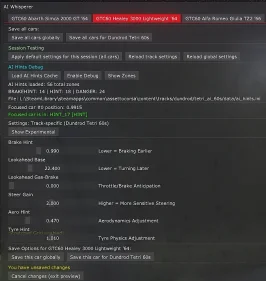
to start editing a car type, click on it on the top tab
View attachment 1487337
AI Hints Debug section:
Automatically loads the track's ai_hints.ini file to get all
HINT zones.
-"Load Ai Hints Cache" if you modified the ai_hints.ini file, to update the new values ingame without reloading (won't apply the ai_hints.ini to the race, which needs a full restart, but you could load new [DANGER] zones without restarting. Use the AIHintsreader app to do that ingame in a few secs. See below.
-"Debug Hints" shows you what's applied to which car in real time. Perf costs are minimal but still there, it's a check feature. Results appear in the LUA Debug App.
-"Show zones" to see all HINTS highlighted when the focused car go thru them.
The "show zone" is just a checking view to see which [HINTS] are applied during the race. For me it's important as i'm into zone creation, but basically for you, it's just to see where [BRAKEHINT] are, for the "
Prevent Braking mistake" slider (see below in Main Values) and where "DANGER Hint" are, for the "Dangerzone' sliders" (see below in Experimental values).
Main Values:
View attachment 1487381
The regular sliders all work the same way : they get the value from the car ai.ini file, intercepts them, and inject new settings set in app's sliders. The values are applied in real time, stored in a temp file, and are discarded if you hit "restart" during a race. You can save them to the track data folder (settings.ini file) or as a global setting in the app folder(different settings.ini file there as well).
The app would load the values from the track first, if not found, from the global file, if not found, start with default values.
You should definitly set those main values to optimal results FIRST before tweaking the experimental ones.
Brake Hints : the brake hint value in the car ai.ini. Increase or decrease 0.005 by 0.005, test, until full lap
Increase to delay brakings, decrease to brake earlier.
Changes drastically the braking points of a given car. Works in combination with [BRAKEHINT] values, as the braking applied to a car
seems to be influenced by a mix of those values. Not sure yet, because i thought BRAKEHINT was applying a percentage of brake pedal, but it seems more complicated than that.
Tweak tip : +/-0.005, test. If a car stops in front of a corner, increase. If a car overshoots the corner, decrease.
Lookahead : the Look-Ahead value in the car 's ai.ini file.
To simplify, how the fastlane (and the data recorded in it) is read by the ai car. Decrease to turn/brake later, increase to turn/brake earlier. Huge improvment depending on the fastlane if a car is starting to steer way too late or too soon in a given corner.
Tweak tip : +/-0.5, test. If a car cuts a corner too sharp, decrease, if it's ending on the outside line, increase.
Lookahead gas_brake seems a little useless. See if it impacts anything for yourself, for me it just makes the cars way too safe. Soon to be deleted. Maybe i could figure a mix with AI Caution that would give interresting results, need testings.
Steer Gain : the sensitivity of the steering wheel when the AI is in control. If you see it making huge fast rotations to compensate on a corner, reduce it. If it doesn't turn the wheel fast enough, increase. Highly dependant of the way the fastlane was recorded : if a GT3 was used and you're on a 1934 formula one, the inputs from the GT3 might be a little hard to transfer to the 1934 's car. This setting can help.
Tweak tip : 0.1 by 0.1. If Ai car makes huge wheel corrections in a medium corner, decrease. If it just floats from a side to the other like a boat, increase.
Aero Hint : influence of the aerodynamics of the car body with speed. higher : huge influence (car will think it can go thru a fast corner faster), lower : less influence. Vintage cars with a lot of drag usually don't take this into account much, GT3 will.
Tweak tip : +/- 0.1, test. See if cars go faster in fast corner and fast chicanes. Faster : keep increasing, slower, decrease.
Vintage cars usually have those values pretty low by default. Usually already well implemented by modders, but there might be half a second to grab on dedicated zones.
Tyre Hint : how the tyres' state influence the car's behavior. Lower values if you're on a vintage car that tends to overheat or damage its tyres quickly. Higher values for a car with undestructible tyres. That setting can prevent ai cars from crashing after many laps out of nowhere if they don't take the tyre wear enough into consideration.
Tweak tip : +/- 0.01. If cars crash after a few laps due to locking brakes or overshooting corners where they were fine laps before, decrease (more tyre hint influence). If fine, increase until it reaches its breaking point; Highly track dependant.
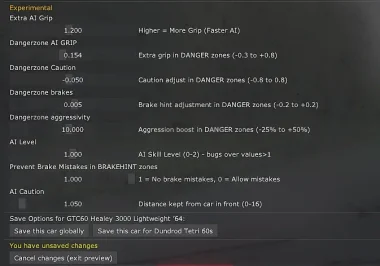
Experimental values (Show Experimental button):
View attachment 1487384
Extra AI GRIP : default for ai cars is at 1.2, to compensate for their incompetence. Bringing this higher gains more grip, therefore making the AI faster. if AI grip is higher, you can also delay brakings by bringing a higher value in Brake hints. Divide by 20 seems to work fine : if ai grip +0.1, brake hints +0.005
AI Level : forget this one. Max at 1. Only use to balance some cars if they're completely out of strenght against their same class competitors by lowering their AI level (0.9=90%). Will be deleted if there's not a better script behind it.
Prevent Brake mistakes : the game has a random Braking mistake that would lock the brakes randomly. Pretty painful in a close track where one crash blocks everyone. The prevent Brake mistakes is strictly applied in [BRAKEHINT] zones, as defined in the tracks ai_hints.ini file. The random mistakes would happen normally on other corners. Default is 1 (that's my choice) : no Brake mistakes allowed in BRAKEHINT ZONES. Bring it to 0 to recall random mistakes.
AI Caution : safe distance from car at front. Use this for cars ramming into the others, or to allow for closer racing with a car class you're confident they are too safe. I wonder how it would work for Nascar, for example, more tests needed, as it seems to impact the distance to sidelines as well : combined with aggressionlevel (Dangerzone aggressivity slider) it's actually a cool feature to add into [DANGER] hints, as the cars 2-wide would actually fight for each inch rather than slowing down like noobs to stay safe.
Decrease : less safe distance, increase : more safe distance. Tweak tip : +/- 0.05, test. Add 0.05 to cars that are fine braking and taking a hard corner by themselves, but struggle not to bump into other cars when there opponents in the way. A litle bump on hard brakings is your first warning, tolerated but not optimal.
Prevent Brake Mistakes : slider at 0, AI will randomly lock brakes. I hate that stupid thing with vintage cars (they crash, as if they needed to suck more). At 1, the value (in seconds) will be set to 0 on each [BRAKEHINT] zone. I have no idea how the random brake mistake is called thru a game, but it can still happen out of the BRAKEHINT zones.
Dangerzone sliders :
The dangerzone sliders will modify the values from the sliders set in regular section. They will be applied each time the car type selectionned run into a [DANGER] hint zone.
Dangerzone AI grip : more is faster, more grip (Duh), less drift. Default for most AI cars is 1.2
ie : Danger zone Final AI Grip result = Extra AI Grip slider value + Dangerzone AI Grip slider value
Dangerzone Caution : more is longer safe distance to car at front, less is shorter safe distance. At values 0.8 they might be a little touchy. At 0.5 they start to crush opponents. Default is 1, so implement the dangerzone caution with +/-0.050 at first and see how high you can go before they ram eachother.
ie : Dangerzone Caution result = AI Caution + Dangerzone Caution
Dangerzone brakes : extra brake setting in danger zones. A value of 0.005 makes them brake later and go a little faster, -0.005 will make them safer.
ie : Danger zone Final brakes result = Brake Hint value + Dangerzone brakes value
You can save your edited cars in a settings file that will automatically be called at start.
if you want to revert to default settings and have a fallback to compare behaviors, i suggest you hit the "apply defaults settings" then "save all cars globally". The "Reload global settings" are now Default, the "Reload track settings" are those applied for the track, and you can compare their pace and behavior in real time in a click.
The app :
MediaFire is a simple to use free service that lets you put all your photos, documents, music, and video in a single place so you can access them anywhere and share them everywhere.
www.mediafire.com
Next updates :
-real time creation of 3 different zones with sliders for each. This one's gonna be funny : you would be able to create your own zones with dedicated slider settings. On the alpha test i'm running, i can now turn a hairpin into a real fighting zone, even with 5-6 cars.
-First lap settings : so they don't do **** with the new settings until they have a little more room, especially on small tracks. That could simply be a Caution value 0.1 higher on dedicated zones on first lap, or a combination of caution and aggression level.
-Prevent Brake Mistake : soon to have a duration value and/or a clamped interval, once i figure out how it's used by the game engine (ie 0.1 second, small smoke, little loss of pace, 0.3 second, full lock, skid mark, important loss of pace)
-Prevent Traction mistake : same as Brake mistake, but with the throttle and (supposedly) with gearbox. Is it necessary? probably not. But maybe i can couple it with the Fury state and maintain a hotlap state (see below).
- "Fury state", where a car you bumped or crashed a few times would enter a revenge state with boost in all values until it reaches you back, and then maintain a close behavior to you to try to **** your race up. Easy to implement, would be a trottle limit each time it's 10m below you, so they don't really overtake you for some time, still maintaining a faster pace, just to push you to mistakes. It works fine atm with a car that is slightly more powerful than yours, so that should be an easy one. Then they pass you with Pedro Pascal 's face on the next straight. Maybe a honk, even.
CSP version 1.0 probability update :
- "Safe state", where a car would maintain a safer pace if 1st for a few laps
- "Auto adjust", where a fraction of some values are added each lap until the car reaches a hotlap (or crashes), with testing on qualification mode. Could be stated by user : i want Alfa Romeo TZ2 to reach 1.52 on BridgeHampton.
- "Hot lap" state settings, where a car would maintain all its parameters once it reaches its best lap value or user's entered value.
"I'll never find time for this" update :
-"Blue lap state", with zones where a soon to be overlapped car could slow down and leave room to let the opponents pass safely without disturbing the race pace
- "Flash Headlights" for a few seconds if you overtake an opponent with contact. Also, for blue lap situations. And for Fury state.
Those are the ideas that SHOULD be "easy" to implement with the tools i have in the lua so far.
The debugging of interacting values is gonna be another story, it's just maths i suppose?
if you wanna create [DANGER]zones in a few clicks ingame without hurting your soul, don't forget the AiHints Editor :
MediaFire is a simple to use free service that lets you put all your photos, documents, music, and video in a single place so you can access them anywhere and share them everywhere.
www.mediafire.com
Tip on [DANGER]zones : apply a LEFT=0.00 and RIGHT=0.00 in the editor to have [DANGER] hints with no particular effect, just to see how the behavior change in those zones with the AIwhisprer app.