No problems here. If you're not using it already, I recommend installing 7zip. If you're already using 7zip, I'm afraid I have no advice for you.does anyone else have trouble extracting the GTLegends cars? I have downloaded them several times but always get an error message trying to extract the files.


This is what i get with the car and your config.
Which makes me wonder, is there a tick box, in CSP, that i haven't ticked after the last update? (again!?)
I think Alx Hill isn't far off the mark... I downloaded the version of the car you, Fall Guy, recommended and included the full string, and the result is the same as Alx Hill's image, so I suspect it's possible that some CSP setting is interfering...Have you copied the full string into your ext_config.ini as advised? If yes, i don´t know how to help, sorry. Because it seems the refracting code is not fully applied...


Wondering if anyone can help as I've spent at least 12 hours of my life recently just trying to get a wall to be collidable with no avail. I've tried every variant of name I can think from 1WALL, 01WALL, 1WALL001 etc etc and making sure it hasn't got the same name as any other object and every time it still acts as an object you can drive through.
I've tried importing planes, and cubes from blender into 3DSimED, adding uprights and boxes inside 3DSimED and exporting an fbx and using KS Editor to make a kn5, flipping normals and duplicating, changing pivot points, collision targets but absolutely nothing seems to work. Below is a dramatic version of me trying to get a wall that is solid just to give an example haha.
View attachment 1509326


I think Alx Hill isn't far off the mark... I downloaded the version of the car you, Fall Guy, recommended and included the full string, and the result is the same as Alx Hill's image, so I suspect it's possible that some CSP setting is interfering...


I'm not into the details of how to do it, but adding a specular map is probably what you need. A specular map defines gloss, reflectiveness etc. on different parts of a model.Skinners, quick question
View attachment 1509322
In order to replicate that glossy Blue, is it possible to use a glossy csp shader, but only on the blue part?
For example, if the blue alpha channel was 100 or 0 and vice versa for other colors, would alpha nullify the csp glossy effect?
Looks good so far, now you need to adjust the light with the reflection debug app ingame, copy the values to clipboard and paste it into your config. Don´t know why the values from me did not work with all of your versions. Really a miracle right now.@Fall Guy I made a clean install with that car
View attachment 1509395
before ext_config change
View attachment 1509396
after change
View attachment 1509397

I am using exactly the same settings, but the lights look weirdHave you copied the full string into your ext_config.ini as advised? If yes, i don´t know how to help, sorry. Because it seems the refracting code is not fully applied.
You can open up the reflection debug app and check some values. Good luck.
View attachment 1509294
 welcome to AC


They have TC turned on in real life.Question about RSS GT-M GT3's:
I cant turn traction control off? I turn it off in setup but cars still wont oversteer. Then I mapped buttons for TC2 but nothing happens when I turn TC2 down. Cars still wont oversteer?
Also tried data without csp and with csp (Found them in cars folder) also I tried uncheck extended phyisics...
Thanks!
Is the object named the same as the object in the surface.ini file? You need to make sure any wall is also stated in the surface.ini file. So 1WALL will need to be an entry in the surface.ini file, then it will act like a solid object.Wondering if anyone can help as I've spent at least 12 hours of my life recently just trying to get a wall to be collidable with no avail. I've tried every variant of name I can think from 1WALL, 01WALL, 1WALL001 etc etc and making sure it hasn't got the same name as any other object and every time it still acts as an object you can drive through.
I've tried importing planes, and cubes from blender into 3DSimED, adding uprights and boxes inside 3DSimED and exporting an fbx and using KS Editor to make a kn5, flipping normals and duplicating, changing pivot points, collision targets but absolutely nothing seems to work. Below is a dramatic version of me trying to get a wall that is solid just to give an example haha.
View attachment 1509326


FALSE!Is the object named the same as the object in the surface.ini file? You need to make sure any wall is also stated in the surface.ini file. So 1WALL will need to be an entry in the surface.ini file, then it will act like a solid object.

Yes, i ended up installing the way they say not to. Through CM. I then had no issue and it even installed the files from the required car folders. Delete the old mods first.does anyone else have trouble extracting the GTLegends cars? I have downloaded them several times but always get an error message trying to extract the files.
I'll try asap. Thank you for your efforts in finding solutions! 👍... Could you please one thing: go to cm showroom, select the mesh of the headlight and check if it is set to transparent?...


Same problem, but not just on the wheels, but on other body parts as well. I think it's a problem with this version of CSP at this point.Hey guys need some help I'm getting weird artifacts on the rims with 3.0-preview212 ,I tried with 2.11 and the artifacts are gone.
First photo is CSP 3.0-preview212
View attachment 1509217View attachment 1509218
Interesting, seen as I've never gotten a track to work without changing the surface.ini file. Whether I called it WALL or 1WALL or whatever, it didn't act like a wall unless I made sure that that was defined in the surface.ini file as well.FALSE!
WALL is defined by default internally by AC itself.
surfaces.ini from my last updated track attached. There is NO WALL statement.Interesting, seen as I've never gotten a track to work without changing the surface.ini file. Whether I called it WALL or 1WALL or whatever, it didn't act like a wall unless I made sure that that was defined in the surface.ini file as well.
Edit - I suppose if you do a lot of tracks (like yourself) and have a well set up surface.ini file that you just copy from track to track then you wouldn't notice the issue?


You need to push the clutch for the time you hit the handbrakeI have a problem when I tackle a SS Rally. When I pull the handbrake, the car tends to stall, and unfortunately, when I need to hold it down a little longer, I find myself with the engine stalling in the middle of a bend... is there any way to prevent this from happening? Thanks a lot.

Question about RSS GT-M GT3's:
I cant turn traction control off? I turn it off in setup but cars still wont oversteer. Then I mapped buttons for TC2 but nothing happens when I turn TC2 down. Cars still wont oversteer?
Also tried data without csp and with csp (Found them in cars folder) also I tried uncheck extended phyisics...
Thanks!
… and anti stall clutch, as well.They have TC turned on in real life.
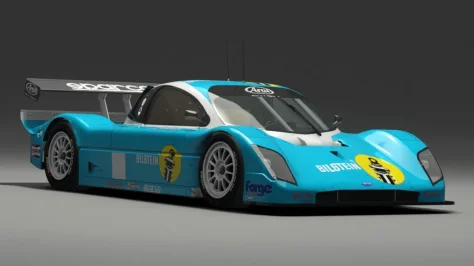
Try to raise a bit the maximum value of the ROD_LENGHT interval (heights) on setup.ini.anyone else got a problem with the DP Doran JE4 by Velo (v1.2) ?
I can't start a session with it , says the ride height is too low... even when I set the suspension to max height!?
View attachment 1509486


no that doesn't help... and it must be something else I am sure, as the creator surely didn't release his mod with faulty data so it could not be ridden until his data is altered by the user... that would be weirdTry to raise a bit the maximum value of the ROD_LENGHT interval (heights) on setup.ini.

Maybe turn off extended physics and try again.no that doesn't help... and it must be something else I am sure, as the creator surely didn't release his mod with faulty data so it could not be ridden until his data is altered by the user... that would be weird
May or may not help, but I found turning on tyre blankets helped when I had the issue last (different mod admittedly).no that doesn't help... and it must be something else I am sure, as the creator surely didn't release his mod with faulty data so it could not be ridden until his data is altered by the user... that would be weird
Try to correct the basey value in suspensions.ini (front and rear). Put something as -0.090 and try. Don't forget to delete the data.acd or repack the new one.no that doesn't help... and it must be something else I am sure, as the creator surely didn't release his mod with faulty data so it could not be ridden until his data is altered by the user... that would be weird
... Could you please one thing: go to cm showroom, select the mesh of the headlight and check if it is set to transparent?...
Well, checked. All the settings match those shown in your image, the four headlight meshes were listed as transparent...I'll try asap. Thank you for your efforts in finding solutions! 👍


Yes, all I did was roll back to 1.1 which solved the issue. The car is still undrivable regardless and I even tuned the suspension, downforce, etc and the car (while was a lot more stable) was still sliding like it was on ice. I gave up on this thing.anyone else got a problem with the DP Doran JE4 by Velo (v1.2) ?
I can't start a session with it , says the ride height is too low... even when I set the suspension to max height!?
View attachment 1509486


Should be included in this pack? LinkHi could anyone share Tomsim's 2012 and 2013 Audis R18?
Thank you
Mine's work fine but you can try to editanyone else got a problem with the DP Doran JE4 by Velo (v1.2) ?
I can't start a session with it , says the ride height is too low... even when I set the suspension to max height!?
View attachment 1509486
[RULES]
MIN_HEIGHT=0.00   ; meters min height front/rear