Assetto Corsa PC Mods General DiscussionPC 

  • Thread starter Thread starter daan
  • 157,750 comments
  • 51,887,078 views
@Young78

EDIT: Solved with 7zip 😀

Hi, [...] thanks for your wonderful mods!

What is the difference between the two versions of F50GT?
 
Last edited:
I was watching a GT race at Monza from 2013 looking for sponsors back then and thought this was interesting. The wall setup leading into the first chicane looks like it does in 2025 for the most part. There are a couple of sections way off in the distance that are not the same.

View attachment 1509909


So this leads me to a couple of questions.

1.) Are these walls temporary and only used for races or are they permanent? If permanent, when did they change them from how Kunos made the track look? Obviously they were there in 2013.

2.) What year is the Kunos version based on? I always thought it was 2013 (since that was roughly when the game was released), but it must be from before 2013 since they didn't make the track look like this.
1.) These are permanent walls. Added in 2012.
2.) KS Monza is based on the 2011 version
 
Hi, you've never seen this message before: what does it mean?😅
Think it’s Italian, the translation seems to be:

Indice oltre i limiti della matrice. = index beyond matrix limits.

Somewhere in CM there is an language adjustment to change it to English so you do not have to translate it.

😅😂🤣


Now Seriously, I can not help you but now the translation is published, a member maybe can help you further. Remember this is an English forum as most members can not read this beautiful Italian language.
 
Hi, you've never seen this message before: what does it mean?😅
In English in programming parlance, "Index out of bounds"
Objects in an array (competitor cars in a race, for example ) might be numbered (indexed) in a group (array).
The error refers to "I have an object claiming to be #11 in array(1..9)"

That said, the error gives us no clue as to the specifics, so a general explainer is all I have ¯\(ツ)/¯
 
Last edited:
This must have been asked for and also answered on a couple of times before I guess, but cannot find it here (this quickly), Apologies for asking again. Is there a simple way in renaming cars such that they do show in CM with (for instance) "LMDh - Ferrari 499P" instead of only 499P? Same goes for "GT3" followed by actual car name in CM, etc. Would make searching in CM a lot more easy for me when setting up a race. Thanks in advance and have the best of day.
Just copy and paste the category name each time and save ? It's not that tedious lol
 
Just copy and paste the category name each time and save ? It's not that tedious lol
@Jeroen V I would rather recommend to use tags, like "GT3" for all your GT3 cars and then just search in CM with the correct string.
1769771690997.webp
 
anyone knows if there´s a way to set tags for multiple cars at the same time?
 
Think it’s Italian, the translation seems to be:

Indice oltre i limiti della matrice. = index beyond matrix limits.

Somewhere in CM there is an language adjustment to change it to English so you do not have to translate it.

😅😂🤣


Now Seriously, I can not help you but now the translation is published, a member maybe can help you further. Remember this is an English forum as most members can not read this beautiful Italian language.

You're right, sorry. I didn't think to change the language before publishing. Thanks for the reply.

In English in programming parlance, "Index out of bounds"
Objects in an array (competitor cars in a race, for example ) might be numbered (indexed) in a group (array).
The error refers to "I have an object claiming to be #11 in array(1..9)"

That said, the error gives us no clue as to the specifics, so a general explainer is all I have ¯\(ツ)/¯
I restarted CM and the error seems to be gone. Thanks a lot.
 
Just had this pop up on loading game this am (found 1 update for mods OULTON PARK (6) any ideas what it is about what the update is ?

Regards

Mark
 
24H
Doran JE4 1.1 should be this one


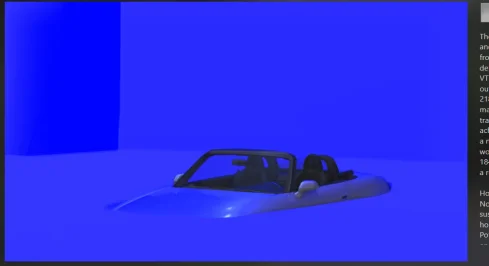
Release of the CSP preview settings 01-2026

Preset: https://acstuff.club/s/loda
Showroom: https://www.mediafire.com/file/ot02bbw1z0dsitu/tav_moderna.7z/file

Please do a backup if you already have the TAV Moderna showroom
Extract to your assetto corsa showroom folder: Steam\steamapps\common\assettocorsa\content\showroom

View attachment 1509849View attachment 1509850View attachment 1509851View attachment 1509852
whats wrong with mine? and what pp filter did you use?

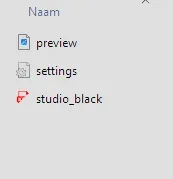
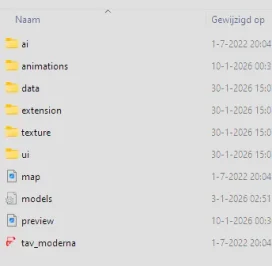
when i look inside the showroom folder your is build like a track structure, all others have only 2 or 3 files
 

Attachments

  • Schermafbeelding 2026-01-30 150003.webp
    Schermafbeelding 2026-01-30 150003.webp
    12.3 KB · Views: 17
  • Schermafbeelding 2026-01-30 151055.webp
    Schermafbeelding 2026-01-30 151055.webp
    2.6 KB · Views: 14
  • Schermafbeelding 2026-01-30 151038.webp
    Schermafbeelding 2026-01-30 151038.webp
    9.9 KB · Views: 19
Last edited:
Luca959, if you see this message, please reply. I would like to reply to the direct message you sent me, but I am unable to do so due to an error in gtplanet.
 
Luca959, if you see this message, please reply. I would like to reply to the direct message you sent me, but I am unable to do so due to an error in gtplanet.
Hi, do you have a download to replace the original Ford Doran collider with yours? I'm not very familiar with replacing files.
Thank you for your kind reply
 
I was unable to reply due to an error on gtplanet, so we will respond from here.

I recommend making a backup in case it doesn't turn out the way you want it to.

This is my car's collider.
It may not work with your version of the car as it is compatible with other modifications. please note.
I'm not sure if my explanation is sufficient, but all you have to do is put this collider in the "data" folder of the relevant car.

Go to the Content tab in Content Manager.

Find Doran JE4 in Content Manager.

Click on "Folder (located next to Reload)" displayed under the car.

Drag and drop the downloaded "collider.ini" into the "data" folder in the displayed folder and replace it.

Alternatively, you can change the collider of your car directly without downloading.
I simply made the height of the collider thinner than the original (it doesn't matter how many 0s you add lol).

Click on the "data" folder in the car folder to open it.

Find "collider.ini" and click to open it (select an app to open it in, such as Notepad).

Delete all the text in the ini file and copy and paste the following string.

[HEADER]
COLLIDERS=1

[COLLIDER_0]
CENTRE=0 ,-0.27 ,0.40
SIZE=1.2 ,0.00000001 ,4.20
GROUND_ENABLE=1

Save your changes and close.
 

Attachments

24H
Doran JE4 1.1 should be this one


Release of the CSP preview settings 01-2026

Preset: https://acstuff.club/s/loda
Showroom: https://www.mediafire.com/file/ot02bbw1z0dsitu/tav_moderna.7z/file

Please do a backup if you already have the TAV Moderna showroom
Extract to your assetto corsa showroom folder: Steam\steamapps\common\assettocorsa\content\showroom

View attachment 1509849View attachment 1509850View attachment 1509851View attachment 1509852
Thanks for sharing. These look great. The clear seperation of background and floor, but with much less texture than the previous release.
Yes please. :cheers:

@Bob Jackson Just go ahead and generate the preview, sir. The finished render doesn't look like that.
 
Last edited:
Azure Coast + Cote d'Azure v1.1
-fixed grass part near highway/train crossing
mediafire or google drive

GT Sainte Croix v1.3
-fixed detail textures for electric poles
-fixed some vehicle shadow issues (via CSP config only)
-made some white lines in corners smoother
-updated crowd textures
-updated 2 pine tree textures
-more detailed/colorfull/shiny vehicle textures
-shinier water
-added some crew stuff in pits
-added more groove in pits
-added timing tower, showing top 12 of leader board
mediafire or google drive

or via CM in the next couple days
 
Last edited:
whats wrong with mine? and what pp filter did you use?

when i look inside the showroom folder your is build like a track structure, all others have only 2 or 3 files

I get the same result...:confused:
Settings/ Content Manager/ Custom Showroom & uncheck the box "Use CSP for final previews render".

24H
Doran JE4 1.1 should be this one


Release of the CSP preview settings 01-2026

Preset: https://acstuff.club/s/loda
Showroom: https://www.mediafire.com/file/ot02bbw1z0dsitu/tav_moderna.7z/file

Please do a backup if you already have the TAV Moderna showroom
Extract to your assetto corsa showroom folder: Steam\steamapps\common\assettocorsa\content\showroom

View attachment 1509849View attachment 1509850View attachment 1509851View attachment 1509852
Beautiful previews & works as intended, no problems on my side!
Thanks for sharing!
Is it possible to have this in a dark theme (background)? Since you were working on this it might be easy for you.
 
Thanks for sharing. These look great. The clear seperation of background and floor, but with much less texture than the previous release.
Yes please. :cheers:

@Bob Jackson Just go ahead and generate the preview, sir. The finished render doesn't look like that.
yes they did, but now i have checked the use csp for final previews render and now its very good looking
 
Settings/ Content Manager/ Custom Showroom & uncheck the box "Use CSP for final previews render".


Beautiful previews & works as intended, no problems on my side!
Thanks for sharing!
Is it possible to have this in a dark theme (background)? Since you were working on this it might be easy for you.
what csp version do u use? i have alot of errors on the latest one and when i use the recomended one the car in the preview is very smal and nothing like the pictures showed above
 
Last edited:
@Tetri: Working with AIWhisperer lately and have a few questions.
  • to share my settings, is it only settings.ini that needs to be shared?
  • I did initial settings at RJ_Monza and saved those as Global settings for all cars (a 24 car subset of GTC60).
  • Then I went to a bunch of other tracks, where if the settings didn't hold up I made changes and saved them out as Track specific (like Stardust, Oulton etc)
  • but not all cars needed adjustment at the other tracks.
  • Question: does saving settings as Track Specific have any influence on the settings previously saved as Global Settings? (and vice versa?) Or can I count on them remaining the same unless I intentionally overwrite?
  • Question: Where are the track specific settings saved? I see no reference to other tracks in settings.ini.
  • Question: Do I need to "Reload" Global settings each time I start a session? Can I reload global settings and then reload track specific settings after to pick up the cars that do have track specific settings (and leaving the others with the Global settings)?
  • Another! Could we have separate settings.ini files for each of different car sets? Nice if we could just pick a carset from a list (or it auto selects the carset based on what it sees)
  • Suggestions! Can you get AIWhisperer to auto-select the tab for the focused car? (optionally?) Can you have the tabs go down onto a second row so all tabs are wider and readable? (Tabs get mighty small with lotsa cars)
___
- What do you think about transferring some of the found data back into the code for the car? Seems to me that since effectiveness at different tracks ultimately requires changing the settings, so maybe not. And are some of those settings ineffective or counter-effective when a real human is driving the car? Like steering gain (when the user is driving the same car as the ai)? Or do all the settings only affect ai drivers (and only when AIWHisperer is running)?
___
So far I'm only working with two variables (mostly, sometimes the closer racing slider), brake hint and turn in (which seems to be corner-radius also) and am getting very good results. I'm staying away from adjusting grip and such (almost) and am finding no need to use them. Civilized ai racing! Apparently if all cars arrive at the corner and turn in correctly there's very little collision action, and even tidy two-wide through the turns! Still the occasional bumper bumped but I also use Stretched Grid keeping things clean. Two wide through the first chicane at Monza! Stoked, I am.
- Another thing, it seems that it's even better if the ai cars don't each have ai_default setups. Or at least they aren't necessary. I suppose ideally I'd drive all the cars and get good setups for them, then review/replace the track ai lines, and Then do the AIWhisperin' but NOT. Gettin closer to racing, not caught in a fixin-things loop. (Maybe we need to set up an AIWhisperer team to mow through all cars & tracks?)
___
Look forward to progressing with this and sharing (and getting feedback). GTC is goin smooth.

bizzarrini-5300@rj-monza_01.webp
 
Last edited:
Regarding the Doran JE4… I made some changes, for my personal use, in this car:

  • New power.lut, curve built based on real data from the Ford version (600bhp@7750rpm; 786Nm@5000rpm)
  • New aero.ini, calibrated based on real aerodynamic data from Daytona prototypes of the time (L/D=2.5; DownF 750kg / Drag 300kg @ 240KM/H; DownF 1100kg / Drag 440kg @ 290KM/H).
  • Updated car.ini: car weight corrected, steer assist neutral (for fine tuning on slider now present in the setup) and new steering ratio (which I found more suitable for cars of that time).
  • Updated engine.ini
  • Updated suspensions.ini
  • Sound tweaks
  • Updated electronics.ini: the regulations did not allow the use of TC for the category
  • Updated digital_instruments.ini
  • Updated setup.ini: power steering assist & brake power sliders added.
  • Updated logo.png and badge.png (Doran Racing)

For those interested, I decided to share it here, I hope the author doesn't mind, I will delete the post immediately, jlmk.

I am not a professional, therefore, I apologize in advance for omissions, errors and mistakes. To those who venture to do so, your feedback will be appreciated. Download


174657.webp
 
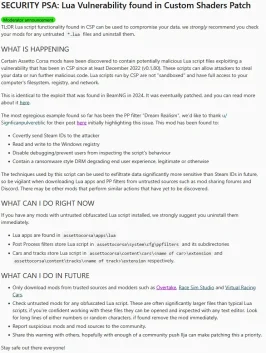
Any thoughts on this thread that appeared in Assetto's subreddit? From how they're describing it, it's a major security flaw in CSP.

Link:

I have found this in the car URD dallas hypercar...is it safe?

local base_char,keywords=128,{"and","break","do","else","elseif","end","false","for","function","if","in","local","nil","not","or","repeat","return","then","true","until","while","getScriptSetupValue","mguCutoffSpeed","mguDeploySpeed","controllerInputs","kersmult","car","mgukDelivery","drivetrainTorque","DataLUT11","overrideGasInput","bopAdjustPerMGU","carData","mguDeploySpeedLockedOut","isInPitlane","speedKmh","debug","index","ac","'-mgu-50-data.controllerInputs[5]='","data","'BOP_POWER'","'MGU_MINDS'","'MGU_MAXDS'","ratio","rpm","get","'-mgu-10-urd.isInPitlane='","'-mgu-60-tempTestMessage='","'-mgu-20-mguDeploySpeed='","'-mgu-30-mguCutoffSpeed='","'-mgu-40-kersmult='","'power_480_40.lut'","'power_500_20.lut'","'power_490_30.lut'","'power_510_10.lut'","'power_470_50.lut'","gear","script","'power_520.lut'","urd","'BOP Override'","isAIControlled","isInMainMenu","isICERunning","kersCharge","'BOP OK'","update","'BLIP'",}; function prettify(code) return code:gsub("["..string.char(base_char).."-"..string.char(base_char+#keywords).."]",
function (c) return keywords[c:byte()-base_char]; end) end return assert(loadstring(prettify[===[package.preload['a_urd_mgu']=(‰(...)Œ c=§.ž.¡(›.¦,¼)Œ p=§.ž.¡(›.¦,¸)Œ i=§.ž.¡(›.¦,¶)Œ d=§.ž.¡(›.¦,·)Œ o=§.ž.¡(›.¦,µ)Œ m=§.ž.¡(›.¦,¹)Œ n=§.–(ª)()Œ r=''Œ u=0
Œ a=‡
Œ t=0
Œ g=200
Œ l=0
Œ e=0
˜=§.–(«)()—=§.–(¬)()‰ ()Š ›.œ==1 ’
e=p:¯(›.®)†
Š ›.œ==2 ’
e=i:¯(›.®)†
Š ›.œ==3 ’
e=d:¯(›.®)†
Š ›.œ==4 ’
e=o:¯(›.®)†
Š ›.œ==5 ’
e=m:¯(›.®)†
Š ›.Â*100<1 ’
e=c:¯(›.®)†
Š ›.œ==0 š==0 ’
e=c:¯(›.®)†
Š(›.>(e*n))’
=((e*n)/›.)§.Ÿ()r=¾„
=©.gas
§.Ÿ()r=Æ
†
‰ ».Ä(e)Š sim.À ’
n=§.–(ª)()u=›.º
˜=§.–(«)()—=§.–(¬)()†
Š(˜>=—)’
—=350
†
Š Ž ›.¿ ’
Š ½.Á Ž a ’
()Š Ž ½.£ ’
Š(›.¤>˜ ›.¤<—)’
š=1
©.™[5]=š
„
š=0
©.™[5]=š
†
†
†
„
Š Ž ½.£ ’
Š(›.¤>˜ ›.¤<—)’
š=1
©.™[5]=š
¢=‡
„
š=0
©.™[5]=š
¢=“
†
†
()†
Š u~=›.º ’
a=“
u=›.º
†
Š a ’
Š t<g ’
t=t+1
§.Ÿ(math.huge)r=Å„
t=0
a=‡
†
†
Š l<=›. ’
l=›.
†
§.¥(°,½.£)§.¥(²,˜)§.¥(³,—)§.¥(´,š)§.¥(¨,©.™[5])§.¥(±,r)†
‰ ».reset()†
†)Œ c=§.ž.¡(›.¦,¼)Œ d=§.ž.¡(›.¦,¸)Œ p=§.ž.¡(›.¦,¶)Œ g=§.ž.¡(›.¦,·)Œ o=§.ž.¡(›.¦,µ)Œ m=§.ž.¡(›.¦,¹)Œ n=§.–(ª)()Œ r=''Œ u=0
Œ a=‡
Œ t=0
Œ i=200
Œ l=0
Œ e=0
˜=§.–(«)()—=§.–(¬)()‰ ()Š ›.œ==1 ’
 
Last edited by a moderator:
Sharing a mod? Host it on GTPlanet Downloads. Free, public hosting for files up to 10GB in size.
Back