Assetto Corsa PC Mods General DiscussionPC 

  • Thread starter Thread starter daan
  • 158,807 comments
  • 52,565,878 views
Can somebody please make these Models:

TOYOTA COROLLA AXIO GT300
1769817194050.webp


VEMAC RD320R / RD350R / RD408R GT300 SGT
1769817221001.webp


HONDA CR-Z GT HYBRID GT300 SGT
1769817249558.webp


PORSCHE 986 BOXSTER GT300 SGT
1769817269909.webp


Lexus IS350 GT300
1769817806984.webp


They are the few cars missing from the greatest race series in the world
 
Last edited:
Monza 2025 (beta 0.975)

monza_2025_beta

Throwing this out there for anyone to try in the hopes to get a little feedback. I am concerned about flickering on the sponsor banners. I had to fix a lot of them and redo a lot of the uv mapping for the textures. I do not see any but i'm on an old CSP version and don't know if that would make a difference.

Don't let the name fool you. This is not a representation of the track in 2025. It's just a name I picked so I can separate this version from the Kunos version in my CM track list. It is nothing more than all of the mods i've created or downloaded for Monza rolled into one track so I can keep the original Kunos version 'clean'. It is a beta version (about 90% complete) so you can expect to see some obvious mistakes and maybe some poor texture choices. Because it's based on the original Kunos track, you are free to use any mods for that track with this one, such as ai files, track skins, etc. The one thing you can't do is use a mod that will overwrite the ext_config file. That would cause some issues.

Credits:
-- @Masscot for the animated flagmen and balloons
-- Assets used from the monza2022crf version of the track.
-- knicker for the crowd files.

While this track is not as confusing as some of my other ones, I still need to explain a few things:

-- There are two layouts, the base layout and a raceday layout that adds sponsor banners in some spots based on a 2025 GT World Challenge video I watched as a reference. The raceday layout is best to use with modern cars because the sponsors wouldn't make much sense for cars 10+ years old. Also, when using the raceday layout, I would suggest enabling the 2025 Raceday track skin to complete the look.
-- There are four 'Years' track skins that will bring back certain buildings and structures to make the track more period accurate. For example, enabling the 2010 (probably should have been named pre-2010) skin will make the track look like the Kunos default version with no structures hidden.
-- For performance reasons, I have the animated flagmen and live jumbotron displays off by default for older computer users. You can turn them on by enabling the appropriate track skin. Plus it's nice to turn them off when driving a practice session.
-- Last thing, there is a huge difference in how bright the crowds look depending on whether you use CSPs 'New spectators rendering method' so you might have to do some adjusting to the ambient and diffuse values in the camera_facing file. I have it setup for my CSP options, but yours may be different.

Have fun and hope to hear from someone on any issues you may see. If not, then i'll just keep plugging along thinking everything is all right.
Track has been updated to version 0.975. Use the link in the quote to get the updated version.

You will definitely need to delete your old track folder first. The changes to the track itself are not significant, but the track setup has changed so I could add collision physics to the new walls for 2025. There are now separate layouts for each era. I hate that it has to be this way, but there were no other options.

Changes:

-- Separate layouts for 2025, 2013 and 2010. If you want to drive one of the older layouts, make sure to enable the track skin for that particular year. If you don't, the track surface and curbs will look like 2025. The 2023 track skin is meant to be used with one of the 2025 layouts. It changes the track surface back to before the resurfacng in 2024 and eliminates the Temple of Speed banner.
-- If you drive the 2013 layout and don't like the changes to the wall colors, go into the 2013 track skin folder and delete the walls-b.dds and walls-b3.dds files. This will make the walls green again. The colors were chosen from watching a youtube video of the 2013 GT Endurance race.
-- Worth mentioning again. The track is based off of the Kunos Monza track so you are free to use any mods (track skins, ai files, etc.) for that track with this one. Just don't overwrite the ext_config file. You can change or add anything to it, but do not delete the 'ROAD' or 'SKINS' section at the bottom or it will mess up how things work.

2025:
2025.webp


2013:
2013.webp


2010:
2010.webp


Unless I or someone else runs across some small detail I missed in making all the layouts, this will be the last update until the track goes to version 1.0. That won't happen until I learn how to fix the Ascari area and widen out the turns in the first chicane for 2025. Since I have no clue how to do that at the moment, don't expect version 1.0 anytime soon.
 
Last edited:
Track has been updated to version 0.975. Use the link in the quote to get the updated version.

You will definitely need to delete your old track folder first. The changes to the track itself are not significant, but the track setup has changed so I could add collision physics to the new walls for 2025. There are now separate layouts for each era. I hate that it has to be this way, but there were no other options.

Changes:

-- Separate layouts for 2025, 2013 and 2010. If you want to drive one of the older layouts, make sure to enable the track skin for that particular year. If you don't, the track surface and curbs will look like 2025. The 2023 track skin is meant to be used with one of the 2025 layouts. It changes the track surface back to before the resurfacng in 2024 and eliminates the Temple of Speed banner.
-- If you drive the 2013 layout and don't like the changes to the wall colors, go into the 2013 track skin folder and delete the walls-b.dds and walls-b3.dds files. This will make the walls green again. The colors were chosen from watching a youtube video of the 2013 GT Endurance race.
-- Worth mentioning again. The track is based off of the Kunos Monza track so you are free to use any mods (track skins, ai files, etc.) for that track with this one. Just don't overwrite the ext_config file. You can change or add anything to it, but do not delete the 'ROAD' or 'SKINS' section at the bottom or it will mess up how things work.

2025:
View attachment 1510062

2013:
View attachment 1510059

2010:
View attachment 1510060

Unless I or someone else runs across some small detail I missed in making all the layouts, this will be the last update until the track goes to version 1.0. That won't happen until I learn how to fix the Ascari area and widen out the turns in the first chicane for 2025. Since I have no clue how to do that at the moment, don't expect version 1.0 anytime soon.

EDIT: Don't download yet. I forgot something for the 2013 layout. Be back in 20 minutes with a fixed version.

EDIT 2: Safe to download. I forgot to add the speed bumps back to the first chicane for 2013.
1769830346274.webp

Got a hole in T1 sausage curb.
 
Any thoughts on this thread that appeared in Assetto's subreddit? From how they're describing it, it's a major security flaw in CSP.

Link:

old news, I discoverd this like 2yr ago and developed full remote proof-of-concept.
oh yeah, its worse than this because its not just the LUA in CSP...

AC itself is also vuln (via a diferent vector) and I reported it to the AC team and they decided to ignore the warning. (yes I have the reciepts)

cest le vie

1769837525800.webp

I have found this in the car URD dallas hypercar...is it safe?

local base_char,keywords=128,{"and","break","do","else","elseif","end","false","for","function","if","in","local","nil","not","or","repeat","return","then","true","until","while","getScriptSetupValue","mguCutoffSpeed","mguDeploySpeed","controllerInputs","kersmult","car","mgukDelivery","drivetrainTorque","DataLUT11","overrideGasInput","bopAdjustPerMGU","carData","mguDeploySpeedLockedOut","isInPitlane","speedKmh","debug","index","ac","'-mgu-50-data.controllerInputs[5]='","data","'BOP_POWER'","'MGU_MINDS'","'MGU_MAXDS'","ratio","rpm","get","'-mgu-10-urd.isInPitlane='","'-mgu-60-tempTestMessage='","'-mgu-20-mguDeploySpeed='","'-mgu-30-mguCutoffSpeed='","'-mgu-40-kersmult='","'power_480_40.lut'","'power_500_20.lut'","'power_490_30.lut'","'power_510_10.lut'","'power_470_50.lut'","gear","script","'power_520.lut'","urd","'BOP Override'","isAIControlled","isInMainMenu","isICERunning","kersCharge","'BOP OK'","update","'BLIP'",}; function prettify(code) return code:gsub("["..string.char(base_char).."-"..string.char(base_char+#keywords).."]",
function (c) return keywords[c:byte()-base_char]; end) end return assert(loadstring(prettify[===[package.preload['a_urd_mgu']=(‰(...)Œ c=§.ž.¡(›.¦,¼)Œ p=§.ž.¡(›.¦,¸)Œ i=§.ž.¡(›.¦,¶)Œ d=§.ž.¡(›.¦,·)Œ o=§.ž.¡(›.¦,µ)Œ m=§.ž.¡(›.¦,¹)Œ n=§.–(ª)()Œ r=''Œ u=0
Œ a=‡
Œ t=0
Œ g=200
Œ l=0
Œ e=0
˜=§.–(«)()—=§.–(¬)()‰ ()Š ›.œ==1 ’
e=p:¯(›.®)†
Š ›.œ==2 ’
e=i:¯(›.®)†
Š ›.œ==3 ’
e=d:¯(›.®)†
Š ›.œ==4 ’
e=o:¯(›.®)†
Š ›.œ==5 ’
e=m:¯(›.®)†
Š ›.Â*100<1 ’
e=c:¯(›.®)†
Š ›.œ==0 š==0 ’
e=c:¯(›.®)†
Š(›.>(e*n))’
=((e*n)/›.)§.Ÿ()r=¾„
=©.gas
§.Ÿ()r=Æ
†
‰ ».Ä(e)Š sim.À ’
n=§.–(ª)()u=›.º
˜=§.–(«)()—=§.–(¬)()†
Š(˜>=—)’
—=350
†
Š Ž ›.¿ ’
Š ½.Á Ž a ’
()Š Ž ½.£ ’
Š(›.¤>˜ ›.¤<—)’
š=1
©.™[5]=š
„
š=0
©.™[5]=š
†
†
†
„
Š Ž ½.£ ’
Š(›.¤>˜ ›.¤<—)’
š=1
©.™[5]=š
¢=‡
„
š=0
©.™[5]=š
¢=“
†
†
()†
Š u~=›.º ’
a=“
u=›.º
†
Š a ’
Š t<g ’
t=t+1
§.Ÿ(math.huge)r=Å„
t=0
a=‡
†
†
Š l<=›. ’
l=›.
†
§.¥(°,½.£)§.¥(²,˜)§.¥(³,—)§.¥(´,š)§.¥(¨,©.™[5])§.¥(±,r)†
‰ ».reset()†
†)Œ c=§.ž.¡(›.¦,¼)Œ d=§.ž.¡(›.¦,¸)Œ p=§.ž.¡(›.¦,¶)Œ g=§.ž.¡(›.¦,·)Œ o=§.ž.¡(›.¦,µ)Œ m=§.ž.¡(›.¦,¹)Œ n=§.–(ª)()Œ r=''Œ u=0
Œ a=‡
Œ t=0
Œ i=200
Œ l=0
Œ e=0
˜=§.–(«)()—=§.–(¬)()‰ ()Š ›.œ==1 ’
This is for sure obufiscated, but likely benign. The exploit only needs a few lines of code...


For those that dont know, I am a security researcher and offensive security expert for 20+ years. My hobby and work is finding vulnerabilities and breaking security measures in Web, IoT and infrastructurer.
 
Last edited:
Can somebody please make these Models:

TOYOTA COROLLA AXIO GT300
View attachment 1510053

VEMAC RD320R / RD350R / RD408R GT300 SGT
View attachment 1510054

HONDA CR-Z GT HYBRID GT300 SGT
View attachment 1510055

PORSCHE 986 BOXSTER GT300 SGT
View attachment 1510056

Lexus IS350 GT300
View attachment 1510057

They are the few cars missing from the greatest race series in the world
It think the AXIO and CRZ are being worked on by TheNuvolari: https://x.com/TheNuvolari (I could be wrong)

As for the IS350, one does exist by BE_Modding in a poor state:

bem_lexus_is350_gt300_m08_autopolis_01_27_32.webp
 
Regarding the Doran JE4… I made some changes, for my personal use, in this car:

  • New power.lut, curve built based on real data from the Ford version (600bhp@7750rpm; 786Nm@5000rpm)
  • New aero.ini, calibrated based on real aerodynamic data from Daytona prototypes of the time (L/D=2.5; DownF 750kg / Drag 300kg @ 240KM/H; DownF 1100kg / Drag 440kg @ 290KM/H).
  • Updated car.ini: car weight corrected, steer assist neutral (for fine tuning on slider now present in the setup) and new steering ratio (which I found more suitable for cars of that time).
  • Updated engine.ini
  • Updated suspensions.ini
  • Sound tweaks
  • Updated electronics.ini: the regulations did not allow the use of TC for the category
  • Updated digital_instruments.ini
  • Updated setup.ini: power steering assist & brake power sliders added.
  • Updated logo.png and badge.png (Doran Racing)

For those interested, I decided to share it here, I hope the author doesn't mind, I will delete the post immediately, jlmk.

I am not a professional, therefore, I apologize in advance for omissions, errors and mistakes. To those who venture to do so, your feedback will be appreciated. Download


View attachment 1510024
I just noticed tomsim has a ford doran. have you tried it? is it as good as this one or better? EDIT nvm, theirs is the ford riley
 
Last edited:
Track has been updated to version 0.975. Use the link in the quote to get the updated version.

You will definitely need to delete your old track folder first. The changes to the track itself are not significant, but the track setup has changed so I could add collision physics to the new walls for 2025. There are now separate layouts for each era. I hate that it has to be this way, but there were no other options.

Changes:

-- Separate layouts for 2025, 2013 and 2010. If you want to drive one of the older layouts, make sure to enable the track skin for that particular year. If you don't, the track surface and curbs will look like 2025. The 2023 track skin is meant to be used with one of the 2025 layouts. It changes the track surface back to before the resurfacng in 2024 and eliminates the Temple of Speed banner.
-- If you drive the 2013 layout and don't like the changes to the wall colors, go into the 2013 track skin folder and delete the walls-b.dds and walls-b3.dds files. This will make the walls green again. The colors were chosen from watching a youtube video of the 2013 GT Endurance race.
-- Worth mentioning again. The track is based off of the Kunos Monza track so you are free to use any mods (track skins, ai files, etc.) for that track with this one. Just don't overwrite the ext_config file. You can change or add anything to it, but do not delete the 'ROAD' or 'SKINS' section at the bottom or it will mess up how things work.

2025:
View attachment 1510062

2013:
View attachment 1510059

2010:
View attachment 1510060

Unless I or someone else runs across some small detail I missed in making all the layouts, this will be the last update until the track goes to version 1.0. That won't happen until I learn how to fix the Ascari area and widen out the turns in the first chicane for 2025. Since I have no clue how to do that at the moment, don't expect version 1.0 anytime soon.
Thanks for update, could you upload on other fast place, through mediafire takes 5 hours...
 
For those that dont know, I am a security researcher and offensive security expert for 20+ years. My hobby and work is finding vulnerabilities and breaking security measures in Web, IoT and infrastructurer.
Besides stay away from illegal things and internet porn, what advice can you give the AC community at GTplanet on how to detect and determine certain suspicious activities caused by this specific AC vulnerability/exploit.
 
As a follow up to the CSP GrassFX debacle on the Targa Florio Discord we have been playing around with the GrassFX config file and have come up with some options.

Thanks is due to h1 for his input.

The file you can edit in Notepad is grass_fx.ini in ....assettocorsa/extension/config or put the section inside your user settings file under cfg/extension in your user folder as updating CSP will overwrite the one in assettocorsa/extension/config

What you find is 5 GENERATIONS which corespond to the Very Low to Very High settings in CSP GrassFX section
0 is Very Low thru to 4 being Very High

Here is an option by h1 to reduce the grass sprouting wave (select Very High in GrassFX to use this)

[GENERATION_4]
MAP_RESOLUTION = 2048
MAP_STEP = 0.5
MAP_SNAP = 1
PASS_0 = 0.25, 16
PASS_1 = 0.5, 8
PASS_2 = 1, 4
PASS_3 = 2, 2
PASS_4 = 4, 1

Here is my attempt at totally killing the wave within 100m of the car and just having a 'medium' level of grass everywhere.

[GENERATION_0]
MAP_RESOLUTION = 1024
MAP_STEP = 0.25
MAP_SNAP = 1
PASS_0 = 0, 0
PASS_1 = 0, 0
PASS_2 = 0, 0
PASS_3 = 0.5, 2
PASS_4 = 1, 1

It seems the first value other PASS_x is the density of the grass (lower denser) in that circle and the second value is the radius (1 being 100%, 2 is 50% etc)

As this is GENERATION 0 I need to choose Very Low in GrassFX to enable it. That way I can still use the regular CSP Very High when I want. No grass is sprouted in the nearest 3 circles so that wave effect is pushed to the far distance

What we have worked out is GrassFX is made up of 5 concentric circle, PASS_0 being the smallest and PASS_4 the largest
The MAP_RESOLUTION increases the 100% radius size. I found that I couldn't add more and more grass and a bigger radius because it seems to me that CSP puts a cap on the time taken to draw the grass (at 0.1ms in my case) or maybe it is just a cap on the total number of elements. It would be great to have the option to increase these by say a factor of 10.

As it is you still see a bit of grass popping into view on hillsides about 100m away but it is so much better than before.

Also CSP 0.3.x is still glitching so I am stuck on 0.2.12, turning off GrassFX in 0.3.x stops the glitching but I need grass.

Hope this helps anyone else who is plagued by 'chasing the grass wave'.
I can't thank you enough. One of the problems that bothered me the most was this grass that appeared out of nowhere and also ruined the whole atmosphere in replays.
The problem hasn't been completely solved, but after various trials and tests, I found some values that allow me to have a good compromise.
On the other hand, I lost at least 10-15 fps, but that was fine.
These are my values in [GENERATION_4]:

2.webp
1.webp
 
Nsnd
I have the 1.3.1 patch, still the same. Isn't mentioned in the changelog either.

Please can you try the attached fix, let me know?


@Tetri: Working with AIWhisperer lately and have a few questions.
  • to share my settings, is it only settings.ini that needs to be shared?
  • I did initial settings at RJ_Monza and saved those as Global settings for all cars (a 24 car subset of GTC60).
  • Then I went to a bunch of other tracks, where if the settings didn't hold up I made changes and saved them out as Track specific (like Stardust, Oulton etc)
  • but not all cars needed adjustment at the other tracks.
  • Question: does saving settings as Track Specific have any influence on the settings previously saved as Global Settings? (and vice versa?) Or can I count on them remaining the same unless I intentionally overwrite?
  • Question: Where are the track specific settings saved? I see no reference to other tracks in settings.ini.
  • Question: Do I need to "Reload" Global settings each time I start a session? Can I reload global settings and then reload track specific settings after to pick up the cars that do have track specific settings (and leaving the others with the Global settings)?
  • Another! Could we have separate settings.ini files for each of different car sets? Nice if we could just pick a carset from a list (or it auto selects the carset based on what it sees)
  • Suggestions! Can you get AIWhisperer to auto-select the tab for the focused car? (optionally?) Can you have the tabs go down onto a second row so all tabs are wider and readable? (Tabs get mighty small with lotsa cars)
___
- What do you think about transferring some of the found data back into the code for the car? Seems to me that since effectiveness at different tracks ultimately requires changing the settings, so maybe not. And are some of those settings ineffective or counter-effective when a real human is driving the car? Like steering gain (when the user is driving the same car as the ai)? Or do all the settings only affect ai drivers (and only when AIWHisperer is running)?
___
So far I'm only working with two variables (mostly, sometimes the closer racing slider), brake hint and turn in (which seems to be corner-radius also) and am getting very good results. I'm staying away from adjusting grip and such (almost) and am finding no need to use them. Civilized ai racing! Apparently if all cars arrive at the corner and turn in correctly there's very little collision action, and even tidy two-wide through the turns! Still the occasional bumper bumped but I also use Stretched Grid keeping things clean. Two wide through the first chicane at Monza! Stoked, I am.
- Another thing, it seems that it's even better if the ai cars don't each have ai_default setups. Or at least they aren't necessary. I suppose ideally I'd drive all the cars and get good setups for them, then review/replace the track ai lines, and Then do the AIWhisperin' but NOT. Gettin closer to racing, not caught in a fixin-things loop. (Maybe we need to set up an AIWhisperer team to mow through all cars & tracks?)
___
Look forward to progressing with this and sharing (and getting feedback). GTC is goin smooth.

View attachment 1510018Gack, the image quality! (Looks good in 4k!)?

Count me in. If you find good hints that we should add to the default cars, that'd be great. Parrilla didn't have time to tune the latest ones so input would be appreciated.
 

Attachments

Any thoughts on this thread that appeared in Assetto's subreddit? From how they're describing it, it's a major security flaw in CSP.

Link:

Thank you for the info!

Right now I am little worried because I have hundreds of .lua files.
About 2500 car mods and hundreds of tracks. I am just thinking should I uninstall whole game. Impossible to check them all.
Deleted some car mods which had big .lua files. Reddit says that they should be under 1mb.

Edit: uninstalled 😢
 
Last edited:
Besides stay away from illegal things and internet porn, what advice can you give the AC community at GTplanet on how to detect and determine certain suspicious activities caused by this specific AC vulnerability/exploit.
In these particular cases:
beware of any "app" that has obufucated/encrypted "code"
encrypted cars/tracks are not an issue, extension LUA shoud be cleartext (see previous point)
download from trusted/known modders
beware of "odd" behavior (game hang on start in particular)
apps/mods should not connect to any external hosts
note: the Reddit thing is certainly refering to one of many lame PP filters out there, stay away from them as I do

It is your due diligence to know what you install.
Anti-virus will likely NOT catch the static code, but might when it connects/exfiltrates to an unknown host

I cant list all the exceptions as variations are many and particular... be safe out there

@SB1 your probably ok, I have as many as you. Dont throw it all away bro
:)
 
Last edited:
old news, I discoverd this like 2yr ago and developed full remote proof-of-concept.
oh yeah, its worse than this because its not just the LUA in CSP...

AC itself is also vuln (via a diferent vector) and I reported it to the AC team and they decided to ignore the warning. (yes I have the reciepts)

Oh wow. That's definitely a mood-killer to try out new mods. I doubt there's any security-related mod-vetting in any of the main sites, so even something downloaded here or at Racedepartment could be dangerous.

We've been complaining about grassfx and stuff like that, but this looks like the bug to fix in CSP (and, if it's been known for 2 years, that only makes it worse).
 
Aaaand that's why I steer clear of all those CPS heavy, 1mil polygon cars and only drive my **** (or JK's, V8SC and BruceD's). Even ASR cars went to the bin cuz that dude is just an arse on his discord lmao.

As the saying goes 'on est jamais mieux servis que par soi-même' :mischievous:
 
Last edited:
shi
Adelaide Street Circuit 1985 - 1995 and 2000 v1.1


View attachment 1455847
Adelaide Street Circuit with 1985 - 1995 and 2000 layout.
Conversion from F1 Challenge.

-CSP recommended
-12 layouts (Yearly billboards and building variations)

-40 pit/start
-AI, cam

Credits & Thanks;
F1 Challenge Track by dmarques
(Converted from Carrera.4's rF version)

Terms Of Use; (F1C)
Enjoy this mod to the fullest, that's all. If you want to convert or use this
as a base to create other cars, you're welcome in doing so as long as the
appropriate credit is given to the respective authors of the files you are
using. You can find all authors in this file

AC converted by @shi (shin956)
AI line, sidelines and ai_hints.ini by @KevinK2
window light config base from adelaide1988 by @rainmaker
logo.png and sections file by @Fanapryde
.lua base and font by @gunnar333
Crowds texture by @Kniker97
marshall and some textures by kunos
Test and Feedback by @Breathe

Enjoy.
;;;;;;;;;;;;;;;;;;;;;;;;;;;;;;;;;;;;
v1.01 changelog;
Added ALMS 2000 layout.
Some logo textures were edited from skins created by Fredelicious.
- Thank you for gave me permission
Even when CSP settings → General Patch Settings → CPU optimizations → Chunks optimizations are set to Advanced, ground objects are no longer hidden. (Tested with CSP 0.2.12-preview1.)

v1.1 changelog;
Edited fast_lane.ai. (Crashes have decreased.)
Updated tree textures using AI.
Fixed floating trees.
Added a cut penalty to Turn 2.
Updated grass and sand shaders.

Adelaide Street Circuit 1985 - 1995 and 2000 v1.1

v1.1 changelog;
Edited fast_lane.ai. (Crashes have decreased.)
Updated tree textures using AI.
Fixed floating trees.
Added a cut penalty to Turn 2.
Updated grass and sand shaders.

Screenshot_ford_doran_je4_adelaide_1985_30-0-126-20-50-55.webp
 
Hello, I have a question about GT3s: are the RSS or URD the best?
 
For previews generation you should use preview140 only. Not p212. CSP 0.2.11 will also not work.
thank you for the help, now it looks amazing 🤩

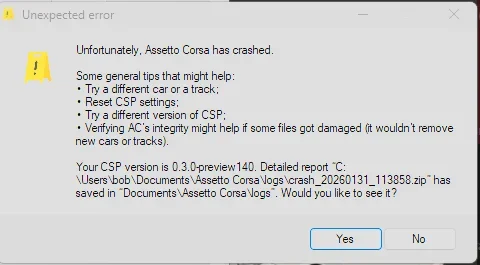
But whit this just like the latest preview i get this errors, any clue on how too solve this?
 

Attachments

  • Schermafbeelding 2026-01-31 124011.webp
    Schermafbeelding 2026-01-31 124011.webp
    18.3 KB · Views: 8
Last edited:
Yes. But which one is up to you.
Logically, both, because some models don't exist, like the M4 at RSS.
When I ask this, it's mainly for the 296 and the Mustang, which can be found at Chemmflumi, LP Design (Mustang), RSS, and URD.
 
thank you for the help, now it looks amazing 🤩

But whit this just like the latest preview i get this errors, any clue on how too solve this?
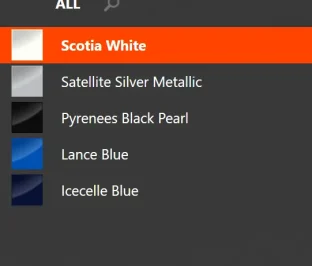
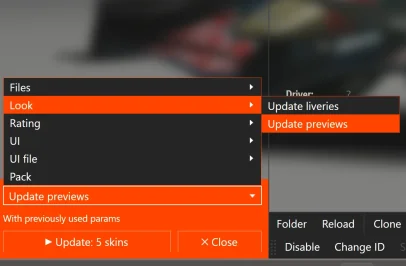
Go to Skins menu

1769870337851.webp

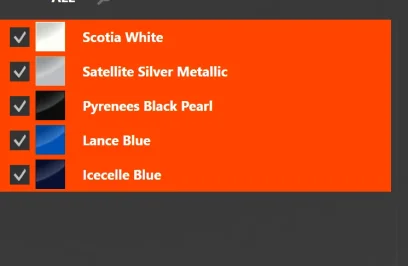
Select all on the left column (Shift and click on the last one)
1769870401762.webp 1769870417829.webp

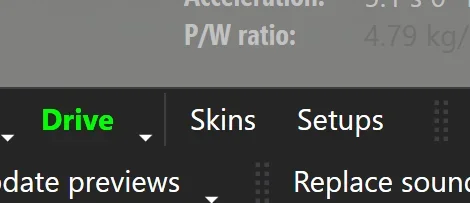
Then Update previews fromt he drop down menu at the bottom left

1769870470075.webp

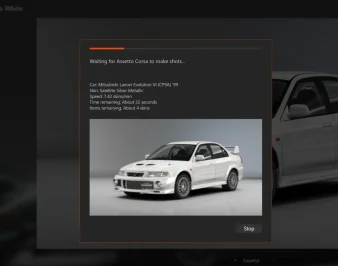
That way its updating each skins individually instead of in batch, takes longer but havent failed me yet for thos recent RSS/VRC one that pop that error

1769870559270.webp

(I know its not a RSS/VRC one, car is only to educational purpose)
 
Go to Skins menu

View attachment 1510148

Select all on the left column (Shift and click on the last one)
View attachment 1510149 View attachment 1510150

Then Update previews fromt he drop down menu at the bottom left

View attachment 1510151

That way its updating each skins individually instead of in batch, takes longer but havent failed me yet for thos recent RSS/VRC one that pop that error

View attachment 1510152

(I know its not a RSS/VRC one, car is only to educational purpose)
thanks for your help!
 
@Tetri: Working with AIWhisperer lately and have a few questions.

View attachment 1510129
Hey mate!

  • to share my settings, is it only settings.ini that needs to be shared?

there are 2 types of settings.ini files saved with Aiwhips.

The global settings are saved in the assettocorsa\apps\lua\aiwhisperer, with the app itself. It's important to save it before updating the app for a new version, cause that's definitly something i'd forget about and your settings file would be overwritten by mine. I suggest saving it somewhere and bring it back after an update.
The track settings are saved in the \content\tracks\whatevertrack you're using, including layouts\data.

Same where the ai_hints.ini are saved for the particular track/layout.

In example, for the WSC layout of the Monza 1966 track :


Capture d'écran 2026-01-31 144447.webp

If you would share the settings for a specific track, this is the file.
In my opinion, since i'm working on everything AI, like the fastlane.ai and the ai_hints.ini, this is a perfect spot as you would share the ai and data folders anyway, allowing you to share everything at once. AI whisp non-users would get that settings.ini file as well, the game would ignore it, no impact for non users.


As for the Global settings : AIWhisp is supposed to load all settings at start :
tracks settings first =>apply , if not existing fallback to
global settings => apply if not existing fallback to
Default settings (the ones AC would charge anyway).

Note that the prevent brakemistakes (default 1.0) and AIgrip (default 1.2) are locked at my values at start to make sure everyone is one the same page. i've seen - rare - cases or cars having ai.ini settings with aigrip at 1.5, and i prefered to have 0 brake mistakes while setting up the app to eliminate false negatives results while tweaking, where i would think the app values made the AI crash while a brakemistake was triggered randomly by the game.


  • Question: does saving settings as Track Specific have any influence on the settings previously saved as Global Settings? (and vice versa?) Or can I count on them remaining the same unless I intentionally overwrite?

Both are different, and saved in different places.

You save a car to global settings when you think you have the perfect combo of values and want them to be used everywhere. Aiwhisp will load them at start when no track settings can be found, ie working on a new track.

Exemple : you run Kunos GT40 vs Ferrari 330 at Stardust; You already made track settings for the Gt40 but only global ones for the Ferrari. The app would load track settings for Gt40 and global ones for Ferrari.

I am changing a few things atm for the saving system, so i'd suggest always saving all cars to track settings once you have a nice combo. Obviously to prevent an update overwriting your hard work, and be sure you would find those settings in the future.

Considering the considerable amount of changes incoming for next versions and their highly "AlpHaTesTINgGuiNEaPig" behavior, it's not off the table that you would rather use the version you currently have instead of the next update, so having those track settings secured would allow you to go back to a previous version and find your settings all clean and ready to run.


  • Question: Do I need to "Reload" Global settings each time I start a session? Can I reload global settings and then reload track specific settings after to pick up the cars that do have track specific settings (and leaving the others with the Global settings)?

Depends on the version you're using. Normally they should be loaded at start, but i would check and make sure they are. Usually it's easy to check by clicking right button on the main values tab, and see if the sliders at start are at default or edited value.

To make it simple to grasp, at start AI whisp would load tracksettings>globalsettings>default. So, if you have track settings saved for a car, it would be loaded instead of global settings.

I'll have a look and make sure everything goes smoothly on the matter for the next update (Automatically load track then global settings at start, which should be the normal behavior). I can't remember having issues with the track settings file anyway, as they were always properly loaded at start, but i'll give it a double check.


  • Another! Could we have separate settings.ini files for each of different car sets? Nice if we could just pick a carset from a list (or it auto selects the carset based on what it sees)
I think i misunderstand the question : you have a car tab that saves settings for a dedicated car type. You mean having different sets of settings you could pick up from for the same car type? or something else, sorry, i'm missing the point completely here😂


  • Suggestions! Can you get AIWhisperer to auto-select the tab for the focused car? (optionally?) Can you have the tabs go down onto a second row so all tabs are wider and readable? (Tabs get mighty small with lotsa cars)

hehe yeah that was discussed this month! This is being implemented. i'm guessing you are playing with 20 different WSC60 cars and the tabs are absolutly unreadable. So far my trick is to click on each tab until the "focused car" warning goes off, but i agree, it needs UI improvments. The only downside is that, using replays, you sometime need


- What do you think about transferring some of the found data back into the code for the car?

Nope! The modder might have intended the car to behave that way for his particular tracks. In my opinion, i would not let my app (or any app for the matter) to modify original files from a car. I'm also going for the torque/power LUTs and other acd files in the next batches, and the app can intercept and modify them on the fly, without touching anything in the original file.

That also makes sense looking forward for the AI apps that could be developped by others, and where AIWhisp would become obsolete. Better have your cars files untouched and ready for online, as AIwhisp already does.


-And are some of those settings ineffective or counter-effective when a real human is driving the car? Like steering gain (when the user is driving the same car as the ai)? Or do all the settings only affect ai drivers (and only when AIWHisperer is running)?

The car#0 (player's car) is unaffected by the changes when a human is driving it. I think on the version currently available it's not even affected by the main values changes, but i have to check on that since i updated this specifically for another user.

Anyway, the changes are strictly when AI is running, and only if the app is running 🙂


-So far I'm only working with two variables (mostly, sometimes the closer racing slider), brake hint and turn in (which seems to be corner-radius also) and am getting very good results. I'm staying away from adjusting grip and such (almost) and am finding no need to use them. Civilized ai racing! Apparently if all cars arrive at the corner and turn in correctly there's very little collision action, and even tidy two-wide through the turns! Still the occasional bumper bumped but I also use Stretched Grid keeping things clean. Two wide through the first chicane at Monza! Stoked, I am.


The side by side behavior and a few other little tweaks helps a lot. basically it tells the AI car to use slightly modified inputs reading from the fastlane when 2 wide. I also think it does a good job - most of the time. Glad you noticed!
The elasticaution, sadly on my end, was way too tricky to use, especially on custom fastlanes where the braking points are super precise. It works fine on "gentle" fastlanes, where everything was way too safe anyway in the first place.

I'm implementing other solutions (see below for the straigh lines ie).
If you wanna have a go at the next version that pushes the AI with gaspedal inputs and positioning, just ask in DM, i need testers anyway.


- Another thing, it seems that it's even better if the ai cars don't each have ai_default setups. Or at least they aren't necessary.


Ah! That's something that needs to be investigated. It is not related to AIwhisp.

I noticed there's a Race Engineer starting in the AC logs at startup and saw that the gear setups were... Almost properly chosen and applied to AI? There must have been a CSP change in the last versions, but i couldn't pinpoint it.

I never had much luck with the ai_default setup anyway, so that was very welcome.

I suppose ideally I'd drive all the cars and get good setups for them, then review/replace the track ai lines, and Then do the AIWhisperin' but NOT. Gettin closer to racing, not caught in a fixin-things loop.

At the moment i'm more about exploring all possibilities and let the user try to find its way with them. Pretty much no automation, just a bunch of sliders. I'm pretty sure it's the best way. Although most of my users would just drop it at first sigh - can't blame them-, the ones that actually dig a little into it can really improve their offline experience.


For example, i saved on almost all my cars these Zone1 modifiers :
Capture d'écran 2026-01-31 154824.webp


Then, using AIHINTSReader, apply Zone1 to all straights acceleration zones :


Capture d'écran 2026-01-31 155546.webp


I cannot stress this enough, only for ACCELERATION ZONES, so the Zone1 should def stops before braking zones, but anyway, with this simple mod, you have AI blasting on straights without slowing down if there's a car slower at front.
It also works at corner exits where an AI would not fully blast the gaspedal if there's someone at front, but there a little bit of try and error for those cases.

(Maybe we need to set up an AIWhisperer team to mow through all cars & tracks?)

Let's see where it goes! I'm in contact with other AI tweakers and they have different visions and ways, can't tell who's gonna come with an ultimate fix for AI.

Anyway, in my opinion, sharing AI whisperer settings for tracks can't harm if it makes the experience better.
 
Sharing a mod? Host it on GTPlanet Downloads. Free, public hosting for files up to 10GB in size.
Back