Assetto Corsa PC Mods General DiscussionPC 

  • Thread starter Thread starter daan
  • 158,809 comments
  • 52,566,968 views
... Thoughts?
That Assetto Corsa ticks practically all the boxes: superb FFB, can achieve gorgeous graphics, great variety of options, compatibility with any PC level, etc, etc... with AI being the weak point (although there's hope for improvement thanks to the efforts of people like Tetri or ancient_3), but also suffers from the dreaded CURSE OF SUCCESS...

The fact that it's open source allows a vast number of modders, with varying levels of skill and knowledge, to offer their mods developed according to their own vision of the game, which sometimes makes it difficult for mods from different origins to work perfectly together. Besides, the perpetual evolution of the game (or rather, of the equally loved/hated CSP) means that many mods become "obsolete," further complicating the situation.

Ideally, all creators would adhere to a single pipeline to ensure consistent results, but of course, that's impossible, and the problem shifts to knowing how to separate the wheat from the chaff... a difficult task for die-hard hoarders like myself, who treasure almost all the garbage that comes our way, even if it sometimes makes our eyes bleed. You never know when you'll need that bathtub on wheels, or those homoerotic musclemen riding on weightlifting bars... 😌
 
Last edited:
One question while enjoying 1990 f1 cars from RSS. I remember there was an entry in ai.ini or tyres.ini where you could define up to how much laps (or was it km) which tyre compound is selected by ai. So that the ai doesn't start the race with Q tyres.
Not an answer to your actual question, but I think you can manage AI starting tyres among other things with one of Nuzzi's apps.
 
One question while enjoying 1990 f1 cars from RSS. I remember there was an entry in ai.ini or tyres.ini where you could define up to how much laps (or was it km) which tyre compound is selected by ai. So that the ai doesn't start the race with Q tyres.
ai_tyres.ini

content like this below, tyres.ini compound reference SHORT_NAME=SS

[SS]
MAX_KM=50
[Comp2]
MAX_KM=70
[Comp3]
MAX_KM=120
[Comp4]
MAX_KM=170
 
Last edited:
No. I have to check that. That was an amazing sim.

Did you know that Valtteri Bottas (10 times F1 GP winner) played LFS regularly back in the day?
If he played a modded version of AC, at least that would be relevant to this thread.

This, and your previous posts, are in the wrong thread.
 
Hi

I'm having a problem with CM (version 0.2.11). I hope you can help.

For a few days now, without making any changes compared to when it worked both in races and on weekends, the car I'm driving teleports to the pits after one or two laps. I've tried with various cars and tracks, but the result is always the same.

Any suggestions?

Thanks
 
Hi

I'm having a problem with CM (version 0.2.11). I hope you can help.

For a few days now, without making any changes compared to when it worked both in races and on weekends, the car I'm driving teleports to the pits after one or two laps. I've tried with various cars and tracks, but the result is always the same.

Any suggestions?

Thanks
"something" has likely modified the ./ai/fast_lane.ai file.
 
Hi

I'm having a problem with CM (version 0.2.11). I hope you can help.

For a few days now, without making any changes compared to when it worked both in races and on weekends, the car I'm driving teleports to the pits after one or two laps. I've tried with various cars and tracks, but the result is always the same.

Any suggestions?

Thanks

"something" has likely modified the ./ai/fast_lane.ai file.
Yeah i was thinking of a penalty false positive.
But if it happens on all tracks, it could be an app somewhere doing weird things.

@roviet, open the luadebug (in the taskbar) and have a look at what's running. Might be an app you forgot about that is looping the player's car or with a reset timer on it.
 
Yeah i was thinking of a penalty false positive.
But if it happens on all tracks, it could be an app somewhere doing weird things.

@roviet, open the luadebug (in the taskbar) and have a look at what's running. Might be an app you forgot about that is looping the player's car or with a reset timer on it.
First of all, thanks for the replies.

After further tests, it seems to be more of a hardware issue. Disabling the teleport-to-pit and restart-race buttons on the wheel rim doesn't cause any problems at the moment.

The problem is figuring out what needs to be changed to reuse these functions: the base (TS-XV-Racer) or the wheel itself, which is giving a false contact due to wear.

I'll try on another sim (Evo-Rally) to definitively determine if the problem is hardware or software.
 
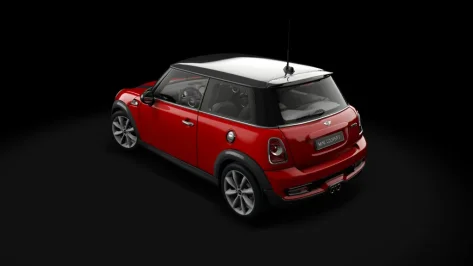
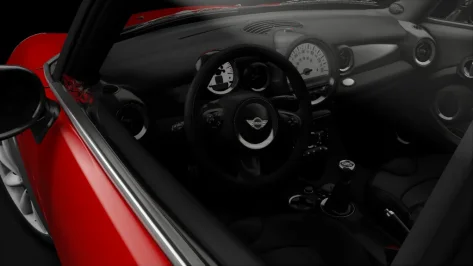
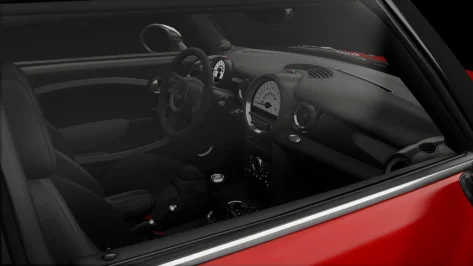
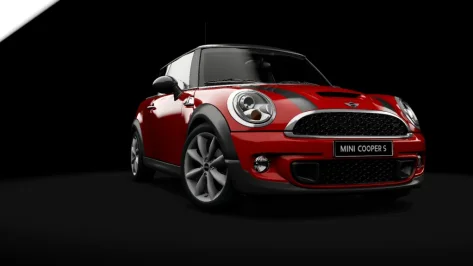
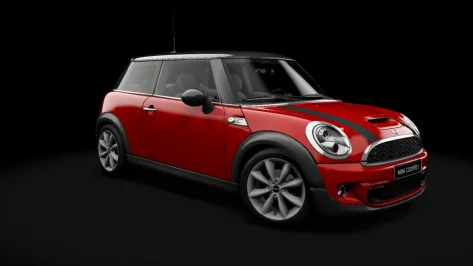
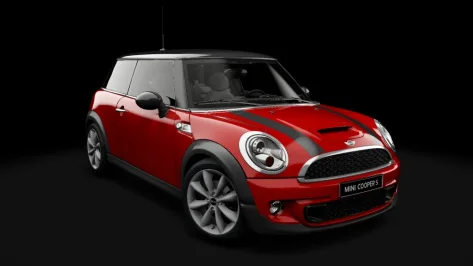
Mini Cooper S R56 2011 Public Release!!
Download: https://www.mediafire.com/file/gu12ffg1bo2jeag/r56_cooper_s__101creative.rar/file
Converted From GT6
-AO inside and out
-Realistic Dashboard
-Physics
-CSP Settings
-Driver Animation
-Panoramic session Start config Daniel Nogal


__custom_showroom_1778871989.webp__custom_showroom_1778871984.webp__custom_showroom_1778871979.webp__custom_showroom_1778871943.webp__custom_showroom_1778871936.webp__custom_showroom_1778871917.webp
 
Hi

I'm having a problem with CM (version 0.2.11). I hope you can help.

For a few days now, without making any changes compared to when it worked both in races and on weekends, the car I'm driving teleports to the pits after one or two laps. I've tried with various cars and tracks, but the result is always the same.

Any suggestions?

Thanks
if is weekend maybe check if you have any time on practice par
 
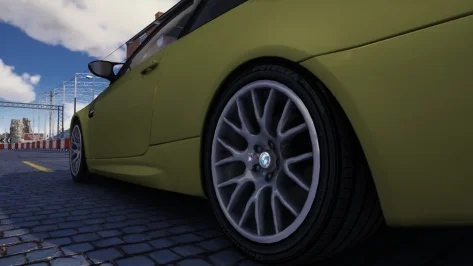
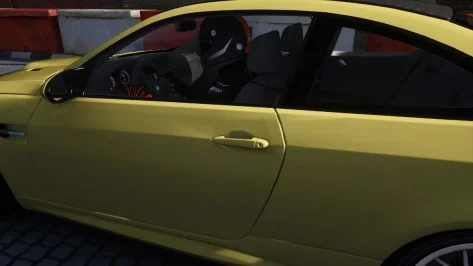
Over the past few days, I've been trying to change models, hoping to continue my work without big issues. While working on the M3 E92, I noticed other strange errors in the 3D meshes...Maybe here we have overcome the hole in the backseats of the Alfa Mito LOL
 

Attachments

  • Screenshot_bmw_m3_e92_ks_highlands_15-4-126-22-36-47.webp
    Screenshot_bmw_m3_e92_ks_highlands_15-4-126-22-36-47.webp
    55.1 KB · Views: 12
  • Screenshot_bmw_m3_e92_ks_highlands_15-4-126-22-37-24.webp
    Screenshot_bmw_m3_e92_ks_highlands_15-4-126-22-37-24.webp
    37.6 KB · Views: 10
Over the past few days, I've been trying to change models, hoping to continue my work without big issues. While working on the M3 E92, I noticed other strange errors in the 3D meshes...Maybe here we have overcome the hole in the backseats of the Alfa Mito LOL
Hi. Is it happened after export from 3d software? Here some pics for comparison how stock kunos model looks.
Screenshot 2026-05-16 000248.webp
Screenshot 2026-05-16 000340.webp
 
Negli ultimi giorni ho provato a cambiare modello, sperando di poter continuare il mio lavoro senza grossi problemi. Mentre lavoravo sulla M3 E92, ho notato altri strani errori nelle mesh 3D... Forse qui abbiamo superato il buco nei sedili posteriori dell'Alfa Mito LOL
Ciao. È successo dopo l'esportazione dal software 3D? Ecco alcune immagini per confronto di come appare il modello Kunos originale.
View attachment 1537216View attachment 1537217
After learning how to fix incorrectly mapped carbon and correct dozens of mods, I would like to understand how to fix these types of mesh errors with blender which is another common problem of many mods
 
Last edited:
Your car is beautiful, like all your mods. Thanks for this. The only thing is, maybe the day lights are a little too bright.
 
So I'm having a problem with aa_ims where the AI will just all pit after a couple laps and sometimes won't even leave the pits or just go straight into the pit wall? Anyone else had this issue before?
 
After learning how to fix incorrectly mapped carbon and correct dozens of mods, I would like to understand how to fix these types of mesh errors with blender which is another common problem of many mods
This is most likely problem with mesh smoothing. But I mostly use other 3d soft than blender. In 3d Max I untick smoothing groups when export meshes and this problem disappears. Try different smoothing (face, edge) export options in blender.
 
BMW M1 Procar v3.0 BETA

__custom_showroom_1778908370.webp


Well, I guess its time to release a Beta at least.

But why is it Beta only? Because I'm unable to create new steer and shifting animations. But hopefully someone will take care of it. Created LODs with Poly Cruncher, no comments please.

Car is now nearly properly scaled and got himself a rear mirror. I'm wondering myself why it never had one. It was a PITA to rework the extension, scaling messed up maaaaaaany things, but it should fit again.

In this Beta release I didnt include the skins, only one skin is within the archive. I think everyone should already have a quadzillion skins for this car.

If you find anything still in need of fixing, feel free to contact me. All physical data is unchanged tho, so dont contact me if you want this car to drive like a modern GT. This will never ever happen!

Temp Download: https://www.mediafire.com/file/a8yuvst23i2bkh9/pddw_bmw_procar_m1_3-0.zip/file

Final release will be added to the database of GTPlanet.
 
Last edited:
BMW M1 Procar v3.0 BETA

View attachment 1537416

Well, I guess its time to release a Beta at least.

But why is it Beta only? Because I'm unable to create new steer and shifting animations. But hopefully someone will take care of it. Created LODs with Poly Cruncher, no comments please.

Car is now nearly properly scaled and got himself a rear mirror. I'm wondering myself why it never had one. It was a PITA to rework the extension, scaling messed up maaaaaaany things, but it should fit again.

In this Beta release I didnt include the skins, only one skin is within the archive. I think everyone should already have a quadzillion skins for this car.

If you find anything still in need of fixing, feel free to contact me. All physical data is unchanged tho, so dont contact me if you want this car to drive like a modern GT. This will never ever happen!

Temp Download: https://www.mediafire.com/file/a8yuvst23i2bkh9/pddw_bmw_procar_m1_3-0.zip/file

Final release will be added to the database of GTPlanet.
Thanks for this. happy to look at the driver and shifting, but it might be better to give this one a new folder name so it doesn't overwrite the original car. It's impossible to compare/contrast otherwise.
People will also lose all the skins if overwriting.

Edit: here's a new driver and shifting animation.

1778915964973.webp 1778915997025.webp 1778916019498.webp 1778916053634.webp

Edit 2: nice job with the rescale. Original bloated Procar is far right, yours is second right, others for context.

1778916622803.webp


Edit 3: you said not to mention the LODs but they seem fine, except for the lights. I think all the light mesh names need to be added to the 'merge exceptions' section of the LOD generator.
Currently LOD A, all fine:

1778917239060.webp

LOD B (and C and D), milky lenses:

1778917285617.webp
You won't see this in CM Showroom as it's a refractions issue, I think. CM Showroom ignores it.

One more thing (an annoyance from the original car), it'd be good if the roll cage welds were the same colour as the tubes. The roll cage is welded THEN painted, so everything should be the same colour. :)
Oh, one more, the instrument dial glass is quite cloudy, maybe has too high diffuse applied?
 

Attachments

Last edited:
@Pfalzdriver, one more thing carried over from the bloated car is the OEL-DRUCK and BENZIN dials being upside down (you can see the milky glass I referred to earlier here).

1778918505853.webp


The dials aren't inverted on the proper car:

1778918365720.webp


Not a big deal if it's a PITA to fix (the dials can be flipped easily in the DDS, but the needles will also need moving in the kn5), but it's always struck me as a little weird.
 
Last edited:
2004 Audi A4 DTM for Assetto Corsa Version 1.1 by F302 and Peugeot905

download: https://www.mediafire.com/file/q8mi...11_Version_1.1_by_F302_and_Peugeot905.7z/file

DTM Touring Cars and GT's Near Finalized: https://www.mediafire.com/folder/ukbm3vkqgpaas/DTM_Touring_Cars_and_GT's_Near_Finalized

Lemans Prototypes: https://www.mediafire.com/folder/7g6488jsyt2ux/Lemans_Prototype_Near_Finalized

Version 1.1 update

-Increase in brake torque
-Minor Aero Balance update more frontward
-Minimum ride height changed from 0.55 to 0.60 mm
-Updates to sound volume
-Slight reduction in Mechanical Grip
-reduction of downforce from the winglet
-Changes to BRAKE_HINT and TRAIL_HINT
-Updated to driver3d.ini shift_animation

Version 1.0 update

-Reworked Physics
-Updated sounds
-Removed Soft, Medium, and Hard Compound Tyres
-Added Dunlop SP Sport Maxx standardized dry slick compound
-Update to wear curve front and rear for tyres
-updates to tyre.in
-slight update to aero balance
-updated final ratios
-adjusted ai.ini
-adjusted drivetrain.ini default gear ratios
-adjusted power_curve
-updated ui
-updated digitalinstruments.ini
-update to car inertia
-adjusted fuel consumption
-new carbon texture (interior, Exterior)
-new alcantara textur
-new AO mapping (interior, exterior)
-new shift animation
-new door animation
-new disc texture
-new tyre texture
-new extensions file
preview.webp
preview.webp

preview.webp
 
Hi. Is it happened after export from 3d software? Here some pics for comparison how stock kunos model looks.
View attachment 1537216View attachment 1537217
Unfortunately is the original mesh without any modification. The scritp I applied brings out the real quality of the 3D models.. If you notice, even on your screenshot those problems are present (look at the two diagonal lines next to the door handle) 😓
After learning how to fix incorrectly mapped carbon and correct dozens of mods, I would like to understand how to fix these types of mesh errors with blender which is another common problem of many mods
Basically it depends on the 3D model you're working on. But generally select every vertex in edit mode, ALT + J for tris to quads and then merge vertex by distance. In this way you have at least a cleaned-up mesh as a baseline. Then, well..there's no step by step guide. Try working with bevel edges, subdivision surface ecc.. but be careful, enable statistics and take a look at the vertex count. 👀
 
2004 Audi A4 DTM for Assetto Corsa Version 1.1 by F302 and Peugeot905

download: https://www.mediafire.com/file/q8mi...11_Version_1.1_by_F302_and_Peugeot905.7z/file

DTM Touring Cars and GT's Near Finalized: https://www.mediafire.com/folder/ukbm3vkqgpaas/DTM_Touring_Cars_and_GT's_Near_Finalized

Lemans Prototypes: https://www.mediafire.com/folder/7g6488jsyt2ux/Lemans_Prototype_Near_Finalized

Version 1.1 update

-Increase in brake torque
-Minor Aero Balance update more frontward
-Minimum ride height changed from 0.55 to 0.60 mm
-Updates to sound volume
-Slight reduction in Mechanical Grip
-reduction of downforce from the winglet
-Changes to BRAKE_HINT and TRAIL_HINT
-Updated to driver3d.ini shift_animation

Version 1.0 update

-Reworked Physics
-Updated sounds
-Removed Soft, Medium, and Hard Compound Tyres
-Added Dunlop SP Sport Maxx standardized dry slick compound
-Update to wear curve front and rear for tyres
-updates to tyre.in
-slight update to aero balance
-updated final ratios
-adjusted ai.ini
-adjusted drivetrain.ini default gear ratios
-adjusted power_curve
-updated ui
-updated digitalinstruments.ini
-update to car inertia
-adjusted fuel consumption
-new carbon texture (interior, Exterior)
-new alcantara textur
-new AO mapping (interior, exterior)
-new shift animation
-new door animation
-new disc texture
-new tyre texture
-new extensions file
View attachment 1537498View attachment 1537502
View attachment 1537503
Does this Audi have friends to race? Or is it a standalone car?
 
Unfortunately is the original mesh without any modification. The scritp I applied brings out the real quality of the 3D models.. If you notice, even on your screenshot those problems are present (look at the two diagonal lines next to the door handle) 😓

Basically it depends on the 3D model you're working on. But generally select every vertex in edit mode, ALT + J for tris to quads and then merge vertex by distance. In this way you have at least a cleaned-up mesh as a baseline. Then, well..there's no step by step guide. Try working with bevel edges, subdivision surface ecc.. but be careful, enable statistics and take a look at the vertex count. 👀
Huh?! Script that affects meshes geometry? What kind of witchcraft is that?
Yes, there is some weak spots in kunos topology. But real quality is shown on my screenshot. Yours looks like lod b. Definitely something breaks polygon alignment, smoothing or something.
 
Thanks, it's very nice indeed. Jugee8 worked his usual magic on the model, managing to make it look just as good as Kingstriker's excellent 959 but with about a third of the poly count. Really nice optimisation there.
I'd personally like a little more mechanical grip, but IDK, maybe it's realistic for Michelin Pilot Sport 4s. An option for semi-slicks would be nice for track use.
If the model ever gets an update there's some stitching on the far left and right of the lower dashboard that's been incorrectly grouped with internal screws, so has a weird metallic effect and missing the necessary alpha blend. It can be toned down in the config but then the actual screws are also affected. Probably only annoying for VR drivers though.
Speaking of which, attached is a tweak to the driving position and a new (less robotic) shifting animation (remove the .txt extensions and put in the car's animations folder), plus a proper preload revs value. If used, you'll need to unpack the data and amend driver3d.ini thus:

[SHIFT_ANIMATION]
BLEND_TIME=100
POSITIVE_TIME=320
STATIC_TIME=10
NEGATIVE_TIME=320
PRELOAD_RPM=6700
INVERT_SHIFTING_HANDS=0
Thanks for these. I agree, some track based semi-slicks would be great, as these default tires seem to over heat around every corner for me. Plus, I can't get them in to the correct pressure window. At 33psi default the tire app says they're 7-8psi below optimum. Is this correct?
 
Sharing a mod? Host it on GTPlanet Downloads. Free, public hosting for files up to 10GB in size.
Back