
have you tried this?I have interest with this car, but sadly I cannot do suspension animation.
maybe anyone can do suspension animation?
have you tried this?I have interest with this car, but sadly I cannot do suspension animation.
maybe anyone can do suspension animation?


problem with 3d model and skinwhat's the problem with them?

Added a rear facing exhaust with shake,glow and flow.
View attachment 1174800View attachment 1174801
Download the mod from safi hellie's original post if you do not already have it.
Assetto Corsa PC Mods General Discussion
Let me guess the small trees are also 2D models, so its a good tip to reduce all those unrealistic 2D models. 90% of AC trees are 2D cardboard trees, this doesen't affect the quality of them. 2D grass instead looks weird because most of the time is a straight line, which is totally unrealistic...www.gtplanet.net
Make a backup just in case,overwrite when asked.
edited sr5.kn5 and necessary .ini's.

have you tried this?

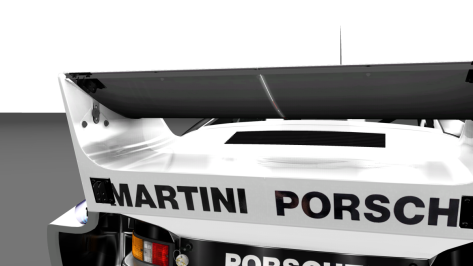
All sorts of problems. I guess that is why @Arturo4AGE has removed the download. The AO map is very flawed with overlapping mapping for example on the door sills, leading to an uncorrectable reversing (mirror image) of whatever is written on the sill on the opposite side, and a split rear spoiler whereby it is impossible to make the top side and the underside fit properly. As the top two sides meet there is a thin black line and the underside still shows a thin strip of what should be the top. No amount of nudging corrects this. There are other places where the mapping is erratic.what's the problem with them?

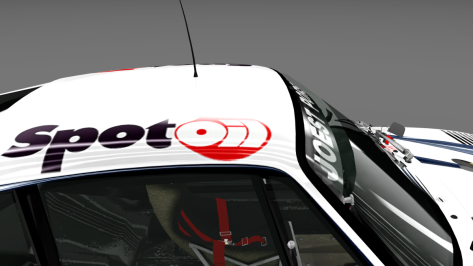


Are the lines okay? It is strange, that the problem occurs only with C9 and XJR-9, all other cars drive correctly.You could probably experiment with AI hints to slow the cars down..
good news is, legion's is the same model (PC2) and is a full conversion so the skins is compatible with that one, it's just renaming them and getting the correct files in.All sorts of problems. I guess that is why @Arturo4AGE has removed the download. The AO map is very flawed with overlapping mapping for example on the door sills, leading to an uncorrectable reversing (mirror image) of whatever is written on the sill on the opposite side, and a split rear spoiler whereby it is impossible to make the top side and the underside fit properly. As the top two sides meet there is a thin black line and the underside still shows a thin strip of what should be the top. No amount of nudging corrects this. There are other places where the mapping is erratic.
Rather more seriously, there are real issues with the 3d model. The windscreen doesn't fit properly for example. All in all It would take a lot of work to fix these issues. I would start the conversion again from scratch.
View attachment 1174919View attachment 1174920View attachment 1174921
Yes you could do that, but the skins are of such dire quality I would need to redo every one in a decent resolution with new decals to be acceptable to me personally. Also Legion's model is not accurate to the 935/80 - most obviously in lacking the grilles above the front wings, which Arturo's model has. Arturo's model also has a bonnet like the 935/80 and the intakes on the rear fins.good news is, legion's is the same model (PC2) and is a full conversion so the skins is compatible with that one, it's just renaming them and getting the correct files in.


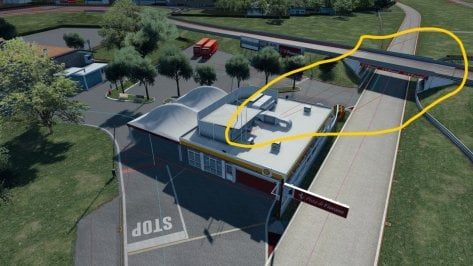


This usually isn't an easy fix. The best solution is to load the model in 3D Studio Max or Blender, use the UVW editor to "cut apart" and "flatten" sections of the model, and reapply materials to them. Very likely what you're seeing are some "stray" polygons that got separated from the hood shape. They need to be "re-stitched" to the hood polygons that make up the shape.Hello everybody
This is my first time writing, but I've been reading you for a long time ...
I wanted to ask you a question:
Is it possible in some way to remove these artifacts that I often find on the surfaces of the car body but especially on the carbon parts?
View attachment 1174916View attachment 1174917

Watching the replay shows that the AI expect to make the turn just by lifting the throttle instead of braking, they only start braking after touching the grass. I don't think it's a problem with the sidelines nor with the fast lane. Since most other cars can make the turn just fine, it's probably something that must be tweaked in the car data instead of reducing the AI speed through the corner globally through ai_hint.ini.Are the lines okay? It is strange, that the problem occurs only with C9 and XJR-9, all other cars drive correctly.
View attachment 1174922


you need to create AI sidelinesI'm currently trying to make new ai lines for fiorano which works great...apart from this section. At first I thought I went over one of the red boundaries, but I redid it staying well clear, and it still messed up. What happens is that the red boundaries get moved all over the place (they are all neat and tidy before recording lines), making the ai cars jerk the wheel on the front straight and all sorts of crazy stuff.
Does someone know, why? Or how to fix this?
View attachment 1174966
 www.racedepartment.com

I can rework the physical road mesh. Is anyone after it or can I proceed?Nice updates! While everyone is improving it...
Road Surface Update?
Can the road surface finally be improved to add some "road feel" bumps to the smooth segments, and more importantly, remove or significantly reduce the small cliffs and drop offs just before some of the turns. I can understand maybe the pavement becoming deformed in areas where's there's a lot of heavy braking, but these bumps are extremely harsh and unrealistic. If it were a real life track, it would be closed until repaired.
Super Bright Lights on Vehicles in the middle of the day
The flashing lights with a glow are a nice feature to add--even though emergency vehicles usually don't flash their lights if there's no emergency. On my system, with CSP 0.1.78, if the time of day is set to noon, these vehicles "glow in the light." Maybe it's my CSP, or maybe they're too bright?
Regardless, Keep up the good work. Looking forward to more releases.

@El Locho I've checked my v1.0 but i don't have any issue like yours :-/Are those red lines supposed to be looking like that (or did I miss an update)? It sure makes for an interesting game mode though...
View attachment 1174134View attachment 1174135
Edit: recording some quick sidelines did the trick. It'll work for me but maybe somebody more experienced can provide some proper sidelines to replace the ones in the mod...


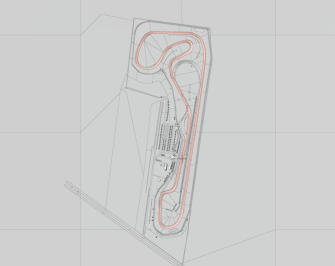
Reworked Crystal Palace from Kit Lethby
Added GrassFX,RainFX,New Trees,Cameras,Blimp and Balloons from Masscot
Have Fun
DaBaeda
Download:


I did that, unfortunately, it didn't do anything. I can record them, and they are present as a file, but when I then record my ai line as soon as I cross the finish line ALL red/yellow side boundaries vanish, such that I only see the previous pink fast line. When I then exit and load back in with the new ai line, there are no more yellow sidelines and the red is all scrambled again :/you need to create AI sidelines
AI Line Helper
Demo Video: AI Lines Extended Tutorial: Partial Side Lines Demo: Extended Tutorial Corrections/Additions/Clarifications 9:30 I should have said “I like the FX17 for recording side lines” 15:50 You don’t need to start recording a fast_lane...
The problem was solved, just forced the cars to slow down a little in this turn, now they pass it on the edge, but stay on the track.Watching the replay shows that the AI expect to make the turn just by lifting the throttle instead of braking, they only start braking after touching the grass. I don't think it's a problem with the sidelines nor with the fast lane. Since most other cars can make the turn just fine, it's probably something that must be tweaked in the car data instead of reducing the AI speed through the corner globally through ai_hint.ini.


From my experience, a newly created AI line creates its own sidelines (not very well) which is why you are seeing the inferior ones.I did that, unfortunately, it didn't do anything. I can record them, and they are present as a file, but when I then record my ai line as soon as I cross the finish line ALL red/yellow side boundaries vanish, such that I only see the previous pink fast line. When I then exit and load back in with the new ai line, there are no more yellow sidelines and the red is all scrambled again :/


I can explain to you, it took me a while to understand but in fact it's not very complicatedI have interest with this car, but sadly I cannot do suspension animation.
maybe anyone can do suspension animation?

I've just tried it works fine here@DaBaeda It says TRACK NOT FOUND for me.
Weird - are you using CM? I don't.I've just tried it works fine here
yes I'm using CM.Weird - are you using CM? I don't.
Thanks. So @DaBaeda, Crystal Palace doesn't load without CM. ("TRACK NOT FOUND") Folder path checked and OK. Could you pls fix it?yes I'm using CM.
It is load only if you use CSP!!Thanks. So @DaBaeda, Crystal Palace doesn't load without CM. ("TRACK NOT FOUND") Folder path checked and OK. Could you pls fix it?
It looks as if (my) CM or CSP are messing up the fast_lane.ai when loading the track for the first time...@El Locho I've checked my v1.0 but i don't have any issue like yours :-/
View attachment 1175007View attachment 1175008
Sorted thanks to a member via PM.ATCK has done some nice fixes for the Mazda Miata I did, but I can't download it as at my end windows is blocking it as a virus.
Has anyone been able to grab it with no issues?


