- 152

- Portugal
That's what you get for not reading the manualThis is from the Pure install guide....
BTW are there proper PPFilters for HDR?
That's what you get for not reading the manualThis is from the Pure install guide....
right click on the folder and check Properties/Security/Users, you should have Complete autorizzations (ITA: Proprietà/Sicurezza/Utenti e Gruppi/autorizzazioni: Controllo completo)... seems that you don't have access permissionsHi guys, i need an help, some days ago my CM start show this message, and since that moment, country flags of tracks are not showing. don't know what to do, a reinstall doesn't work. CM vers. is 0.8.2561.39678
Thanks!
View attachment 1266955
Sorry, there is imo no grassfx lod value that we can change. Seems to be hard coded by Ilya.Amazing, do you know also how to increase grassfx lod? On some tracks grass is generated everywhere but on others the grass is generated only to a certain distance and it's quite horrible
Any idea how to increase the height of the onboard cam ?
The adjustment is only possible in cockpit view (with the wheel), once you have the view you want you have to select save dash. If save dash is not available, you will have to unpack data first.but when you choose this cam (without steering wheel) it won't let you adjust the height position.
Hi there,Probably something wrong with the settings of the cubes. You can do it with 3DSimed too:
![]()
Track conversion tutorial (gMotor2 to AC) v2.1 by Rainmaker
MediaFire is a simple to use free service that lets you put all your photos, documents, music, and video in a single place so you can access them anywhere and share them everywhere.www.mediafire.com
First of all, thanks once again for share...
I take this opportunity to comment on a small problem that happens with some mods, in this case with the interior rearview mirror of the Lancia Stratos (another of my wet dreams of youth)...
Sometimes, the image of the asphalt is reflected in some elements of the interior of cars; the white lines, the pianos, the grass (yeah, I'm always off track limits 😅), etc, etc, which is annoying and unreal. It usually happens in structures like carbon parts of the interior, or in the roll cage bars, usually with shiny surfaces, but it had never happened to me with the mirrors. In the interior rearview mirror of this Stratos, in addition to reflecting the correct rear image, you can also subtly see the texture of the asphalt, the starting lines, the pianos...
Is there an easy way to correct this effect? And if so, could someone explain how to do it step by step? I would like to learn how to solve these little nuisances...
Easiest way if you know how to do it is through Blender. You can do it also with 3DSimed but it is more time consumingWould you recommend this 3DSimed program for making such edits as adding more pitboxes then? I'm wondering if Blender is not well-suited to such things, although I'm nowhere near experienced enough to really comment on it. I'm interested in knowing the simplest way to make such edits.
Thanks, unpack data is the answer for this. Thanks to all for helping me.The adjustment is only possible in cockpit view (with the wheel), once you have the view you want you have to select save dash. If save dash is not available, you will have to unpack data first.
To see the result from save dash in on board cam view, you have to exit back to CM and re enter.
View attachment 1267112
You can disable SSLR either entirely or in cockpit view only (what I recommend)Hi there,
Thank you for your reply.
Would you recommend this 3DSimed program for making such edits as adding more pitboxes then? I'm wondering if Blender is not well-suited to such things, although I'm nowhere near experienced enough to really comment on it. I'm interested in knowing the simplest way to make such edits.
I think this is caused by SSLR, and I believe there's even an option to disable SSLR in interior views somewhere in the CSP settings. I'm not sure if that would disable SSLR entirely (so no vehicle reflections on wet surfaces, etc).
Hi there,
Thank you for your reply.
Would you recommend this 3DSimed program for making such edits as adding more pitboxes then? I'm wondering if Blender is not well-suited to such things, although I'm nowhere near experienced enough to really comment on it. I'm interested in knowing the simplest way to make such edits.
I think this is caused by SSLR, and I believe there's even an option to disable SSLR in interior views somewhere in the CSP settings. I'm not sure if that would disable SSLR entirely (so no vehicle reflections on wet surfaces, etc).
Here:You can disable SSLR either entirely or in cockpit view only (what I recommend)
I am not at Home now but it has to be somewhere under extra.fx
Barber Motorsportspark from Terra21 updated DaBaeda
Thanks to Rainmaker for Ai and Sidelines and Fixes
Helicopters from BJ911
GrassFX,RainFX and Cams
Have Fun
DaBaeda
Download:
View attachment 1260775View attachment 1260776View attachment 1260777View attachment 1260778View attachment 1260779View attachment 1260780
it that still valid ? may I have a link no-patreon to download the CM version suggested by Boese ?DON'T UPDATE TO CM 0.8.2561.....
For all people who updated to the newest CM 0.8.2561....
This version will crash Pure and Sol !!!
Please uncheck this option: CM - settings - Content Manager - general - "update to untested versions" !!!
Please revert to this version:
https://drive.google.com/file/d/1tUusPtFLF2CNTqZY_ElM338lVNqkiti2/view?usp=sharing
Replace your ContentManager.exe with the one in the zip file.
Then reinstall CSP 0.1.80p218 again MANUALLY!
Download the zip, open it and copy the dwrite.dll and the extension folder to your AC root folder (steampapps/common/assettocorsa).
I worked with ImageMagick over 4 years ago as a batch converter or image editing tool for dds files. Cli command was mogrify imo. It worked very well then, and I'm sure it will be even better by now.thx, yes, I will explore that further... indeed much to be gained with nearly impossible to notice difference in quality.
So you mean CompactGUI LZX compress will give an extra gain over already compressed content folder with CM Compress (also uses LZX as per recommended)?
I will try that, thanks! EDIT: No, this doesn't give any gain on top of the compress of CM Compress tool.
Seems alot of improvement can be made still to the CM Compress Tool...![]()
:: Base Version
del /S /Q /F /a "Thumbs.db" "Desktop.ini" "*dropbox" "*DS_Store" "*picasa.ini" "~*" "pspbrwse.jbf"
:: Extentended Version
::del /S /Q /F /a "*template" "*.psd" "*.rar" "*.7z" "*.zip" "*backup"
del /S /Q /F /a "*template" "*.psd" "*.rar" "*.7z" "*.zip" "*backup"
I find that very strange. It ALWAYS has gained me quite a few hundred MB at least. CompactGUI on the content folder or even the full AC folder will compress every file it finds possible, whereas CM compress does not touch a lot of the files such as PSD/PDF files etc etc. But if you say you gained no extra space then that's just unlucky (or you already have removed all PSD files and such and left nothing else in your content folder available to compressthx, yes, I will explore that further... indeed much to be gained with nearly impossible to notice difference in quality.
So you mean CompactGUI LZX compress will give an extra gain over already compressed content folder with CM Compress (also uses LZX as per recommended)?
I will try that, thanks! EDIT: No, this doesn't give any gain on top of the compress of CM Compress tool.
Seems alot of improvement can be made still to the CM Compress Tool...![]()
Nice stuff brow, once again!!!Circuit de Pau-Ville
by TMM
shader overhaul, new AI and fixing
Get the base track here: https://cloud.zalohuj.eu/index.php/s/oE9J3rx6fmgMB3f
Changelog:
- new AI
- shader overhaul
- added hot lap starting point
- added support for time attack mode
- fixed trees
- fixed missing curb in second hairpin
- added loading screens
- new UI and maps
- reduced intensity of the groove
- new GrassFX
- fixed shadow for red track side car
- added geo tags
![]()
Circuit de Pau-Ville (TMM) new shader, AI and fixing v1.1 by Rainmaker
MediaFire is a simple to use free service that lets you put all your photos, documents, music, and video in a single place so you can access them anywhere and share them everywhere.www.mediafire.com
View attachment 1267231View attachment 1267232
it that still valid ? may I have a link no-patreon to download the CM version suggested by Boese ?
Nevermind, my bad.Circuit de Pau-Ville
by TMM
shader overhaul, new AI and fixing
Get the base track here: https://cloud.zalohuj.eu/index.php/s/oE9J3rx6fmgMB3f
Changelog:
- new AI
- shader overhaul
- added hot lap starting point
- added support for time attack mode
- fixed trees
- fixed missing curb in second hairpin
- added loading screens
- new UI and maps
- reduced intensity of the groove
- new GrassFX
- fixed shadow for red track side car
- added geo tags
![]()
Circuit de Pau-Ville (TMM) new shader, AI and fixing v1.1 by Rainmaker
MediaFire is a simple to use free service that lets you put all your photos, documents, music, and video in a single place so you can access them anywhere and share them everywhere.www.mediafire.com
View attachment 1267231View attachment 1267232
works fine here with Rainmaker's addition. using csp ver 1.80 218 previewThis version crashes my AC, tried several times with clean (manual) install.![]()
That track from @Ginot team, sorry to say, but this needs a complete overhaul, think its maybe better to bring some vintage 60’s touch to the TM Pau track.Nice stuff brow, once again!!!
What we now need a similar treatment for Pau 1967 and 1974, by Ginot Team. Those versions of the track are a mess of textures.
... I think this is caused by SSLR, and I believe there's even an option to disable SSLR in interior views somewhere in the CSP settings. I'm not sure if that would disable SSLR entirely (so no vehicle reflections on wet surfaces, etc).
You can disable SSLR either entirely or in cockpit view only (what I recommend)
I am not at Home now but it has to be somewhere under extra.fx
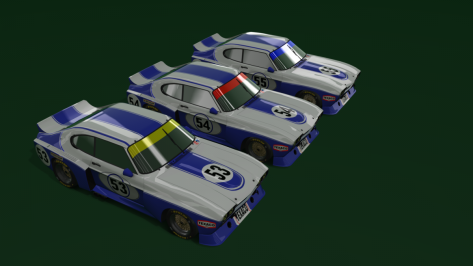
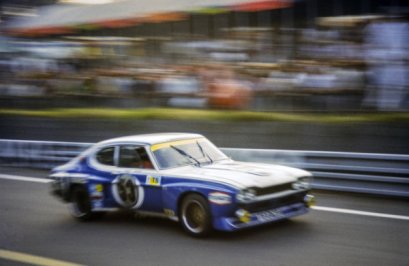
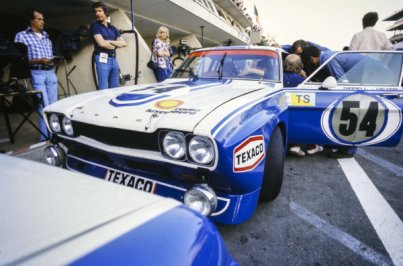
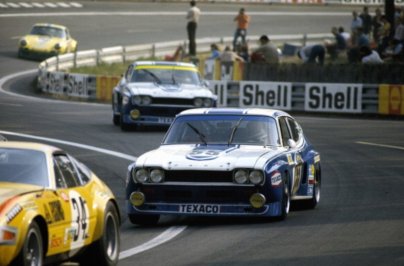
when you edit, I assume you are meaning in a paint program, like photoshop or gimp. if the standard windows.dds works, are you keeping the alpha channel the same as the original in your edit, but with white where you want the window banner to be and the rest black? (assuming the default has black as the transparency)Alo..alo..I was adapting skins for the 1973 Ford Capri Le Mans ( not quite the same for the ACL mod ), but I don't know how to make the windows transparent again.
I edited to leave (the colors: yellow, red and blue). On the onboard camera, no problem, but when I "replay", I can't see anything from the pilot. If I put the file "windows.dds" without editing "it's perfect", but as I wanted to leave it with the colors I commented (after editing), they are mirrored (you can't see anything from the cockpit through the showroom), as you can see in the print .
This answer is within the screenshot.I searched this forum, but I couldn't find a fix.
Are you adding @Rainmaker87's files to the track? You need to keep the base track, it doesn't replace the track, it changes some files/folders.This version crashes my AC, tried several times with clean (manual) install.![]()