Assetto Corsa PC Mods General DiscussionPC 

  • Thread starter Thread starter daan
  • 154,745 comments
  • 48,689,136 views
hello, looking for help/guidance for a weird issue i have not seen before.

i am skinning a honda integra typre r and i have come across a weird issue with just the rear spoiler, it has weird what i would call artifacts all over it, everytime you move the camera they move about like crazy and in game it looks even worse it glitches pretty bad, you can see what i mean in the picture the spanner in the works is there are a fair few other skins for this car already made and none of the skins have this issue the spoiler in all of them are perfect and by what i can see all the skins have been done in paint.net or the equivalent so they are no different to what i am doing.

any help would be greatly appreciated

thanks
View attachment 1315379

View attachment 1315380
The 3d model of the car has a bug. I think the poligons of the rear wing is duplicated, (or something wrong with multiple uv channels)

I selected a livery, and realised that the wing is on 2 part of the texture.:confused: I painted with a red and blue rectangle, and I saw the same issue as You.


So if you want a simple colored wing you must paint on two place. (Not so ideal solution, but working.) If you want stickers on it, I think it is impossible, bacause the size of the 2 area is different in the texture....
 

Attachments

  • 1703962525406.png
    1703962525406.png
    124.8 KB · Views: 25
  • 1703962753642.png
    1703962753642.png
    205.4 KB · Views: 27
Last edited:
The 3d model of the car has a bug. I think the poligons of the rear wing is duplicated, (or something wrong with multiple uv channels)

I selected a livery, and realised that the wing is on 2 part of the texture.:confused: I painted with a red and blue rectangle, and I saw the same issue as You.


So if you want a simple colored wing you must paint on two place. (Not so ideal solution, but working.) If you want stickers on it, I think it is impossible, bacause the size of the 2 area is different in the texture....
yep you are correct i just did what you said and voilaaa! luckily this rear wing has no stickers just 1 colour so the fix is perfect for this skin thankyou very much for the help in solving it.
 
Hi there! I hope you are enjoying Chrismas holidays.

Is there any mod that modifies the behavior of IA to release the cars, from boxes or from starting line, but one by one, a minute by minute? As it happens in rallying. Or is there any possibility to work around this?

I believe that there was a similar mod in RF2.

Thanks in advance!
 
Last edited:
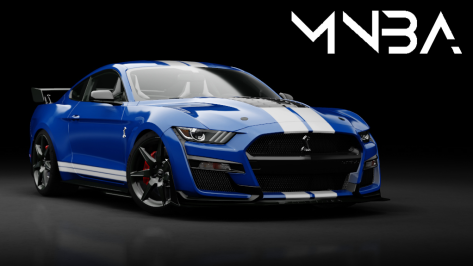
In case you missed this rather spiffing Shelby GT500 2020 pack from MNBA...

1703969181299.png


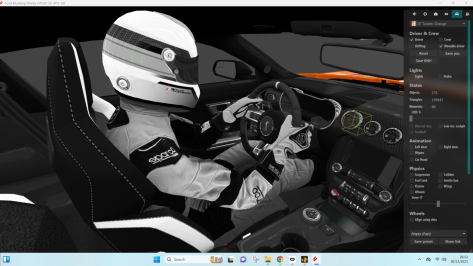
In VR, the driver posture was a little odd and his grip on the steering wheel wasn't great, so here's an alternative if you want it (works for both cars).
(put the steer.ksanim in the 'animations' folder, and the driver_base_pos.knh in the car folder)

1703969630192.png
 
Hey everyone,

I've been having this issue with the sun flickering and I'm not sure what could be causing this issue. It also happens with other pp filters and it happens regardless of the track and car combo. I'm using Pure 0.222 and CSP 0.2.3-preview1. I don't believe I've really changed any of my settings lately either.
Anyone know of what the problem might be and a possible solution?

Thanks in advance!


(Ignore the driving, I'm not used to driving on keyboard :P)
 
Last edited:
Curse my luck, that'll teach me to buy 3D blender model...
yeah, high poly unwrapping is more or less the same as low poly, only just more edges to select (and depending on how many poles there are more edge loops that have to be selected)

couple things you can do:

1. use a checkered grid and prioritize eliminating distortion
2. look at other f1 mods to get an idea where their seams are placed (assuming it's done well)


also try comparing the meshes to primitive shapes. The front/rear wings for instance can be unwrapped similar to a cylinder (so a seam running along horizontally)
 
yeah, high poly unwrapping is more or less the same as low poly, only just more edges to select (and depending on how many poles there are more edge loops that have to be selected)

couple things you can do:

1. use a checkered grid and prioritize eliminating distortion
2. look at other f1 mods to get an idea where their seams are placed (assuming it's done well)


also try comparing the meshes to primitive shapes. The front/rear wings for instance can be unwrapped similar to a cylinder (so a seam running along horizontally)
Thanks, I'll get back to you next year, when i'll get serious about it. May even be a launch mod for Assetto Corsa 2 lmao.

For now I'll have to finish my 2011 mod and FVA.
 
Last edited:
Skins for Aston Ulster (1931 to 1937)Skins Ferrari 212 Inter (for me, I decided to separate them into 3 models, 195s, 166mm and 195s/166mm Coupe (all with slightly different "DATA" files).

For now, for you, here are all the skins for LM1950 and Targa Florio 1950 (they serve in Ferrai 212 Inter).
SKINS ASTON ULSTER
SKINS FERRARI 212 Inter
hello,
Where I can found the cars for the ferrari's skins ?
thanks in advance.
 
Hey everyone,

I've been having this issue with the sun flickering and I'm not sure what could be causing this issue. It also happens with other pp filters and it happens regardless of the track and car combo. I'm using Pure 0.222 and CSP 0.2.3-preview1. I don't believe I've really changed any of my settings lately either.
Anyone know of what the problem might be and a possible solution?

Thanks in advance!


(Ignore the driving, I'm not used to driving on keyboard :P)

Open Pure Config app. What do you see at the main page?

Flickering of sky or track objects is mostly caused be wrong settings here:
1704012340034.png


Its not supposed to be that the first value is higher than the second value in a field.
Those 2 values mean:
  • the fade out of an object starts with the first distance value
  • the fade out ends with the last distance value
  • those values are representing meters

I guess in your case the far plane values are 200000, 30000. This was an old typo from the SRP server.
In its results, it reverses the fade out logic and produces then such flicker. So just reset this field to default by right clicking it...

Pure Config can solve such proplems by 1 click in the Main tab.
 
Last edited:
Hi everyone,
Does anyone have this FSR mod? I didn't know them and I purchased this car for my collection, but I'm deeply disappointed. The interior steering wheel animations are terrible, the windshield wipers don't work and seem detached from the cockpit not to mention the interior lights. Is anyone interested in fixing this mod? Thanks in advance
 

Attachments

  • Screenshot 2023-12-31 113116.png
    Screenshot 2023-12-31 113116.png
    59.7 KB · Views: 31
Hi everyone,
Does anyone have this FSR mod? I didn't know them and I purchased this car for my collection, but I'm deeply disappointed. The interior steering wheel animations are terrible, the windshield wipers don't work and seem detached from the cockpit not to mention the interior lights. Is anyone interested in fixing this mod? Thanks in advance
I wouldnt pay for any FSR mods. I doubt it could be fixed as he encrypts everything. Im surprised he's still operating with his physics and other work stolen from RSS, Studio 397, iracing etc
 
Last edited:
I have almost all the RSS, VRC and URD mods (sorted by preference)...Simdream I bought the F12009 mod and it doesn't seem bad to me, even if I haven't heard good things about it. FSR I didn't know about them, but now I know about them and will stay away from them. However, they refunded my purchase. Thank you
 
Open Pure Config app. What do you see at the main page?

Flickering of sky or track objects is mostly caused be wrong settings here:
View attachment 1315521

Its not supposed to be that the first value is higher than the second value in a field.
Those 2 values mean:
  • the fade out of an object starts with the first distance value
  • the fade out ends with the last distance value
  • those values are representing meters

I guess in your case the far plane values are 200000, 30000. This was an old typo from the SRP server.
In its results, it reverses the fade out logic and produces then such flicker. So just reset this field to default by right clicking it...

Pure Config can solve such proplems by 1 click in the Main tab.
Reducing the far plane high value from 200000 to 20000 seems to have indeed fixed my issue. Thank you so much, you're the best!
Have yourself a lovely New Year's eve!
 
My new "fake" version for the Ferrari 330 TR/LM, winner of the 24 Hours of Le Mans 1962 (O.Gendebien/P.Hill). Two versions of skins (clean and dirty). You can have fun while something better is not done.
Hello
again a good work !
im interesting to drive it for the Lm 1962 against 250 GTO ..
do you have the link ?
again a great thank in advance.

Do you if a can found the Ferrari 250 tri 1961 ?
 
Thank you. I will try that but every ai making tutorial I ever saw said you were supposed to start the pit line way back from the actual pit entry. Were those people all wrong? They also said the pit_line exit had to synch up with the racing line at some point, but i've seen it work even if the pit_line is no where near the racing line.
Record the AI line and Side lines (not necessary, you have already done it)
Copy the AI line to "Data" folder and rename it to "ideal_line.ai"
Switch on "Ideal line" in Drive menù options (you will get it visible on track and it will be easyer to record the pit line)
Go on track and stay on the "Ideal line" 20-30 m before you want to go to the pits (so you will have the pit_line overlapping the ai_line for about 20-30 m) )
Record the "pit_line.ai" and finish the recording untill you reach the "Ideal line" and overlap it for another 20-30 m.
 
Last edited:
Aston Martin V12 Vantage Manual 2010 Public Release !!!!
Download:
-AO inside and out
-Realistic Dashboard
-Physics By VRDRIVING
-CSP Settings
-Driver Animation by Mascot
-Panoramic session Start config Daniel Nogal
-Beta testing and help ,@Mascot,and others

View attachment 1313749
rearview mirrors are not working here ... ? anyone else had this issue?

EDIT : never mind, I had a version v1.01 from ACTK Garage, and he prob. botched it ... Reinstalled the v1.0 and all good now!

For who wants, here my skin :

1704031577733.png

(don't be scared when you look in the rearview ;)

Have a wonderful end of 2023 all , with nice celebrations , no accidents, and just the right amount of alcohol.

A good tip : think about the morning after last time you drank too much , before opening that next bottle this evening! ;)
Cheers!
 
Last edited:
Copy this in ext-config :

[ANIMATED_WIPER_...]
MESHES = GEO_Wiper5,GEO_Wiper4,GEO_Wiper2,GEO_Wiper1
UNDERLYING_SURFACE = FrontWindow_Windshield_Glass
DEBUG = 1 ; remove when everything is ready

[MESH_ADJUSTMENT_...]
MESHES = GEO_Wiper5,GEO_Wiper4,GEO_Wiper2,GEO_Wiper1
MOVE_TO = modelRoot:y

[BASIC]
DISABLE_WIPER_KSANIM = 1
---------------------
[ANIMATED_WIPER_0]
DEBUG = 1
MESHES = GEO_Wiper5, GEO_Wiper4, GEO_Wiper2, GEO_Wiper1
UNDERLYING_SURFACE = FrontWindow_Windshield_Glass
GROUP_0 = 'GEO_Wiper2@A=', 'GEO_Wiper1@A='
GROUP_0_ANGLE_TO = 120
GROUP_0_AXIS = 0, 0.70710677, 0.70710677
GROUP_0_AXIS_OFFSET_0 = 0, 0.70710677, 0.70710677
GROUP_0_AXIS_OFFSET_1 = 0, 0.70710677, 0.70710677
GROUP_0_END = -0.65879905, 0.73148143, 0.6872159
GROUP_0_PIVOT = 0.52884674, 0.72183037, 0.8451538
GROUP_0_BASE_AXIS = 0, 0.70710677, 0.70710677
GROUP_0_BASE_PIVOT = 0.52884674, 0.72183037, 0.8451538
GROUP_1 = 'GEO_Wiper4@A=', 'GEO_Wiper5@A='
GROUP_1_ANGLE_TO = 120
GROUP_1_AXIS = 0, 0.70710677, 0.70710677
GROUP_1_AXIS_OFFSET_0 = 0, 0.70710677, 0.70710677
GROUP_1_AXIS_OFFSET_1 = 0, 0.70710677, 0.70710677
GROUP_1_END = -0.65758467, 0.73688126, 0.6839595
GROUP_1_PIVOT = -0.060710907, 0.69358253, 0.92959595
GROUP_1_SCALE_LUT = '(|0.000=1.000|1.009=1.052|)'
GROUP_1_BASE_AXIS = 0, 0.70710677, 0.70710677
GROUP_1_BASE_PIVOT = -0.060710907, 0.69358253, 0.92959595
This doesn´t fix the wipers for AssettoDrives Porsche GT2 RS.
That´s a disappointment. There are only good GT2 RS MR but no Root-Car-Version with awesome functionally wipers, turn-signals, lights. The car was an technical wonder. It messed up with cars that had more power/cylinders.
I search for a good version since the start of AssettoCorsa. I´ll start a party when sometimes it arrives... :gtpflag:
 
This doesn´t fix the wipers for AssettoDrives Porsche GT2 RS.
That´s a disappointment. There are only good GT2 RS MR but no Root-Car-Version with awesome functionally wipers, turn-signals, lights. The car was an technical wonder. It messed up with cars that had more power/cylinders.
I search for a good version since the start of AssettoCorsa. I´ll start a party when sometimes it arrives... :gtpflag:
How about trying to sort them yourself? I came across this tutorial which looks pretty easy to follow -

I once downloaded a pack which added CSP wipers to a ton of cars but cannot for the life of me find where I got it from.

:edit:

Found the URL in my JDownloader list...I knew there was a reason I never clear out the complete download list :D
 
Last edited:
Sharing a mod? Host it on GTPlanet Downloads. Free, public hosting for files up to 10GB in size.
Back