Assetto Corsa PC Mods General DiscussionPC 

  • Thread starter Thread starter daan
  • 154,837 comments
  • 48,721,881 views
View attachment 1376811

Here in all his "Hardware Store Style" full glory, endorsed by my own trustworthy neighborhood mechanic.
"I know someone who does it cheaper..."

Some of us prefer to stick with our old "tried and true" CSP version...
Ok... but atm i can't figure out, why it won't work (maybe) with the csp v1.79. The Viper is on the same level as the other cars. Nothing special added. So i'm sorry that the viper isn't working for some people at the moment.
 
Last edited:
I dont know what Version you have but Chemmflummy version 2.0 and even 1.8 has carshadows
look on my video at time 1.01
https://www.gtplanet.net/forum/threads/assetto-corsa-video-thread.290887/post-14293437

View attachment 1376787


FSR one is crap!

next video time 0.34
when this is no carshadow what is carshadow?
look at your Content Manager Settings
https://www.gtplanet.net/forum/threads/assetto-corsa-video-thread.290887/post-14293438
You´re right with that, thanks.

1722366805034.png
 
Ok... but atm i can't figure out, why it won't work (maybe) with the csp v1.79. The Viper is on the same level as the other cars. Nothing special added. So i'm sorry that the viper isn't working for some people at the moment.
I'm on CSP v1.80 preview 1, and it gets stuck validating the setup for me, too. Tried making various setup changes, but nothing seemed to work. Appreciate your looking into it, though! I'll still be enjoying your other great car mods. :)
 
Thank you for this fantastic little car. It's really fun to drive. But I noticed a little bug. The inside of the doors are reflecting the street. You can fix this by moving the door meshes to COCKPIT_HR in the ext_config.ini

[MESH_ADJUSTMENT_...]
MESHES = porte G paint int, porte D paint int
MOVE_TO = COCKPIT_HR
This time that Jedi trick didn't work for me. The road is still reflected in the interior door panel... 😥
 
I'm on CSP v1.80 preview 1, and it gets stuck validating the setup for me, too. Tried making various setup changes, but nothing seemed to work. Appreciate your looking into it, though! I'll still be enjoying your other great car mods. :)
Yes 179p5 also stuck in setup sorry did not mention that before
 
I'm looking out the window, there are coniferous and deciduous trees, different, but everything is noticeably lighter than those in your screenshot. Don't you think that your trees are too dark?
No, I'm sure the trees look like they would IRL. I have driven the track plenty enough times to know.
another IRL shot to compare if you want:

spa.png


Anyway, the in game shot I posted was with sol_xtra PP filter at 90%. Using another PP filter and/or changing the value can easily make trees darker/lighter.
Personal preference / other system etc...
 
another IRL shot to compare if you want:
well in this picture it is clear why the trees are "black", the picture was taken against the sun. but I looked at a lot of photos on the internet, yes, in some photos the trees are really dark, but in some the trees are "normal" color, like I see them with my own eyes in life. apparently a lot depends on the weather, time of day, angle of the sun, and the style of the photographer himself)
 
I am assuming you are trying to install the original track created by guigui0256 that's available on Overtake because my versions do not have a 'Track Installation' folder. My mods are alternatives for that version to fix some treeline lighting issues (plus a few other tweaks) the original version has. You don't need the original track from Overtake to use mine. Just pick the version you prefer to use and manually extract it into the root assettocorsa folder and overwrite anything it asks.
Ok I think I'm close. I got this.

Screenshot 2024-07-30 203959.png


And then I put the pyyer extension folder here into the track folder.

Screenshot 2024-07-30 204032.png


But it isn't showing up. It's just the regular track without the F1 24 stuff.
 
Atm i don't know, why some can't drive the Viper. 🤔

Wich CSP Version are you using?

Have you unchecked the "extended physics" option?

Have you manually installed the car or drag'n'drop install via CM?
Manually installing is what made it work for me, when I'd just drag and drop onto cm it would just show an empty UI and the car wouldnt show up unless searched for.

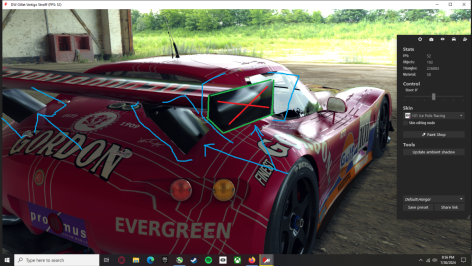
A few quick things I've noticed that could use tweaking on the Gillet Vertigo Streiff

1) The sound doesnt rev high enough for the rpm, so when driving from the outside of the car, the audio will cut out around the top 5% of the rev range, from the inside it just sounds like its hitting a rev limiter too early instead of completely cutting out, which still sounds a bit odd

2) Nitpicky thing I've noticed for a while with this model, it looks like the smoothing groups on the mesh where the spoiler is connected to the car, and the outer flat section of the wing is grouped together in a single smoothing group. I usually would put the outer face as a different smoothing group, so the flat side doesnt look like it's bending light wrong. To illustrate what I'm talking about, the sides with green lines, I'd make those poly's a separate smoothing group from the sides with the red X.
 

Attachments

  • Screen grab.png
    Screen grab.png
    291.8 KB · Views: 29
Last edited:
Update to latest csp 2.5p1. Then it runs fine.

View attachment 1376844

Unfortunately I can’t since the newest versions runs no more properly in combination with pure/Sol of not using Content manager

And i am an no CM user.

Before u ask why the hell. I us AC for custom championships only. And these are running much better for me with the vanilla launcher.

But it’s ok it’s my fault or my problem I can’t enjoy some few cars ….
 
I have a quick question that has been bugging me to no end, but what does it mean when you open a FBX file in KsEditor and it closed itself down during loading? This happened with me with two different modded cars yesterday. The Mustang GT3 and 2019 Jaguar F-Type Racing both by First Studio Race. I'm trying to reduce the overall size of textures by reimporting it. I highly doubt it some type of encryption security otherwise it wouldn't have let me unpack LOD KN5 in CM.

Sorry if this is the obvious question ive been searching and got no answer.


EDIT: Nevermind, It turns out it's just encryption BS :(
 
Last edited:
1) The sound doesnt rev high enough for the rpm, so when driving from the outside of the car, the audio will cut out around the top 5% of the rev range, from the inside it just sounds like its hitting a rev limiter too early instead of completely cutting out, which still sounds a bit odd
I don't know if you used the newest version, because the Vertigo got a new sound (new sound since v3.5, newest version is v3.6) and it is all OK. No cutting of rev range at the outside and internal sound is even OK. checked it again few minutes before i wrote this answer. 🤷‍♀️ 🤔


2) Nitpicky thing I've noticed for a while with this model, it looks like the smoothing groups on the mesh where the spoiler is connected to the car, and the outer flat section of the wing is grouped together in a single smoothing group. I usually would put the outer face as a different smoothing group, so the flat side doesnt look like it's bending light wrong. To illustrate what I'm talking about, the sides with green lines, I'd make those poly's a separate smoothing group from the sides with the red X.
Yeah, this was mentioned before. forgot to fix this.😑 will fix this with next update.
 
Last edited:
@DaWallace

Congratulations on the work done on this Dodge Viper, it's really exciting.

As far as CSP is concerned, I'm using the latest version (for years I only wanted to use the recommended version) and I always do the installations manually, which can be important.

I have to admit that I was blown away by the LED lighting effects on the gloves, I don't remember seeing that anywhere else.

For the sound, I'am plenty happy with it, maybe the sound balance on other configurations isn't good (I'm using a specific soundcard, It could help me for the sound balance).

Just a minus opinion, Maybe the FFB could be strongless.

Cheers and thanks a lot, I'm very grateful. :):bowdown:
 
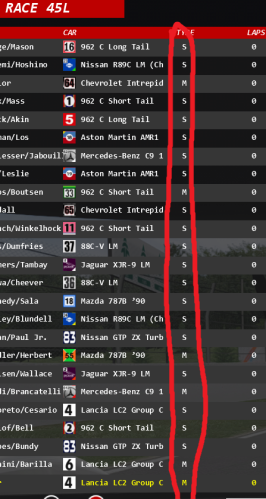
In all the latest versions of the CSP starting from 0.2.1, the AI uses a random tire composition in the race, is it possible to fix this? Because of this bug, i have to use version 0.2.0 for a long time, where there are no problems with it.
Screenshot_1.png
 

Attachments

  • Screenshot_1.png
    Screenshot_1.png
    55.2 KB · Views: 24
@DaWallace

Congratulations on the work done on this Dodge Viper, it's really exciting.

As far as CSP is concerned, I'm using the latest version (for years I only wanted to use the recommended version) and I always do the installations manually, which can be important.

I have to admit that I was blown away by the LED lighting effects on the gloves, I don't remember seeing that anywhere else.

For the sound, I'am plenty happy with it, maybe the sound balance on other configurations isn't good (I'm using a specific soundcard, It could help me for the sound balance).

Just a minus opinion, Maybe the FFB could be strongless.

Cheers and thanks a lot, I'm very grateful. :):bowdown:
thx 🤩

FFB is always a topic. I changed the strenght three times and it is everytime someone who complains about to less strength on the FFB or someone who complained about to much strength on the FFB. In the end I took the middle of the settings i had before. Some have a direct drive wheel from Fanatec, others a Moza, others a Logitech and still others a Thrustmaster.... the differences in the FFB strengths are simply too different to define one comfortable setting for everyone.
Use the ingame FFB Setting app to change the FFB to your own feeling.
 
Ok I think I'm close. I got this.

View attachment 1376886

And then I put the pyyer extension folder here into the track folder.

View attachment 1376888

But it isn't showing up. It's just the regular track without the F1 24 stuff.
Hey, so potentially totally silly question, BUT - you are unzipping the files into the track folder - right? You aren't just dropping the rar/zip file into the folder? What I tend to do as soon as I start playing a game is I go into the root folder where the install is, then I have a look at how things are structured. For instance, you have the AC main folder, from there all the goodies are mainly stashed in the CONTENT folder, from there is fairly simple, you've got TRACKS folders (obvs, all track related stuff gets extracted here). You've got your CARS folder (anything car related goes here). For the most part people are quite good these days and within their zip files you'll just find a CONTENT folder - in which case you just unzip that into your AC main folder as that will already be setup to go where it needs to go. Just go into steam and find AC, then right click on it, a drop down will appear from there it's something like - properties or manage. Click on that, then find browse local files (something to take effect). From there you can work out everything I've just said above.
 
thx 🤩

FFB is always a topic. I changed the strenght three times and it is everytime someone who complains about to less strength on the FFB or someone who complained about to much strength on the FFB. In the end I took the middle of the settings i had before. Some have a direct drive wheel from Fanatec, others a Moza, others a Logitech and still others a Thrustmaster.... the differences in the FFB strengths are simply too different to define one comfortable setting for everyone.
Use the ingame FFB Setting app to change the FFB to your own feeling.
Maybe adding the steer assist in the setup could be a solution :)

I would have liked to share with you the three skins I had made for my version but the body mapping is different 😞
 
Hey, so potentially totally silly question, BUT - you are unzipping the files into the track folder - right? You aren't just dropping the rar/zip file into the folder? What I tend to do as soon as I start playing a game is I go into the root folder where the install is, then I have a look at how things are structured. For instance, you have the AC main folder, from there all the goodies are mainly stashed in the CONTENT folder, from there is fairly simple, you've got TRACKS folders (obvs, all track related stuff gets extracted here). You've got your CARS folder (anything car related goes here). For the most part people are quite good these days and within their zip files you'll just find a CONTENT folder - in which case you just unzip that into your AC main folder as that will already be setup to go where it needs to go. Just go into steam and find AC, then right click on it, a drop down will appear from there it's something like - properties or manage. Click on that, then find browse local files (something to take effect). From there you can work out everything I've just said above.
Yes I am unzipping or unraring them first to see where things go. You're right, the easy ones are when you open them up and it says CONTENT, I know that goes into the main assettocorsa file. It's when there are multiple options that I seem to struggle with. Now last night after I finally got the main spa_2022 track installed, I downloaded the pyyer extension file from @racinjoe013 and opened it up and it said CONTENT, but he said to put that to the spa_2022 track file and not the assettocorsa file but it's not showing up.

I had a similar issue with @DaWallace car pack. Downloaded the main file and opened it up and there were subfolders like DW_VIPER and I'm paraphrasing from memory, so I installed each one of them into CARS. But that caused an error. So I was trying to figure out what happened so I went back and looked at those files again and further opened up each one I think two or three more times and then got to dw_viper which is where the actual car file was and installed each one in CARS and they showed up.

If every file opened up with CONTENT then I probably wouldn't have as much trouble as I do. But it's when there are multiple subfolders that I really struggle with. I'm sure more computer savy people see these instructions as clear as day but a lot of them are very blurry to me.
 
Sharing a mod? Host it on GTPlanet Downloads. Free, public hosting for files up to 10GB in size.
Back