Assetto Corsa PC Mods General DiscussionPC 

  • Thread starter Thread starter daan
  • 150,373 comments
  • 45,718,806 views
other cars from raceroom
__custom_showroom_1726768305.jpg
 
It's z-fighting, and the reason it's more prominent with some tracks than others has to do with the precision of the depth buffer. On large tracks, the depth buffer will often be less precise because it has to be larger than on smaller tracks. For objects that are really close, a small change in the depth buffer precision like this can trigger z-fighting on some tracks, while others are just fine. Not really a track problem, and not really a car problem - just a synergy of bad luck. (Someone smarter than me explained it to me some time back.)

There are settings in CM that can aid in this, but I can't come up with any specific advise right now.

For reference, I have no similar problems with the same car on the same track, and I'm just running default settings for everything that should matter. And the Dallas/Cadillac is a really nice car. :)
After some searches, you could solve this issue by enable "double precision physics engine" on CSP settings.

but this setting was in old versions of CSP, but I don't have it in my version (CSP 0.2.3)

does someone know something about this setting right now ? Is there another setting to solve Zfighting on big tracks ?

Thanks
 
Last edited:
looool bit confused? SKIN.dds is what you need to rename the main skin to.

The "body_map.png" i never touched dont even no what it does.....not alot from what i can see

if you still have issues i can just send you the entire car, everything works as it should on mine i have even got Zink5ki stuff to work on the OG skins so they have no passenger seat with working skins

what threw me of was looking in "CM showroom" instead of just "showroom" and wondering why it was always borked
I'd be happy to take it too if you don't mind.
I was tired of changing stuff again and again (ended up wit a car without body work at a certain moment while it was OK in CM showroom etc...)
So I reinstalled the original car from my backup, with only the original skins...
 
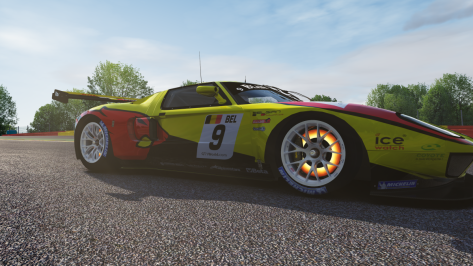
FORD GT GT1 MATECH 2010

After a long time, it's finally out too. I would like to thank @Chem_Flummi infinitely for giving me a great help.

Original mod: BEM
3D updates: ChemFlummi, PaddockClubMods
Physics: ChemFlummi
Digital instruments: PaddockClubMods
Shaders/Scripts: PaddockClubMods, ChemFlummi
Animations: PaddockClubMods (this is why they suck LOL)
Sound: ChemFlummi
Skins rework: PaddockClubMods

The rules are always the same, no reuploads with other links and for anything we are here. 😎

Download --> https://mega.nz/file/T0ZGDCrC#osucHWp-fQ3d_psTFKh5hJIr3mZ3L92rmjHioAUDiK8 (updated version)
 

Attachments

  • Screenshot_bem_ford_gt_gt1_monza_10-8-124-14-50-53.jpg
    Screenshot_bem_ford_gt_gt1_monza_10-8-124-14-50-53.jpg
    211.6 KB · Views: 24
  • Screenshot_bem_ford_gt_gt1_monza_10-8-124-14-50-42.jpg
    Screenshot_bem_ford_gt_gt1_monza_10-8-124-14-50-42.jpg
    215.4 KB · Views: 20
  • Screenshot_bem_ford_gt_gt1_imola_19-8-124-22-3-59.jpg
    Screenshot_bem_ford_gt_gt1_imola_19-8-124-22-3-59.jpg
    52 KB · Views: 21
  • Screenshot_bem_ford_gt_gt1_imola_19-8-124-22-2-30.jpg
    Screenshot_bem_ford_gt_gt1_imola_19-8-124-22-2-30.jpg
    85.7 KB · Views: 23
  • Screenshot_bem_ford_gt_gt1_imola_19-8-124-22-2-19.jpg
    Screenshot_bem_ford_gt_gt1_imola_19-8-124-22-2-19.jpg
    126.9 KB · Views: 23
  • Screenshot_bem_ford_gt_gt1_imola_19-8-124-22-1-8.jpg
    Screenshot_bem_ford_gt_gt1_imola_19-8-124-22-1-8.jpg
    85.5 KB · Views: 20
  • Screenshot_bem_ford_gt_gt1_imola_19-8-124-22-0-58.jpg
    Screenshot_bem_ford_gt_gt1_imola_19-8-124-22-0-58.jpg
    166.2 KB · Views: 20
  • Screenshot_bem_ford_gt_gt1_imola_19-8-124-22-0-38.jpg
    Screenshot_bem_ford_gt_gt1_imola_19-8-124-22-0-38.jpg
    87.5 KB · Views: 25
  • Screenshot_bem_ford_gt_gt1_imola_19-8-124-22-0-22.jpg
    Screenshot_bem_ford_gt_gt1_imola_19-8-124-22-0-22.jpg
    95.9 KB · Views: 24
  • Screenshot_bem_ford_gt_gt1_imola_19-8-124-21-59-53.jpg
    Screenshot_bem_ford_gt_gt1_imola_19-8-124-21-59-53.jpg
    181.8 KB · Views: 23
  • Screenshot_bem_ford_gt_gt1_monza_10-8-124-14-51-3.jpg
    Screenshot_bem_ford_gt_gt1_monza_10-8-124-14-51-3.jpg
    105.5 KB · Views: 30
Last edited:
I'd be happy to take it too if you don't mind.
I was tired of changing stuff again and again (ended up wit a car without body work at a certain moment while it was OK in CM showroom etc...)
So I reinstalled the original car from my backup, with only the original skins...
Yeh i understand what you mean, sometimes i get so deep into stuff i forget what my name is let alone what i am meant to be doing

this is the entire car with everything, if there is anything wrong let me no im certainly not a pro but they look correct to me


https://mega.nz/file/9NNXwI4J#eXcDDgndxTzyNwaf0OVkKDjZj5QexIZS_CtcaEmEU60

any issues with mega let me no it should be good though
 
Last edited:
Yeh i understand what you mean, sometimes i get so deep into stuff i forget what my name is let alone what i am meant to be doing

this is the entire car with everything, if there is anything wrong let me no im certainly not a pro but they look correct to me


https://mega.nz/file/9NNXwI4J#eXcDDgndxTzyNwaf0OVkKDjZj5QexIZS_CtcaEmEU60

any issues with mega let me no it should be good though
All seemed to be OK, (Showrooms, previews, cockpit view etc)... until I watched a replay (with one of the new skins):
car lost parts, windscreen turned black, headlights turned on and off...something to do with LODS I assume.
But then I tried with one of the old skins and got no such issues there...
 
FORD GT GT1 MATECH 2010

After a long time, it's finally out too. I would like to thank @Chem_Flummi infinitely for giving me a great help.

Original mod: BEM
3D updates: ChemFlummi, PaddockClubMods
Physics: ChemFlummi
Digital instruments: PaddockClubMods
Shaders/Scripts: PaddockClubMods, ChemFlummi
Animations: PaddockClubMods (this is why they suck LOL)
Sound: ChemFlummi
Skins rework: PaddockClubMods

The rules are always the same, no reuploads with other links and for anything we are here. 😎

Download --> https://mega.nz/file/msZgnTSa#nCLWnsv3Z6J-YPDUjmN5qd0IHsy7XKbugi0GjA3cVW8
Nice updates. Thanks!
Great fun at Spa, and they burn a lot of sparks in the Eau Rouge dip. AI seems to crash and spin a little more than usual too, which is always welcome.
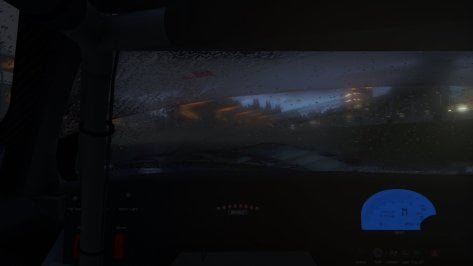
Not a fan of the 'shower screen' frosting on the windscreen in low sun (it's like driving through mist) so if you want, try the attached internal glass DDS for a more scratched/dirty version. Had to create a new DDS for this as the internal glass mapping is a little weird.


Also spotted some sun getting into the cockpit through bodywork seams so add this to the config to tidy those up:
Code:
 ;stop sun getting places it shouldn't
[SHADER_REPLACEMENT_...]
ACTIVE = 1
MATERIALS = WCCARBODY
CAST_SHADOWS = 1
DOUBLE_FACE_SHADOW_BIASED = 1
 
Hi, I downloaded the various Alfa Romeo Giulia GT/GTAm by elia misculini, but they don't have the real official Alfa Romeo skins of the time. Are there any skins for these mods? Thanks
 
FORD GT GT1 MATECH 2010

After a long time, it's finally out too. I would like to thank @Chem_Flummi infinitely for giving me a great help.

Original mod: BEM
3D updates: ChemFlummi, PaddockClubMods
Physics: ChemFlummi
Digital instruments: PaddockClubMods
Shaders/Scripts: PaddockClubMods, ChemFlummi
Animations: PaddockClubMods (this is why they suck LOL)
Sound: ChemFlummi
Skins rework: PaddockClubMods

The rules are always the same, no reuploads with other links and for anything we are here. 😎

Download --> https://mega.nz/file/msZgnTSa#nCLWnsv3Z6J-YPDUjmN5qd0IHsy7XKbugi0GjA3cVW8
Car has no wiper ?
 
All seemed to be OK, (Showrooms, previews, cockpit view etc)... until I watched a replay (with one of the new skins):
car lost parts, windscreen turned black, headlights turned on and off...something to do with LODS I assume.
But then I tried with one of the old skins and got no such issues there...
unfortunetly i can't help with that as i never use the replay function.

all it will be is bits of code putting back in for the lod's

best thing to do is get the OG code of zink's upload and have a look to see what is missing from what i sent you, add it back in and see what happens i would guess it's 1 bit of code


STCC skin re-purposed for the VRC Mondeo

Drag and drop to install this wil go into the csp version of the car i have not included the file structure for the non csp version

This is 1 of the worst mapped car's i have ever come across.


Screenshot (695).png
 
Last edited:
Here's some quick-and-dirty RainFX for leomaldonadoh's just-released Autodromo Las Vizcachas, if anyone wants it. Just create an "extension" folder in the track folder, rename ext_config.txt to ext_config.ini, and drop it in.

I also had to darken some of the textures as they were way too bright for me, but if the default looks OK on your system, just comment out or delete the [SHADER_REPLACEMENT_...] lines.

1726800773094.png
 

Attachments

Last edited:
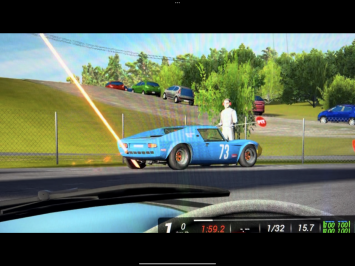
Anyone know what this is?
If you mean the laser beam, I was having this issue on LCS with Pure - they were everywhere, particularly at the start of practices and races. Couldn't fix it with any CSP settings or a clean Pure install. Reverting to Pure Gamma and re-enabling C13 AEGIS 1.9 completely fixed the issue.

I assume it's an LCS bug. Another reason to hold out on LCS for a while.
 
All seemed to be OK, (Showrooms, previews, cockpit view etc)... until I watched a replay (with one of the new skins):
car lost parts, windscreen turned black, headlights turned on and off...something to do with LODS I assume.
But then I tried with one of the old skins and got no such issues there...
sorry to harp on but i may of misread what you wrote. I didn't delete any code from the ext_config.ini file in any of zink5i's skins they were left as is i only changed it for the other original skins sorry for the wrong info
 
sorry to harp on but i may of misread what you wrote. I didn't delete any code from the ext_config.ini file in any of zink5i's skins they were left as is i only changed it for the other original skins sorry for the wrong info
I get an alert while loading, then the Venturi loads fine but one of the lods is kinda weird, weird shadow under the car, etc...
haven't checked which one.
There's also some front wheel clipping in the lot.
 
Nice updates. Thanks!
Great fun at Spa, and they burn a lot of sparks in the Eau Rouge dip. AI seems to crash and spin a little more than usual too, which is always welcome.
Not a fan of the 'shower screen' frosting on the windscreen in low sun (it's like driving through mist) so if you want, try the attached internal glass DDS for a more scratched/dirty version. Had to create a new DDS for this as the internal glass mapping is a little weird.


Also spotted some sun getting into the cockpit through bodywork seams so add this to the config to tidy those up:
Code:
 ;stop sun getting places it shouldn't
[SHADER_REPLACEMENT_...]
ACTIVE = 1
MATERIALS = WCCARBODY
CAST_SHADOWS = 1
DOUBLE_FACE_SHADOW_BIASED = 1
@GT3Masters97 further to the above, here's a revised digital_instruments.ini that corrects the z-coordinates of the floating digits on the MoTeC, and fixes the red rev LEDs, which now all have a shift-up 10Hz blink when revs hit 6700rpm.
(remove the .txt extension)

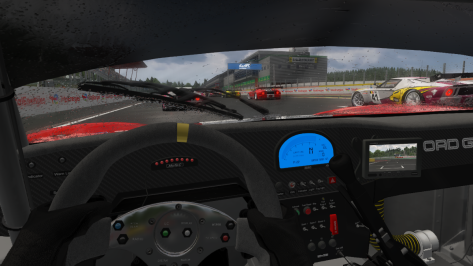
The wiper works fine for me. Not sure why others are having problems.
The only bad thing about the wiper is its AO bake on the glass which remains as a vertical shadow even when the wiper blade is sweeping.
Be good if this shadow could be omitted in any update.

Edit: I just noticed that the wiper sweeps smoothly, even though the blade's 'parked' position is vertically in the middle of the sweep.
I'm pretty sure that vertical wipers like this always had a short pause in the sweep at the vertical position as the animation looped. Has this been fixed in a recent CSP update?

1726819771898.png
 

Attachments

Last edited:
FORD GT GT1 MATECH 2010

After a long time, it's finally out too. I would like to thank @Chem_Flummi infinitely for giving me a great help.

Original mod: BEM
3D updates: ChemFlummi, PaddockClubMods
Physics: ChemFlummi
Digital instruments: PaddockClubMods
Shaders/Scripts: PaddockClubMods, ChemFlummi
Animations: PaddockClubMods (this is why they suck LOL)
Sound: ChemFlummi
Skins rework: PaddockClubMods

The rules are always the same, no reuploads with other links and for anything we are here. 😎

Download --> https://mega.nz/file/msZgnTSa#nCLWnsv3Z6J-YPDUjmN5qd0IHsy7XKbugi0GjA3cVW8
very nice update. thank you for that. I wish the fenders of such a beautiful car were not like a car that had an accident. also the brake discs are always red
 

Attachments

  • Screenshot_bem_ford_gt_gt1_spa_20-8-124-11-5-40.png
    Screenshot_bem_ford_gt_gt1_spa_20-8-124-11-5-40.png
    380.8 KB · Views: 16
Here's some quick-and-dirty RainFX for leomaldonadoh's just-released Autodromo Las Vizcachas, if anyone wants it. Just create an "extension" folder in the track folder, rename ext_config.txt to ext_config.ini, and drop it in.

I also had to darken some of the textures as they were way too bright for me, but if the default looks OK on your system, just comment out or delete the [SHADER_REPLACEMENT_...] lines.

View attachment 1390671
Thanks for this. It's a really great-looking track and finally gives hope that photogrammetry might actually work if combined well with traditional 3D assets, without everything looking like melted ice cream. It certainly gives more of a naturally organic look to the environment. Even the best manually-textured tracks can look rather fake by comparison.
I noticed that the trees have planar shading so the normals probably aren't pointing vertically.
Add this to correct that, but you might need to adjust the ambient and diffuse values for personal preference (I've not tried it in conjunction with your own config adjustments yet).
I had to point the normals vertically down for some reason, pointing up didn't work. It sometimes doesn't.
Code:
;fix tree normals (should work if ksTree shader is used)
[ALTER_NORMALS_...]
MATERIALS = shader:ksTree
OFFSET = 0, -1, 0; 0, 1e9, 0
DESCRIPTION= lighten/darken trees after normal fix above
MATERIALS = shader:ksTree
PROP_... = ksAmbient, 0.4 ;adjust for personal preference
PROP_... = ksDiffuse, 0.4 ;adjust for personal preference
 
Last edited:
looool bit confused? SKIN.dds is what you need to rename the main skin to.

The "body_map.png" i never touched dont even no what it does.....not alot from what i can see

if you still have issues i can just send you the entire car, everything works as it should on mine i have even got Zink5ki stuff to work on the OG skins so they have no passenger seat with working skins

what threw me of was looking in "CM showroom" instead of just "showroom" and wondering why it was always borked
I think it's better if you can send me your mod, because it goes from bad to worst on my side.
Screenshot_f302_venturi_600lm_le_mans_1998_20-8-124-12-22-43.jpg
 
Here's a challenge for the braves, i've been tweaking the AI a bit lately and recreating some vintage races and i'm quite proud of this one. If you guys could have a look and give me feedbacks, i need to know if it's challenging enough.
Thoroughly enjoyed the videos - what a tough competitor that #62 - diving late in front of you in that horseshoe-turn, you having to go on the inside, clipping the tall grass coming out of the turn - the effects were awesome... Tell me, you're obviously driving in VR mode - what hardware do you have? Cause the immersion is phenomenal, thanks. Going to start saving immediately for it so it doesn't break the household budget... :lol:

Opel Calibra DTM - Classic Gulf Livery WIP

Personally, this is a classic livery for me, which I'm happy to include in the collection...

opel_calibra_dtm__gulf-007_1.png

opel_calibra_dtm__gulf-007_2.png

opel_calibra_dtm__gulf-007_3.png
 
Sharing a mod? Host it on GTPlanet Downloads. Free, public hosting for files up to 10GB in size.
Back