- 597

- Germany
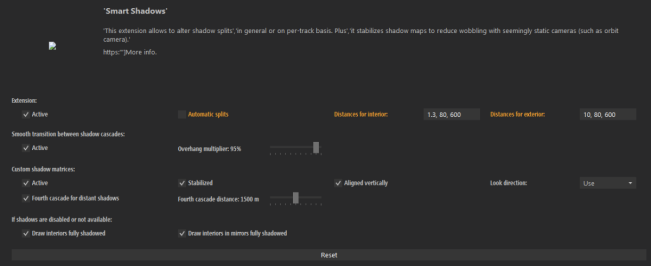
You can't have superp settings for all situations with these 3 values!!!hi , can someone explain these 3 values please? (Why don't these things come with a tooltip explanation??
Unfortunately the last digit does not increase the range (distance from the car) until where shadows are rendered in details
these are my settings:
View attachment 1390845
I can clearly see that the shadows become less detailed approx 20m in front of my car... )
View attachment 1390846
increasing the last number to 2000 as Masscot suggested,
still the detailed render distance seems same, but after that the shadows are no longer rendered at all ... so it got worse instead of improved:
View attachment 1390872
EDIT: in fact LOWERING this number seems to have the desired effect!
View attachment 1390873
View attachment 1390874
EDIT2 : and yet the same settings don't seem to fix it on all tracks! For example on Charlotte Motor Speedway Oval , I still get blurry shadows after some distance:
View attachment 1390886
EDIT3:
it seemed to me the best solution is to disable Smart Shadows altogether... but then I am faced again with this disturbing shadow issue of the shadows only being drawn in front, and when looking to the side, you can see the shadows are not drawn there :
View attachment 1390892
So please WHAT are good settings for having realistic shadows (that don't cut off anywhere too obvious) ?

Those are the distances of the shadow cascades.
So in AC the shadows, or better the shadows resolution, or better the resulution of the sun light processing on track objects is splitted into 3 or 4 parts. Also the resolution within such a cascade is dynamic, dependend on the range from one to another cascade.
So the first one (the nearest one) has the biggest resolution. It is the resulotion you set for the shadows in the AC video settings.
So the higher a value is there, the more distant the next shadow cascade is, but you will also lower resolution if you widen the cascade distance.
So the quality of shadows in AC is always balanced to reduce the load on the GPU.
You can set it very high quality, but only with the cost of being very rough in the distance or vise versa.
The only way to have overall superb quality is to set the 3rd value very big and set shadows resolution to the highest possible.
And you have many many optimization methods in AC to bypass the shadows rendering, because it is always heavy. So you might see sudden unshadowed things out of a certain FOV.
So sunlight light processing is the most GPU heavy render thing and thats why there are so many methods to minimize the load.
Because noone will understand it, that for good shadows your fps will massively go down.
Here are settings for very good shadows:
But with a very high GPU load!
Attachments
Last edited: