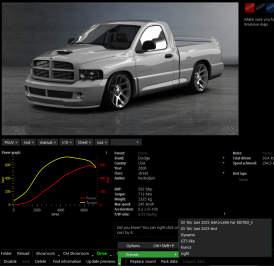
I have followed you instructions to the tee but see nothing in the available showroom/presets ....any ideas?C:\Users<YOUR_USERNAME>\AppData\Local\AcTools Content Manager\Presets\Custom Previews
Last edited:
I have followed you instructions to the tee but see nothing in the available showroom/presets ....any ideas?C:\Users<YOUR_USERNAME>\AppData\Local\AcTools Content Manager\Presets\Custom Previews


1.Please confirm that you have followed the instructions provided by the publisher:I have followed you instructions to the tee but see nothing in the available showroom/presets ....any ideas?View attachment 1462277


Ha! Yes, that'll be quite the mountain to climb.Only thing less "fun" is doing all 5000 car collection with it!!

Like ThisI have followed you instructions to the tee but see nothing in the available showroom/presets ....any ideas?View attachment 1462277


You're looking for it in the wrong section, Peter.I have followed you instructions to the tee but see nothing in the available showroom/presets ....any ideas?View attachment 1462277
 It's quite easy to get the car right off the window. Rinse and repeat till you're happy and then do all the previews for the car.

It's much more easy and less time consuming.Only thing less "fun" is doing all 5000 car collection with it!!


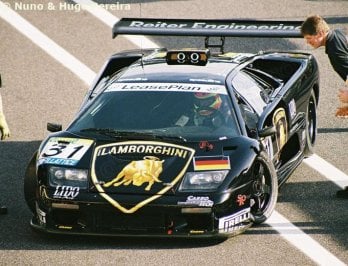
Does anybody know what sticker this is? i have been searching for ages but i cannot find it.
even though it seems tied to RTL i cannot find this sticker on any other car from that era, it seemed to be only on this car
View attachment 1462364
thats the one! thats good enough for me to make it up now for tomorrows round of skinning. Thanks for taking the time out to find it.

Been looking at it for a while (longer than I should have, lolz) and I'm almost certain that the "Video" bit is a sticker over a rectangular section of the racing number box.Does anybody know what sticker this is? i have been searching for ages but i cannot find it.
even though it seems tied to RTL i cannot find this sticker on any other car from that era, it seemed to be only on this car
View attachment 1462364
Thanks for the help mate, sticker made upBeen looking at it for a while (longer than I should have, lolz) and I'm almost certain that the "Video" bit is a sticker over a rectangular section of the racing number box.
Like "No, not advertising THAT, what can we stick over it?"
I can't make head nor tail of the box footer, but I can have a go at the "Video" red on white part?
Ha! Ninja'd and corrected by @CrisT86


even with this angle i have the bug that the kunos r8 lms ultra doesnt show all body parts when the skin is using the chemflummi addon, does someone maybe know how to fix it? i swaped the ext config from another skin over and then did the preview for that skin and after that restored the original ext config with chemflummi addon but its so much labour xDI had the same issue. Try this adjusted preset, plus drop the models.ini in the TAV_moderna showroom folder.
View attachment 1462151


He's just as lost as the guy who keeps posting need for speed mods in the Assetto Corsa cars section in downloads....r u lost m8


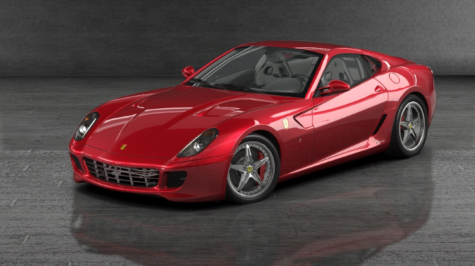
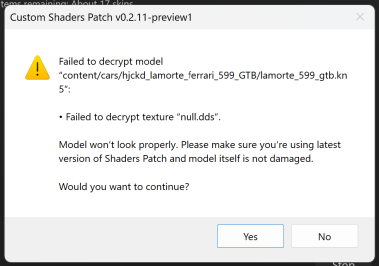
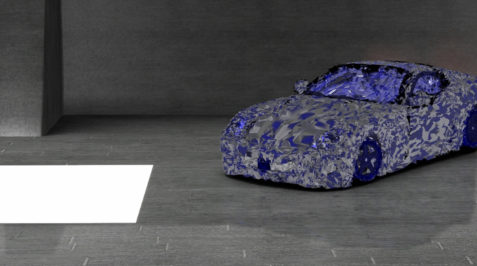
Be a little careful with doing a blanket update, as some encrypted cars still can't use CSP previews and will still display blue crystals, eg the Ferrari 599 GTB Fiorano by LaMorte.It's much more easy and less time consuming.
1) Navigate to 'Content', then 'Cars'.
2) Click on any car on the left.
3) Click the tiny arrow next to 'Update Previews' at the bottom of the window, then click 'Options'.
4) Select the new preview you'd like to use at the bottom of the preference window, then click the 'Update Selected Skin (without confirmation)' button (box with a + in it).
This tells Content Manager that this is the default skin to use.
5) Quit the preview, and select all cars in the left list (click one, then CTRL+A).
6) Click the drop-down at the bottom and select Look > Update Previews.
7) Click 'Update XXX cars' when you're ready. This may take a few hours depending on the number of cars.
Or
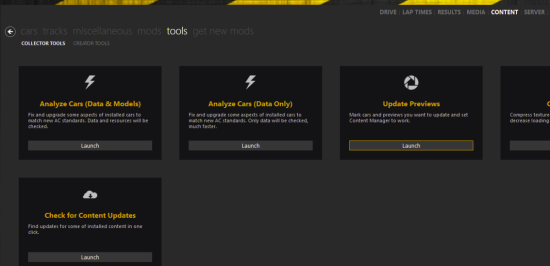
1) Go to 'Content', then 'tools'.
2) Click 'Launch' button of the 'Update previews' tool
3) Click 'Autoselect' button at the bottom
4) Click 'Update Previews' at the bottom of the window
View attachment 1462359


A strange new issue, I have the latest Pure hotfix (2.60) and the latest CSP preview... and for some reason the track is dry, it's not raining but the cars are spraying rain mist. I'm not sure what causes it, if I clear the weather schedule and load a static weather it doesn't seem to happen, but as soon as I load a weather plan or start adding other weathers to the plan it happens. It doesn't seem tied to humidity, mist or any other setting so I'm not sure how to avoid/fix it.
Any ideas?
Not to mention that sometimes previews are ufked and you need to restart the process (car moving into a corner, disc brake glowing red)Be a little careful with doing a blanket update, as some encrypted cars still can't use CSP previews and will still display blue crystals, eg the Ferrari 599 GTB Fiorano by LaMorte.
I thought CSP previews were supposed to have solved this problem, but apparently not in all cases.
Was just about to post that the first time I applied a CSP preview to the Ferrari 599 GTB Fiorano by LaMorte, it was all blue crystals and hanging off the side of the screen. I just hit the 'update previews' button a second time and the car is now centred and rendered properly.Not to mention that sometimes previews are ufked and you need to restart the process (car moving into a corner, disc brake glowing red)

I think it's the heat.r u lost m8
Sorry can anyone plz shed me some light on this? ThxTo all friendly experts, may I ask what's wrong with my setting for screenshot with CSP? Or is that my AMD driver problem?
View attachment 1462329View attachment 1462330View attachment 1462331View attachment 1462332
Thank you!
I also noticed a drop in performance with large grids of AI cars with recent CSP builds. Maybe the newer AI features are overloading the CPU? Or memory leaks?Very annoying, whatever the cause.Anyone else get horrendous performance with 20 cars on track? Never had this before. Maybe due to latest CSP version?
When I'm alone on track no issues at all..



Glad it's not only me than.. Thought I was going crazy.I also noticed a drop in performance with large grids of AI cars with recent CSP builds. Maybe the newer AI features are overloading the CPU? Or memory leaks?Very annoying, whatever the cause.


just try one at a time and it always works....If you do everything together it doesn't workWas just about to post that the first time I applied a CSP preview to the Ferrari 599 GTB Fiorano by LaMorte, it was all blue crystals and hanging off the side of the screen. I just hit the 'update previews' button a second time and the car is now centred and rendered properly.
View attachment 1462476
It seems CM sometimes struggles to resolve the code the first time, but gets there in the end.
If anyone gets janky results with certain cars, just try another pass.
Edit: HA! One skin at a time is OK but I tried updating all of the Fiorano skins in one go and got this:
View attachment 1462477
View attachment 1462478
So yeah... something isn't quite right somewhere.
Edit: restarting CM seems to fix things... until they bork themselves again. Rinse/repeat.