Assetto Corsa PC Mods General DiscussionPC 

  • Thread starter Thread starter daan
  • 157,268 comments
  • 51,147,404 views
I also use 0.1.79 rain. However I have the newest CSP always installed on my other computer but some tracks stopped working with these experiments.

I'm happy with 0.1.79 on my gaming machine. It's the last stable version anyway.
Yep, I always rather use those old stable version. I only update CSP when I am forced to, when the latest mods stop working with older version.

And it's usually followed by problems and frustration.

 
RMS 2000-2005 Courage C60 Megapack Version 1.0

Download: https://www.mediafire.com/file/9d4m...2005_Courage_C60_Megapack_Version_1.0.7z/file

Credits

Team: RMS ScreenShots: AndyGTR

Converstion: NeilB1971,Kamil Cader

Model improvements: Kamil Cader, Peugeot905, NeilB1971

Physics: Peugeot905,Kamil Cader,Mach-77

Sound: RMS

Other Lemans Prototypes: https://www.mediafire.com/folder/7g6488jsyt2ux/Lemans_Prototype_Near_Finalized


Change log

-Updated sounds for GV4 V10

-Updated correctly scaled wheels and tyres

-Updated rear wing for Courage C60 JX #N°2 chassis

-Removed 2000 Courage C60 Nissan Variant

-Added 2000 Courage C60 Judd chassis #N°1

-Lowered inertia on all models

-Updated steering on all Courage C60s

-Updated Rear wing for Courage C60 Hybrid and C60 Hybrid LMS

-Extensive updates to the aero.ini files for both Courage C60 Hybrids

-Revised front splitter for 2000 Courage C60 Judd and frontal aero

-Updated sound for Peugeot V6 sounds

-Updated Digital Instruments for Courage C60 Hybrid and C60 Hybrid LMS

image.jpg

image (1).jpg

image (2).jpg

38vdoW (1).jpg

p6Q7sS.jpg

xAehMK.jpg

vUc92E.jpg

VjxcpD.jpg

jF1uyg.jpg

NwUSJY.jpg

QGYzMc.jpg

AKgja4.jpg

V4QAaZ.jpg
 
Last edited:
Is it possible to use camera_facing.ini on "tso_grandstand_big.kn5" and "tso_grandstand_small.kn5"?
I've tried with
[CAMERA_FACING_0]
SURFACE=gg_building_grandstand_01_a-2_0
ELEMENTS=500
SIZE=0.8,1.4
TEXTURE=content/tracks/... crowds_sitting.dds
TEXTURE_ROWS=3
TEXTURE_COLUMNS=8
SHADED=1
DIFFUSE=0.014,0.014,0.014
AMBIENT=0.075,0.075,0.075

but it doesn't work
Only two things I can see that might be the cause, cos everything else looks right, are:
1. You sure that's the correct surface name? Mesh, yes?
2. The texture path doesn't look valid? Just visual truncation?
 
Last edited:
Is it possible to use camera_facing.ini on "tso_grandstand_big.kn5" and "tso_grandstand_small.kn5"?
I've tried with
[CAMERA_FACING_0]
SURFACE=gg_building_grandstand_01_a-2_0
ELEMENTS=500
SIZE=0.8,1.4
TEXTURE=content/tracks/... crowds_sitting.dds
TEXTURE_ROWS=3
TEXTURE_COLUMNS=8
SHADED=1
DIFFUSE=0.014,0.014,0.014
AMBIENT=0.075,0.075,0.075

but it doesn't work
try these for
SURFACE=gg_building_grandstand_01_a-2
SURFACE=gg_building_grandstand_01_g
 
Is there a version from Rfactor that exists?
Yes there is and the correct layout for 1997 as well before they changed it - https://pitlaneweb.blogspot.com/2024/06/vancouver-street.html

Someone said that creating oval tracks is problematic on AC as creating the racing line is difficult. I have no idea. Do the ovals play well too?
Some do, it does depend on the combination of the Ai line of the track and the AI settings for the cars. From my experiments with tracks, you have to be a lot more precise with the AI line to make sure the cars don't lose too much speed.
 
Last edited:
Only two things I can see that might be the cause, cos everything else looks right, are:
1. You sure that's the correct surface name? Mesh, yes?
2. The texture path doesn't look valid? Just visual truncation?
1) Yes, it's the chairs mesh
2) It's just truncated. The dots are only visual

try these for
SURFACE=gg_building_grandstand_01_a-2
SURFACE=gg_building_grandstand_01_g
It doesn't work. Could be the vertical surface of the mesh ?
 
@maximeerkat since u are doing a lot of skins for the btcc mods from cyrill cherry, can u also maybe to do these? they are for another alfa 156 mod i had laying around?
Probably not, from a quick search on the net the skins you sent me never raced in the BTCC, there are 2 variants of the skin you shown me already done that i made/converted

what you sent me is 2 skins with half the logo's misssing by the looks of it (it has the wrong race plates so i guess the skin creator did not give a ****).

have a search yourself and see what you can find and send me the pictures but i do not think you will be able to as like i said the skins are already done in 1 varient or another
 
I'm testing the Race Project 2003 and planning to make a 2003 season as it was one of my favorites. Very exciting Raikkonen vs Schumacher battle until the very end.

Nice work otherwise but these cars don't work on any Monaco track I've tried. They crash in the Loews/Grand Hotel hairpin (among some other places). I suspect these cars' steering rod ratio is wrong so that their wheels don't turn enough. This was the cardinal sin of some SimDream "dream mods".

Anyone has tried? Crashfest with the newest CSP's anyway. I have to investigate.
 
Last edited:
1) Yes, it's the chairs mesh
2) It's just truncated. The dots are only visual


It doesn't work. Could be the vertical surface of the mesh ?
I think I know whats going on (without actually testing)

TrackDeco places objects relative to 0,0,0 and the position you see is based on that 0,0,0 as a pivot. An eample of this is that if you place a wall in TD it will only be colideable at 0,0,0 and not where you see it. This is true if using models.ini or the raw .kn5 that is produced in TD.

To check if this is the case, press F7 and fly to 0,0,0 and see if your camface are there floating in space... (if yes, this is the issue)

To fix this, be sure to save as .kn5 in TD then extract that new .kn5 to fbx with CM or kn52fbx, then load that fbx into ksEditor and save as a new .kn5. This should restore the object pivot properly.
 
Last edited:
Maybe the texture (off.png) is corrupt?
I only have my amended one if you want to try, maybe someone can provide the original?
Put it in assettocorsa/content/texture after backing up the one that's already in there.
You'll need to rename it off.png, GTP renames it randomly when posting.

View attachment 1463914
(from here: https://www.gtplanet.net/forum/thre...ral-discussion.307899/page-4803#post-14442459)
I didn't get to try the fallguy solution but I tried this and it worked wonders (plus the traffic light looks so much better now), thank you so much Masscot
 
I'm testing the Race Project 2003 and planning to make a 2003 season as it was one of my favorites. Very exciting Raikkonen vs Schumacher battle until the very end.

Nice work otherwise but these cars don't work on any Monaco track I've tried. They crash in the Loews/Grand Hotel hairpin (among some other places). I suspect these cars' steering rod ratio is wrong so that their wheels don't turn enough. This was the cardinal sin of some SimDream "dream mods".

Anyone has tried? Crashfest with the newest CSP's anyway. I have to investigate.
That is because the race project is just reusing Simdream's mods, and updating them... and then charging people which is not right at all.
 
View attachment 1464369
Does anyone know how to fix this error? Only happens with a specific car mod. The car can spawn fine when driven by AI if that's of help.
Reset CSP settings completely!
Goto /Documents/Assetto Corsa/cfg/ rename the "extension" folder to something different.
Restart CM. It will create a new "extension" folder. You can restore it later.

If that does not help, its related to the mods you are using...

Maybe also create a new CSP settings file after you reset them, so you can always test with default CSP settings in the future!
 
Last edited:
Reset CSP settings completely!
Goto /Documents/Assetto Corsa/cfg/ rename the "extension" folder to something different.
Restart CM. It will create a new "extension" folder. You can restore it later.

If that does not help, its related to the mods you are using...

Maybe also create a new CSP settings file after you reset them, so you can always test with default CSP settings in the future!
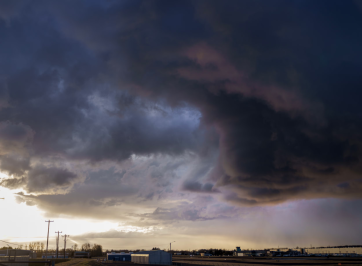
While you're here @Peter Boese, is there any way to make the thunderstorm clouds darker and moodier? The clouds don't really look like they're heavy with rain and electrical energy to me, they look a little too much like a normal overcast sky with my settings (Pure/Natural_Mod filter, but the Pure PPF looks the same). You can always tell when a thunderstorm is on the way by the build-up of dark angry clouds and the oppressive atmosphere, but I don't get that sense at all from the Pure skybox. It's too light, too uniform. Too friendly.

Pic for attention:
1752394384987.png
 
Last edited:
While you're here @Peter Boese, is there any way to make the thunderstorm clouds darker and moodier? The clouds don't really look like they're heavy with rain and electrical energy to me, they look a little too much like a normal overcast sky with my settings (Pure/Natural_Mod filter, but the Pure PPF looks the same). You can always tell when a thunderstorm is on the way by the build-up of dark angry clouds and the oppressive atmosphere, but I don't get that sense at all from the Pure skybox. It's too light, too uniform. Too friendly.

Pic for attention:
View attachment 1464465
I agree, especially with cloudy weather, to see the gray clouds clearly and not the uniform gray sky, I increase the contrast in Pure config, but then in sunny/cloudy weather, they become too "black."
It would be nice to have less contrast but without losing cloud detail.
The fact remains that your work Peter is fantastic.
 
Reset CSP settings completely!
Goto /Documents/Assetto Corsa/cfg/ rename the "extension" folder to something different.
Restart CM. It will create a new "extension" folder. You can restore it later.

If that does not help, its related to the mods you are using...

Maybe also create a new CSP settings file after you reset them, so you can always test with default CSP settings in the future!
It seems to only be happening with a specific car mod I've downloaded, all other cars and tracks work fine.
 
Ha, that’s my car! Incredible :cheers:
LOOOOOOOL! thats funny, did you smack the front splitter/bumper off or was it taken of to load it onto the flatbed?

I had to make up some of the stickers on this and do pure guess work if you can correct me on anything then please do

maybe you have some more pictures of this car?

the 2 below are the only 2 i can find personally

i tried way back machine and just get blank pages or nothing usefull


2437.jpg

2438.jpg
 
Last edited:
So, just going to share with you all the list of tracks/layouts that I haven't been able to exactly find (and outlining what they are in relation to currently existing tracks). Please keep in mind as well, that I'm not considering layouts such as Spa, Barcelona and Montreal 1994 as different layouts.

  • Ain-Diab/Casablanca 1958
  • Barcelona 2004-2006 (Layout with the shorter T10, and no chicane)
  • Buenos Aires 1953, 1955-1960 (Exists as Circuit No. 9 Alternative GT, but with the shorter final hairpin, and the newer final chicane)
  • Buenos Aires 1954 (Same layout as above, but run in reverse)
  • Buenos Aires 1995-1998 (Exists as Formula Argentina Circuit No. 6, but uses the older chicane before the final corner)
  • Caesar's Palace 1981-1982
  • Dallas 1984
  • Detroit 1982 (Same layout as Detroit 1988, but with extra hairpin section at Turn 5)
  • Estoril 1994-1996 (Mix between Old Estoril, and Current Estoril. It's basically current Estoril, but before the Turn 1 reprofiling)
  • Hockenheim 1970-1981 (Hockenheim 1988 but before the chicane at Ostkurve was put in)
  • Le Mans Bugatti 1967 (Current version of this circuit exists)
  • Long Beach all four versions (1976, 1978, 1982, 1983)
  • Magny-Cours 1991 (Has a chicane after the first hairpin)
  • Marina Bay 2008-2012 (With Singapore Sling)
  • Monsanto 1959
  • Montreal 1978-1986 (Pit straight after hairpin, and extra chicane before what is currently Turn 1)
  • Montreal 1996-2001 (Almost tempted to just count this as current Montreal, as the only thing that has changed is the pit exit, not the actual track layout
  • Monza 1972-1973 (first iteration of chicanes)
  • Monza 1974-1975 (same as above, but reprofiled Ascari chicane)
  • Monza 1994-1999 (Current Monza, but with the old Rettifilo chicane. Curva Grande through to Lesmos had all been reprofiled from 1993)
  • Nurburgring 1984-1985 (Final chicane isn't really a chicane in comparison to 1995-2001 layout)
  • Pedralbes 1951-1954
  • Pescara 1957
  • Phoenix 1989-1990 (1st sector completely different to 1991 layout)
  • Reims-Gueux 1950-1951 (old circuit that actually goes through Gueux)
  • Reims Gueux 1953 (Tempted to just say it exists as current Reims layout. Has tighter hairpins at Muizon and Thillois)
  • Sebring 1959 (I think a 1970s version exists somewhere? Even then, the chicane down the back straight is earlier on the straight in 1959)
  • Silverstone 1994-1995 (Differences to current 1991 layout are: Reprofiled Copse, reprofiled Stowe, introduction of Abbey chicane, Priory/Brooklands brought forward)
  • Silverstone 1996 (Differences to current 1999 layout are: Reprofiled Copse [same layout as above], Priory/Brooklands brought forward [same layout as above])
  • Silverstone 2010 (same as current, but pit-straight in the old spot before Copse)
  • Spa 2004-2005 (Before they straightened the pit-straight, but had reprofiled the Bus-Stop chicane)
  • Yas Marina 2021 (new layout for this season)
  • Zandvoort 1980-1985 (Chicane added at Hondenvlak)
  • Zeltweg 1964
  • Zolder 1973 (Close to Zolder 1967 that exists, but with Klein chicane added in)
  • Zolder 1975-1984 (Introduction of Jackie Ickxbocht chicane)
I'm going back a long long time here - but thought I'd update the list again of what's 'precisely' missing if we want to be completely accurate.

I know I've done this again recently, but thought I'd go back on the original list I've done from 4 years ago:

  • Silverstone 1950-1951 (technically we have, but start-finish straight in it's original spot before Woodcote)
  • Buenos Aires 1953-1960 (uses older chicane at turns 8/9, and final hairpin is out longer)
  • Reims-Gueux 1953 (1954 layout, but with a tighter first hairpin
  • Buenos Aires 1954 (same as 1953-1960 layout, but run in reverse)
  • Ain Diab 1958
  • Monstanto 1959
  • Brands Hatch 1964-1974 (we have the '76-'87 version, but prior to this, Paddock Hill, Graham Hill/Bottom and Surtees/South Bank bends were all in a different profile (including Cooper/Bottom Straight)
  • Jarama 1968-1979 (Without extensions at the first corner, and Portago, before Bugatti corner was reprofiled)
  • Buenos Aires 1972-1973 (Uses older chicane at turns 8/9)
  • Anderstorp 1973-1974 (Sweeping right at end of back straight, start/finish after Atlaskurve
  • Anderstorp 1974-1977 (Chicane at end of back straight, start/finish after Atlaskurve)
  • Anderstorp 1978 (Current layout, but start/finish still after Atlaskurve
  • Zandvoort 1980-1985 (Introduced Hondenvlak chicane)
  • Jarama 1981 (1968-1979 layout, but with the reprofiled Bugatti corner)
  • Long Beach 1982 (changes across first and last sectors)
  • Long Beach 1983 (changes made to use Seaside Way instead of Ocean Boulevard)
  • Silverstone 1994-1995 (Circuit as 1991-1993, but reprofiled Copse, Stowe, Priory/Brooklands, and addition of Abbey chicane
  • Silverstone 1996 (Circuit as 1994-1995, but reprofiled Stowe)
  • Silverstone 2010 (Current layout, but start/finish still before Copse - A version of this exists, but without the Club chicane/complex in it's current form)
  • Marina Bay 2015-2017 (Reprofiled Turns 11-13)
  • Possibly up to date Monaco?
By my count, this is 167 different layouts used across Formula 1's history, and assuming we do have the current up to date Monaco, 21 circuits we do not have yet (and only 2 - the bolded circuits - we do not have in any form)
 
While you're here @Peter Boese, is there any way to make the thunderstorm clouds darker and moodier? The clouds don't really look like they're heavy with rain and electrical energy to me, they look a little too much like a normal overcast sky with my settings (Pure/Natural_Mod filter, but the Pure PPF looks the same). You can always tell when a thunderstorm is on the way by the build-up of dark angry clouds and the oppressive atmosphere, but I don't get that sense at all from the Pure skybox. It's too light, too uniform. Too friendly.

Pic for attention:
View attachment 1464465
What about using the Squalls weather?
1752418892175.png
1752418855599.png

1752418914217.png


and actually this is Thunderstorm on my side:
1752419017963.png


You can also reduce Humidity to get a clearer look and therefore darker clouds!

Also, if you want to have thunder/lightning in other weather types, there is a hack you can customize this:
in this file, you can define the thunder parameter for every weather:

1752419338179.png
 
Last edited:
What about using the Squalls weather?
View attachment 1464531View attachment 1464530
View attachment 1464532


and actually this is Thunderstorm on my side:
View attachment 1464533

You can also reduce Humidity to get a clearer look and therefore darker clouds!

Also, if you want to have thunder/lightning in other weather types, there is a hack you can customize this:
in this file, you can define the thunder parameter for every weather:

View attachment 1464534
Mmmm... my thunderstorm weather (or squalls) doesn't look anything like that for some reason. Your image is exactly what I was after.
 
Mmmm... my thunderstorm weather (or squalls) doesn't look anything like that for some reason. Your image is exactly what I was after.
Try the pure ppfilter with all default settings in Pure Config and Pure PP app. Would be interesting if it looks ok then.

Also this is Pure LCS 2.60.
There was a big change with Pure LCS 2.35 and the skydomes.
 
Last edited:
How can you force AI cars to choose S tyres for the race instead of M?

Is there some kind of trick? I'd love to make the AI cars even more competitive.

Yeah I know... removing all other tyremodels. But is there any other way?

In some F1 mods the cars choose even wets for the free practice.. in dry Monaco.. Like in this Raceproject 2003 mod. How can I prevent this from happening?

This would be a great season to make but these cars in Monaco 2017 and Monaco 1998 like crazy. It's a total mayhem. It might be the steering ratio issue or simply the tyre issue as M's won't offer enough traction. I can test if I know how to adjust these (I absolutely hate car tweaking but whenever SimDream has even something to do with the cars it's always mandatory hehe). These cars have so many nice things like sounds and graphical details but you can't actually race them on Monaco at this state.

It was already too easy to create a seasson with the good old F2002. That car works like a dream on every track with zero issues.

ALgvA47.jpeg


This is Monaco with these cars. After 1st lap 18 out of 20 cars are already retired.

FjxwzWi.jpeg


Edit: I improved them quite a bit by decreasing the steering rod ratio from 15 to 12. Still crashing but way less now.

Edit2: 1998 Monaco to rescue. They work now with steering rod ratio at 12 and race nicely and safely in the 1998 version.
 
Last edited:
I think I know whats going on (without actually testing)

TrackDeco places objects relative to 0,0,0 and the position you see is based on that 0,0,0 as a pivot. An eample of this is that if you place a wall in TD it will only be colideable at 0,0,0 and not where you see it. This is true if using models.ini or the raw .kn5 that is produced in TD.

To check if this is the case, press F7 and fly to 0,0,0 and see if your camface are there floating in space... (if yes, this is the issue)

To fix this, be sure to save as .kn5 in TD then extract that new .kn5 to fbx with CM or kn52fbx, then load that fbx into ksEditor and save as a new .kn5. This should restore the object pivot properly.
You nailed it. The crowd is at 0,0,0.
As you suggested, I made the KN5 in TD and extracted with CM. But ksEditor get stuck on loading the FBX.
I've tried opening and saving the FBX with Blender, but ksEditor still get stuck on loading.
 
Sharing a mod? Host it on GTPlanet Downloads. Free, public hosting for files up to 10GB in size.
Back