Assetto Corsa PC Mods General DiscussionPC 

  • Thread starter Thread starter daan
  • 155,500 comments
  • 49,514,134 views
Mmmm... my thunderstorm weather (or squalls) doesn't look anything like that for some reason. Your image is exactly what I was after.
Try the pure ppfilter with all default settings in Pure Config and Pure PP app. Would be interesting if it looks ok then.

Also this is Pure LCS 2.60.
There was a big change with Pure LCS 2.35 and the skydomes.
 
Last edited:
How can you force AI cars to choose S tyres for the race instead of M?

Is there some kind of trick? I'd love to make the AI cars even more competitive.

Yeah I know... removing all other tyremodels. But is there any other way?

In some F1 mods the cars choose even wets for the free practice.. in dry Monaco.. Like in this Raceproject 2003 mod. How can I prevent this from happening?

This would be a great season to make but these cars in Monaco 2017 and Monaco 1998 like crazy. It's a total mayhem. It might be the steering ratio issue or simply the tyre issue as M's won't offer enough traction. I can test if I know how to adjust these (I absolutely hate car tweaking but whenever SimDream has even something to do with the cars it's always mandatory hehe). These cars have so many nice things like sounds and graphical details but you can't actually race them on Monaco at this state.

It was already too easy to create a seasson with the good old F2002. That car works like a dream on every track with zero issues.

ALgvA47.jpeg


This is Monaco with these cars. After 1st lap 18 out of 20 cars are already retired.

FjxwzWi.jpeg


Edit: I improved them quite a bit by decreasing the steering rod ratio from 15 to 12. Still crashing but way less now.

Edit2: 1998 Monaco to rescue. They work now with steering rod ratio at 12 and race nicely and safely in the 1998 version.
 
Last edited:
I think I know whats going on (without actually testing)

TrackDeco places objects relative to 0,0,0 and the position you see is based on that 0,0,0 as a pivot. An eample of this is that if you place a wall in TD it will only be colideable at 0,0,0 and not where you see it. This is true if using models.ini or the raw .kn5 that is produced in TD.

To check if this is the case, press F7 and fly to 0,0,0 and see if your camface are there floating in space... (if yes, this is the issue)

To fix this, be sure to save as .kn5 in TD then extract that new .kn5 to fbx with CM or kn52fbx, then load that fbx into ksEditor and save as a new .kn5. This should restore the object pivot properly.
You nailed it. The crowd is at 0,0,0.
As you suggested, I made the KN5 in TD and extracted with CM. But ksEditor get stuck on loading the FBX.
I've tried opening and saving the FBX with Blender, but ksEditor still get stuck on loading.
 
How can you force AI cars to choose S tyres for the race instead of M?

Is there some kind of trick? I'd love to make the AI cars even more competitive.

Yeah I know... removing all other tyremodels. But is there any other way?

In some F1 mods the cars choose even wets for the free practice.. in dry Monaco.. Like in this Raceproject 2003 mod. How can I prevent this from happening?

This would be a great season to make but these cars in Monaco 2017 and Monaco 1998 like crazy. It's a total mayhem. It might be the steering ratio issue or simply the tyre issue as M's won't offer enough traction. I can test if I know how to adjust these (I absolutely hate car tweaking but whenever SimDream has even something to do with the cars it's always mandatory hehe). These cars have so many nice things like sounds and graphical details but you can't actually race them on Monaco at this state.

It was already too easy to create a seasson with the good old F2002. That car works like a dream on every track with zero issues.

ALgvA47.jpeg


This is Monaco with these cars. After 1st lap 18 out of 20 cars are already retired.

FjxwzWi.jpeg
I also had problems in some other seasons in this regard (trying to remove the other problems, etc.).What "alleviated" it a bit was trying to better adjust the "AI" file within the "DATA" folder itself... but I think that perhaps part of this problem (would be someone making a new AI Line)...
 
Try the pure ppfilter with all default settings in Pure Config and Pure PP app. Would be interesting if it looks ok then.

Also this is Pure LCS 2.60.
There was a big change with Pure LCS 2.35 and the skydomes.

When i download pure from patroen it doesn't give me the skyboxes, so i reckon I'm using really old sky boxes as it mostly looks like gash, hence why i don't use it, how do i get the latest skyboxes?
 
shi
Monza 1994 v1.01

View attachment 1463940
Monza with 1994 layout.
Conversion from F1 Challenge.

-CSP recommended
-54 pit/start
-AI, cam

Credits & Thanks;
F1 Challenge Track by dmarques
(Based on the default F1C circuit with major upgrades to buildings and surroundings)

Terms Of Use; (F1C)
Enjoy this mod to the fullest, that's all. If you want to convert or use this
as a base to create other cars, you're welcome in doing so as long as the
appropriate credit is given to the respective authors of the files you are
using. You can find all authors in this file

AC converted by @shi (shin956)
AI line, sidelines and ai_hints.ini by @IMEAN
logo.png and sections file by @Fanapryde
.lua base and font by @gunnar333
Crowds texture by @Kniker97
pit tents from F1-S-R track pack (rF1)
some textures by kunos
Test and Feedback by @Breathe

Enjoy.
;;;;;;;;;;;;;;;;;;;;;;;;;;;;;;;;;;;;;;;;;;;;;;;
v1.01 changelog;
Lancia adboard was “8”, corrected to “δ” (delta). (Thank you Antonio Losapio for the report.)
Fine-tuned the tree textures.

Monza 1994 v1.01
The link is in the quote.

v1.01 changelog;
Lancia adboard was “8”, corrected to “δ” (delta). (Thank you Antonio Losapio for the report.)
Fine-tuned the tree textures.
Screenshot_bmw_m3_e30_dtm_monza_1994_12-6-125-20-8-15.jpg
 
When i download pure from patroen it doesn't give me the skyboxes, so i reckon I'm using really old sky boxes as it mostly looks like gash, hence why i don't use it, how do i get the latest skyboxes?
1752458641079.png

Download comes with everything needed
 
This looks promising: NVIDIA Introduces "Smooth Motion" Frame Generation for RTX 40 Series GPUs in Latest Preview Driver, Proven to Double In-Game FPS https://wccftech.com/nvidia-introduces-smooth-motion-frame-generation-for-rtx-40-series-gpu/
Travelling at the moment, so won't get a chance to test it this week.
I just realised i can use AMD FSR3 frame generation on older Nvidia cards like my 2060. improves frame rates a lot... but only if game supports fsr3, so not appolicable to AC. Smooth motion wont do much to AC, as you need a 40-50 series card and they are already powerful enough for perfect AC frame rates.
 
You nailed it. The crowd is at 0,0,0.
As you suggested, I made the KN5 in TD and extracted with CM. But ksEditor get stuck on loading the FBX.
I've tried opening and saving the FBX with Blender, but ksEditor still get stuck on loading.
Right. I have this issue sometimes also. Try starting with only one or two (grrandstand) objects first, this might help.
You can always join multiple KN5s later to build up a larger set if needed.

(Will investigate this issue in TD as I dont recall it hapening in earlier versions)
 
Last edited:
When i download pure from patroen it doesn't give me the skyboxes, so i reckon I'm using really old sky boxes as it mostly looks like gash, hence why i don't use it, how do i get the latest skyboxes?
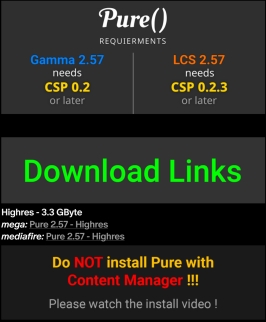
It is not installed properly then! Please be sure you install Pure exactly like shown in the install video!

You must use 7zip app and you must use the "Extract" button to extract the 4 folders to your used AC root folder.

Also check your used AC root folder in CM - settings - Content Manager - general!
 
I just realised i can use AMD FSR3 frame generation on older Nvidia cards like my 2060. improves frame rates a lot... but only if game supports fsr3, so not appolicable to AC. Smooth motion wont do much to AC, as you need a 40-50 series card and they are already powerful enough for perfect AC frame rates.
Wait, how does that work on Nvidia cards?
 
LOOOOOOOL! thats funny, did you smack the front splitter/bumper off or was it taken of to load it onto the flatbed?

I had to make up some of the stickers on this and do pure guess work if you can correct me on anything then please do

maybe you have some more pictures of this car?

the 2 below are the only 2 i can find personally

i tried way back machine and just get blank pages or nothing usefull


View attachment 1464505
View attachment 1464506
I’ll have a dig through the archive for any other photos that may be of use. I may also have some of the logos in PSD/AI format. I’ll bundle it up and send it when I can get to the relevant hard drive.

That first photo was after a coming together with the BMW 320i of Luke Searle (black with SAE signage, recently available from F302) at the last corner at Oran Park. My recollection is that I was taking a look down the inside of someone and Luke went for a sim-racing move on the inside of me. I probably over did my attempt to back out of it all and ended up getting squeezed, breaking the RF upright. Splitter had to come off to get on the truck if I remember correctly. We borrowed an upright from another team to get going again.

I think that was my last meeting in that chassis as I moved to the later body shape - same as the VRC Mondeo, which I will say is an excellent rendition - model and physics-wise (although I think the physics got a little further from reality when they updated it).

Thank you for your work :cheers:
 
Last edited:
How do you get 2.60. Patron is 2.57. Many thanks.
In the Pure Patreon community chat, there is a hotfixes channel. There you get it.

But you also get it in the hotfixes channel at Pure Discord Server.
Link your Discord account in Patreon settings - More - Connected apps. You will be automatically linked with Pure Discord Server and get a role to view the Pure channels. There you find the "pure-hotfixes" channel then.

It's just some minor tweaks and fixes...
 
Last edited:
In the Pure Patreon community chat, there is a hotfixes channel. There you get it.

But you also get it in the hotfixes channel at Pure Discord Server.
Link your Discord account in Patreon settings - More - Connected apps. You will be automatically linked with Pure Discord Server and get a role to view the Pure channels. There you find the "pure-hotfixes" channel then.

It's just some minor tweaks and fixes...
Cheers Peter. Yes I’m on Discord. Didn’t think of that 😎
 
In the Pure Patreon community chat, there is a hotfixes channel. There you get it.

But you also get it in the hotfixes channel at Pure Discord Server.
Link your Discord account in Patreon settings - More - Connected apps. You will be automatically linked with Pure Discord Server and get a role to view the Pure channels. There you find the "pure-hotfixes" channel then.

It's just some minor tweaks and fixes...
Hi Peter. Just checked my Discord. It didn’t give me permission so checked on Patreon to see if app was connected to Discord.
It said leave server but not connected. I tried to join again but no luck. Re signed into Discord but no difference. I have now lost my discord for sol/ pure. Any ideas please.
 
Right. I have this issue sometimes also. Try starting with only one or two (grrandstand) objects first, this might help.
You can always join multiple KN5s later to build up a larger set if needed.

(Will investigate this issue in TD as I dont recall it hapening in earlier versions)
I've done some investigation.
Each section of the camera_facing.ini must have only one mesh (it's not possible to trunkate the mesh names or use "?").
If you have 10 grandstands you must have 10 separated section inside camera_facing.ini.

When I was investigating I came across with the following issue.

I tried with one big and small grandstands and the crowd work fine.
Then with 2 of each one and was fine.
And so on, untill I put 5 of a kind and the names of the last ones meshes were different from what I expected.

With TD they were name as I expected (gg_building_grandstand_01_a-2_4, gg_building_grandstand_01_g_4)
TD_meshes.png


But after creating the KN5 in TD, extract the FBX and creating the KN5 in KsEditor, the _4 were truncated from the mesh names
KN5_mesh.png


Then I tried with 6 and all the mesh names were in sequence again.

I've also tried adding (at the end and between grandstands sections of the TD model.ini) also a different objest (a brake marker) and the crowd was still there
 
I've done some investigation.
Each section of the camera_facing.ini must have only one mesh (it's not possible to trunkate the mesh names or use "?").
If you have 10 grandstands you must have 10 separated section inside camera_facing.ini.

When I was investigating I came across with the following issue.

I tried with one big and small grandstands and the crowd work fine.
Then with 2 of each one and was fine.
And so on, untill I put 5 of a kind and the names of the last ones meshes were different from what I expected.

With TD they were name as I expected (gg_building_grandstand_01_a-2_4, gg_building_grandstand_01_g_4)
View attachment 1464764

But after creating the KN5 in TD, extract the FBX and creating the KN5 in KsEditor, the _4 were truncated from the mesh names
View attachment 1464765

Then I tried with 6 and all the mesh names were in sequence again.

I've also tried adding (at the end and between grandstands sections of the TD model.ini) also a different objest (a brake marker) and the crowd was still there
Thank you for the report
 
I’ll have a dig through the archive for any other photos that may be of use. I may also have some of the logos in PSD/AI format. I’ll bundle it up and send it when I can get to the relevant hard drive.

That first photo was after a coming together with the BMW 320i of Luke Searle (black with SAE signage, recently available from F302) at the last corner at Oran Park. My recollection is that I was taking a look down the inside of someone and Luke went for a sim-racing move on the inside of me. I probably over did my attempt to back out of it all and ended up getting squeezed, breaking the RF upright. Splitter had to come off to get on the truck if I remember correctly. We borrowed an upright from another team to get going again.

I think that was my last meeting in that chassis as I moved to the later body shape - same as the VRC Mondeo, which I will say is an excellent rendition - model and physics-wise (although I think the physics got a little further from reality when they updated it).

Thank you for your work :cheers:
That would be great Sam i would like to get this car as accurate as i can purely due to you being here i may aswell if i am able to

Thanks for the explanation i was looking at the car when i was skinning it thinking "how the hell did that happen" and now i know :cheers:

do you still do motor racing now? or are you still in and around the track at all?

Final update to the red ovlov https://www.gtplanet.net/forum/down...00-volvo-850-saloon-cyril-cherry.7239/updates
 
Last edited:
Thank you for the report
I've just found something else that could help.
I've opended the FBX in Blender and there are two separate meshes with the same name. One is the seats mesh of one grandstand and the other is the structure of another grandstand.

[edit]
I belive that the issue is created by the following mesh names of the grandstand different parts
gg_building_grandstand_01_g
gg_building_grandstand_01_g-1
gg_building_grandstand_01_g-2

When you duplicate the grandstand the meshes are renamed adding something like "_n".
In same way the name gets screwed up (I don't know how, depends on the code).
I suppose that just renaming "gg_building_grandstand_01_g" to "gg_building_grandstand_01_g_0" will solve it.
 
Last edited:
kn5join.exe was changed a bit to better keep parented objects, seems like that's broken now...
Will fix!

EDIT: for now you could just use kn5Join\kn5join.exe (complete folder) from previous version...
I've done some investigation.
Each section of the camera_facing.ini must have only one mesh (it's not possible to trunkate the mesh names or use "?").
If you have 10 grandstands you must have 10 separated section inside camera_facing.ini.

When I was investigating I came across with the following issue.

I tried with one big and small grandstands and the crowd work fine.
Then with 2 of each one and was fine.
And so on, untill I put 5 of a kind and the names of the last ones meshes were different from what I expected.

With TD they were name as I expected (gg_building_grandstand_01_a-2_4, gg_building_grandstand_01_g_4)
View attachment 1464764

But after creating the KN5 in TD, extract the FBX and creating the KN5 in KsEditor, the _4 were truncated from the mesh names
View attachment 1464765

Then I tried with 6 and all the mesh names were in sequence again.

I've also tried adding (at the end and between grandstands sections of the TD model.ini) also a different objest (a brake marker) and the crowd was still there

seems like that error is in previous versions too :(
 
Last edited by a moderator:
Sharing a mod? Host it on GTPlanet Downloads. Free, public hosting for files up to 10GB in size.
Back