Assetto Corsa PC Mods General DiscussionPC 

  • Thread starter Thread starter daan
  • 150,416 comments
  • 45,745,860 views
Guys I still do not understand you why repeatedly polluting this thread, there is not problem when using a good free adblocker. Read the post from @slider666 below. If that is too difficult then use a free alternative web browser like Opera, DuckduckGo or Vivaldi. I did btw use a selective window that by selecting the irritated adv popup, is now always blocking every adv popup. I cannot remember if this is from Ublock origin or Adguard as I use them both, not only for Overtake, but also for the Youtube advertising.
Bob’s yer Uncle! :)


Last edited:
20251206-192215-industrial-f302_mclaren_f1_gtr_97.webp

Released : Mclaren F1 GTR (Longtail) 1997
Author:F302
3D Model Car :GT7
Texture Update : F302 (rework)
3d work: F302
Turnlight is Working
hope u enjoy the Car
ps : send feedback ,bugs ,missing things
tested on 0.2.12-preview1
PP filer PURELIFE EVO GT
VR
have fun!
To install, move folders to "...\SteamApps\common\assettocorsa" or simply
drag'n'drop archive to Content Manager


https://mega.nz/file/pXFHlRgS#bGKD_16OUVFH_cLk_W1-W_PdX6y4k6ATDbZdqUPQhZU
 
That GT-M Adonis V8 Evo has a very strange cockpit with super-shiny materials, and footwells that seem to be backlit.
Not one of RSS's prettier cars.
From their Discord there is a toggle in the Extension for LCS or Gamma. Perhaps the default is the opposite of what you use?
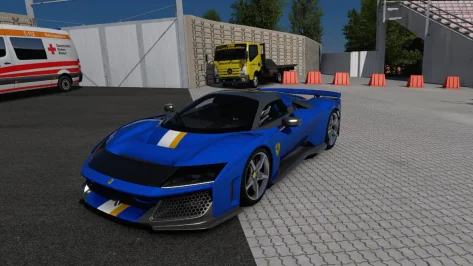
# GT-M Adonis V8 EVO - Tip 1
You can switch between Pure Gamma and Pure LCS optimised materials in the car's extension/ext_config.ini file, changing rss_materials_gamma to rss_materials_purelcs and pressing Save
https://i.gyazo.com/19e5f1602b68205fef6588bf4a3fdfe7.mp4
 
From their Discord there is a toggle in the Extension for LCS or Gamma. Perhaps the default is the opposite of what you use?
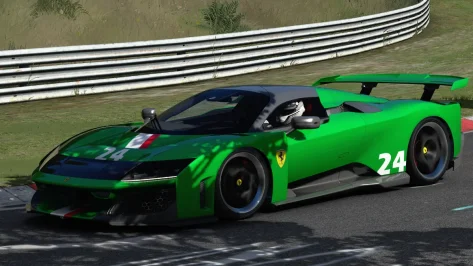
# GT-M Adonis V8 EVO - Tip 1
You can switch between Pure Gamma and Pure LCS optimised materials in the car's extension/ext_config.ini file, changing rss_materials_gamma to rss_materials_purelcs and pressing Save
https://i.gyazo.com/19e5f1602b68205fef6588bf4a3fdfe7.mp4
Thanks, but I already tried that. Shader values just seem a little weird. Maybe they tune the visuals for ExtraFX, which still doesn't work in VR.
 
Released : Chevrolet Corvette C5.R
Author:F302
3D Model Car :Raiza
Texture Update : F302 (rework)
3d work: F302
hope u enjoy the Car
ps : send feedback ,bugs ,missing things
tested on 0.2.12-preview1
PP filer PURELIFE EVO GT
VR
have fun!
To install, move folders to "...\SteamApps\common\assettocorsa" or simply
drag'n'drop archive to Content Manager


https://mega.nz/file/5PlzhA6Q#K_nWY4HJNanouDKq9FCl-L58MMU2whxx5Z4Mcx-vZXM

20251205-141345-spa-f302_chevrolette_corvette_c5r.webp


Place the two files in the fonts folder

...\SteamLibrary\steamapps\common\assettocorsa\content\fonts
 

Attachments

Last edited:
A little track skin\config mod for the ks_nurburgring track. If you feel like trying it, make a backup of your track's extension folder first. This will overwrite your existing ext_config file.

ks_nurburgring_mod

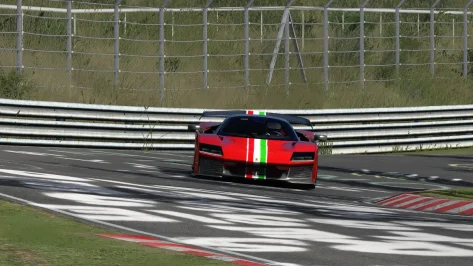
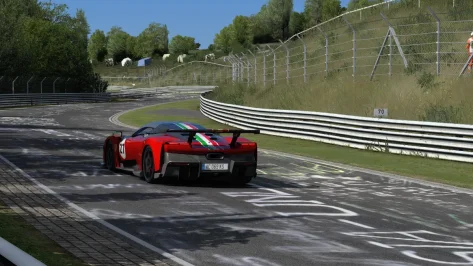
The mod changes the tree textures and darkens the grass a bit. The skins are split into separate folders so you can pick and choose which parts you want to use. If you like all of them, feel free to lump them all into one folder (except for the Seasonal Trees and Live Displays skins). As usual, there is an optional vaos folder to eliminate some of the really dark areas under the trees. Although I found the default csp vao for this track is not as bad as on other tracks.

View attachment 1493683
View attachment 1493684
View attachment 1493685
View attachment 1493686

I have an updated version of my ks_nordschleife mod to match the trees and grass on this mod.. If you like how this looks, be on the lookout for it soon. I just need to double check some things.
Update to the mod to turn on the display boards on the TV trucks. Use the link in the quote to get the update.

I believe I setup the $'read("csp/version", 0) command correctly so that the TV's will display no matter which CSP version you use. Could someone who uses a newer version let me know if the TV's don't display. If they display but are too dark, you may need to do some self-adjusting in the config. I can't account for everyone's ppfilter of choice. Thanks...
 
View attachment 1497166
Released : Mclaren F1 GTR (Longtail) 1997
Author:F302
3D Model Car :GT7
Texture Update : F302 (rework)
3d work: F302
Turnlight is Working
hope u enjoy the Car
ps : send feedback ,bugs ,missing things
tested on 0.2.12-preview1
PP filer PURELIFE EVO GT
VR
have fun!
To install, move folders to "...\SteamApps\common\assettocorsa" or simply
drag'n'drop archive to Content Manager


https://mega.nz/file/pXFHlRgS#bGKD_16OUVFH_cLk_W1-W_PdX6y4k6ATDbZdqUPQhZU
Fix for the floating digits on the dash panel. An extra decimal point was needed for all of the Y-values.
 

Attachments

Last edited:
Released : Chevrolet Corvette C5.R
Author:F302
3D Model Car :Raiza
Texture Update : F302 (rework)
3d work: F302
hope u enjoy the Car
ps : send feedback ,bugs ,missing things
tested on 0.2.12-preview1
PP filer PURELIFE EVO GT
VR
have fun!
To install, move folders to "...\SteamApps\common\assettocorsa" or simply
drag'n'drop archive to Content Manager


https://mega.nz/file/5PlzhA6Q#K_nWY4HJNanouDKq9FCl-L58MMU2whxx5Z4Mcx-vZXM

View attachment 1497235

Place the two files in the fonts folder

...\SteamLibrary\steamapps\common\assettocorsa\content\fonts
Wonderful, thank you very much!
 
Released : Chevrolet Corvette C5.R
Author:F302
3D Model Car :Raiza
Texture Update : F302 (rework)
3d work: F302
hope u enjoy the Car
ps : send feedback ,bugs ,missing things
tested on 0.2.12-preview1
PP filer PURELIFE EVO GT
VR
have fun!
To install, move folders to "...\SteamApps\common\assettocorsa" or simply
drag'n'drop archive to Content Manager


https://mega.nz/file/5PlzhA6Q#K_nWY4HJNanouDKq9FCl-L58MMU2whxx5Z4Mcx-vZXM

View attachment 1497235

Place the two files in the fonts folder

...\SteamLibrary\steamapps\common\assettocorsa\content\fonts
Finally, That god awful Legion car can be thrown in the trash where it belongs. Now we just need everyone to convert their existing liveries over to this one.
 
Released : Chevrolet Corvette C5.R
Author:F302
3D Model Car :Raiza
Texture Update : F302 (rework)
3d work: F302
hope u enjoy the Car
ps : send feedback ,bugs ,missing things
tested on 0.2.12-preview1
PP filer PURELIFE EVO GT
VR
have fun!
To install, move folders to "...\SteamApps\common\assettocorsa" or simply
drag'n'drop archive to Content Manager


https://mega.nz/file/5PlzhA6Q#K_nWY4HJNanouDKq9FCl-L58MMU2whxx5Z4Mcx-vZXM

View attachment 1497235

Place the two files in the fonts folder

...\SteamLibrary\steamapps\common\assettocorsa\content\fonts
I don't know if it looks different with ExtraFX on or not, but you're crushing a LOT of detail in the cockpit by having BrightnessAdjustment = 0.1 or 0.2 for a lot of materials configs.
The cockpits end up looking like those standard car cockpits in GT5, which were basically black silhouettes.
This is just a very quick 1-minute lightening of the dash, carbon and roll cage without too much thought, but it reveals all sorts of geometry and texture detail that was previously crushed. Who knew the roll cage wasn't just flat vanta black, but actually had a pattern and shape to it?
1765062224524.webp
 
View attachment 1497166
Released : Mclaren F1 GTR (Longtail) 1997
Author:F302
3D Model Car :GT7
Texture Update : F302 (rework)
3d work: F302
Turnlight is Working
hope u enjoy the Car
ps : send feedback ,bugs ,missing things
tested on 0.2.12-preview1
PP filer PURELIFE EVO GT
VR
have fun!
To install, move folders to "...\SteamApps\common\assettocorsa" or simply
drag'n'drop archive to Content Manager


https://mega.nz/file/pXFHlRgS#bGKD_16OUVFH_cLk_W1-W_PdX6y4k6ATDbZdqUPQhZU
Finally a great quality F1 GTR Longtail. THANK YOU!!!
 
Released : Chevrolet Corvette C5.R
Author:F302
3D Model Car :Raiza
Texture Update : F302 (rework)
3d work: F302
hope u enjoy the Car
ps : send feedback ,bugs ,missing things
tested on 0.2.12-preview1
PP filer PURELIFE EVO GT
VR
have fun!
To install, move folders to "...\SteamApps\common\assettocorsa" or simply
drag'n'drop archive to Content Manager


https://mega.nz/file/5PlzhA6Q#K_nWY4HJNanouDKq9FCl-L58MMU2whxx5Z4Mcx-vZXM

View attachment 1497235

Place the two files in the fonts folder

...\SteamLibrary\steamapps\common\assettocorsa\content\fonts
I'm in love! Thank you so much!!
 
Spa 2022 Update

This is my take on the excellent Spa 2022 mod by guigui0256. I cannot stress enough how I take no credit for this what so ever. Please do not give me any credit or thanks for this. I did basically nothing other than fix a couple of technical issues with the treeline lighting and altered a few textures. I realize this is not a cool thing to do to alter someone else's work without permission. I did reach out to the creator awhile back about these issues and he said he was happy with the track so I don't feel like I am doing anything wrong. If he sees this and asks, I will pull it.

The download is rather large because it is a full track folder. I run the track as it's own separate track, not as an addon in the original Kunos Spa folder. Reason being, his extension impacted how the original Spa looked and I didn't want to change that so I made it a separate track. Sorry for the big download.

Spa 2022 Update


Spa 2022 Update to work with original Spa Folder. Won't alter the original track.

Spa 2022 Update for original Spa Folder

The mods have full support for all of Pyyer's Spa F1 and WEC extensions. In order for them to work properly, please follow the directions below.

1.) Install whichever version of the mod you choose to use.

2.) Install Pyyer's Spa extensions into the track folder. Do not drag them into the root 'assettocorsa' folder or they will not get installed to the correct location.

3.) Install the files in the included 'Files_for_Pyyer_extensions' folder and overwrite anything it asks.

View attachment 1205882


Notes:

-- If you want the sound effects back, open up the ext_config file and set the ext_config-audio section at the top to ACTIVE = 1. It does weird things on my system so I had to disable it.
Mod has been updated to the latest version. This update is only for the full track version (top link), not the 'Spa 2022 Update for original Spa Folder' version. The amount of changes was kind of impossible to make work for that version. I may give it a try some day. Use the Spa_2022_Update link in the quote above to get the new version.

Since it's a full track update, I would suggest you backup your existing spa_2022 folder first for safe keeping (assuming you have one). That way you can restore anything you have added that didn't come with the mod (i.e., ai lines, extra track skins, etc). Also disable and delete your existing skins folder. Then extract the new version and overwrite when it asks (don't use the CM install feature, do things manually). If you were using Pyyer's Spa extensions with the track, also extract the contents of the ' Files_for_Pyyer_extensions' folder and overwrite when it asks. I have not finished the F1 2025 extension edits yet. Be advised, I did not include his full extensions so you need those first. I only included a small handful of edited files so his extensions would work with this version of the track.


Notes:

-- The mod includes three layouts. The original Kunos Spa track with my grass, tree, etc. edits built in. The original Spa 2022 track from guigui0256 with my edits and a 2023 layout which is nothing more than the Spa 2022 track but with grass on the construction dirt area instead of dirt.
-- There are a handful of track skins you can try, but all of them are optional. You can run the track without using any of them if you prefer. All of them are self-explanatory as to what they do, but one word about the two Green Construction Dirt skins. The Green Construction Dirt skin only needs to be used on the 2022 layout if you'd rather see grass instead of dirt. The Green Construction Dirt 2 skin can be used with either the 2022 or 2023 layout and simply makes the grass a little less patchy looking.

Lastly, sorry for the hassle with the update. I know I said I was going to try and find and easy way to make the construction dirt green, but once I got started I decided to fix a bunch of other things that bothered me. In the end the update list got too extensive and required a full track update. Hopefully the changes are worth the hassle for you.

1.webp
 
I don't know if it looks different with ExtraFX on or not, but you're crushing a LOT of detail in the cockpit by having BrightnessAdjustment = 0.1 or 0.2 for a lot of materials configs.
The cockpits end up looking like those standard car cockpits in GT5, which were basically black silhouettes.
This is just a very quick 1-minute lightening of the dash, carbon and roll cage without too much thought, but it reveals all sorts of geometry and texture detail that was previously crushed. Who knew the roll cage wasn't just flat vanta black, but actually had a pattern and shape to it?

View attachment 1497269
Could you share your modified ext_config ? Thanks
 
Sharing a mod? Host it on GTPlanet Downloads. Free, public hosting for files up to 10GB in size.
Back