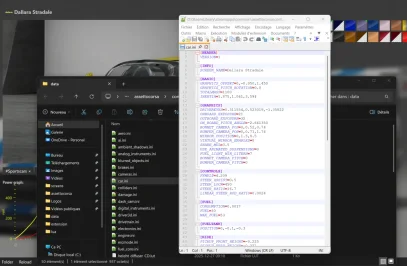
I just download it and clean install it. It is fine on my end. I did not encrypt it. It is likely corrupted download or not manually installed.Doesn't load for me. And the data file is encrypted now, despite the original not being, so I can't fix it.
Hmmm. That's weird. When I unpack the data file, I just get text files full of goobleygook characters. And I always do a manual install too.I just download it and clean install it. It is fine on my end. I did not encrypt it. It is likely corrupted download or not manually installed.
Maybe redownload and do manual install.
Thanks for your kind attention, what fixed it was this:
actually I gotta take the screenshot comment back, somehow it looks flatter now.... wondering if there should be new settings I should do to make it closer to before.Thanks for your kind attention, what fixed it was this:
View attachment 1502095
tricky.....
But the new update did made screenshots looked better, thanks Ilja!!!
Pardon me being late to the party.I know no one cares, but i'm kind of proud of myself for starting to figure this out. I got something on the center display now with the gear number working as well. Adding the other information should be easy now that I understand how it is done. The two right side displays, well that's another story. Those I may never figure out.
View attachment 1502091
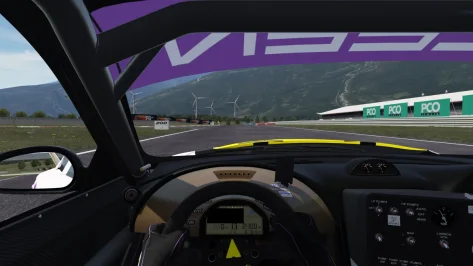
Nope, it's not just a VR issue, it displays the same in pancake mode too.Hi, Looked into it and so far it seems to be caused by VR, At least that's the current assessment(?) as we have only gotten 2 reports about this and both are from VR users (You and another one) can you switch to non VR and let me know if the issue is still persistent?
If it's still there with out VR mode then we know it's at least not related to VR completely. Unfortunetly neither of us own an VR headset so we are completely unable to check as to why it's happening.
The texture there is an basic .png file that shouldn't cause any issues that we are aware off. Unless there is an issue with VR rendering .png images etc. If you could let me know what csp version you are using would also be helpful, It might be an CSP issue.

View attachment 1501828
Saleen is now officially launched. Wrote an whole bunch of mumbo jumbo over on the Overtake page.
Enjoy it, Have started to gather references for the Porsche 911 GT2 variant that i'd like to commision next.
Please lmk of any issues you find with the car, Physics, Shaders, Textures, anything. we'll try and fix it as fast as possible.
If you feel like it and that it's deserved we got one of those paypal.me links if you want to. Not needed. But any donations will go towards the Porsche.
Tbh, looking at the previews generated of both cars I can't see much difference. I'll give it a further look/test though.It's not. Separate car to the older M4. I read somewhere that an update to that car is coming in Jan. This one is good though...
View attachment 1502105
I can't stop looking at this duo, very nice quality unicorns!
View attachment 1502109
We just need one more (hint hint), then we'll have the 4 horseman of GT2.
I hope that 993 GT2 will actually be good and not just another dupe that gets neg
MERRY Christmas everyone ♥ , where can I download these cars in the photos?View attachment 1502105
I can't stop looking at this duo, very nice quality unicorns!
View attachment 1502109
We just need one more (hint hint), then we'll have the 4 horseman of GT2.
I hope that 993 GT2 will actually be good and not just another dupe that gets neglected over time.
News from URD:
We’re excited to officially unveil the Detroit Coyote GT3, our most advanced and detailed project to date. Every inch of this car has been recreated with extraordinary precision, being the result of hundreds of hours dedicated to capturing its real world counterpart in stunning 3D. Developed using real data and real documentation, the Detroit Coyote GT3 mirrors the true engineering behind the machine. Mounting points, component stiffness, damping rates, torque values, every technical element has been replicated with exacting accuracy. To break past the original limits of AC, the Coyote GT3 is fully built around CPHYS extensions, unlocking a depth of physics the base game was never designed to handle. Advanced aero mapping, COSMIC suspension, ray cast tires, extended brake modeling, enhanced dampers, chassis flex, and countless other systems come together to deliver driving dynamics that feel alive, reactive, and unmistakably real.
https://shop.unitedracingdesign.com/p/ac-detroit-coyote-gt3
NOTE: CSP Version 0.2.6 or higher is required.
The car will not work under older versions.
Shop
AC Detroit Coyote GT3
We’re excited to unveil our latest project: the Detroit Coyote GT3!The Detroit Coyote GT3 sets a new standard for realism, with hundreds of hours spent meticulously recreating every detail of the car in stunning 3D. This project offers an unprecedented level of authenticity, bringing the car to life
![]()
YouTube
United Racing Design
The Car that Redefines Sim Racing - Drive it Now! | CGI Film
![]()
IMPORTANT: To get the most out of the Detroit Coyote GT3, we strongly recommend reading the included manual.It explains all systems, setup options, CPHYS features and the car unique functionalities, ensuring you fully understand how to operate and tune the car as intended.
It's another bug in the latest version of CSP. With p140, there is no black square.Nope, it's not just a VR issue, it displays the same in pancake mode too.
View attachment 1502110
I thought it might be an issue with digital_instruments.ini but I can't even try troubleshooting it for you because... encryption.
Does anyone know how to create CM custom preview for the URD Coyote Detroit GT3? I'm getting double banners on the windshield and endurance panel not displayed (or not hidden) properly. I've tried on CSP 0.2.6 and CSP 0.2.11. I've tried the "Use CSP for final previews render" setting as well as unticking that setting. The custom skin creators have gotten their custom previews to display correctly. Looks like they selected the "Use CSP for final previews render." But no success on my end.![]()
Try this link and see if it fixes it.Nope, it's not just a VR issue, it displays the same in pancake mode too.
View attachment 1502110
I thought it might be an issue with digital_instruments.ini but I can't even try troubleshooting it for you because... encryption.
After so much work, it's a shame they don't have LODs so they can be used by everyone.Classic V8 Supercars
AK Racing Mods are proud to officially release Classic V8 Supercars – V1.0, marking a huge milestone in the AK Racing development roadmap.
This project wouldn’t be possible without the incredible work from the AKR MODS Team, and we want to take a moment to thank the people behind the scenes who brought this to life: Falzon, Hughes, Snooks, Mellow, Hoodlum, Slyfox, McEwem, Spool, Pearce
Countless hours of testing and refinement have gone into V1.0, and this is only the beginning. V1.0 lays the foundation for continued updates and improvements as we move forward.
Thank you to everyone involved and to the community for the ongoing support.
Jump in, turn some laps, and enjoy the classics.
Visit https://www.akracing.online to download the cars and liveries.
View attachment 1502107View attachment 1502106
Yes and no. My problem is the displays don't work on old CSP versions. Neither does the car for that matter, but that was fixed with a few data.acd file edits. Now I need to make a new digital_instruments.ini file to display stuff on those screens. That's where this mod may come in handy, so thanks for pointing it out.Pardon me being late to the party.
Would these from here help your quest?
View attachment 1502100
View attachment 1502101
This took a bit of time:MERRY Christmas everyone ♥ , where can I download these cars in the photos?
Problem solved. I placed the extension files in the wrong path.
This 100% needs to be released, Just for the Volvo alone.These won't replace the excellent V8Corsa cars (despite what I wanted at first but I don't have the courage to remake every skins from 2013 to 2017) but they can serve as a 'better looking' alternative (wanted to say more modern but these models are from FM6 which came out in 2016 so really these are older lmao).
I'll just do the 2015 season and call it a day and hopefully release them when all the skins will be done. Will need help for lods although I ain't there yet - the mod is a 0.7 at best lol
(the Merc pictured isn't from TonyB but I did use a couple of textures from him or whichever mod he ported first, soz)
View attachment 1502160
View attachment 1502161
This is disingenuous, the car has almost a completely new mesh (I think only like 20% of it was reused) and totally new physics utilizing CPHYS and COSMIC, plus some of the other newer URD features the original doesn't have. They probably should have given owners of the old car a discount at the very least but it's not unfair that they didn't. The 2.0 for their 296 I think is supposed to be free, you can look forward to that I suppose.It's not really a separate car. New gear ratios, slightly altered headlight and rear-view mirror aero. That's it.
You are my HeroI got it. It just needs some size and spacing adjustments and values placed for the bottom buttons, but at least most things are in place. More importantly, I now know how to do it so maybe I can do something with the two far right displays. And for the record, replays don't display a few things properly which is why the fuel values are 0. They work in an actual session.
View attachment 1502165
View attachment 1502166
I do have a question for anyone in the know. How do I set the INPUT value for the Brake Bias number to eliminate the .0. I'd like to make more room for the projected lap time so it can be bigger. Thanks...
It is maybe related to the adaptive displays brightness. There are things you can define as adaptive displays parts.Try this link and see if it fixes it.
Edit: Found the issue with some help from another person, But it appears to be Pure LCS related, Both me an Nuvo uses Pure Gamma so we forgot to test it with LCS, Issue is that we believe it's an Pure LCS issue that we can't fix, At least that's our thinking. Maybe Peter tweaked the rpm graph in LCS at some pointCould be completely wrong though.
For me the sweet spot is the combo: Dirt 2, Grass 2, Grass Masks 2.Riverside Mod (kind of a beta so use at your own risk)
Been over a week and I haven't heard from Lilski so I decided to throw out this beta-ish version of my mod for Riverside. Because it's a beta, it's a bit complicated in it's setup (you'll understand when you read below) so you might not want to hassle with it. If you do decide to try it, I would strongly suggest you backup your existing track folder first. The mod will most likely override some files you already have.
Obvious credit to Lilski for the great track. @Masscot for the cable fix trick. And @Quark67 for the skins trick to make managing track skins easier.
Riverside mod
Notes\Instructions:
-- The mod will replace your existing ext_confg file if you have one. I did not because the track didn't come with an extension folder. If you find things are a bit dark, there is an alternative config included that you can rename to lighten things up a bit.
-- I animated all 199 existing flags and added lights to some parts of the track. For now the lights are only on the grandstands and a few turns. I haven't figured out a good way to get lights on the crowd\car areas yet. I set the light brightness kind of low because I figured way back then lights would not be super bright. You can edit the lights settings in the config if need be.
-- Now the really confusing part and why you may not want to try this. There are 17 track skins because I haven't decided which combination I like yet. I have all the different track skins separated into folder names for what they do and also as a way to test different texture combos. Each skin has a description if you hover over it describing what it changes (using @Quark67 method). The only ones you need to have enabled together is one of the 4 Grass skins, one of the 6 Dirt skins and one of the 3 Grass Mask skins. The other 4 (billboard, road, skyline, trees) are optional. The thing that may make the skins easier to manage is that using @Quark67 method, you can't enable two conflicting skins. If you enable one that conflicts with another, the other one gets disabled automatically.
Lastly, I would really love suggestions\feedback. I know nothing about the track and all the photos I could find are so old that it was hard to make a good judgement on color choices. I'm open to any suggestions for improvements. And remember, it is a beta so i'm sure you will run across a few quirky looking things here and there with the textures.