Assetto Corsa PC Mods General DiscussionPC 

  • Thread starter Thread starter daan
  • 154,879 comments
  • 48,744,736 views
I think I might have asked this before but I can't remember. When I'm trying to download a file and I keep hitting errors, ff you hit Try Again and it won't move past it so I hit skip and it goes to the next, skip, to the next etc., is that what you're supposed to do? Or when you hit the first one and try again doesn't work just cancel the operation and forget about it? The file in question is Pyyer's Daytona 2026 extension and it probably had 8-10 errors so I skipped them all and obviously the extension didn't install. This was the first one.

Walk me through it. What program are you using? And what are you pressing / where are you trying to extract the files to? I've never encountered that error extracting a zip/rar - it is fully downloaded (even though that wouldn't even extract if it wasn't). If all else fails try YouTube or Reddit.
 
Last edited:
Walk me through it. What program are you using? And what are you pressing / where are you trying to extract the files to? I've never encountered that error extracting a zip/rat - it is fully downloaded (even though that wouldn't even extract if it wasn't). If all else fails try YouTube or Reddit.
Double click the file to open it and it says "content". I then cut and paste it into "assettocorsa". It starts installing and then hits these errors. There was another one saying something about cameras, one about flags_2023, something pyyer_2025, a Kn5, and probably 3 or 4 more that I forgot what they were about. His Patreon page has comments with other people having problems with it too.

Also his Portimao extension had some errors.
 
the AI's all end up in a barier... some setting on my end or a track issue?...
Yesterday I did a few laps on that track and everything went well, without pileups, although I did it with less powerful cars, like the Lotus 3-Eleven or the Mazda MX-5 Cup... Let's see if the problem is also related to the type of car being used.

Double click the file to open it and it says "content". I then cut and paste it into "assettocorsa". It starts installing and then hits these errors...
Perhaps my question are very silly because it's so obvious, and I don't want to doubt you since you're a veteran here, and it's possible I haven't quite understood the problem, but... is that file you double-click a compressed file? Are you opening it without having decompressed it first?
 
Last edited:
the AI's all end up in a barier... some setting on my end or a track issue?

View attachment 1510213

Yesterday I did a few laps on that track and everything went well, without pileups, although I did it with less powerful cars, like the Lotus 3-Eleven or the Mazda MX-5 Cup... Let's see if the problem is also related to the type of car being used.
Did do the usual couple of test drives after this update, with pre-war Grand Prix cars, nothing wrong. I’m on the 2:12 and included the vintage track mod from MrShock.
Think Perico Lospa could be right on this. If not who knows it could be another magical AI adjustment in CM that needs to be (un)selected?
 
Last edited:
Double click the file to open it and it says "content". I then cut and paste it into "assettocorsa". It starts installing and then hits these errors. There was another one saying something about cameras, one about flags_2023, something pyyer_2025, a Kn5, and probably 3 or 4 more that I forgot what they were about. His Patreon page has comments with other people having problems with it too.

Also his Portimao extension had some errors.
Are you extracting the files before cut and paste? or you could use extract to
 
I think I might have asked this before but I can't remember. When I'm trying to download a file and I keep hitting errors, ff you hit Try Again and it won't move past it so I hit skip and it goes to the next, skip, to the next etc., is that what you're supposed to do? Or when you hit the first one and try again doesn't work just cancel the operation and forget about it? The file in question is Pyyer's Daytona 2026 extension and it probably had 8-10 errors so I skipped them all and obviously the extension didn't install. This was the first one.

Install 7Zip.
Open the compressed archive with it.

Drag the folder "content" of the archive to "assettocorsa" folder.
If the folder name is "cars" or "tracks", drag it to "assettocorsa\content" folder.
 
Plexus22 submitted a new resource:

Texture update for "meadowlands_84_87" by shin956 - Texture "meadowlands_84_87"

Here is a little skin "Alternative textures" for "meadowlands_84_87" by shin956.
I really like the tracks by Shin but they look too "clean" for my taste, especially for classic old tracks (no offence Shin, just my taste ;) )
Did a few changes, nothing professional. Less contrast on Billboards, changed the road surface and kurbs, and darkened a bit the walls.
I used some textures from Sebring90 for the road textures that I merged with the original ones. If that is a problem let me know and I will...

Read more about this resource...
 
Last edited:
Yesterday I did a few laps on that track and everything went well, without pileups, although I did it with less powerful cars, like the Lotus 3-Eleven or the Mazda MX-5 Cup... Let's see if the problem is also related to the type of car being used.
Did do the usual couple of test drives after this update, with pre-war Grand Prix cars, nothing wrong. I’m on the 2:12 and included the vintage track mod from MrShock.
Think Perico Lospa could be right on this. If not who knows it could be another magical AI adjustment in CM that needs to be (un)selected?
I used the historic 1954-1972 layout as it comes without chicane, which is what I thought would be the biggest hurdle for a modern f1 car ...

Apart from too narrow tracks, or dirt/gravel surfaces, I imagine f1 pilots would be able to drive on any circuit (provided they can make the turns at lowest speed)... they just would adjust their driving style to the track ...
(and not change cars because the track is not 100% suited for their car)

Granted for the purists it's not done, but I bet IRL they would not all end up sidetracked as they would compensate for the condition at hand (something which the AI fails to do clearly).

AI lanes are there per layout , and these lanes dictate how the cars should drive , right?
So I imagine indeed this could be limiting to certain types of car ... or is it the car mod that is faulty for not braking soon enough?

EDIT: I also tried with a 1958 BRM Type 25 (brm_type_25 by GØD , v1.1 by ACTK), which is a car that drove there IRL and that too doesn't keep on track :
1769948664621.webp

1769948731954.webp

(but ACTK also did something to the AI of that car... )
The Cooper T43 '58 I have in v1.0 version of GOD (untouched by ACTK) , and that seems to stick to the track better...
Anyways, no biggie just wanted to report in case something is wrong w the track ai.
 
Last edited:
Very strange issue, whit this mod, the FFB goes completely crazy and I’m forced to exit the game. I’ve tried both with CSP enabled and disabled, but nothing changes.
 
Last edited:
For the GTC Porsche 911 SWB shadow, this old trick works.

[SHADER_REPLACEMENT_...]
ACTIVE=1
DESCRIPTION= shadows on
MESHES = ??
MATERIALS = ??
CAST_SHADOWS = 1
LOD_OUT = 1500
DOUBLE_FACE_SHADOW_BIASED = 1

does anybody have the old lods for the Ferrari 250 GTO Series II? despite the update one of the latest lods still has a bit of warping on the trunk.
 
Last edited:
For the GTC Porsche 911 SWB shadow, this old trick works.

[SHADER_REPLACEMENT_...]
ACTIVE=1
DESCRIPTION= shadows on
MESHES = ??
MATERIALS = ??
CAST_SHADOWS = 1
LOD_OUT = 1500
DOUBLE_FACE_SHADOW_BIASED = 1

does anybody have the old lods for the Ferrari 250 GTO Series II? despite the update one of the latest lods still has a bit of warping on the trunk.
Works, thanks a bunch!
 
For the GTC Porsche 911 SWB shadow, this old trick works.

[SHADER_REPLACEMENT_...]
ACTIVE=1
DESCRIPTION= shadows on
MESHES = ??
MATERIALS = ??
CAST_SHADOWS = 1
LOD_OUT = 1500
DOUBLE_FACE_SHADOW_BIASED = 1

does anybody have the old lods for the Ferrari 250 GTO Series II? despite the update one of the latest lods still has a bit of warping on the trunk.
doesn't fix things for me... ¯\(ツ)/¯

without this code:
1769976865435.webp

with the code:
1769976918080.webp

(looks identical to me)

EDIT : ps: I am on 0.3.0-preview212 ...
 
Last edited:
Updated the CLK GTR SuperSport with all new channels for the exterior intake sounds:

https://www.gtplanet.net/forum/downloads/mercedes-benz-clk-gtr-supersport-1-0-release.7464/

Previous version would turn from stereo to mono under tunnels so this new version is much better along with fixed pitch for some of the sounds as they were abit off.


Will update the F1 LM, RGT and GT-ONE next and am nearly finished with the F50 GT but have to fix an issue where some of the AI most notably the F1 LM seem to have increased grip when the player is driving the car as the car seemingly tips over easily as if it wasn't fixed when only driving the F50 GT. I am doing 8 cars from every PGR4 class from A-E Class and once done I will reconfigure the career mode to be as similar as possible to PGR4 which I estimate will take around 1-3 months to complete after doing the cars.
 
Yesterday I did a few laps on that track and everything went well, without pileups, although I did it with less powerful cars, like the Lotus 3-Eleven or the Mazda MX-5 Cup... Let's see if the problem is also related to the type of car being used.


Perhaps my question are very silly because it's so obvious, and I don't want to doubt you since you're a veteran here, and it's possible I haven't quite understood the problem, but... is that file you double-click a compressed file? Are you opening it without having decompressed it first?
Did do the usual couple of test drives after this update, with pre-war Grand Prix cars, nothing wrong. I’m on the 2:12 and included the vintage track mod from MrShock.
Think Perico Lospa could be right on this. If not who knows it could be another magical AI adjustment in CM that needs to be (un)selected?

Are you extracting the files before cut and paste? or you could use extract to

Install 7Zip.
Open the compressed archive with it.

Drag the folder "content" of the archive to "assettocorsa" folder.
If the folder name is "cars" or "tracks", drag it to "assettocorsa\content" folder.
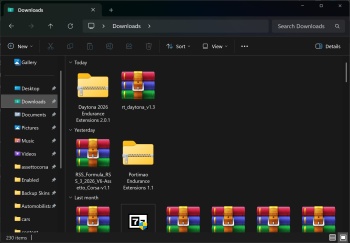
Here is what I did. It's the same thing I've always done for these files. Double clicked on the extension folder.


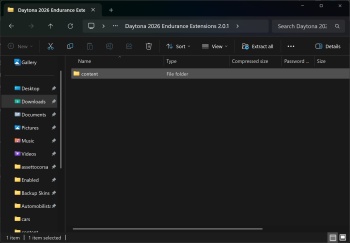
Cut and pasted content


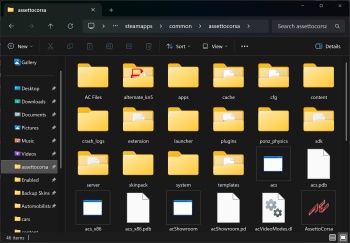
Into the assettocorsa folder and the installation procedure begins and then it started to hit those file errors one by one

 
Last edited:
doesn't fix things for me... ¯\(ツ)/¯

without this code:
View attachment 1510556
with the code:
View attachment 1510557
(looks identical to me)

EDIT : ps: I am on 0.3.0-preview212 ...

Screenshot_ac_legends_gtc_porsche_911_swb_lilski_watkins_glen_1-1-126-22-6-49.webp

We are talking about the crooked shadow under the car, right?
Looks shadowy here on track, 211.


So, everybody.
Are there other (newer than 212) magical CSP versions where all AI apps live happily togheter?
 
Last edited:
For the GTC Porsche 911 SWB shadow, this old trick works.

[SHADER_REPLACEMENT_...]
ACTIVE=1
DESCRIPTION= shadows on
MESHES = ??
MATERIALS = ??
CAST_SHADOWS = 1
LOD_OUT = 1500
DOUBLE_FACE_SHADOW_BIASED = 1

does anybody have the old lods for the Ferrari 250 GTO Series II? despite the update one of the latest lods still has a bit of warping on the trunk.
Actually, on my end, it was the ext_config.ini in the individual skin folder that messed up the shadows. I'm no guru at this, but it seems like a object nesting issue or something, when inserting the kn5 for the rims in the wrong place?

I replaced:
INSERT_AFTER=Object096
with
INSERT_AFTER=Object093

preview.webp
 
Actually, on my end, it was the ext_config.ini in the individual skin folder that messed up the shadows. I'm no guru at this, but it seems like a object nesting issue or something, when inserting the kn5 for the rims in the wrong place?

I replaced:
INSERT_AFTER=Object096
with
INSERT_AFTER=Object093

View attachment 1510588
No clue, I just blindly apply the old trick whenever I see broken shadows. It overrides the skin's ini then, all my skins previews rendered with proper shadows.
 
Sharing a mod? Host it on GTPlanet Downloads. Free, public hosting for files up to 10GB in size.
Back