Assetto Corsa PC Mods General DiscussionPC 

  • Thread starter Thread starter daan
  • 154,772 comments
  • 48,693,892 views
Lately (last two CSP updates) I lost all race messages like "leader on last lap" or "race over" on my offline races, without hidden them from CSP UI settings. And that's besides the superbright virtual mirror that I haven't solved yet. Do you still have messages from the race or is it just happening to me?
 
Lately (last two CSP updates) I lost all race messages like "leader on last lap" or "race over" on my offline races, without hidden them from CSP UI settings. And that's besides the superbright virtual mirror that I haven't solved yet. Do you still have messages from the race or is it just happening to me?

The lap counter seems to be 1 off for me, so I don't see Leader on Last Lap either. Was curious to whether it's just me because I haven't seen it mentioned.
 
I kinda dont get all this upscaling talk with AC. I have run a GTX 1080ti at 60fps vsync@4k with full grids and max settings for years...

If works...

1774688756345.webp
 
Maybe those discussions about DLSS are a bit overpresented, but it is not about upscaling, even it could be used to save fps.
But it is just the point that all those new AA methods coming along in parallel with the upscalers and so finally it is an EASY way now to activate much better AA in AC. Thats all.
There is no critical part in it. Some post sound like the PC will explode after switching to some new stuff.

Its just that easy: Turn on extraFX (it just must be on, no component needs to be running), switch on a certain method in the upscaling section and set the resolution (mostly 100% if you just want AA and no loss of resolution) and switch off MSAA.

In the newest dev version of CSP you can even activate more of those "scaling" methods like GSR2 and other without caring about what it actually is. And because everything is switched live you can directly try it while the game is running, so a very fast seak and find thing.

So now with the latest CSP you can easily hop on a better AA without any struggle to install 3rd party stuff. Its a thing of some seconds and it will work, If you don't care and everything is fine, you don't need to try it. But i guess all of us see those jaggy lines and Moiré patterns with MSAA and now you can avoid this if this bothers you...
 
Maybe those discussions about DLSS are a bit overpresented, but it is not about upscaling, even it could be used to save fps.
But it is just the point that all those new AA methods coming along in parallel with the upscalers and so finally it is an EASY way now to activate much better AA in AC. Thats all.
There is no critical part in it. Some post sound like the PC will explode after switching to some new stuff.

Its just that easy: Turn on extraFX (it just must be on, no component needs to be running), switch on a certain method in the upscaling section and set the resolution (mostly 100% if you just want AA and no loss of resolution) and switch off MSAA.

In the newest dev version of CSP you can even activate more of those "scaling" methods like GSR2 and other without caring about what it actually is. And because everything is switched live you can directly try it while the game is running, so a very fast seak and find thing.

So now with the latest CSP you can easily hop on a better AA without any struggle to install 3rd party stuff. Its a thing of some seconds and it will work, If you don't care and everything is fine, you don't need to try it. But i guess all of us see those jaggy lines and Moiré patterns with MSAA and now you can avoid this if this bothers you...

I believe you are in regular contact with Ilja - do you know if he is actively working on getting ExtraFX to work in VR, or has he given up on the idea? Thanks.
 
... Its just that easy: Turn on extraFX (it just must be on, no component needs to be running), switch on a certain method in the upscaling section and set the resolution (mostly 100% if you just want AA and no loss of resolution) and switch off MSAA...
These are the kinds of explanations that are needed.

Currently, CSP has so many options to tinker that those of us who aren't geeks in this field find it confusing: AA, DLAA, MSAA, TAA, FXAA, CMAA, SMAA, MMA, AXN, HBO... (just kidding🤭).

In the end, you go nuts trying to decide which is the best option, because you're trying things out without knowing exactly what the hell they are, or if they're compatible with each other, etc., etc... You follow the advices notes on CSP, search the web for what those acronyms mean... but it's all so complicated that you spend a lot of time trying to get everything working properly and end up thinking you're not getting the most out of it...

It's a good thing to have a miriad of options for almost every single situation (from NASA to potato rigs), but sometimes, less is more... 🤷‍♂️
 
Last edited:
All that talk about DLSS, but... the poor guys as me that has an AMD 9060XT, there is a way to use FSR 2 or 3? I tried to enable, with or wihtout Optiscaler, but it doesn't work,
The game crashes enabling native FSR (only 1.0.2 works fine), and I receive "Can’t activate optiscaler/version.dll, required extension is not installed." if I enable Optiscaler....
 
Does anyone know if this is fixed in the latest CSP? Or is GrassFX still broken and visibly popping up?
The GrassFX is now fixed. I'm getting no more 'flashing' frames where the GrassFX wouldn't be drawn and the wave that you are eternally chasing is much less now, although not totally absent. The colour of the grass is consistent between the road edge and slopes. I have now moved to CSP 0.3.x from 0.2.x because of this latest update.
 
Last edited:
This is a great upgrade, it drives so well and it has gone straight into the keepers file.

No exterior sound for me but that is an easy fix. Thank you for all your work.

I have the same problem with exterior sound.
How did you fix it?
 
Last edited:
Detroit Belle Isle 1992 v1.0

Screenshot_ks_alfa_romeo_gta_detroit_belle_isle_1992_28-2-126-20-17-28.webp

Detroit Belle Isle with 1992 - 1997 layout.
Conversion from rFactor.

-CSP recommended
-32 pit/start
-AI, cam

Credits & Thanks;
rFactor Track by jpalesi
-I have tried to contact him but have not been able to. I thank him for his work.

AC converted by shin956
Fountain textures and config from detroit2021 (updated by Gunnar333)
logo.png by Fanapryde
Crowds texture by Kniker97
cameraman and some textures by kunos

Enjoy.
 
Maybe those discussions about DLSS are a bit overpresented, but it is not about upscaling, even it could be used to save fps.
But it is just the point that all those new AA methods coming along in parallel with the upscalers and so finally it is an EASY way now to activate much better AA in AC. Thats all.
There is no critical part in it. Some post sound like the PC will explode after switching to some new stuff.

Its just that easy: Turn on extraFX (it just must be on, no component needs to be running), switch on a certain method in the upscaling section and set the resolution (mostly 100% if you just want AA and no loss of resolution) and switch off MSAA.

In the newest dev version of CSP you can even activate more of those "scaling" methods like GSR2 and other without caring about what it actually is. And because everything is switched live you can directly try it while the game is running, so a very fast seak and find thing.

So now with the latest CSP you can easily hop on a better AA without any struggle to install 3rd party stuff. Its a thing of some seconds and it will work, If you don't care and everything is fine, you don't need to try it. But i guess all of us see those jaggy lines and Moiré patterns with MSAA and now you can avoid this if this bothers you...
I totally agree with you, you deserve a round of applause for your post.
 
All that talk about DLSS, but... the poor guys as me that has an AMD 9060XT, there is a way to use FSR 2 or 3? I tried to enable, with or wihtout Optiscaler, but it doesn't work,
The game crashes enabling native FSR (only 1.0.2 works fine), and I receive "Can’t activate optiscaler/version.dll, required extension is not installed." if I enable Optiscaler....
Ilja is working on a fix for AMD cards, he is aware of the issue. Be patient.
 
Last edited:
Ilja is working on a fix for AMD cards, he is aware of the issue. Be patient.
Oh, ok... so it's not me to be so stupid to can't make it work. Good news 😅 I have all the patience of this world, no problem.
But maybe for the same reason since p322 I have strange flickering on textures and shadows. About that, I sent some comparison videos to Ilja to understand if it's a settings problem or something else.
 
Last edited:
Great stuff, amazing work on those layouts, been really loving them. But the lighting in the tunnel seems a bit weird on my game though? I'm using Pure (with Pure PP). I will also note that it wasn't happening with the earlier version of the track. Here's how it looks for me:

View attachment 1524085

Also, I hope you don’t mind me asking because I know it’s a bit of a cheeky question, but do you happen to have any plans to convert more GT7 tracks in the future? I’d be incredibly excited to see more of them!
Same here. Any solutions?
 
Anyone noticing this issue when using the free roam camera and the photo mode(with the latest CSP preview338)? If I adjust the focal length to go more than 200mm I start to clip into the ground of the circuit and eventually if you go long enough it actually clips through the car model...

This was not an issue in preview 322 IIRC

1774709433826.webp

1774709444863.webp

1774709454270.webp
 
Last edited:
question about the ac legends pack. in it is the updated tvr griffith 200 based on pctm and it needs the base version of that but is there a way to make it indepent and only use the updated one and the "old" can go "away"?
 
1774711890132.webp


Does anyone know why the motion blur suddenly appears (You can see what I mean around the middle of the picture, where the tiny tyre marks go a lighter gray)

Also, what's with this dithering?
 
I kinda dont get all this upscaling talk with AC. I have run a GTX 1080ti at 60fps vsync@4k with full grids and max settings for years...
I just dont understand.
same here but i dont use pure, too demanding

i also use lossless scaling on heavy combo track/grid
 
Hello car modders,

Maybe I'm doing something wrong or it is really a bug ?

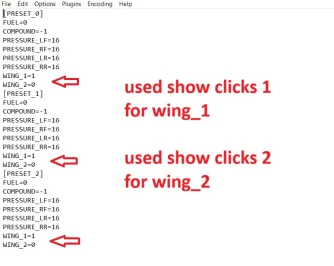
If in the setup.ini for the WINGS the "SHOW_CLICKS=1" option is used, which changes how adjustment options appear in the setup menu, allowing for click-based adjustments rather than precise numerical input.

There is a problem loading an already saved setup file especially the content of the setup.sp file which shows the pit strop strategy.

In my example the front wing section is like this in setup.ini:
[WING_1]
SHOW_CLICKS=1
TAB=AERO
NAME=Front Left
MIN=3
MAX=99
STEP=3
POS_X=0
POS_Y=1
HELP=HELP_FRONT_WING
PITSTOP=0

This is represented in the ingame setup menu as a selectable front wing from a value of 1 to 33. I wanted to avoid it starts from 0, zero wing is optically disturbing me in the GUI. :-)

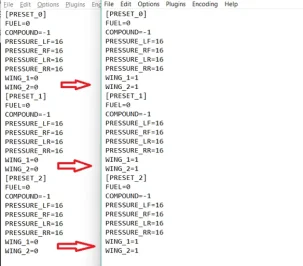
When I save the setup created from scratch the corresponding setup.sp file has the following parameters stored for all 3 pit stops:
WING_1=0
WING_2=0

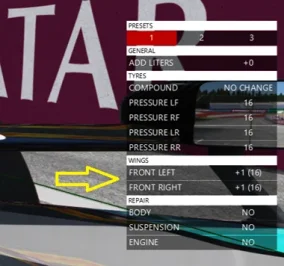
When I start the race in-car pit stop menu shows default 0 wing adjustment for all 3 pit stops (everything is fine).

When I restart the session or I start a new session and load the exact same setup which still has WING_1=0 and WING_2=0 values in the setup.sp file on the disk, during loading these values seem to change to WING_1=1 and WING_2=1 for all 3 pit stops in the memory and when I start the race in-car pit stop menu shows default 1 wing adjustment for all 3 pit stops (incorrect behaviour).

If I save the setup then the setup.sp file now has WING_1=1 WING_2=1

This is a problem, because then by default the front wing will be adjusted 1 higher downforce level at each tyre change except if my drivers manually set it to 0 before the pit stops.

This issue is not present when using SHOW_CLICKS=0 or SHOW_CLICKS=2 in setup.ini.

Is it possible to fix it ? I'm doing something wrong ?
 

Attachments

  • Untitled11.webp
    Untitled11.webp
    40.3 KB · Views: 2
  • Untitled12.webp
    Untitled12.webp
    20.9 KB · Views: 1
  • Untitled13.webp
    Untitled13.webp
    42.6 KB · Views: 2
Last edited:
shi
Detroit Belle Isle 1992 v1.0

View attachment 1524133
Detroit Belle Isle with 1992 - 1997 layout.
Conversion from rFactor.

-CSP recommended
-32 pit/start
-AI, cam

Credits & Thanks;
rFactor Track by jpalesi
-I have tried to contact him but have not been able to. I thank him for his work.

AC converted by shin956
Fountain textures and config from detroit2021 (updated by Gunnar333)
logo.png by Fanapryde
Crowds texture by Kniker97
cameraman and some textures by kunos

Enjoy.

shin my goat pls consider doing Phoenix pretty pls
 
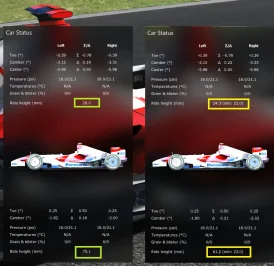
Also something strange, can somebody also check this, tried two different cars already.

If I change this section in car.ini to anything other than MIN_HEIGHT=0.0

like to this
[RULES]
MIN_HEIGHT=0.023

Then the default setup and all previously saved setups the displayed front and rear ride height is changed without any reason.
 

Attachments

  • Untitled14.webp
    Untitled14.webp
    72.6 KB · Views: 1
question about the ac legends pack. in it is the updated tvr griffith 200 based on pctm and it needs the base version of that but is there a way to make it indepent and only use the updated one and the "old" can go "away"?
TVR Griffith Series 200 1963 GTC60

In order to make the car work on its own & avoid having duplicates:

Copy the kn5 files from the original car and paste them to the GTC60 version.
Go in the extension folder & create a "data_override" folder.
Make a lods.ini file in that folder which contains the following lines:

[COCKPIT_HR]
DISTANCE_SWITCH=7

[DRIVER_HR]
DISTANCE_SWITCH=25

[LOD_0]
FILE=tvr_griffith_200.kn5
IN=0
OUT=15

[LOD_1]
FILE=tvr_griffith_200_LOD_B.kn5
IN=15
OUT=45

[LOD_2]
FILE=tvr_griffith_200_LOD_C.kn5
IN=45
OUT=201

[LOD_3]
FILE=tvr_griffith_200_LOD_D.kn5
IN=201
OUT=2000


or:
unpack data.acd
delete or rename data.acd
edit lod.ini as above
 
Last edited:
Sharing a mod? Host it on GTPlanet Downloads. Free, public hosting for files up to 10GB in size.
Back