Assetto Corsa PC Mods General DiscussionPC 

  • Thread starter Thread starter daan
  • 155,741 comments
  • 49,755,085 views
... I would recommend you use the latest Lotus Type 23 Cosworth Mk XII. In my opinion, it's a significant improvement in the car's handling on the track compared to previous versions...
Thanks for the clarification, I'll follow your advice and stick with the latest version you shared and delete the old version... although it's pretty good too...👍

Thanks again! :cheers:
 
Last edited:
2002 DTM Pack Version 1.2 For Assetto Corsa by F302 and Peugeot905

download: https://www.mediafire.com/file/v0ub..._Assetto_Corsa_by_F302_and_Peugeot905.7z/file

Mercedes-Benz DTM Pack Version 1.7: https://www.mediafire.com/file/e0eg..._Assetto_Corsa_by_F302_and_Peugeot905.7z/file

Drop folders in SteamLibrary/steamapps/assettocorsa/content/cars

Cars included

2002 ABT Audi TT-R

2002 Mercedes-Benz CLK DTM (C209)

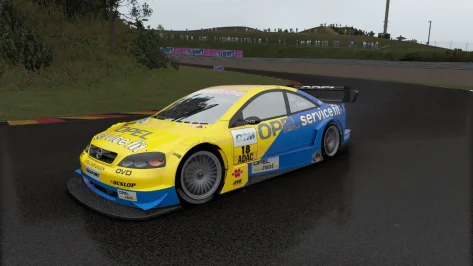
2002 2002 Opel Astra DTM

CSP 0.167 or over recommended

DTM Touring Cars and GT's Near Finalized: https://www.mediafire.com/folder/ukbm3vkqgpaas/DTM_Touring_Cars_and_GT's_Near_Finalized
Lemans Prototypes: https://www.mediafire.com/folder/7g6488jsyt2ux/Lemans_Prototype_Near_Finalized

Credits

Author:F302,Peugeot905

Physics: Peugeot905

3D Models by Raceroom

3D work: F302

Sound:F302/RMS

Sound Modification: Peugeot905

Updates to Opel skins: StoffleWaffle

Version 1.2 updates

-Fixes to collider.ini and aerodynamics.
-Fixes the issue with cars bottoming out, riding curbs, and major instability.
-Unique collider.ini for each model.
2002 ABT Audi TT-R, 2002 Mercedes CLK-DTM (C209), and 2002 Opel Astra DTM.

View attachment 1543986
View attachment 1543987
View attachment 1543988
Thank you for your work, is it normal that when I install it it says version 1.1?
 
Updated the Lotus Type 23 Cosworth Mk XII.
Graphics changes:
Skins optimized, missing shadows under opponents' cars (first-person view) fixed when Extra FX was enabled.
Physics changes:
Now the car feels like a completely different car, as almost every parameter has been adjusted: axle geometry, aerodynamics, suspension, tires, etc.

Hey there... Many thanks for this version. Physics changes really (r) really are to my tastes. The car is STILL slid-ey, but now MUCH more catchable and fun to push. Bravo on that.

Something you may want to look at, it pinched me and might pinch others. In the packed data.acd there are comments in the power.lut which I think included some non-ANSI/Unicode (Ruski?) chars. in my instance AC would choke on launching for previews or driving. Unpacked, edited the comments out, saved, all good. Attached if you want to scrutinise :)
 

Attachments

Something you may want to look at, it pinched me and might pinch others. In the packed data.acd there are comments in the power.lut which I think included some non-ANSI/Unicode (Ruski?) chars.
Thanks for the relevant feedback. The front axle arm geometry adjustments, new aerodynamics, and recalibration of high- and low-speed rebound/compression damping did the trick. There were many other adjustments, but these had the biggest impact on the car's new handling.
Yes, I did leave comments in some .ini files, including in Russian. In theory, this shouldn't be a problem, and everything works fine for me, but if other users complain about this, I'll update the upload with the Cyrillic characters removed.
 
Don't think this has been posted.


360_F_165319793_Rz6L5nZHS61LbBCnWKv3paa0vb3mXXQp.jpg
 
Anyone here encountered this?

Even with latest CM , whenever I start a race session, my screen keeps flickering!

Windows Event Viewer shows:
1. Warning: Dwminit - "The Desktop Window Manager process has exited. (Process exit code: 0x889800d3, Restart count: 3, Primary display device ID: NVIDIA GeForce RTX 4080 SUPER)"
2. Error: Faulting application name: Content Manager.exe, version: 0.8.2879.40455, Faulting module name: KERNELBASE.dll, version: 10.0.26100.7462, Exception code: 0xe0434352 Fault offset: 0x00161e54

Things i tried already:
  • DDU and clean install of NVIDIA driver w NVCLeanstall (v595.97 DCH)
  • .net removed/ reinstalled
  • DISM /RestoreHealth
  • sfc /scannow says all ok...
  • checked for too much Disabled services

I am at the end of my rope and bummed I cannot play!
ps: This is also with Single screen rendering (completely taking the VR stack out of the loop).

EDIT: I found it !!! It had to do with .Net that got out of wack!
Ran these 2 commands in CMD (as Admin) to rebuild cached .NET Native Images (NGEN Queue) :
C:\Windows\Microsoft.NET\Framework\v4.0.30319\ngen.exe update /force
C:\Windows\Microsoft.NET\Framework64\v4.0.30319\ngen.exe update /force

After that no more crashing of CM! (thought I'd share it in case anyone else ever encounters a similar issue... this .Net update is a safe thing to try...)
 
Last edited:
Something similar happened to me a while ago, in my case with some AMD drivers, but it wasn't as bad as what you're describing. There was a flicker, slight but annoying, especially noticeable in the dark areas of the image (or in the lighter, I don't remember exactly), although it was still playable. It was fixed in the next drivers version.
 
Last edited:
Sharing a mod? Host it on GTPlanet Downloads. Free, public hosting for files up to 10GB in size.
Back