- 161

- Italy


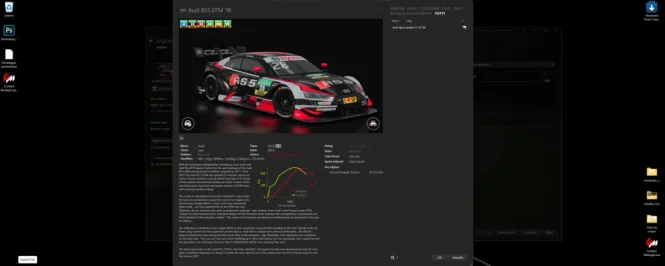
Its a known bug introduce a couple of preview agoDoes anyone know how to resize the car selection window in Content Manager? For some reason, it has become much bigger, as you can see, but when I try to resize it using the arrows, I can only make it narrower, not reduce its height.
Thanks a lot!


I do like that style of previews, it's just that I'm too lazy to change it again for almost 3,000 cars... and then check each and every one of them to see if the previews have been generated correctly... (Yes, my OCD would prevent me from not checking if they're ALL ok... 😁)This issue happens with scenes which don´t use a showroom but only a blank scene, like the preview you have used here. Use the same with a showroom instead, like TAV or ULT grey. Or don´t turn the wheels. Ilja has fixed this issue already with some later internal build, so maybe wait until a next official release. Then you will have also the possibility to do such kind of previews here (maybe not your liking but I do like them really much right now)...

My solution with the most "rebel" mods (which fortunately are not very many) sometimes involves creating previews without CSP, hence the images doesn't match the in-game appearance... even though it means battling my OCD, knowing that the preview perhaps doesn't reflect the exact reality... 😅Hi. My theory is that there is some problems with front suspension (to long rods or something) if car is hanging in showroom without physical floor, suspension overextends and goes crazy. I saw that happen with some mods.


In the upcoming update, turning the front wheels no longer breaks the suspension in CSP previews.That is wild 😊
I've seen it happen a few times, and been able to fix it by changing the amount the wheels are turned (steered) in the (i think) Car tab? I can't say how much or less or more, because the results are unpredictable, but it has worked for me a couple of times.
Try 0° ? Or if it is 0, maybe 1 or -1 according to taste.
If I'm honest, I think it's the act of changing it that does the trick, not the amount. Could be wrong tho.
Mine updated about a week ago and is fine now.Its a known bug introduce a couple of preview ago


I use the tool "Compactor" once in a while to save tons of disk space. It is only a graphical interface for the file system compression of Windows 11 and works much better than the compession with CM. You only need to compress the "cars" and "tracks" folders of AC. But you should be aware, that the first compression can take quite a long time.I have to reduce my AC folder size again.....maybe you guys can help me with calling some modders names which mods can be deleted without testing them

There is a better—and above all, faster—option, because it utilizes 100% of your CPU cores.I use the tool "Compactor" once in a while to save tons of disk space. It is only a graphical interface for the file system compression of Windows 11 and works much better than the compession with CM. You only need to compress the "cars" and "tracks" folders of AC. But you should be aware, that the first compression can take quite a long time.


I confirm what Mascott said, I also had the problem, I updated CM to the latest version and now the last window enlargement setting is remembered. 💪 😉Its a known bug introduce a couple of preview ago
In the upcoming update, turning the front wheels no longer breaks the suspension in CSP previews.
Mine updated about a week ago and is fine now.
I'm on 0.3.0-preview542, and choosing Categories - New, it will show me a random car instead of the current one.I confirm what Mascott said, I also had the problem, I updated CM to the latest version and now the last window enlargement setting is remembered. 💪 😉
I just manually updated CM—fixed it!I confirm what Mascott said, I also had the problem, I updated CM to the latest version and now the last window enlargement setting is remembered. 💪 😉
 www.overtake.gg
Could you please tell me which version of CM we are talking about...? Thanks!I just manually updated CM—fixed it!...

Find it here, the first one, TreeIt support..Could you please tell me which version of CM we are talking about...? Thanks!
 github.com


This issue happens with scenes which don´t use a showroom but only a blank scene, like the preview you have used here. Use the same with a showroom instead, like TAV or ULT grey. Or don´t turn the wheels. Ilja has fixed this issue already with some later internal build, so maybe wait until a next official release. Then you will have also the possibility to do such kind of previews here (maybe not your liking but I do like them really much right now).
View attachment 1559335

already used itBesides deleting you can also try Compactor program. It really helps me a lot to downsize the weight of many mods. I first use CM compacting tool and then this program.

You mean the new one? Currently under development, not officially released yet. I could share it but it would look differently. Sorry.Could you please, please share this previes like you did the "blacky blackback" preview.
I realy love this one.
Hi.
One more to add to DPi pack.
This time Mazda RT24-P.
Its got small 2 liter engine which revs up to 9k+ rpm.
Download.
View attachment 1559687

Finally! I've been waiting for this one.**Released : Chevrolet Corvette by Greenwood Chevrolet (Version0.9)

cant download your mods ! any help would be greatly appreciatedHi.
One more to add to DPi pack.
This time Mazda RT24-P.
Its got small 2 liter engine which revs up to 9k+ rpm.
Download.
View attachment 1559687


Foremost, welcome to GTplanet.. You may find what you're seeking on https://www.overtake.gg/ (formerly known as Race Department - miss that site-name)Purchased the vrc and rss f1 2026 and am trying to get a season working does anybody have any presets or ai help to get my season going im a oldtime gamer with not alot of time on my hands and could use a little help setting it up.I got the tracks for the season now.Any help would be much appreciated
www.overtake.gg
www.overtake.gg
www.overtake.gg
www.overtake.gg
www.overtake.gg
www.overtake.gg
www.overtake.gg


Hi. I don't remember saying that these mods are minecant download your mods ! any help would be greatly appreciated


Do you have both?As a track builder I updated my CSP Shader Patch to the latest build along with installing Pure 3.50 (and the newest version of Content Manager) but I notice on my tracks that the light emmission from my light towers don't work at night time. The bulb 'glow' is there, but they don't actually cast light across the track. I loaded into a couple of the ks_ tracks (with the light support enhancements you get with Shader Patch) and they seem to work fine. Does anyone have any thoughts on what my extension.ini file might be missing, if it's something in that?