Gran Turismo 7 Bug Reports

  • Thread starter Thread starter Busdriveriow
  • 3,148 comments
  • 464,987 views
The Chaparall also has a very long 1st gear (and only 3 gears in total), however it does not have the same problem.
It's also a clutchless auto/semi-auto. The Ford GT40 Mk1 is a manual (don't know which in the one in the game, as they used a few).
 
The GT40 ratios are correct for one optional gear set of the Ford Toploader transmission. And yes, the first gear is insanely tall but in real life it wouldn't be driven "normally" as those were racing ratios. The tyres of the era were pretty hopeless and the way of getting it moving in a race from a stop, usually when leaving the pits, was simply flooring it and dumping the clutch.
 
The GT40 ratios are correct for one optional gear set of the Ford Toploader transmission. And yes, the first gear is insanely tall but in real life it wouldn't be driven "normally" as those were racing ratios. The tyres of the era were pretty hopeless and the way of getting it moving in a race from a stop, usually when leaving the pits, was simply flooring it and dumping the clutch.
Thanks for the explanation.
There is a difference if you brake, floor it, release the brake and yes it will go much faster to 30kph in that case. But still it is soo slow on the slope (last corner before Eiger start/finish line). 30-50kph still takes several seconds. And no wheel spin at all.

Anyway, if that really is realistic then i stand corrected…
 
Last edited:
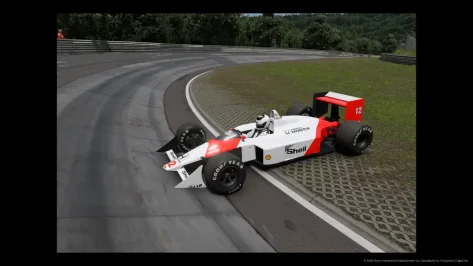
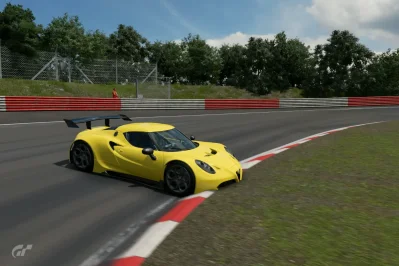
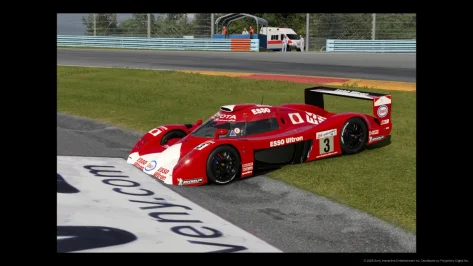
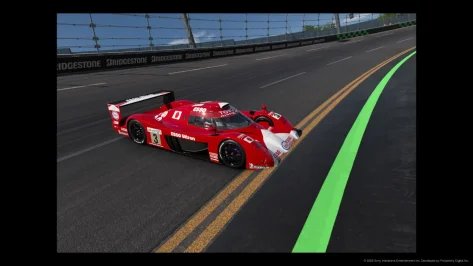
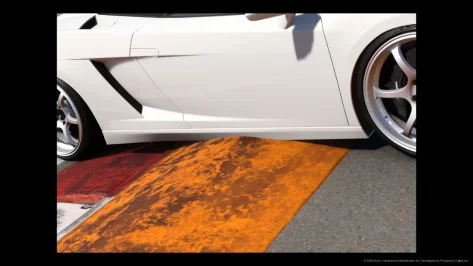
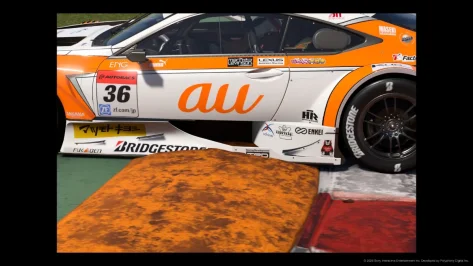
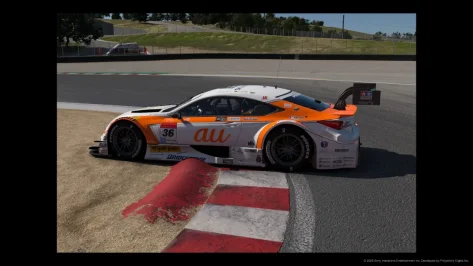
I dunno, can't seem to find much about this, been looking for quite a while, but the version of GT7 I'm playing (PS4, disc, <> buttons on pad) doesn't do a great job a recognising a car's bodywork as physical?

At first I thought it was something to do with height i.e. high kerbs, when car is horizontal. But then I tried different things like going off road, might be Watkins Glen I think.

Then I tried going up a bank and pointing car down towards the ground, whichever way I tried, bodywork just 'disappeared' (?).

What's weird is that at places like Tsukuba, that has an open pit entrance, there is something physical stopping the car from driving over the grass verge if you miss pit lane entrance, so the game has someway of recognising the 'car'(?) sometimes.

I'm guessing this is just a PS4 thing???? I've searched for things like GT7 bodywork / glitch / bug etc etc but can't find anything like this????

:confused::boggled::confused:
 

Attachments

  • Gran Turismo™ 7_20260818131133.webp
    Gran Turismo™ 7_20260818131133.webp
    74 KB · Views: 2
  • Gran Turismo™ 7_20260818131523.webp
    Gran Turismo™ 7_20260818131523.webp
    56.6 KB · Views: 2
  • Gran Turismo™ 7_20260818131534.webp
    Gran Turismo™ 7_20260818131534.webp
    66.5 KB · Views: 2
  • Gran Turismo™ 7_20260818131548.webp
    Gran Turismo™ 7_20260818131548.webp
    66.8 KB · Views: 1
  • Gran Turismo™ 7_20260818131606.webp
    Gran Turismo™ 7_20260818131606.webp
    59 KB · Views: 2
  • Gran Turismo™ 7_20260818131615.webp
    Gran Turismo™ 7_20260818131615.webp
    74.2 KB · Views: 3
  • Gran Turismo™ 7_20260818131629.webp
    Gran Turismo™ 7_20260818131629.webp
    66.4 KB · Views: 3
  • Gran Turismo™ 7_20260818131645.webp
    Gran Turismo™ 7_20260818131645.webp
    93.5 KB · Views: 3
  • Gran Turismo™ 7_20260818131656.webp
    Gran Turismo™ 7_20260818131656.webp
    73.3 KB · Views: 4
  • Nürburgring Nordschleife_.webp
    Nürburgring Nordschleife_.webp
    120.4 KB · Views: 1
  • Gran Turismo™ 7_20260818131505.webp
    Gran Turismo™ 7_20260818131505.webp
    102.8 KB · Views: 1
  • Gran Turismo™ 7_20260818131447.webp
    Gran Turismo™ 7_20260818131447.webp
    72.4 KB · Views: 2
  • Gran Turismo™ 7_20260818131426.webp
    Gran Turismo™ 7_20260818131426.webp
    45.6 KB · Views: 4
  • Gran Turismo™ 7_20260818131149.webp
    Gran Turismo™ 7_20260818131149.webp
    87.5 KB · Views: 2
  • Gran Turismo™ 7_20260818131208.webp
    Gran Turismo™ 7_20260818131208.webp
    90.2 KB · Views: 1
  • Gran Turismo™ 7_20260818131225.webp
    Gran Turismo™ 7_20260818131225.webp
    112 KB · Views: 2
  • Gran Turismo™ 7_20260818131244.webp
    Gran Turismo™ 7_20260818131244.webp
    58.5 KB · Views: 2
  • Gran Turismo™ 7_20260818131257.webp
    Gran Turismo™ 7_20260818131257.webp
    87 KB · Views: 2
  • Gran Turismo™ 7_20260818131311.webp
    Gran Turismo™ 7_20260818131311.webp
    92.2 KB · Views: 1
  • Gran Turismo™ 7_20260818131330.webp
    Gran Turismo™ 7_20260818131330.webp
    22.3 KB · Views: 3
  • Gran Turismo™ 7_20260818131355.webp
    Gran Turismo™ 7_20260818131355.webp
    52.3 KB · Views: 1
  • Gran Turismo™ 7_20260818131411.webp
    Gran Turismo™ 7_20260818131411.webp
    59.8 KB · Views: 2
Some issues I found:


1.) Many cars revs bounce up and down, seems to happen when custom transmissions are applied, happens even at low speed. Only tested in old cars, Charger was most extreme example I had.


2.) R8 Gordini LSD is now locked and set to all zeros, previous game version it was changeable


Last edited:
I dunno, can't seem to find much about this, been looking for quite a while, but the version of GT7 I'm playing (PS4, disc, <> buttons on pad) doesn't do a great job a recognising a car's bodywork as physical?

At first I thought it was something to do with height i.e. high kerbs, when car is horizontal. But then I tried different things like going off road, might be Watkins Glen I think.

Then I tried going up a bank and pointing car down towards the ground, whichever way I tried, bodywork just 'disappeared' (?).

What's weird is that at places like Tsukuba, that has an open pit entrance, there is something physical stopping the car from driving over the grass verge if you miss pit lane entrance, so the game has someway of recognising the 'car'(?) sometimes.

I'm guessing this is just a PS4 thing???? I've searched for things like GT7 bodywork / glitch / bug etc etc but can't find anything like this????

:confused::boggled::confused:
I believe this has always been in the case. You’d see this same behavior in GT6 when exploring the off track areas in Willow Springs, the hit box is more rigid on the sides and roof, and most behavior is determined by what the wheels can contact. The underside isn’t as rigid of a contact area in the games.
 
EVO V in-car sound seems off. Like a blown speaker sound. It wasn't like this before this latest update. This is a 600pp tuned car.
 
Diablo had max spring rate of 3.80 this has dropped to 3.75, have tested and it's slightly too soft, please revert back to 3.80 as many tunes need that rate at the rear. Haven't tried all the Lambos yet but most seem ok as they weren't at max spring rate for their tunes to begin with.

After trying for a while, this is definitely an issue that I can't get around with other settings. The car bottoms out during braking and stops steering. This is at 1300kg let alone higher weights. It's cool that max damping expansion increased from 50 to 60, but still there's a bit of delay for the car to respond when turning and braking.

Please fix this asap this is my fav car, I'm sure I'm #1 in the world for mileage on this car I take it 99% of the time and have been since gt5 & fm4. Currently I can race with it only due to max damper 60 but it's still a bit compromised, eg it can wiggle during braking due to briefly bottoming out. Just cos of that 0.05 difference.
 
Last edited:
After trying for a while, this is definitely an issue that I can't get around with other settings.
Higher ride height, wheels with normal width and offset? Many cars have suffered from similar issues and it's always been one or more of those that solved it.

And it's not a bug as such. Simply tyres rubbing inside the fenders with a setup that allows it.
 
Last edited:
Higher ride height, wheels with normal width and offset? Many cars have suffered from similar issues and it's always been one or more of those that solved it.

And it's not a bug as such. Simply tyres rubbing inside the fenders with a setup that allows it.
The tunes I'm using are based on Praiano's & have always worked with specific settings, the issue is the change in max spring rate, not the normal parts and tunes I've been using through many physics updates. Like I said issues start from 1300kg+ and I usually drive closer to 1700kg so I can have more power, currently only <1300kg is competitive
 
The tunes I'm using are based on Praiano's & have always worked with specific settings, the issue is the change in max spring rate, not the normal parts and tunes I've been using through many physics updates.
This isn't one of those updates - this is how it is now. You have to adapt, like all the rest of us did with PP changes and car handling balance changing with the new physics. Raise the front end and/or use narrower wheels and get on with it. There isn't a bug to be fixed here.
 
I think this should be a bug(?) - Lancia Integrale rally car, it's springs are now locked at 1.2 front and 1.35 rear, they are no longer adjustable, but all the other parts of the suspension are still adjustable.
 
Is it a legitimate bug that every road car has its Dampers set to 45 compression and 60 expansion?

Seems weird that a 2009 MiTo has the same damper values as a ‘73 BMW CSL?
 
Last edited:
Hi everyone.

I encountered an issue this morning after applying a livery to a car.

Once the livery was donc, I got out of the GT Auto menu and it usually takes a couple of seconds to get to the main menu, but here the loading get stuck around 37~38% and it progresses very slowly. I remember getting to 49% before being brought back to 30%.

I tried it with different cars and it's the same issue.


27918.webp
 
Hi everyone.

I encountered an issue this morning after applying a livery to a car.

Once the livery was donc, I got out of the GT Auto menu and it usually takes a couple of seconds to get to the main menu, but here the loading get stuck around 37~38% and it progresses very slowly. I remember getting to 49% before being brought back to 30%.

I tried it with different cars and it's the same issue.
This is commonly a connectivity issue.

Have you tried this:


This is commonly a connectivity issue.

Have you tried this:


Thanks, I'll check what I can do !
 
This is commonly a connectivity issue.

Have you tried this:


Update: I tried a wired connection and it worked ! But the loading is still not as fast as before the issue.
 
There is a very weird (and possible very problematic) timing bug.

If you do a time trial at Daytona the sector split times and the gap to your best lap are out of sync. E.g. As you pass sector 1 timing point your gap to best ghost says you are 0.121 up but the sector time that’s recorded is 0.176 faster. It’s not only Daytona, but it’s consistent there.

This also seems to be affecting the offline events as I can be 3 turns ahead of the AI at Kyoto, but the gap will only show as 2.4 seconds.

This makes me wonder about the integrity of online time trials and qualifying times.
 
There is a very weird (and possible very problematic) timing bug.

If you do a time trial at Daytona the sector split times and the gap to your best lap are out of sync. E.g. As you pass sector 1 timing point your gap to best ghost says you are 0.121 up but the sector time that’s recorded is 0.176 faster. It’s not only Daytona, but it’s consistent there.

This also seems to be affecting the offline events as I can be 3 turns ahead of the AI at Kyoto, but the gap will only show as 2.4 seconds.

This makes me wonder about the integrity of online time trials and qualifying times.

I think, just like in real life, the timing and graphics are not entirely in sync. There is latency in real life and when you time to 0.001 even on a simulator there’s still latency.

I’ve seen this several times before in the game that the graphics will initially say one time, but then change to the more accurate recorded time. The time you are seeing is pretty much an animation. It’s not possible to render every 0.001 of a second; at 60fps it takes 0.016 of your count (and 0.08 at 120fps).

I’m not sure what timestamp the game uses - in real life we use GPS. I expect there’s some particular load on either the CPU or GPU at that sector that affects it.
 
I think, just like in real life, the timing and graphics are not entirely in sync. There is latency in real life and when you time to 0.001 even on a simulator there’s still latency.

I’ve seen this several times before in the game that the graphics will initially say one time, but then change to the more accurate recorded time. The time you are seeing is pretty much an animation. It’s not possible to render every 0.001 of a second; at 60fps it takes 0.016 of your count (and 0.08 at 120fps).

I’m not sure what timestamp the game uses - in real life we use GPS. I expect there’s some particular load on either the CPU or GPU at that sector that affects it.
I’d agree if it were only a few thousandths here or there. But it persists across entire sectors. I’ve got an example where the gap at the end of sector 2 is still showing as smaller than than the real gap at sector 1 even though I’ve increased the gap in sector 2. I’ll try and record some examples to show the scale of what I’m talking about, because it’s way too large to just be latency.

If I had to guess, I’d say there’s a calculation error in the code.
 
Last edited:
There is a very weird (and possible very problematic) timing bug.

If you do a time trial at Daytona the sector split times and the gap to your best lap are out of sync. E.g. As you pass sector 1 timing point your gap to best ghost says you are 0.121 up but the sector time that’s recorded is 0.176 faster. It’s not only Daytona, but it’s consistent there.

This also seems to be affecting the offline events as I can be 3 turns ahead of the AI at Kyoto, but the gap will only show as 2.4 seconds.

This makes me wonder about the integrity of online time trials and qualifying times.
Are you using ghost replays from before 1.71? This may be the issue that the ghost replay does not sync up with new version's timing?
 
I spotted this as well - I did two laps at the Nurb and my 'live gap' to Lap 1 (visible at all times) didn't match with the split gap, and it was off by over 0.1s - never seen this before this update.
 
I’ve been seeing the brake inputs during replays being entirely red, regardless of ABS activation, not white w red abs

Flat replays in PSVR2
 
Hi everyone,


I’m opening this thread to highlight a few critical issues with the AI and race settings in Custom Races that have progressively gotten worse, especially after recent update (1.71).


I'd like to check if others are experiencing the same problems and gather visibility so hopefully Polyphony Digital can address them.


1. Severe AI Pace Drop Mid-Race (Standard AI & Boost Bug)


There is a major issue with the standard AI behavior during Custom Races:


Sudden Pace Loss: A few laps into the race, all AI drivers suddenly and drastically slow down. Their lap times collapse completely compared to the opening laps.


Boost Setting Broken: Prior to recent updates, setting Boost to "Weak" kept the AI somewhat competitive and balanced. Now, even with Boost set to Weak, the AI becomes brutally slow after the first few laps, completely ruining the immersion and challenge of custom offline races.


2. Gran Turismo Sophy: "Convoys" in Equal Car Races


While GT Sophy is a huge step forward in dynamic driving, it suffers from a immersion-breaking behavior in equal-car grids:


When running a grid with identical or balanced cars, Sophy drivers don't push for dynamic overtakes—instead, they form a rigid "train" or single-file procession for almost the entire race, following each other at identical intervals without fighting for positions naturally.


3. Tire Compound Bug in Custom Races


There is a persistent issue with how tire selections are applied to opponent vehicles:


Even when assigning specific tire compounds to individual cars in the grid setup, the game defaults or locks them back to standard/hard compounds (such as Comfort Hard or Sports Hard) once the race begins, ignoring the pre-set selections.


4. Request for Custom Championship Mode


To make offline racing truly rewarding, Polyphony Digital should introduce a proper Custom Championship Mode:


The ability to connect multiple Custom Races into a structured championship season with points tables, standings, and consistent regulation enforcement.


Is anyone else running into these specific AI slowdowns and tire override bugs in Custom Races? Any known workarounds would be greatly appreciated.


Thanks for reading!
 
I spotted a new bug in "Custom Race" mode using Sophy with my grid of classic cars. They all had factory settings, no modifications other than a different livery.

In this case, we are talking about the Jaguar D-Type, but I observed exactly the same thing behind with the Aston Martin DB3S, the Maserati A6GCS/53 Spyder, the Ferrari 500 Mondial Pinin Farina Coupe (whose suspension physics remain completely bugged to this day), and both Porsche 356 A.

Here it is : the car approaches its top speed on the first straight of the 24 Hours of Le Mans circuit, then brakes sharply while shifting to the right. It then resumes accelerating up to the braking point :
GTSophy_1.webp

GTSophy_2.webp

GTSophy_3.webp

I don't think it's a bug related to the gearbox limiter, since it slows down around 235 km/h before subsequently exceeding 250 km/h.

And here we go again on the straight following the first chicane. It's even worse, since all the AI cars brake down to around 160 km/h before accelerating again :
GTSophy_4.webp

GTSophy_5.webp

GTSophy_6.webp

I didn't try running any further tests by changing the race parameters or car settings; I don't have the time. But there is clearly something wrong here.

This was a Sophy Custom Race with professional difficulty, a 2 hours endurance race with time multiplier set on x12, heavy damages, realistic grip loss, boost set on weak, weak slipstream, flag rules on, and no penalities.

Thank you if you read this.
 
Back