- 2,157

- Australia
@safi hellie Since you kindly take requests, may I add the vintage 1967 Watkins Glen to your additional cams list?
Here is one camera. Track has some bumps on it doesn't it!!
'txt' to 'ini' add to track data folder...
@safi hellie Since you kindly take requests, may I add the vintage 1967 Watkins Glen to your additional cams list?
How do you made that export? Seems not been made correctly.Need some help with Blender
Cannot open fbx files
"files/import/fbx" do not work
In "edit/preferences/add-ons" fbx is checked, don't know what to do more...
Small race At Monza 2013 with some Group C I tried to pack.
With neutral liveries and balanced performances.
View attachment 914591
View attachment 914592
View attachment 914593
R89C and DBR1 in the box, or maybe one Rondeau.
For the moment the XJR-9 use the C9 physics, as the sole NA group C in kunos game, the Velo and RTM one reach 340km/h too easy. I need help to fix that
While it's a bit rough around the edges I've really been enjoying trying to get my times down on this hillclimb course. https://www.racedepartment.com/downloads/harewood-speed-hillclimb.32001/updates
It could definitely do with some work to get it to a really good state but it's pretty good where it is and boy is it a hard one to get a fast time without ending up in the fields or orchard.
@safi hellie The replay camera isn't too bad here but is a little high at some points, but if you would be kind enough to make one or two i'd really appreciate it
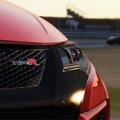

Thank you, I am pleased you are happy with the carThank you Sir! Good upgrade, now I can drive it under rain 👍. Digital display is welcome also. Not to mention Gulf skin just the way I like them for road cars: sober clean and nice looking. I like to drive it even more, especially since alongside the very good physics, you kept this realistic steering wheel DOR which is quite rare on AC mods.
hi guys, I'm looking for this car: Audi 80 Superturismo. Does it exist for AC?


Done.
Mega DiRT rally vibes to this camera.
Track doesn't seem to end? It's weird got to the end and if you carry on through the car park my camera will track you down a dirt track which weirdly is more fun than the road bit...eventually you re-join the road half way down....
'txt' to 'ini' etc.


ThanksI can't see this car for AC. The post 95 version is exsist for Race07. AndreasFSC made it, but a bit small the height of the front lights for me.
https://www.racedepartment.com/attachments/audi-80-stw-96-jpg.101416/



AndreasFSC created a version for AC? Where can I find it?I can't see this car for AC. The post 95 version is exsist for Race07. AndreasFSC made it, but a bit small the height of the front lights for me.
https://www.racedepartment.com/attachments/audi-80-stw-96-jpg.101416/


Very nice, thank you! It's good to see more of the rolling countryside with your longer distance angles.Here is one camera. Track has some bumps on it doesn't it!!
'txt' to 'ini' add to track data folder...


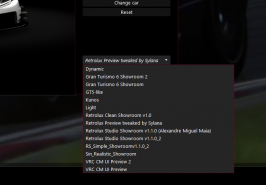
What determines what car preview is used when you just hit the 'update previews' button? I thought I'd deleted all preview presets except one, but pressing 'update previews' loads an old one that I thought I'd deleted a while ago. There must be alocation for the default one, but where?
I can select the one I want by going update previews/presets, but I want to change the default one so that just hitting 'update previews' does it.
What in the options is set currently determines the previews. Simply deleting is not enough, you have to change the preset in the options too

Excuse my memory but were you doing visual updates to this Gr. A Skyline? Somebody wanted to and I can't remember who and then there it pops up.Where did you create the preview? It could be that you just saved a cm showroom preset instead of a preview preset
Have you tried over "Update previews" > "Options" and then save there the preset?

What in the options is set currently determines the previews. Simply deleting is not enough, you have to change the preset in the options too


Nothing weird going on so far...I'm scared to update CM. You do it first.
Edit: dammit - too late, I forgot to turn off auto update after the last fiasco. I'm the guinea pig.
In 'update previews -> presets', yes. But 'update previews -> options' just opens a window with the scene in it that I can manipulate with the mouse (zoom, pan, rotate etc).then it should be enough, as long as you changed it
EDIT:
You don't have these?
View attachment 916629
Something like Kunos should be able to be choosed or don't you get the list at all?
The update is from 14 days ago. Why am I just getting this. Hmm.Nothing weird going on so far...
OK so heres 3 cameras for Anglesey track. Pretty sure i got it from RD if you don't already have it.
It has some cameras that i got from RD and they are really good. I was going to leave it, but then i love this track so what the hell...few more cameras can't hurt can it.
The folder structure has dry track / wet track, both these folders have data folders in which the cameras need to go in...
Also like his Kirkstown track there is also a data folder in the main part of the track too...so add them in there as well..
...if you don't have any other cameras in the folders then keep as numbered in my uploads...
If you have other cameras in there then rename mine to consecutive numbers...
Just remember whatever cameras you have they MUST go from 1 up wards, never mixed up like 2 1 4 7 etc..they won't work..
Cheers.
Here is a quick taste...

I was just updated to CM data version 144 a few minutes ago.The update is from 14 days ago. Why am I just getting this. Hmm.
I'll be happy when I don;t have to "alt-tab" close every other session for some reason or another. I guess part of that is my own doing though working on broken things and making wacked out wrong configs.