- 2,432

- Sherbrooke, Québec, Tabarnak!
Apparently it wasnt out enough...Its origin is at the middle of the disk. I just simply rotated along x-axis (click on object - r - x - move mouse), maybe a bit of rotation on z to straighten it out

Apparently it wasnt out enough...Its origin is at the middle of the disk. I just simply rotated along x-axis (click on object - r - x - move mouse), maybe a bit of rotation on z to straighten it out


...and 45 LODs.what a gent, thank you!
now to try and find a ligier with the low airbox!


That didn't fix it for me.I've checked the track and it loaded fine for me in any variation (with csp ai, v1.79, 180p115, 180p218). So it's hard for me to tell if it's fixed. Could you please test this lines?


man i had a look through and doesnt seem like hes fixed much. maybe im missing something? ferrari still needs resizing? or should i say all the other cars need resizing?...and 45 LODs.
Ay Carrambita! Mucho dolorrrrrr.


Does Need for Speed: Shift counts?Is this the first ever Madness Engine track to make it into AC?
There are a few tracks from that game like Miami Bayside.


TMK there are a bunch of 2CV around, e.g.Any mod for this?


Yes they are to be found at the linked page. That site is quite confusing - the link says "portugal spain" but it links to the "france monaco" page :-)there's this one ..., it does not hold all car mods (that would be near impossible with the chear number of mods out there), but it does seem to be pretty up-to-date on the race-cars (and if not sorry, not my sheet, just saw this posted here and thought I'd re-post the link)
Hi Bart, for these 2 I can't find the actual track ... sure they are from https://assettorallygrb.wixsite.com ?
ps: Thx for all your updates! Keep up the good work!


Yeah, that's how it came originally, so I kept it this way.Very nice mate, but i have this glitch. when i install your mod, the road texture is tarmac but i have the effect as if im driving on gravel / sand, why is that?


thank you very much mateYeah, that's how it came originally, so I kept it this way.
You can easily change it though:
Go into the track folder and open the "data folder".
Inside open "the surfaces.ini" file and set DIRT_ADDITTIVE= to zero
[SURFACE_0]
KEY=ROAD
FRICTION=0.98
DAMPING=0
WAV=
WAV_PITCH=0
FF_EFFECT=NULL
DIRT_ADDITIVE=0
IS_VALID_TRACK=1
BLACK_FLAG_TIME=0
SIN_HEIGHT=0
SIN_LENGTH=0
IS_PITLANE=0
VIBRATION_GAIN=0
VIBRATION_LENGTH=0
And the dust is gone.

 www.racedepartment.com


 www.printables.com


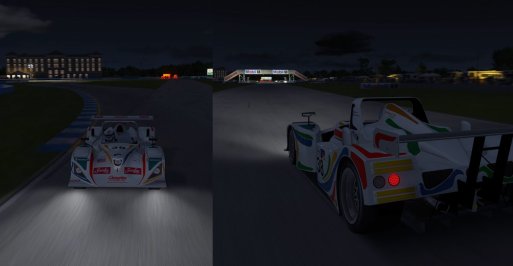
Try this, but don´t overwrite existing ext_config.iniafternoon GTplanet is there anyway to "fix" these broken shadows on certain cars?. i have tried "update ambient shadows" in CM but it doesn't seem to do anything. thanks
edit i am running csp 1.79 with the new version of CM and sol
Use CM to convert the .kn5 to an .fbx and run the model through kseditor. In the editor you'll be able to step through every part of the model and can change the settings so that the required parts emit shadows. Then export the model as a .kn5 and you'll be good to go.afternoon GTplanet is there anyway to "fix" these broken shadows on certain cars?. i have tried "update ambient shadows" in CM but it doesn't seem to do anything. thanks
edit i am running csp 1.79 with the new version of CM and sol
thankyou for the help i will get on the caseTry this, but don´t overwrite existing ext_config.ini
Instead, append to old ones.
But best would be, to inform the authors of these cars, so they can fix that for all other ones.
thankyou for the information. i will get involved and have a go for sure. i would like to learn abit more and go more in depthUse CM to convert the .kn5 to an .fbx and run the model through kseditor. In the editor you'll be able to step through every part of the model and can change the settings so that the required parts emit shadows. Then export the model as a .kn5 and you'll be good to go.
you can assign keys to move the onboard camera around in CM........think thats what your looking for?Is there a way to adjust the driver focal point (where he's looking) somewhere in the setup?
No. I mean the standard position when you get in the car. The driver is looking slightly to the left when it should be on centre. It looks straight in the showroom, but not on track. Look Left and Look Right function normally, but Look Left looks farther left than the right since the center point is farther left...you can assign keys to move the onboard camera around in CM........think thats what your looking for?
yeh you need to assign the hot key in CM to adjust the camera so you can move it anyway you like. up/down left/right tilt e.t.c this will sort the driver looking slightly to the left once adjustedNo. I mean the standard position when you get in the car. The driver is looking slightly to the left when it should be on centre. It looks straight in the showroom, but not on track. Look Left and Look Right function normally, but Look Left looks farther left than the right since the center point is farther left...
you can use the app, cant remember its name. think driver position its called. comes with csp if i remember correctly.No. I mean the standard position when you get in the car. The driver is looking slightly to the left when it should be on centre. It looks straight in the showroom, but not on track. Look Left and Look Right function normally, but Look Left looks farther left than the right since the center point is farther left...
That worked pretty good, thanks! Needs a "roll" adjuster to go with the pitch and yaw though. Do you happen to know where the position for the first function-key-F1 driver position is saved, as it looks perfect (albeit with no steering wheel)? (lorelord: the in-game app (helmet icon) doesn't have a driver-focal-point adjustment)yeh you need to assign the hot key in CM to adjust the camera so you can move it anyway you like. up/down left/right tilt e.t.c this will sort the driver looking slightly to the left once adjusted
setting-assetto corsa-controls-patch and then find "onbaord camera small tweaks"
i am really sorry but i have no idea, i am sure someone will be able to guide you in the right direction. glad it helped anyway there is nothing more annoying than the camera being wonky/out of positionThat worked pretty good, thanks! Needs a "roll" adjuster to go with the pitch and yaw though. Do you happen to know where the position for the first function-key-F1 driver position is saved, as it looks perfect (albeit with no steering wheel)? (lorelord: the in-game app (helmet icon) doesn't have a driver-focal-point adjustment)


That worked pretty good, thanks! Needs a "roll" adjuster to go with the pitch and yaw though. Do you happen to know where the position for the first function-key-F1 driver position is saved, as it looks perfect (albeit with no steering wheel)? (lorelord: the in-game app (helmet icon) doesn't have a driver-focal-point adjustment)
I'm familiar with that app. It does NOT have a focal point adjuster. (The point out in front of the car that the drivers' eyes are fixed on. This app only allows forward/back, left/right and field of view.)View attachment 1261285maybe that's what you mean?