- 2,028

- United States
- RaceManiacGT1
I wonder if AI can't start the car?
Lighting on trees is certainly better now.Crowd has normal values I always use. This is what it looks like for me:
View attachment 1281693
EDITED v3 https://www.mediafire.com/file/owyannwpswstryp/Vaca_Valley_60s_%28Sergio_Loro%29_shader_overhaul_and_new_AI_v3.0_by_Rainmaker.7z/file
thanks a lot for the update! any chance for a volvo update as well?V8 Supercars modern 2 gen
Erebus Mercedes E63 AMG 2015 - v1.1 big update
Changelog: v1.1 08.2023 update by Jeb, Gts, aanonioo, Zoom
Hope you will enjoy the new car with Jeb updates
- 30 new Liveries, remapping texture/shading work and some additional 3d modeling by Jeb!!! Decals on the dashboard, remade windshield textures and decals. Reworked head and tail lights - now they are very realistic. Rework of most of textures. LODS etc etc
- Freem gloves by aantonioo at Race Department
- suspension visual ground clearance fix, ground collider fix
- Beta testing by Zoom
Fully balanced to V8SC mod, animation, rain (csp required)
DOWNLOAD
In v3 I changed the spectators. If they too dark I focus more on them. Well and for the trees in the water waterlogging ain't good. Or is it "water"? Volunteers to drink to test?Lighting on trees is certainly better now.
But Sergio should give 'm a bit more leaves imo. Even those that get enough water are almost dead...
View attachment 1281730
That said, I agree with @Perico Lospa about the lighting on the spectators. The less you can see them, the better.
So for now (still have to test your PP filter), I'm only keeping the updated ai. 👍
tryGreetings everyone.
I have recently been working on skins to upgrade track textures to my liking. I have plenty experience working in retouching digital images, but am fairly new to SIM modding and very new to the technical side of 3D textures.
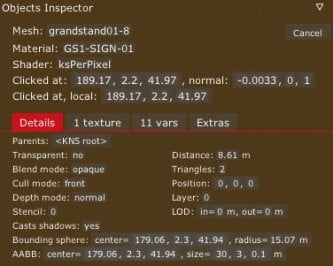
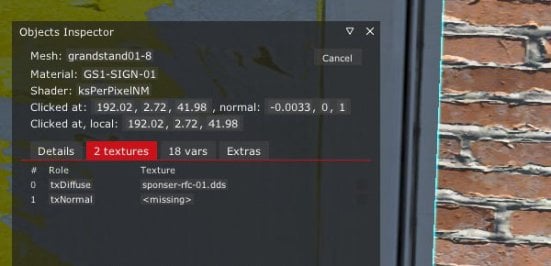
I have added a weathered texture to a track side billboard and am now hoping to add a normal map to accentuate the folds and torn areas. I created a normal map using the 3D filter in Photoshop and saved it as a DXT1 DDS with MipMap. This format has worked for me when replacing other textures, that already have a normal map applied in a track.
After many Google searches, and looking into ext_config.ini files from other track upgrades, I haven't been able to find any code that will give me the appearance of a 3D texture shape, so I am lookin for some guidance from the gurus on the group.
Is it possible to add a Normal Map to an existing image in a track, using an ext_config entry?
What is the code that I should add?
Or does this have to be added in a 3D editor?
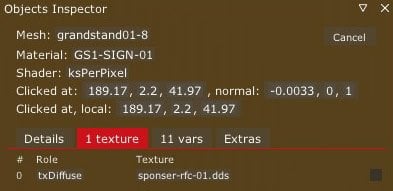
Below is one of the many variations I have tried based on other changes I have seen in ext_config files. I'm guessing it might be something as simple as the shader being wrong, or maybe my text is just incorrectly ordered or missing an important line. I had also tried with a line for RESOURCE_1 = txDiffuse and the one indicating the file for RESOURCE_TEXTURE_1 = sponser-rfc-01, but that didn't help either.
[MATERIAL_ADJUSTMENT_...]
ACTIVE = 1
MATERIALS = GS1-SIGN-01
SHADER = ksPerPixelNM
RESOURCE_1 = txNormal
UseNormalMap = 1
RESOURCE_TEXTURE_1 = sponser-rfc-01_NM.dds
Thank you in advance :-)
As always, I said it half jokingly, half seriously, but it's true that it doesn't add up for the figures to be more illuminated (or with a different light angle) than the rest of the surrounding elements... look unnatural. It appears as if the entire scene is receiving sunlight from above, except for the figures, which are receiving light from the front.... the lighting on the spectators. The less you can see them, the better...
That material was set to a tree shader. Trees are moving and that was what it did.@Rainmaker87
Btw: thanks for the background update for Monaco 1966.
Now there's still something left (it has been like that for ages and I have not found a solution yet): that bridge with the Shell Lonlife advert is acting strange. Difficult to explain correctly, so a short clip to show:
https://mega.nz/file/iHRGhSbY#OnP48Fzb9jiewlKky7KKIJUkBbh2OBO6wLpiG6LLy0o
It's fixed now, after all these years... thanks 👍That material was set to a tree shader. Trees are moving and that was what it did.
![]()
Monaco 1966 (Reboot Team) new AI + background fix v2.0 by Rainmaker
MediaFire is a simple to use free service that lets you put all your photos, documents, music, and video in a single place so you can access them anywhere and share them everywhere.www.mediafire.com
Short answer: yes.Greetings everyone.
I have recently been working on skins to upgrade track textures to my liking. I have plenty experience working in retouching digital images, but am fairly new to SIM modding and very new to the technical side of 3D textures.
I have added a weathered texture to a track side billboard and am now hoping to add a normal map to accentuate the folds and torn areas. I created a normal map using the 3D filter in Photoshop and saved it as a DXT1 DDS with MipMap. This format has worked for me when replacing other textures, that already have a normal map applied in a track.
After many Google searches, and looking into ext_config.ini files from other track upgrades, I haven't been able to find any code that will give me the appearance of a 3D texture shape, so I am lookin for some guidance from the gurus on the group.
Is it possible to add a Normal Map to an existing image in a track, using an ext_config entry?
What is the code that I should add?
Or does this have to be added in a 3D editor?
Below is one of the many variations I have tried based on other changes I have seen in ext_config files. I'm guessing it might be something as simple as the shader being wrong, or maybe my text is just incorrectly ordered or missing an important line. I had also tried with a line for RESOURCE_1 = txDiffuse and the one indicating the file for RESOURCE_TEXTURE_1 = sponser-rfc-01, but that didn't help either.
[MATERIAL_ADJUSTMENT_...]
ACTIVE = 1
MATERIALS = GS1-SIGN-01
SHADER = ksPerPixelNM
RESOURCE_1 = txNormal
UseNormalMap = 1
RESOURCE_TEXTURE_1 = sponser-rfc-01_NM.dds
Thank you in advance :-)
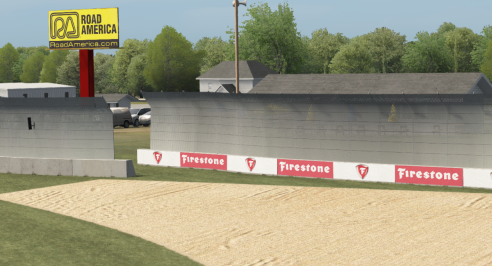
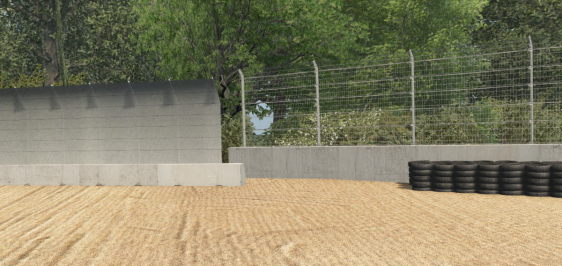
Caught the guy doing it...Anyone know how to fix this? Some fences on road America changed like this months ago and could never figure out why. Clean reinstall of the track didn't fix it.
Its not all fences, just this specific model.
try:Greetings everyone.
I have recently been working on skins to upgrade track textures to my liking. I have plenty experience working in retouching digital images, but am fairly new to SIM modding and very new to the technical side of 3D textures.
I have added a weathered texture to a track side billboard and am now hoping to add a normal map to accentuate the folds and torn areas. I created a normal map using the 3D filter in Photoshop and saved it as a DXT1 DDS with MipMap. This format has worked for me when replacing other textures, that already have a normal map applied in a track.
After many Google searches, and looking into ext_config.ini files from other track upgrades, I haven't been able to find any code that will give me the appearance of a 3D texture shape, so I am lookin for some guidance from the gurus on the group.
Is it possible to add a Normal Map to an existing image in a track, using an ext_config entry?
What is the code that I should add?
Or does this have to be added in a 3D editor?
Below is one of the many variations I have tried based on other changes I have seen in ext_config files. I'm guessing it might be something as simple as the shader being wrong, or maybe my text is just incorrectly ordered or missing an important line. I had also tried with a line for RESOURCE_1 = txDiffuse and the one indicating the file for RESOURCE_TEXTURE_1 = sponser-rfc-01, but that didn't help either.
[MATERIAL_ADJUSTMENT_...]
ACTIVE = 1
MATERIALS = GS1-SIGN-01
SHADER = ksPerPixelNM
RESOURCE_1 = txNormal
UseNormalMap = 1
RESOURCE_TEXTURE_1 = sponser-rfc-01_NM.dds
Thank you in advance :-)
Thank you Short Circut, and RMi_wood. Both your slightly different suggestions worked and 'applied' a darkening effect to the billboard that changes depending on lighting conditions, so it should be working now. Unfortunately I am facing an unexpected challenge where the actual normal map is not being applied.try:
[SHADER_REPLACEMENT_...]
ACTIVE = 1
MATERIALS = the_material ; or MESHES = the_mesh
SHADER = ksPerPixelNM ; or ksPerPixelAT_NM
RESOURCE_... = txNormal
RESOURCE_FILE_... = the_new_normal.dds
I have noticed this as well. I believe a CSP update did this.Anyone know how to fix this? Some fences on road America changed like this months ago and could never figure out why. Clean reinstall of the track didn't fix it.
Its not all fences, just this specific model.
Anyone know how to fix this? Some fences on road America changed like this months ago and could never figure out why. Clean reinstall of the track didn't fix it.
Its not all fences, just this specific model.
Just checked, I don't have the issue (CSP 0.1.80-preview342)I have noticed this as well. I believe a CSP update did this.
There's only one .ini file in that upload, sir, and of course, it's the other one (for Pure) that I'd like to tryFor those who have problems with brightness and stuff, I revised my pp filter I'm using for making my tracks.
Neutral PP-Filter for Assetto Corsa
This post process filter is made for the best possible visuals by using the most neutral values for color, color temperature, saturation, brightness and contrast. I tested many filters and especially the contrast was always to intensive. Other problems were the saturation (too much or too less) or brightness.
This filter was made to get a optimal color gamut with the knowledge of a professional printer. You will especially see the difference to other filters if you are using a calibrated monitor.
This is the filter I'm using for all my track previews.
Features:
- neutral value for color (0.0)
- neutral value for brightness (1.0 for Pure)
- neutral value for contrast (1.0)
- neutral value for saturation (1.0)
- color temperature 4000 K (neutral white)
- no interrupting auto exposure
- slightly corrected gamma value for better color gamut of dark areas
Install guide:
Copy the two .ini files into this directory: YOUR-STEAMFOLDER\SteamApps\common\assettocorsa\system\cfg\ppfilters
In game open the "Post Process Filter" app and choose "Neutral" for non CSP, CSP, CSP + SOL or "Neutral (Pure)" for using Pure by Peter Boese.
See the difference in the preview before-after picture (included in the download package):
View attachment 1281720
- sunside of the church is not too bright
- you can see structure in the shadows side of the church tower
- the better contrast of the trees in the background makes them look more natural
- road looks more natural
![]()
Neutral PP-Filter v3.1 by Rainmaker
MediaFire is a simple to use free service that lets you put all your photos, documents, music, and video in a single place so you can access them anywhere and share them everywhere.www.mediafire.com
I had to remove it. I had issues with auto exposure that did no wok correctly. After trying some edits I decided to drop the Pure version. There are errors of Pure like the monitor shaders that make the picture brighter instead of darker.There's only one .ini file in that upload, sir, and of course, it's the other one (for Pure) that I'd like to try![]()
why no one posts slower AI's ??? I can't even keep up with them as-is!
It's a relief to know that I might not be the only one skipping updates titled "faster-what-e-ver"... 😅why no one posts slower AI's ???...
Normaly it´s funny to ask for a slower AI .....why no one posts slower AI's ???
....but in case of Symmons Plains i am with you. Never score a single point thereI can't even keep up with them as-is!![]()
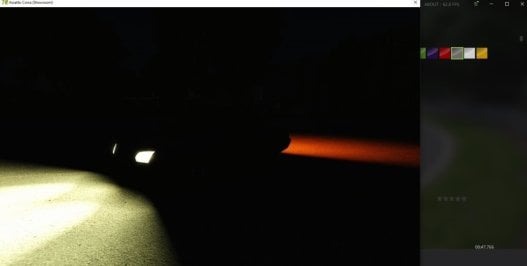
Would anyone happen to know what causes the change in lighting/shading for CSP Previews from Preview218 to Preview346?
I noticed when trying to update my car previews after going to CSP 1.80-preview346 that the lighting/shading was not the same from previews that were rendered in preview218, resulting in the exposure appearing brighter and blacks appearing much darker in comparison.
I took a comparison shot with an Encrypted Lamborghini Diablo GT model to show off what I'm referring to;
-
Preview218, how it used to appear beforehand.
View attachment 1281908
Preview346, how it appears now.
View attachment 1281911
-
Not sure what they changed to affect this. I thought it might've been a cause of the PPFilter since preview346 no longer resets it to "default" upon rendering, but trying a different filter doesn't seem to affect the final result.
Anyone knows what's up?
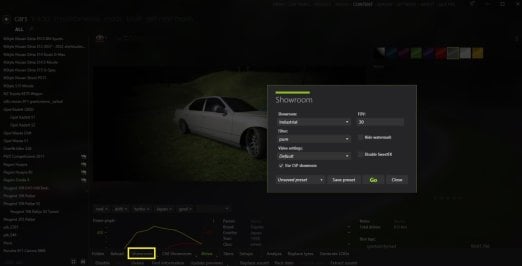
"Use CSP for final previews render" was introduced in preview218.View attachment 1281924
i think this was new from .346