Assetto Corsa PC Mods General DiscussionPC 

  • Thread starter Thread starter daan
  • 157,621 comments
  • 51,510,622 views
how does it work? Never heard of compactGUI before :confused:
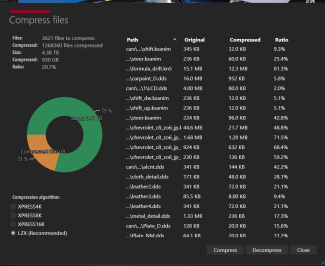
"CompactGUI transparently compresses your games and programs reducing the space they use without affecting their functionality. It used to use the Windows 10 compact.exe function but now works directly with the Win32 API to be much more efficient."


Simple instructions:
Download CompactGUI exe (from here ), or direct download link

Save the exe somewhere on your drive and run it , then select your Assetto Corsa car folder (or a specific car subfolder )
and press (re)compress. (you can choose some extra options, like to have it skip some files which are known to not compress too much anyway, but I left everything as per default. I think CM tool also uses somthing similar compresses only some filetypes (hence the compactGUI gives still additional gain, but not sure exactly... )

ps: Next I think I may attempt compressing the track folder, as I'm sure there's also alot to be gained there!
 
Running CSP 1.80 Preview 218, I don't remember seeing this happening before...

Looks like its happening to both the RSS GT3 cars(the Huracan and the AMG GT3) Wonder if its some CSP setting issue or something?
You have not seen that happen before? Really? 🤨
I think I have seen it here every couple of days when someone post 'what are these black lines coming out of the other cars?'
Seems to be an issue load of people are having but somehow not seeing any of the posts about it and how to fix the issue 😁
 
Pretty sure I've made this change before but I also changed CSP version a few times recently so it got unticked again....thanks
 
Running CSP 1.80 Preview 218, I don't remember seeing this happening before...
View attachment 1287633
View attachment 1287634
Looks like its happening to both the RSS GT3 cars(the Huracan and the AMG GT3) Wonder if its some CSP setting issue or something?

From the MDRS user manual:

I have a strange thing heading from the driver to the sky!

A bug with CSP v180p218. Disable “New human skin shader” in CSP settings “Graphic Adjustments”.
 
Last edited:
Breaking News !

Race Sim Studio updated the MP-H Bayer to Version 2

Cheers. :cheers:
 
FYI : track folder compress with CompactGUI gained me another 64 GB (on top of CM Compress tool)!

before compress (CM compress already executed)
1694890295457.png


after compress w CompactGUI (not skipping any file types):
1694890266744.png
 
Breaking News !

Race Sim Studio updated the MP-H Bayer to Version 2

Cheers. :cheers:
They fixed the windshield, nice! So I can remove my fix now.
 
Donington Park 2018 Mod

This is an updated version of the test mod I put out a few days ago. Because of the number of changes, it got difficult to do it as a mod to the original track. I made it a standalone track so as not to fool with the original version. All credit for the track goes to the original author Brun. It will come up as Donington Park 2023 in your track list, but the year is not indicative of how the track is represented. I just needed some way to recognize which track was which. You can edit the ui files and give it whatever name you want.

Please let me know of any problems or suggestions so I can try and make it better.

Donington Park 2023 v0.95

Changes from past version:

-- Added original author's name and version number to the track ui files.
-- Made the 40 pit layouts from Paprika work with my changes.
-- Added geo tags to the ui files.
-- Animated all of the flags that were not animated. I'm not real happy with the new flags, but at least they are animated. I wanted flags that were attached to the pole and did not arc in heavy winds, but I couldn't figure out how to make them. Plus they have an odd shading. In some directions, they are very bright and in other directions they are darker. Most likely a fault in the way I made them from lack of knowledge. If I ever find a way to fix these issues, I will update the flags.
-- Some tweaks to the night lighting and also enabled the lights to turn on when it rains.
-- Incorporated my grass changes directly into the kn5 file so it would be easier for people to make their own track skins.
-- Little tweaks to the ai sidelines to keep them off the raised kerbs. If you use a 3rd party ai already, then you may not need this.
-- Re-made the starting position file for the 40 pit GP layout from Paprika. Thanks to @Quikslvr for pointing it out to me. It must have been created for online use because he had the cars lined up in a position of the road that wasn't part of the track. This caused the ai cars in the back not to move at the start. It's not perfect and the tail end cars take some time to get moving, but at least they move now.
-- Fixed blurry Paddock area texture
-- Added semaphore lighting to start lights

One thing I still want to do is find a way to bring back the mow lines that the real track has. I've got some ideas on a way to do it, but I didn't want to hold up the release just for that.

View attachment 1286295

EDIT: Forgot to mention, if you find the tree shadowing too dark, you can try unremarking the very last section in the ext_config file. I go back and forth between which way I prefer so I left the code in there for people to decide for themselves.
Link updated with new version, but if you have already downloaded the track, just download the attached zip file. No need to download the whole track again.

Changes:
-- Added new ext_config file and cams from @CrisT86 . The original config is included if you prefer it, but why would you? The man knows what he's doing.
-- Added new cams from @racealot
-- Added small grass track skin if you find the default grass to be a little dull. The skin adds a bit of saturation and a bit of yellow tint to the grass areas. Sorry, still no mow lines yet. That's coming, but it was a bit more work than I expected.
 

Attachments

Last edited:
"CompactGUI transparently compresses your games and programs reducing the space they use without affecting their functionality. It used to use the Windows 10 compact.exe function but now works directly with the Win32 API to be much more efficient."


Simple instructions:
Download CompactGUI exe (from here ), or direct download link

Save the exe somewhere on your drive and run it , then select your Assetto Corsa car folder (or a specific car subfolder )
and press (re)compress. (you can choose some extra options, like to have it skip some files which are known to not compress too much anyway, but I left everything as per default. I think CM tool also uses somthing similar compresses only some filetypes (hence the compactGUI gives still additional gain, but not sure exactly... )

ps: Next I think I may attempt compressing the track folder, as I'm sure there's also alot to be gained there!
Thank you! I saved 35gb :D Now I have 75gb free against 45 gb before using compact gui (I know I have little free space compared to what should technically be kept free on an SSD)
 
A chap called Chris Hands had posted a BTCC mod with 31 cars which he'd modified, mostly from old Sim Dream assets. I can't find the links now as the original posts have been deleted from Facebook. I managed to grab the 27 car version but just wanted to see if anyone had a link to the updated version. I don't know how extensive the modifications were but any improvement over Sim Dream is worthwhile!

Also, incredibly long shot, but does anyone know of a Skoda Fabia VRS mod as I used to have one of these and loved that car so much. The rally version I've found is fine but has lights so can't easily reskin it to look like the road version.
 
For those who have been following or downloading my Michelin Le Mans Cup P3 skins, I have made some updates to a number of them as well as a few new skins. New is the #2 CD Sport Ligier, the #20 United Autosport as well as updated #22 & #23 and new #97 of Cool Racing to accompany the updated #87. These are for the fsr_ligia_jsp320 mod. These skins will simply overwrite any previous version.
I hope to clean up a few more skins in the near future. in the mean time, enjoy!

https://mega.nz/file/rkYGCZ4L#mkI3AFhXo49EXXfqvzdFQYjghBSr7I9EjP8qePaujMo

View attachment 1286511
View attachment 1286512
View attachment 1286513
View attachment 1286514
View attachment 1286515
I've downloaded these but can't get them installed on the car. I've tried putting each skin into the car folder, into the skin folder, and each time I just get the broken windows symbol in content manager. I don't know how to do screen shots or I would show you what I'm seeing.
 
Random question, how are your laptimes at the Indy road course compare to the IRL time this weekend? The pole time in the 963 is a 1:13.6, meanwhile GTD pole is 1:23.0

In game my best effort is in the 1:19 in absolute quali trim with ACF LMDh, AI GTD cars are running in the 1:29s

I'm not sure I have 6 seconds to find here...

Also um...when the grid was loaded with 43 cars:
1694913232102.jpeg
 
Last edited:
Hi guys! Sorry for ask but do You remember a bug whit estrange ligjths under/sides of the cars? I read is a issue whit csp but can't find the solución for this problem...i mean is not a problema of headlights..is a estrange ilumminated zone..thanks in avance!
 
I've downloaded these but can't get them installed on the car. I've tried putting each skin into the car folder, into the skin folder, and each time I just get the broken windows symbol in content manager. I don't know how to do screen shots or I would show you what I'm seeing.
@Jezza819

Strange, since this is the first time hearing this . You have the fsr mod ? Content manager and CSP?
________________________________________________________________________________________________________

While we're on the topic of fsr_ligia_jsp320 mod, here is an update to the #28 MV2S racing P3 Ligier as well as a new skin, the #29 sister car as well.

https://mega.nz/file/LtoA3SgR#OCQs9-IwntTnCg0KxpYQ-EXRvLKGs1cV1NB2NTaj7wI

20230916-224337-ks_barcelona-fsr_ligia_jsp320.jpg

MV2S 28 & 29 pic.PNG
 
Last edited:
Can anyone get the Pure landscape generator working?
I certainly can't.
I'm following the video but nothing appears.
I can move the skydome up and down fine, but no terrain ever appears.
@Peter Boese, another one for you to ponder along with the daytime headlights.
The shader is active in the shader tab?
1694928007318.png
 
Hi guys! Sorry for ask but do You remember a bug whit estrange ligjths under/sides of the cars? I read is a issue whit csp but can't find the solución for this problem...i mean is not a problema of headlights..is a estrange ilumminated zone..thanks in avance!
Try again but disable "Light bounce estimation" in ExtraFX before.
 
@Jezza819

Strange, since this is the first time hearing this . You have the fsr mod ? Content manager and CSP?
________________________________________________________________________________________________________

While we're on the topic of fsr_ligia_jsp320 mod, here is an update to the #28 MV2S racing P3 Ligier as well as a new skin, the #29 sister car as well.

https://mega.nz/file/LtoA3SgR#OCQs9-IwntTnCg0KxpYQ-EXRvLKGs1cV1NB2NTaj7wI

View attachment 1287723
View attachment 1287724
fsr_ligia_jsp320 Yes, CM Yes, not sure what CSP is.
 
Last edited:
Hey guys, I just released a physics update for the BMW M Hybrid V8.

 
I have an account, but can't load, I get this error message:
""""

General Error​

Illegal use of $_COOKIE. You must use the request class to access input data. Found in /home/clifda5/f1classic.net/cache/production/s9e_renderer_8d23dd1e351107ce88214c0e430a77094c473eeb.php on line 1. This error message was generated by deactivated_super_global.
""""
Web site is working again.
 
The shader is active in the shader tab?
View attachment 1287738
Yes, it was the first thing I checked. Tried toggling it on and off a few times too, but no difference.
I can imagine a few people missing that checkbox though. Is there any reason it's not grouped with the rest of the landscape controls, rather than in a separate tab where it could easily be missed?

One other thing I've noticed is that the first time I load a track after installing the new Pure, it crashes back to CM. Load it again and there's no problem, and no problem on subsequent loads of that same track. I'm wondering if a missing file gets created with tracks that the new Pure hasn't been used with yet, and that causes the initial crash? You can almost guarantee it happening.

One last thing: any chance of a randomiser for wind direction? I know it can be manually set, but it would be add some nice variety if wind direction (and strength) varied every time a track was visited, especially as so many now use FlagFX.

Oh, and daylight headlights continue to be a major annoyance. Still no progress there?

Cheers.

Edit: just a reminder about the feature discussed previously where we can elect to drive in mid summer, no matter where the track is located. This to avoid low default sun angles when driving in the southern hemisphere if your default date is set to June, for example.

Cheers again.
 
Last edited:
One last thing: any chance of a randomiser for wind direction? I know it can be manually set, but it would be add some nice variety if wind
If you set a range in a slider, it will be randomized in this range, the next time the slot becomes current slot.
So for wind direction, just make the range over the whole slider and it will randomize between 0-360°

Is there any reason it's not grouped with the rest of the landscape controls, rather than in a separate tab where it could easily be missed?
It is a shader, so it is listed there in the list. Actually it is always active. There was just a problem with Pure 0.190, which is fixed now (triple screen bug). So it can be active all the time, but it is controlled via track parameters. So the main control is in the "Track" tab.

"Is there any reason it's not grouped with the rest of the landscape controls, rather than in a separate tab where it could easily be missed?"

You could try this:
1694942713143.png

1694942750664.png


You should see such debug graphics then:
1694942783345.png
 
Last edited:
If you set a range in a slider, it will be randomized in this range, the next time the slot becomes current slot.
So for wind direction, just make the range over the whole slider and it will randomize between 0-360°


It is a shader, so it is listed there in the list. Actually it is always active. There was just a problem with Pure 0.190, which is fixed now (triple screen bug). So it can be active all the time, but it is controlled via track parameters. So the main control is in the "Track" tab.

"Is there any reason it's not grouped with the rest of the landscape controls, rather than in a separate tab where it could easily be missed?"

You could try this:
View attachment 1287775
View attachment 1287776

You should see such debug graphics then:
View attachment 1287777
Thanks for swift answer Peter.
Ticking the LANDSCAPE_COVER_NEGATIVE box seems to have solved it, even with debug mode deactivated. I'm sure I tried that tickbox during previous troubleshooting though. Weird!
What exactly is that tickbox intended to do?
@RMi_wood try this, it might also solve your issue.

Thanks as well for the tip about randomising the wind direction, it never occurred to me to use the range tolerance like that but it works a treat.

I've been trying to find a pattern, a logic, or a method to trigger the 'daylight headlights' issue.
You could try this, it seems to trigger it but still has certain randomness:
1. start a dry daylight hotlap session, and restart it a few times. (Car and track don't seem to matter).
2. assuming headlights haven't come on, manually toggle them on and of a few times. Then leave them off.
3. start a race against AI on the same track, same conditions, using the same car
4. headlights for your car and AI cars might now be on.

Not 100% effective, but seems to trigger it more often than not.
And sometimes just changing tracks will mean that the session starts with headlights on, which then seems to be the default state until CM is shut down and restarted.
Spooky.

Thanks again.
 
Last edited:
Sharing a mod? Host it on GTPlanet Downloads. Free, public hosting for files up to 10GB in size.
Back