Assetto Corsa PC Mods General DiscussionPC 

  • Thread starter Thread starter daan
  • 157,764 comments
  • 51,957,122 views
It's release Friday!

This time lets celebrate track number 100 with the most downloaded WIP track Daytona 1970!

DAYTONA 1970 release

This 3D-track was made for Grand Prix Legends by Sergio Loro and Ginetto. GTR2 conversion and enhancement by motorFX, Philrob and BillBro. It was converted by Rainmaker to Assetto Corsa. Thank you Philrob for the permission.

Features:
-both layouts road and oval
-competitive AI
-working track map
-support for hot lap mode
-replay cameras by DaBaeda
-support for time attack mode
-40 pit boxes with working pit lane
-RainFX, GrassFX, water shader
-night lights
-option for bumpy and smooth road meshes in extras folder, standard is bumpy

KNOWN ISSUES: Some corners are edgy in design.


Get always the latest version here:


View attachment 1370082View attachment 1370083View attachment 1370084View attachment 1370085

View attachment 1370086
This is track #100 released!​

I congratulate you very much, thank you very much for your work, your quality, your effort
 
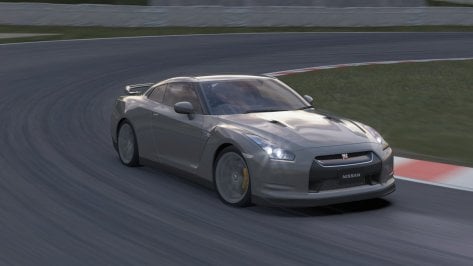
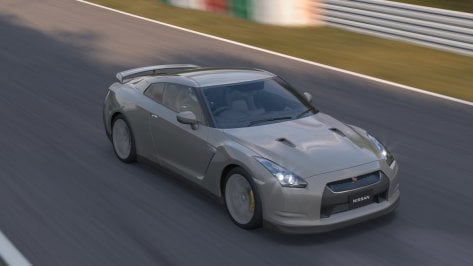
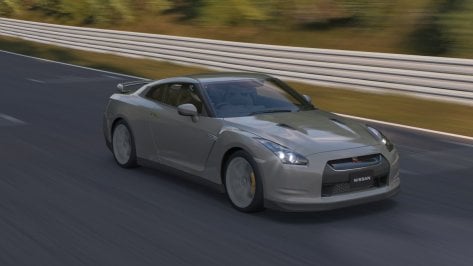
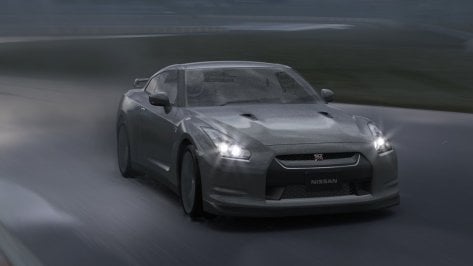
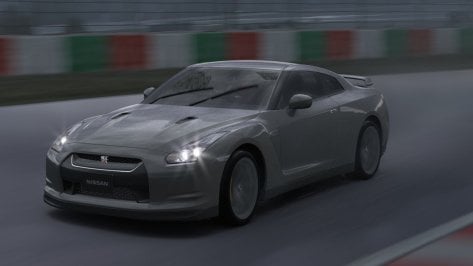
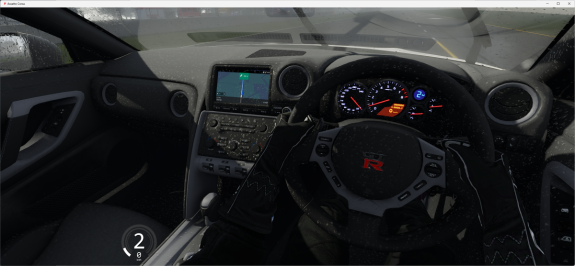
Nissan GT-R R35 2007 Public Release!!
Download: https://sharemods.com/nls5vppw56zm/gtr_nissan_r35_2007_1.0_101creative.zip.html
Converted From GT6
-AO inside and out
-Realistic Dashboard
-Physics By VR DRIVING AI
-CSP Settings
-Driver Animation
-Panoramic session Start config Daniel Nogal
-Beta testing and help ,@norms,@Mascot,and others
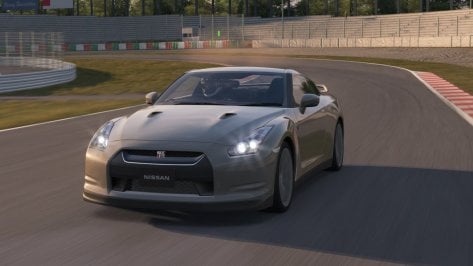
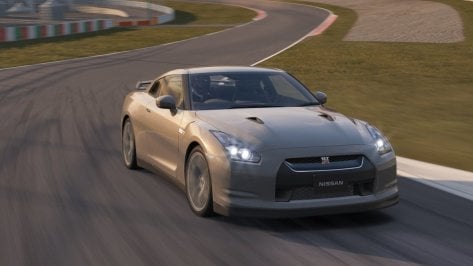
Screenshot_gtr_nissan_r35_2007_rt_suzuka_4-6-124-21-45-54.jpgScreenshot_gtr_nissan_r35_2007_rt_suzuka_4-6-124-21-45-58.jpgScreenshot_gtr_nissan_r35_2007_rt_suzuka_4-6-124-21-46-42.jpgScreenshot_gtr_nissan_r35_2007_rt_suzuka_4-6-124-21-46-59.jpgScreenshot_gtr_nissan_r35_2007_rt_suzuka_4-6-124-21-47-54.jpgScreenshot_gtr_nissan_r35_2007_rt_suzuka_4-6-124-21-47-57.jpgScreenshot_gtr_nissan_r35_2007_rt_suzuka_4-6-124-21-50-6.jpgScreenshot_gtr_nissan_r35_2007_rt_suzuka_4-6-124-21-50-20.jpg
 
This car will be my next release when I get around to finishing a few things on it, it's not a continuation of 101Creative but a fresh convert. I'm hoping to have it ready in the next couple of weeks.

View attachment 1370064
That's my real life car! Should you need any help, I'd be more than happy to assist in any way :)
 

Attachments

  • FB_IMG_1719234875421.jpg
    FB_IMG_1719234875421.jpg
    48 KB · Views: 27
  • 20221226_121211.jpg
    20221226_121211.jpg
    96.9 KB · Views: 28
Last edited:
Nissan GT-R R35 2007 Public Release!!
Download: https://sharemods.com/nls5vppw56zm/gtr_nissan_r35_2007_1.0_101creative.zip.html
Converted From GT6
-AO inside and out
-Realistic Dashboard
-Physics By VR DRIVING AI
-CSP Settings
-Driver Animation
-Panoramic session Start config Daniel Nogal
-Beta testing and help ,@norms,@Mascot,and others
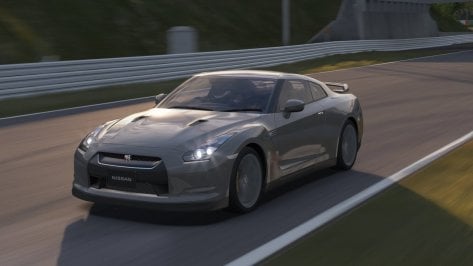
View attachment 1370092View attachment 1370093View attachment 1370094View attachment 1370095View attachment 1370096View attachment 1370097View attachment 1370098View attachment 1370099

Nice, but interior getting wet during raining :)
 

Attachments

  • wet.png
    wet.png
    183.5 KB · Views: 31
Punta del Este ePrix v1.0

Screenshot_ks_porsche_cayman_gt4_clubsport_punta_del_este_eprix_5-6-124-20-44-54.jpg

Punta del Este Street Circuit is a street circuit located in Punta del Este, Uruguay. It runs along the town's harbour – nicknamed the Monte Carlo of South America. (Wikipedia)

Conversion from rFactor2.

-CSP recommended
-26 pit/start
-AI, cam

NOTE; If you are using Sol and the track screen is dark, rename ext_config_for_sol.ini to ext_config.ini in the extension folder.

Credits & Thanks;
rFactor2 Original Track by Garitt Gibsn and Errol Prefet
-Thank you for giving me permission

AC Converted by @shi (shin956)
Crowds texture by Kniker97
marshall, cameraman and some textures by kunos

Download (MEGA)

Enjoy.
Converted upon request by Patreon member Woodtom14.
 
There isn't a high-quality Calibra available on the market. Have you ever considered making a Calibra
I think that would require a scratch built model? I can't do that, but I would also love to see a standard Calibra in the game. I think someone was posting progress shots of one being built on RaceDepartment a little while ago though.
 
I think that would require a scratch built model? I can't do that, but I would also love to see a standard Calibra in the game. I think someone was posting progress shots of one being built on RaceDepartment a little while ago though.
The person whose link I shared was working on it, but there hasn't been any news for a while.

 
I want to paint the black plastic strips of the Ferrari F40 red, but I haven't been able to do it. Can anyone help guide me?

Ekran görüntüsü 2024-07-05 174201.png
 
I want to paint the black plastic strips of the Ferrari F40 red, but I haven't been able to do it. Can anyone help guide me?

View attachment 1370152
Select the plastic strip, get the txdiffuse from the 3 dots next to the texture image, paint it red and put it back in the skin folder.

Bonus point : It might paint all plastic surfaces red... Maybe. Can't know for now :)
 
Select the plastic strip, get the txdiffuse from the 3 dots next to the texture image, paint it red and put it back in the skin folder.

Bonus point : It might paint all plastic surfaces red... Maybe. Can't know for now :)
I did exactly what you said, but it didn't work. It works on the body color and wheels, but I can't do it on this plastic strip."
 
I did exactly what you said, but it didn't work. It works on the body color and wheels, but I can't do it on this plastic strip."
it may be that the shader value for that plastic is set to low which makes the colour you put on there basically black anyway

its a pretty common thing
 
Last edited:
it may be that the shader value for that plastic is set to low which makes the colour you put on there basically black anyway

its a pretty common thing
"I'm just starting to learn these things and I'm a beginner. How can I do what you said?"
 
"I'm just starting to learn these things and I'm a beginner. How can I do what you said?"
that's ok, we all have to start somewhere.

click on the platic trim and click the 3 dots next to "material" and then hit "change values" and change the very first value "ksambient" it will probably be 0.1 or something. as you enter a value it will automatically change. If you get it where you want it hit save and thats that

Screenshot (614).png


Screenshot (613).png
 
Last edited:
Anyone familiar with the Istanbul track know if the gravel is this yellow on the real life track? And what about the saturated green strip. Is that accurate as well? They stand out so much that i'd love to change them unless that is actually how they look.


gravel.jpg
 
Anyone familiar with the Istanbul track know if the gravel is this yellow on the real life track? And what about the saturated green strip. Is that accurate as well? They stand out so much that i'd love to change them unless that is actually how they look.


View attachment 1370204
Google maps say no. F1 2021 onboard too. No grass, no astroturf, but kerbs and tarmac

 
Last edited:
Anyone familiar with the Istanbul track know if the gravel is this yellow on the real life track? And what about the saturated green strip. Is that accurate as well? They stand out so much that i'd love to change them unless that is actually how they look.


View attachment 1370204
It is definitely not like this. Here is an example, albeit an old one.

Saved by me 6 months ago

 
Last edited:
Google maps say no. F1 2021 onboard too. No grass, no astroturf, but kerbs and tarmac


After watching the video, I wonder where the track creator got the idea that those things should be those colors. Unless it's based on the track prior to 2021 and they used to look that way. Guess I got some color editing to do. Thanks for the video.
 
@Ale2Passos
I would not recommend the update, I've just spend at least an hour trying to figure out why suddenly all my Kunos cars were updated (as shown by the green dot in CM)

It will reset all your custom previews and other changes you've made to Kunos files! Luckily I have a good backup system, so was able to rollback. It also gave me the opportunity to see what has been changed compared to my backup.

The update changes the following files:

\content\gui\NationFlags\TWN.png has been changed to the correct flag (Republic of China)
\launcher\themes\.base\ac.utils.js on line 1036 "TWN": "Taiwan", has been changed to "TWN": "Taiwan, China",
\launcher\themes\default\js\ac.localization.chs.js line 535 "Taiwan": "
台湾", has been changed to "Taiwan, China": "中国台湾",
\launcher\themes\default\js\ac.localization.cht.js line 538 "Taiwan": "
台灣", has been changed to "Taiwan, China": "中國臺灣",
\launcher\themes\default\modules\profile\profile.html line 283 value="TWN">Taiwan has been changed to value="TWN">Taiwan, China


Very weird that Kunos has decided that Taiwan is now part of China (People's Republic of China). A very controversial topic!

To only interesting change is in to the following files:

\acs.exe file size was 22.918.296 is now 22.890.776
\acs_x64.exe file size was 21.921.880 is now 21.895.384


If anybody want these changed ACS files, let me know and I'll upload them!
I'd love those files because China can get screwed
 
that's ok, we all have to start somewhere.

click on the platic trim and click the 3 dots next to "material" and then hit "change values" and change the very first value "ksambient" it will probably be 0.1 or something. as you enter a value it will automatically change. If you get it where you want it hit save and thats that

View attachment 1370201

View attachment 1370198
Thanks for the tip. It helped a lot and I got the result I wanted :cheers:

__custom_showroom_1720204741.jpg
 
Sharing a mod? Host it on GTPlanet Downloads. Free, public hosting for files up to 10GB in size.
Back