Assetto Corsa PC Mods General DiscussionPC 

  • Thread starter Thread starter daan
  • 155,107 comments
  • 49,028,108 views
This is the issue ticket I have submitted to the CSP github page.If anyone has information on this I would be so very greatful.
https://github.com/gro-ove/actools/issues/123

When I am creating a skin or updating a material in CMshowroom,the raised/lowered effect from a normals texture is very different from what I see ingame.


I frequently have to flip the y channel and or rotate it to work properly ingame.(using the photoshop action located in Assetto Corsa sdk folder)


For instance gloves.If I export the normals texture from a set of gloves,ingame the results will be completely wrong.Raised where it should be lowered and vice versa.Inverting the y channel in photoshop will sometimes get it to react to light correctly but even then sometimes you have to rotate a channel to get the now correctly raised areas to render hilights and shadows from the correct direction.


Its a mess honestly.I have spent days just to get a clear handle on this and I'm still not certain I have it right.
Another example is the crewmans face.Incorrect rendering of the normals texture makes him look hideous in some lighting situation.(because the normals are fighting the AO)


I dont know which is correct,the game or CMshowroom,but I suspect the game is rendering normals textures incorrectly because it looks like Kunos knew they had a problem...hence the photoshop action they supplied in the sdk folder.


In one instance where I was creating a txNormal file from photoshop,It didnt work correctly til I first flipped the image horizontally then created the normals texture with the opposite y channel setting than what CMshowroom wanted.Then flip the resulting normals image horizontally again.This seems very similar to what the photoshop action performs on an already available normals file.


Its maddening trying to create things and not even know if you doing it correctly or if you will need to fix everything once the underlying problem is corrected.
Please help and thank you.
 
Last edited:
Does anyone know what's up with this new Goodwood Circuit (gt_goodwood_circuit) that's hit Breathe's list? Link:


It looks like there's been a number of models (planes, stanchions and such) added, ambient audio added to the pit lane a la Brno, and changes made to the pit straight environment - but I can't find any info on what exactly was changed past that. I have been using racinjoe's excellent 0.99 touch-up as my default for years - was the original mantasisg one the base for this new version, or was the racinjoe version used? There's no author or version info provided in the ui.json.

It looks intriguing, but I'd like to know more before considering moving to this one - and if these changes could be ported to the racinjoe version, all the better.

Cheers to anyone who may know.
 
Last edited:
Try reinstalling the car and app manually, the led settings section missing from the advanced setup menu.


More BTCC are on the way.
Thanks, that was the problem. When I originally downloaded the update, I didn't unpack the folder "AC Files" before installing. This time I opened that up and installed "apps" and "content" and the LED settings are in there now.

I know I've said this in the past but I'm getting increasingly frustrated with this whole sim racing genre. It's just too much info you need to know, computer stuff you need to know, and it's very tedious. It's just so far over my head and I get so angry that I can't figure things out quickly. Plus there's the physical problem it's giving me. I'm 59 now with a bad back. I bought this Fanatec cockpit rig a few months ago and I can't sit in it for more than 20 minutes or so without the right lower quarter of my back feeling like it's on fire. But it was the same before I got it with the portable GT Omega wheel stand and regular racing type office chair I had.

Don't get me wrong, when everything works, it's great. But I seem to have so many problems getting it to that great point. I'm probably only using about 60% or so of Assetto Corsa's capability because I just don't understand how it all works. I haven't updated Pure in a while because I don't remember how I did it the last time and I'm afraid I'll mess it up so bad trying that it will make the game unplayable.

Everyone here has been really helpful when I've asked how to fix my problems. That hasn't been the case other places. Some people have been incredibly rude and nasty when I've asked what I thought was a very simple question. But I suppose that's the way gaming culture is.

I just feel so bad that I keep having to ask over and over again for help. I'm sure the folks at VRC and RSS think, "oh no not another email from him". I desperately need a new home PC to replace my 10 year old one and part of me thinks I should take this one and strip all of the games off of it and just use it for home purposes. But I've also got many issues on that side of it I can't figure out either and need help with.
 
There is an update to the blackhood amuse s2000 mods. Are there any improvements to these mods? Or are the old ones much better? Has anyone managed to download the updates in the content manager?
 
Config to fix some light leakage around mesh seams in @DaWallace's excellent Ultima GTR 3.2 and Ultima GTR V8:

Code:
;stop sun ingress around cockpit mesh seams, into footwells etc
[SHADER_REPLACEMENT_...]
ACTIVE = 1
MATERIALS = body, foam, interior, dashboard, int_metal_base, INT_Carbon_OCC, ext_plastics, int_metal_parts ; external bodywork, internal trim, pillars, dashboard etc
CAST_SHADOWS = 1
DOUBLE_FACE_SHADOW_BIASED = 1
Shouldnt that be MESHES instead of MATERIALS.It worked properly on the car I am working on(thank you so very much) after making the change and using the needed Mesh names for my car.

Thanks to Masscot for that fix...Now I still need the instrument guage glass to stop reflecting the road under the car...any help please?
 
Last edited:
@jac0
just trying something... shots in showroom (both .png), first is 1022 x 575 (Kunos format), second is 3860 x 1080...
__custom_showroom_1733781265.png


__custom_showroom_1733781247.png

The first one has kept the same format after downloading.

The second one goes from 3860 x 1080 to 1200 x 336 after downloading.
 
Last edited:
LODs for Tree/ Track are maxed out at 320%,
but even when I disable 3D Trees, these black spot show in replay.
How did you disable it? Deleted everything from the ext_config.ini?
Hi Guys, I'm wondering if anyone can solve this issue that's suddenly started happening in the photos I'm taking.
I took this photo yesterday:
View attachment 1411672
I took this one today, but don't understand why it all looks so pixelated:
View attachment 1411674
I haven't altered any of the settings of the 'nice screenshots' in Content Manager, and have taken photos today with other car/track combinations, which are also pixelated.

I'm using the latest Content Manager, Pure LCS 2.35 and CSP 0.25 preview 1.
Any help would be greatly appreciated.
Don´t use AMD FidelityFX. That could be the issue.
 
How did you disable it? Deleted everything from the ext_config.ini?

Don´t use AMD FidelityFX. That could be the issue.
Exactly, deleted everything from ext_config.ini.
As long as it only appaears in replay, its not that big of an issue...just a little annoying.

If anybody is interested, I added the Cable fix from @Masscot to Le Mans 1991 and deleted these strange looking grass tracks (rename txt to zip).

Is there a fix for the holes in the two strips of grass at the second chicane?
How do you make the cones at the first corner collidabe (or even movable)?
 

Attachments

  • Screenshot_ks_mazda_787b_lemans_1991_9-11-124-23-10-35-accum.png
    Screenshot_ks_mazda_787b_lemans_1991_9-11-124-23-10-35-accum.png
    429.5 KB · Views: 22
  • extension.txt
    extension.txt
    1.4 KB · Views: 23
Last edited:
X90
Does anyone know what's up with this new Goodwood Circuit (gt_goodwood_circuit) that's hit Breathe's list? Link:


It looks like there's been a number of models (planes, stanchions and such) added, ambient audio added to the pit lane a la Brno, and changes made to the pit straight environment - but I can't find any info on what exactly was changed past that. I have been using racinjoe's excellent 0.99 touch-up as my default for years - was the original mantasisg one the base for this new version, or was the racinjoe version used? There's no author or version info provided in the ui.json.

It looks intriguing, but I'd like to know more before considering moving to this one - and if these changes could be ported to the racinjoe version, all the better.

Cheers to anyone who may know.
Im not sure but I like it better than the rest except the chicane wall has no collision which is so disappointing. I'm not familiar if there is an easy way for me to fix that because I'm not a modder. Otherwise I love the little things added to the environment.
 
Dunes of Giza - v1.0

View attachment 1411122
View attachment 1411123
View attachment 1411124
"Originaly created by Simraceway the Dunes of Giza was one of my first conversions for AC. Stuck in perpetual WiP since 2020...
however until now, for all to enjoy" - M.Wood 2024

features:
  • 14 pit/grid
  • 95% sand/dirt
  • 5% tarmac
  • 100% clean dirty fun

credits:


:: DOWNLOAD ::
How do I get past a "virus detected" notification?
 
Mods dont have viruses... but if you want, I can make one that does :D
I remember having a virus generator for dos back in the early 90's. Could make custom versions of all the classic viruses like Cascade, infecting .com and .exe-files.

There was also a virus, which only feature was to randomly swap keyboard inputs from a to s, p to o and so on, making you think you just made more typos than usual. Can't remember its name. Those were the days.

Wonder if that still works. And if modern antivirus-software will stop it. 🤣
 
... I know I've said this in the past but I'm getting increasingly frustrated with this whole sim racing genre...
I understand you, bro: 56 years old here and I also suffer from some back discomfort, although apparently not as pronounced as yours.

I don't know in what position you will have the cockpit adjusted, but I noticed more comfort (fixed baquet in my case) by lying down more than I was at the beginning, with my feet practically at the height of the "derriere" and my back slightly reclined back, trying to imitate a position halfway between a GT and an F1. In addition to the improvement in my back, I have noticed that my feet swell less when I spend several hours sitting in the cockpit, since apparently before I had them too low relative to the seat. Now the only thing that hurts is my butt, but from spending so much time behind the wheel.

And regarding the computer problems... well, it seems that it's part of the experience, and I'm very afraid that the only solution to nip the problems in the bud would be to switch to playing on... (gasp!) console... In my case, since I only play Assetto Corsa I only have to worry about one game, which is already quite a task, by the way...

To try not to constantly ask about the same questions and since I've always been quite forgetful, I have become accustomed to saving in Favorites links to messages or videos of solutions to problems that arise, to take a look at them again if necessary...

And although it's cool to be in the latest fashion, other thing to avoid problems is follow the "if isn't broken, don't fix it" approach; I don't usually update applications that work well for me unless it's a necessity... For example, until recently I was using CSP version 0.1.79, and I have only updated it because it's almost mandatory for a lot of car mods that are appearing lately.

On a side note, I also tried installing Pure, but seeing (at least for me 😅) how complicated is to adjust to make it look right, I went back to the old reliable Sol, which more or less gives me what I need. I don't know why I didn't follow my prerogative "if isn't broke..." 😩
 
Last edited:
Is this a ****ing joke lol


Look at the bloody prices ! You're better off buying a PS5 and GT7 for crying out loud.
Gumroad no longer supports paypal purchases. So he's set the prices to that to stop people from buying the mods until Gumroad makes it so he can get paid again.

It clearly states in all of them that you need to DM him for the actual prices.
 
I understand you, bro: 56 years old here and I also suffer from some back discomfort, although apparently not as pronounced as yours.

I don't know in what position you will have the cockpit adjusted, but I noticed more comfort by lying down more than I was at the beginning, with my feet practically at the height of the "derriere" and my back slightly reclined back, trying to imitate a position halfway between a GT and an F1. In addition to the improvement in my back, I have noticed that my feet swell less when I spend several hours sitting in the cockpit, since apparently before I had them too low relative to the seat. Now the only thing that hurts is my butt, but from spending so much time behind the wheel.

And regarding the computer problems... well, it seems that it's part of the experience, and I'm very afraid that the only solution to nip the problems in the bud would be to switch to playing on... (gasp!) console... In my case, since I only play Assetto Corsa I only have to worry about one game, which is already quite a task, by the way...

To try not to constantly ask about the same questions, I have become accustomed to saving in Favorites links to messages or videos of solutions to problems that arise, to take a look at them again if necessary...

And although it's cool to be in the latest fashion, other thing to avoid problems is follow the "if isn't broken, don't fix it" approach; I don't usually update applications that work well for me unless it's a necessity... For example, until recently I was using CSP version 0.1.79, and I have only updated it because it's almost mandatory for a lot of car mods that are appearing lately.

On a side note, I also tried installing Pure, but seeing how complicated is to adjust to make it look right, I went back to the old reliable Sol, which more or less gives me what I need. I don't know why I didn't follow my prerogative "if isn't broke..."
What is complicated to let Pure look right? You just need to install it and use the "pure" PPFilter and it will look right with all settings on default!
Also Pure is way easier, because if there would be any incompatible CSP setting, it will tell you and you can fix those settings with 1 click!

This is just a quick screenshot with everything on default. For example, the exposure is always right!
Screenshot_ks_maserati_levante___ks_red_bull_ring_10-11-124-10-5-55.jpg


Also you have a simple way to match your preferred look with these 2 sliders in the "pure" ppfilter script:
That mostly covers all the general different looks the people have
1733821763420.png


Not to mentioned that Sol's code is really crap in comparison to Pure Gamma and esp in comparison to Pure LCS.
Pure is way more efficient with the CPU. Sol causes big microstutters. Just look at the render stats.
So Sol was broke all the time if you want fliud frame flow....
 
Last edited:
What is complicated to let Pure look right? You just need to install it and use the "pure" PPFilter and it will look right with all settings on default!...
Then I did something wrong, because after downloading it from Patreon and installing it following the instructions in your tutorials, with the default settings the image I got was too bright and faded... I started fiddling with settings and it was getting worse and worse; the amount of options is overwhelming... In the end I gave up (easily, I admit) and went back to the familiar.

It will be a matter of trying again.
 
Hello everybody. I need some help with the Ext Config. I managed to build some lights around my track and also got the bulbs glowing. But I don't get how to switch them of when I drive in daylight.
Which magic words do I have to add?
 

Attachments

  • Screenshot_rss_formula_rss_supreme_speedvalley_10-11-124-0-38-26.png
    Screenshot_rss_formula_rss_supreme_speedvalley_10-11-124-0-38-26.png
    273.9 KB · Views: 19
Gumroad no longer supports paypal purchases. So he's set the prices to that to stop people from buying the mods until Gumroad makes it so he can get paid again.

It clearly states in all of them that you need to DM him for the actual prices.
Still selling conversion from GT7 and that's ****** in itself, even if it costs 5 bucks.

if he wants to get paid, maybe he oughta work on his own stuff ? Or get a job like most of us.

So my point still stands lol
 
Then I did something wrong, because after downloading it from Patreon and installing it following the instructions in your tutorials, with the default settings the image I got was too bright and faded... I started fiddling with settings and it was getting worse and worse; the amount of options is overwhelming... In the end I gave up (easily, I admit) and went back to the familiar.

It will be a matter of trying again.
Ok, if something is wrong, please also come to the Pure Discord Server. We will find the problem if it occurs again.
 
Hello everybody. I need some help with the Ext Config. I managed to build some lights around my track and also got the bulbs glowing. But I don't get how to switch them of when I drive in daylight.
Which magic words do I have to add?

[LIGHT_SERIES_...]
"your other stuff"
CONDITION=NIGHT_SMOOTH

[MATERIAL_ADJUSTMENT_...]
"your other stuff"
CONDITION=NIGHT_SMOOTH
 
Last edited:
[LIGHT_SERIES_...]
"your other stuff"
CONDITION=NIGHT_SMOOTH

[MATERIAL_ADJUSTMENT_...]
"your other stuff"
CONDITION=NIGHT_SMOOTH
I tried that. But now the lights are off even at night :(

All my other lines look like that:

[LIGHT_SERIES_0]
MATERIALS = 420Light
DIRECTION = NORMAL
RELATIVE_POSITION = 100,25,0
ROTATION = 50
RANGE = 120
RANGE_GRADIENT_OFFSET = 0
SPOT = 200
SPOT_SHARPNESS = 0,1
FADE_AT = 1000
FADE_SMOOTH = 200
COLOR = 255, 248, 232, 0.3


Is something else missing?
 
Last edited:
I tried that. But now the lights are off even at night :(

All my other lines look like that:

[LIGHT_SERIES_0]
MATERIALS = 420Light
DIRECTION = NORMAL
RELATIVE_POSITION = 100,25,0
ROTATION = 50
RANGE = 120
RANGE_GRADIENT_OFFSET = 0
SPOT = 200
SPOT_SHARPNESS = 0,1
FADE_AT = 1000
FADE_SMOOTH = 200
COLOR = 255, 248, 232, 0.3


Is something else missing?
be sure
INCLUDE = common/all_conditions.ini

is in your preamble

a working example:
[LIGHT_SERIES_...]
ACTIVE=1
DESCRIPTION= flood
VISIBILITY_LEVEL=0
MATERIALS= BULBGLOW
CONDITION=NIGHT_SMOOTH
OFFSET=0,0,0
DIRECTION = NORMAL
SPOT=180
SPOT_SHARPNESS = 0.3
RANGE=60
RANGE_GRADIENT_OFFSET=0.4
FADE_AT=900
FADE_SMOOTH=55
CLUSTER_THRESHOLD=8
DIFFUSE_CONCENTRATION=0.55
COLOR=230,200,210,0.024

[MATERIAL_ADJUSTMENT_...]
ACTIVE=1
DESCRIPTION=flood
MATERIALS=BULBGLOW
KEY_...=ksEmissive
VALUE_0=220,200,220,0.35
CONDITION=NIGHT_SMOOTH
 
Last edited:
be sure
INCLUDE = common/all_conditions.ini

is in your preamble

a working example:
[LIGHT_SERIES_...]
ACTIVE=1
DESCRIPTION= flood
VISIBILITY_LEVEL=0
MATERIALS= BULBGLOW
CONDITION=NIGHT_SMOOTH
OFFSET=0,0,0
DIRECTION = NORMAL
SPOT=180
SPOT_SHARPNESS = 0.3
RANGE=60
RANGE_GRADIENT_OFFSET=0.4
FADE_AT=900
FADE_SMOOTH=55
CLUSTER_THRESHOLD=8
DIFFUSE_CONCENTRATION=0.55
COLOR=230,200,210,0.024

[MATERIAL_ADJUSTMENT_...]
ACTIVE=1
DESCRIPTION=flood
MATERIALS=BULBGLOW
KEY_...=ksEmissive
VALUE_0=220,200,220,0.35
CONDITION=NIGHT_SMOOTH
That did the trick :) Thanks a lot.
 
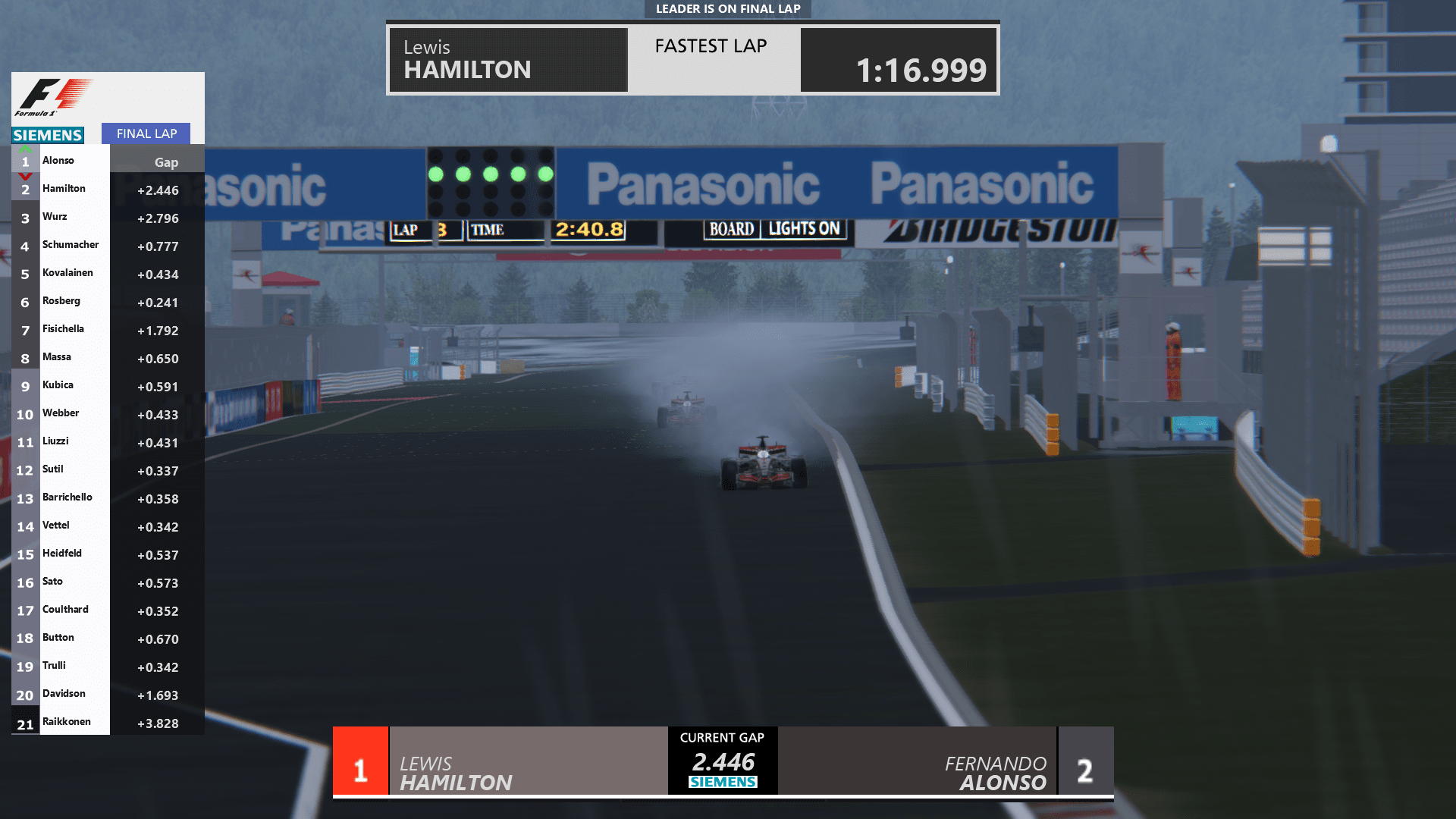
Finally had time to properly finish Fuji 2007. So much work on that one. You know the famous rain race. It still had a few annoying wrong era ads like Dunlop, Porsche, Audi. Fixed now.

Some improvements to Melbourne 2005/2007 too (old style Marlboro ads switched to all red ones that were used in 2005).

lCK1wih.png


ubgyZOh.png


ZdbSf2P.png


PCtNmfK.png


oPlsyjy.png


Also Melbourne final tuning.

uK5s1NV.png


Ik0jCnf.png


Package updated.

 
Last edited:
Sharing a mod? Host it on GTPlanet Downloads. Free, public hosting for files up to 10GB in size.
Back