Assetto Corsa PC Mods General DiscussionPC 

  • Thread starter Thread starter daan
  • 157,771 comments
  • 52,005,066 views
I guess you don't like the bright blue seat... :D

But the real one is (partly) blue too, be it a bit on the darker side:

View attachment 1419237
all the pictures i seen it looked black

i promise it did!! 🤣

i even thought to myself after looking at a few pics "yep defo black no way is this a blue seat........lol!

thats fair enough i had no idea some of it was actually blue

never research 10 mins before going to sleep :gtpflag:
 
Last edited:
Thanks, I'll try those.
At 4096 or higher?
Also, are all other Smart Shadow tick boxes at defaults?

These shadows have been driving me mad for a few days now. I can get them to a good place EXCEPT for striped shadow banding immediately in front of the car from cockpit view.
I was even starting to get decent results with automatic splits, apart from this one issue.

Edit: those stripes in front of the car are still there with 8k shadows... they're just thinner lines, closer packed. But still very visible.

Here's what I mean. Looks worse in action in the Reverb G2 HMD, and hard to see in a static image.
Seems to get worse the lower the sun angle.
View attachment 1419318
Yes at 4096. Everything else enabled as default except for look direction which is set to don't use in VR.

Looking at your example though is not something I have suffered or overcome with shadow settings and I cannot think how a piece of track in full sun should have much shadow information for the settings to affect. The closest I have personally got to your pictured problem is when I have pushed sharpness settings too far or enabled sharpness via Radeon settings. I dunno, just thinking out loud.
 
I have been having the same issues. Apart from rolling back to the last csp build i have found another setting that improves it for me. It kinda goes the opposite way with shadow res. I reduced the overhang multiplier to minimum 50%. Seems to soften the shadow and smooth things up for me. Lets put it this way, it is not so obvious to me since i did this. Oh and look direction = do not use in VR is helping i feel
Thanks, will test and report back.
I used to have look direction = do not use in VR set too as it was causing shadow flickering in the cockpit, but that seems to have been resolved so I have it active now. Not even sure what it does to be honest. Like most CSP things you need a crystal ball, a Rosetta stone, a time machine and a degree in rocket surgery just to work out what a tickbox might do, maybe..

Edit: tested. No change. Thanks anyway.
 
Last edited:
I know sod all about track edits, so sorry if this is a daft question, but is there a way to apply that to tracks with solid bales if those aren't mentioned in the surfaces.ini file?
Im my experience I have tried to play with making existing walls (1WALL_?) flexible, bouncy etc. It was possible to make these non-colideable via CSP config (actually extended track physics). Technically WALL is in a "global surfaces.ini" just like ROAD, GRASS and SAND. I think you would need to have a colideable mesh, in AC is any mesh named with a prefix numeral, not in any suface definition in order to change it. Likely it is preferable to have a non-collide mesh that can then be defined using extended track physics such as detailed here and here

I may or may not have understood or answered your question :)
 
Last edited:
  • create a new folder named "data_override" inside "ac_legends_gtc_tvr_griffith_200\extension"
  • create a new text file with notepad and name it "lods.ini"
  • paste the following lines

[COCKPIT_HR]
DISTANCE_SWITCH=8

[DRIVER_HR]
DISTANCE_SWITCH=25

[LOD_0]
FILE=tvr_griffith_200.kn5
IN=0
OUT=20

[LOD_1]
FILE=tvr_griffith_200_LOD_B.kn5
IN=20
OUT=60

[LOD_2]
FILE=tvr_griffith_200_LOD_C.kn5
IN=60
OUT=200

[LOD_3]
FILE=tvr_griffith_200_LOD_D.kn5
IN=200
OUT=1500


You can follow a similar procedure for Alfa Romeo Giulia TZ2.
You have to edit also "hide_plate.ini" in a similar way.
NOTE: this car for now doesn't work. It gives an encryption error.
It was worth trying, but as soon as I remove the pctm version, the ACL stops working...

upgrades.png


😬
 
Last edited:
Spa Vintage Track Updates:

These are my updates to all three versions of the Spa Vintage tracks. They are all full stand alone tracks because it was suggested that I do it this way instead of config\track skin mods.

All versions now have a vao patch, animated flags, working clock tower and new grass and tree textures. They also have two additional track skins that get a progressively bluer tint and less saturation. The skins also have only the files I altered from the original so you can edit them to make a skin that fits your liking. There are also new ext_configs for each track that add seasonal changes, some shader adjustments and a few other things.

Explanation about each one so you know which one to download. They each represent a specific version of the track:

Spa-Francorchamps 1938:

Spa-Francorchamps 1938

-- Based on the Spa_Faux_Pre_War version. All credits for the track go to Legion.
-- Additions include all things listed above plus removal of floating flag poles that had no flags and scaling of flag poles that were floating off the ground. Plus I added collision physics to most of the haybales. Some I left without to help with AI behavior. All other things about the track are the same as the original.


Spa-Francorchamps 1966:

Spa-Francorchamps 1966

-- Based on the Spa_1966 version. All credits for the track go to the Reboot Team.
-- Additions include all things listed above plus collision physics to most haybales. Some I left without to help with AI behavior. Also included the Spa 1966 AI done by Parri. The original AI is still included in the ai_original and data_original folders. Just rename them to ai and data to revert back to the original AI behavior. All other things about the track are the same as the original.

Spa-Francorchamps 1934 & 1966:

Spa-Francorchamps 1934 & 66

-- Based on the Spa_THR version. All credits for the track go to the Reboot Team and Waffles for the THR updates.
-- Additions include all things listed above plus a new AI line for the 1934 layout done by me. The original AI was unusable. It was my first attempt at an AI line so don't expect perfection. All other things about the track are the same as the original.

Please point out any and all mistakes. I'm sure there are a few. Was kind of hard managing three versions of the same track. I was never sure if I made the same changes on all three tracks.

View attachment 1216445
Updated just the Spa 1966 track to version 1.05. Use the link in the quote above to get the update. It's kind of a test version just to get some feedback.

It would be best to delete or backup your existing track folder. If you are using a custom ai file (i.e., parilla's version) make sure to keep a copy of the lines and hints file handy to put back in place once you update the track.

-- Added 3 new road physics files that correct (hopefully) all the road holes. The difference between them is how bumpy they are. The default one sits in the middle. If you want more road feel, rename the spa66_phy_bumpy_road.kn5 file to spa66_phy.kn5. If you want less bumps, rename the spa66_phy_no_road_noise.kn5 file to spa66_phy.kn5. I included the original file as well if you prefer the old feel. Just know that the holes will still be there with that one.
-- Altered the haybale physics. They are now pass through with a speed penalty for getting too deep into them, but at least your race won't end if you barely graze them. If you find the effect too extreme, open up the surfaces.ini file in the data folder. Go to the BALE heading section all the way at the bottom and lower the FRICTION and DAMPING values until you come up with something you prefer.
-- Added an additional replay cam from @Felix789

I will eventually do the haybales the same way on the other two versions, but not until I hear whether people like this new way of handling the bale physics. It's a pretty time consuming process and i'm not wasting the time until I know it's a better approach.
 
Last edited:
Regarding AC Legends GTC 60s v1.2, does anyone know, if the Mercedes 300sl and Ferrari 250 GT SWB are for some reason significantly slower than other cars, although their power/weight ratio is approximately the same, is that how it should be?
 
Last edited:
The 300SL and the250 GT SWB are the previous gen of GT cars, even if they have the same ratio, IRL they were slower
 
Regarding AC Legends GTC 60s v1.2, does anyone know, if the Mercedes 300sl and Ferrari 250 GT SWB are for some reason significantly slower than other cars, although their power/weight ratio is approximately the same, is that how it should be?

They're the two oldest cars in the pack so a lot of other parts aren't as good, especially brakes.
 
Maybe stupid question so pardon me but is the Kunos GT40 and the GT40 MK1 of the latest WSC pack the same car (I think about to delete either the kunos or the bazza one, for disc-space reason)?
 
Maybe stupid question so pardon me but is the Kunos GT40 and the GT40 MK1 of the latest WSC pack the same car (I think about to delete either the kunos or the bazza one, for disc-space reason)?
Why would you even delete an official Kunos-made car ? You've paid for it !
 
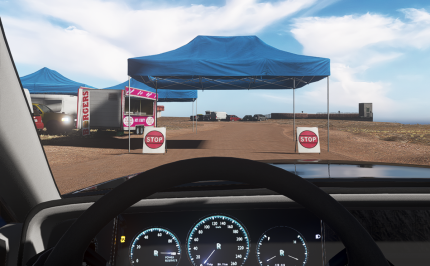
Oh.. & if someone finds a solution for the "ghosting stripes" on tarmacs, please post the solution! It drives me crazy, to the point that i can't play the game! Thanks!
 
Maybe stupid question so pardon me but is the Kunos GT40 and the GT40 MK1 of the latest WSC pack the same car (I think about to delete either the kunos or the bazza one, for disc-space reason)?
It's a different model made by HSS, the Kunos is a late 60s Mk 1 which is different but both Historically important in their own way. I renamed them like this if any help;

1736352134138.png
 
Last edited:
Between the CSP 2.5.1 and the 2.7.1 version noone took care of the grass on the tracks you didn't use, meaning that you have to update "LawnmowerFX" manually:

Screenshot_gadu_alfa_romeo_tz2_ks_monza66_8-0-125-16-57-39.jpg


It happened on a few tracks with longer GrassFX, and the good thing is that you just need to reinstall the tracks thru CM.


On a "modding" note (i call myself a modder because i often play with sliders, sometimes with results), i made another NeckFX for some speed sense with the Alfa TZ2(gadu Boyz version) and it's pretty cool :


My neckfx listing is here : https://www.mediafire.com/file/xr7hp3nfa8zdhko/Tetri_Neck_FX_listing.rtf/file
 
The 300SL and the250 GT SWB are the previous gen of GT cars, even if they have the same ratio, IRL they were slower
The mod description states that "For racing/BoP purposes the 6 cylinder engine is swapped for the 300SLR straight 8 engine"

I watched several videos from Goodwood festivals where these cars were used quite aggressively, and there 250 GTSWB is approximately equal to 250 GTO (C1), i understand, that this is not an indicator, but i dont think the difference should be that big))
 
Oh.. & if someone finds a solution for the "ghosting stripes" on tarmacs, please post the solution! It drives me crazy, to the point that i can't play the game! Thanks!
Language barrier, i need a pic, but i think i know what you're talking about ;)
 
Language barrier, i need a pic, but i think i know what you're talking about ;)
Between the "stop" signs, if that's visible! It's pretty obvious when you're driving though!
 

Attachments

  • AClines.png
    AClines.png
    376.1 KB · Views: 40
Alright, I'll not touched it any further but it is in a good place. Decals aren't 100% accurate but I won't bother, it's not my mod anyways lol

List of things fixed / altered :

  • Edited windows so decals could be painted on them. Resulted in 10 texture files but not my problem :)
  • Driver names on the right windows
  • Added Peugeot Lease decals in lieu of Sevel
  • Removed some Michelin logos
  • Added Kronos logos here and there
  • Moved the Peugeot 806 badges (these were too low compared to the real car)
  • Removed the AutoTrader plaque inside cockpit
  • Added external_glass to cockpit_hr (am I ACTK/EASY ? Oh crap...)

KN5 provided due to the changes


View attachment 1418886

View attachment 1418887
Are you able to work out why the dirt/smudges on Cyril Cherry internal windscreens always looks like little hard-edged semi-transparent stickers when driving into the sun?
All of his cars have this effect on the dirt layer and it always looks very bad compared to the more naturally blended Kunos method that most mod cars use.
He's doing something wrong when creating his windscreen DDSes, but I'm not quite sure what.
 
Last edited:
Between the "stop" signs, if that's visible! It's pretty obvious when you're driving though!
Looks like what @Masscot was having issues with, a little upper in the thread! For me it's often a sharpen setting or a LOD set wrong in CM (Extra FX sharpen, AMD fidelity CAS extra sharp, or track LOD set to more than 100%).

But with the SmartShadows issues lately, i would just ALT-tab and play with the settings live until you find the proper setting
 
Maybe stupid question so pardon me but is the Kunos GT40 and the GT40 MK1 of the latest WSC pack the same car (I think about to delete either the kunos or the bazza one, for disc-space reason)?
Not at all a stupid question. The Kunos car represents chassis P-1075, built in 1968 specifically as a JW Automotive car. (I know there are a million liveries, across the years, but...Kunos intent was :))
AFAICS, the WSC car represents an amalagam/average of the GT40's during 1966-1967. Of course there are small developmental differences. The 66-67 cars were mostly 289 (4.7 litres) whereas P-1075 had a 302 (5-litre) Westlake engine.
P-1075 was famously, the first double Le Mans winner to use the same chassis at both attempts.
These differences might be irrelevant to some, but maybe not to you :)
 
It happened on a few tracks with longer GrassFX, and the good thing is that you just need to reinstall the tracks thru CM.
This statement makes absolutely no sense and is factually illogical, are you trolling?
 
It was worth trying, but as soon as I remove the pctm version, the ACL stops working...
Strange, you have copied all the 4 tvr_*.kn5 files. It should work.
Check if the folder structure. It should be like this

cars\ac_legends_gtc_tvr_griffith_200\extension\data_override

and inside it you shoul have the modded lods.ini file
 
This statement makes absolutely no sense and is factually illogical, are you trolling?
Half trolling. I did discover a few tracks where the grass fx seemed overscaled (trunk sized on the overgrown ones, or completely out of proportion, and out of where they should be), and with all the latest small bugs we encountered i though it was worth sharing the solution rather than play with the grass fx settings for half an hour like i did.

For the actual coding madness that lead to it, it's out of my range.
 
Maybe stupid question so pardon me but is the Kunos GT40 and the GT40 MK1 of the latest WSC pack the same car (I think about to delete either the kunos or the bazza one, for disc-space reason)?

Basically, WSC one is the 66-67 car and Kunos one is the 68-69 car. I would recommend keeping both, as a future WSC mod may use the latter version with the wider tyres and the larger engine.
 
Strange, you have copied all the 4 tvr_*.kn5 files. It should work.
Check if the folder structure. It should be like this

cars\ac_legends_gtc_tvr_griffith_200\extension\data_override

and inside it you shoul have the modded lods.ini file
I can’t check anymore because I binned it, but yes, that is exactly how it was.
 
Basically, WSC one is the 66-67 car and Kunos one is the 68-69 car. I would recommend keeping both, as a future WSC mod may use the latter version with the wider tyres and the larger engine.
When Bazza Showed off this preview for WSC69 Pack (https://www.gtplanet.net/forum/threads/assetto-corsa-pc-mods-general-discussion.307899/post-13902063)
there isnt any GT40 68-69 But at the same time We are seeing Pasta2000 Make the Alfa Tippo, and Legion Posting the Chevrons so who is to say if it will or not feature a 68-69 GT40 and other Late 60s Protoypes :)
 
Hello

a belated happy new year.

After i installed CSP 0.2.7p1 today, an orange square appears in the top left during races or trackdays. With Mouse over the square: "a delay in data stream from the server".

delay.png


However, there are still no delays or anything similar.

training or hotlaps works fine . no orange square appears.


If i go back to CSP 0.2.6p1, the message doesn't appear.

Can anyone imagine where this could be coming from?

btw, a second PC - same problem.

Thx - Rob
 
Sharing a mod? Host it on GTPlanet Downloads. Free, public hosting for files up to 10GB in size.
Back