Assetto Corsa PC Mods General DiscussionPC 

  • Thread starter Thread starter daan
  • 157,782 comments
  • 52,020,412 views
re haybales and embeded tires:

I have been using a technique for several years now, (first?) realized in my Keimola release with its infamous burried tires.
Another track to feature my softbales style is Paramount Ranch among others.

These were achieved by surfaces manipulation without implimenting CSP custom collision parameters (which is still quite buggy imho).
 
Last edited:
re haybales and embeded tires:

I have been using a technique for several years now, (first?) realized in my Keimola release with its infamous burried tires.
Another track to feature my softbales style is Paramount Ranch among others.

These were achieved by surfaces manipulation without implimenting CSP custom collision parameters (which is still quite buggy imho).

I know sod all about track edits, so sorry if this is a daft question, but is there a way to apply that to tracks with solid bales if those aren't mentioned in the surfaces.ini file?
 
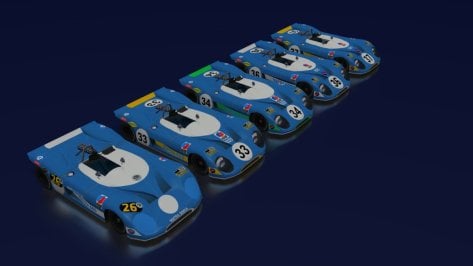
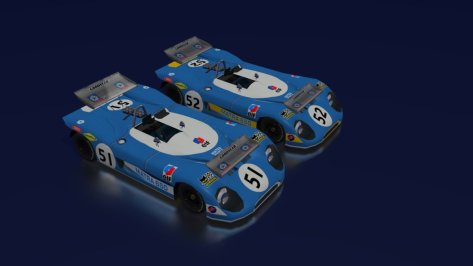
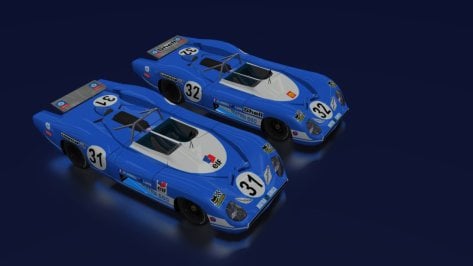
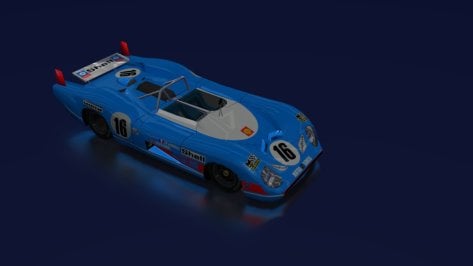
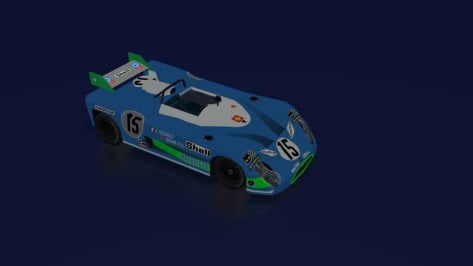
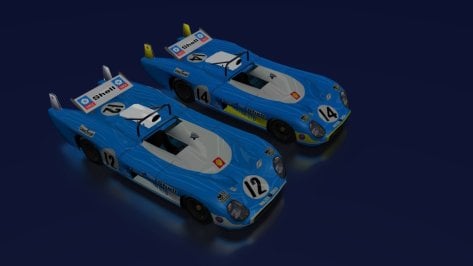
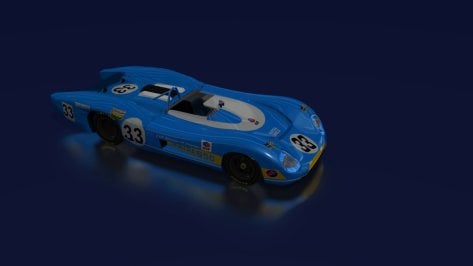
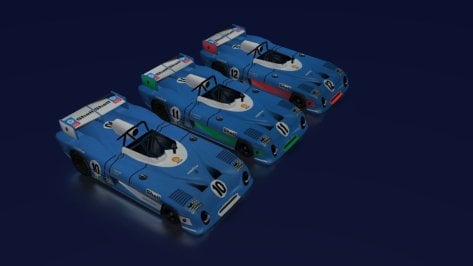
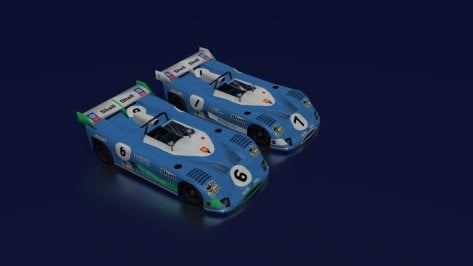
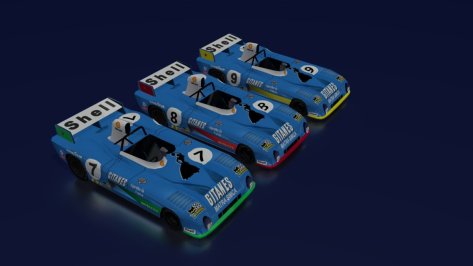
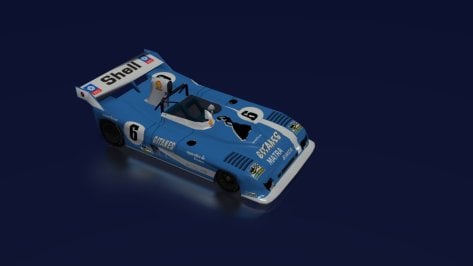
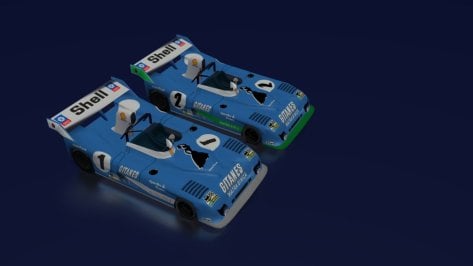
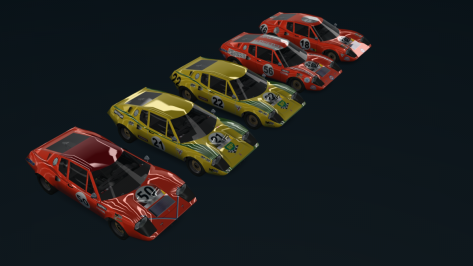
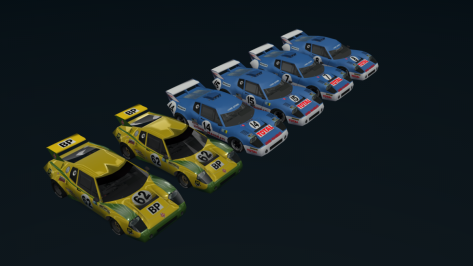
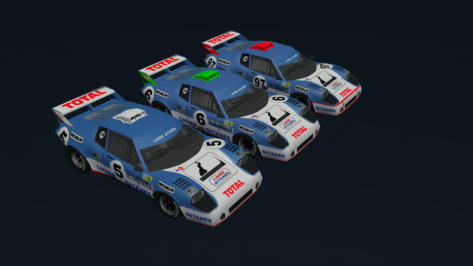
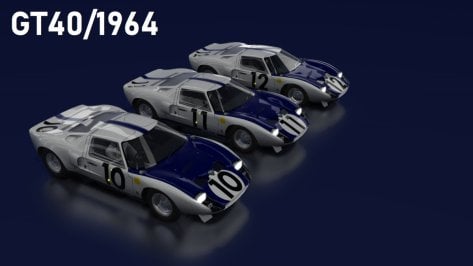
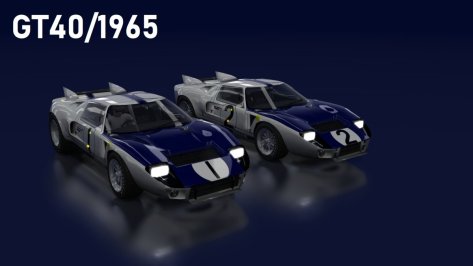
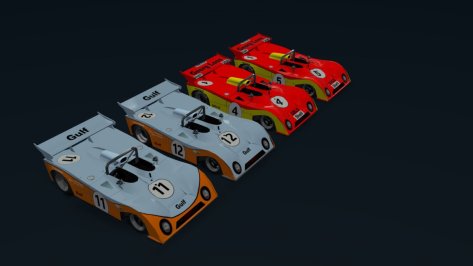
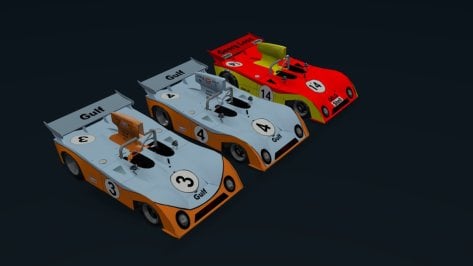
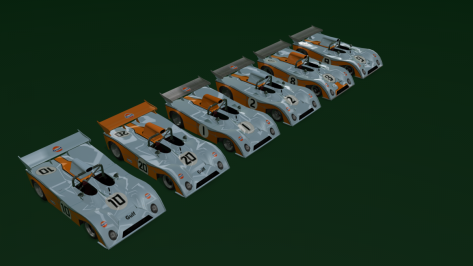
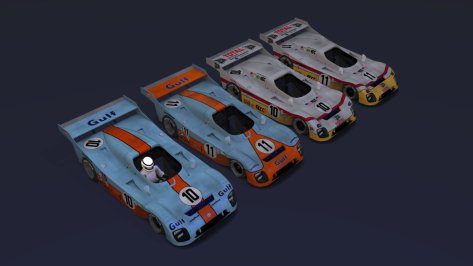
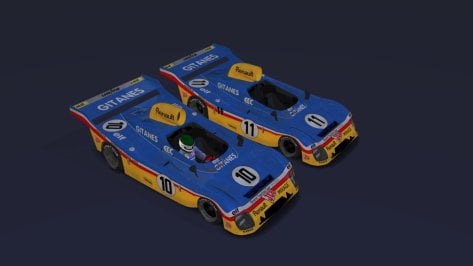
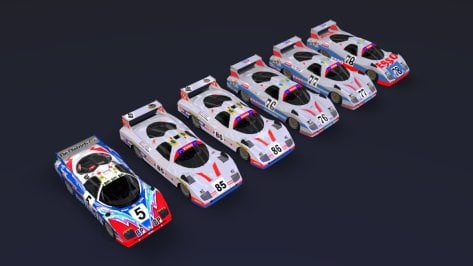
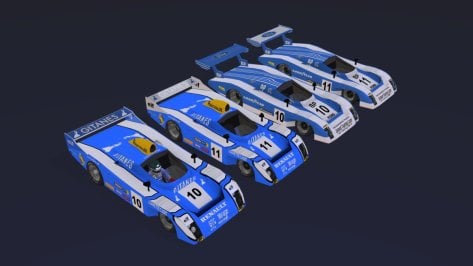
Hoping in the near future that some of these versions of the

Matra, Ligier JS2 and Ford GT40 (partially converted from GTR2) and with the possible improvements in the textures made (by MrHunt) ....

and some WM and Mirage (in the same way but with improvements by Aleroy), can be made ( in the standard by Bazza or another simulator that comes to make them).

For now we will use these to compose the historical grids.
 

Attachments

  • 2.jpg
    2.jpg
    64.3 KB · Views: 51
  • 3.jpg
    3.jpg
    56.9 KB · Views: 45
  • 4.jpg
    4.jpg
    66.3 KB · Views: 46
  • 5.jpg
    5.jpg
    40.5 KB · Views: 42
  • 8.jpg
    8.jpg
    33.6 KB · Views: 43
  • 7.jpg
    7.jpg
    58.9 KB · Views: 46
  • 6.jpg
    6.jpg
    36.8 KB · Views: 37
  • 9.jpg
    9.jpg
    58.1 KB · Views: 41
  • 10.jpg
    10.jpg
    47.7 KB · Views: 46
  • 11.jpg
    11.jpg
    65.4 KB · Views: 44
  • 13.jpg
    13.jpg
    40.1 KB · Views: 48
  • 12.jpg
    12.jpg
    54.1 KB · Views: 42
  • 0.png
    0.png
    97.3 KB · Views: 48
  • 1.png
    1.png
    83.5 KB · Views: 46
  • 2.png
    2.png
    89.1 KB · Views: 45
  • 3.jpg
    3.jpg
    68 KB · Views: 43
  • 4.jpg
    4.jpg
    58.4 KB · Views: 46
  • 10.jpg
    10.jpg
    60.1 KB · Views: 44
  • 9.jpg
    9.jpg
    61.3 KB · Views: 44
  • 11.png
    11.png
    76.7 KB · Views: 44
  • 12.jpg
    12.jpg
    72.3 KB · Views: 40
  • 13.jpg
    13.jpg
    62.8 KB · Views: 48
  • 15.jpg
    15.jpg
    92.6 KB · Views: 54
  • 14.jpg
    14.jpg
    86.4 KB · Views: 55
Last edited:
Hoping in the near future that some of these versions of the

Matra, Ligier J2 and Ford GT40 (partially converted from GTR2) and with the possible improvements in the textures made (by MrHunt) ....

and some WM and Mirage (in the same way but with improvements by Aleroy), can be made ( in the standard by Bazza or another simulator that comes to make them).

For now we will use these to compose the historical grids.
Looks great. Will you be publishing them on Discord?
 
Starting to wonder if the last CSP update has borked the shadows. I can't seem to get rid of quite vivid tramline shadow banding on the track and adboards etc.
Changing the time of day with the Pure slider has the tramlines changing direction as the sun position changes.
The effect gets worse at low sun angles.
Increasing shadow resolution lessens the effect, but does not eliminate it.
I've tried all sorts of Smart Shadow settings, different splits etc etc.
Looks pretty awful.
 
Last edited:
That does kind of help to deconstruct things. I think.
From this text...
Code:
; Shadow cascades for interior cameras. unfortunately, with only three splits,
; not much can be done, so if you want to increase quality or distance for shadows
; outside, you can go full Gran Turismo and set it to something like 25, 75, 200
; (that game has incredibly bad interior shadows, but with dark interiors, it’s not
; really noticeable). Also, if needed, original Kunos values are 1.3, 80, 250.
INTERIOR_SPLIT=1.3, 40, 200 ; Distances for interior; text; hidden with AUTOMATIC_SPLITS
... it seems that the first value was the distance in metres that the highest-quality shadow would be rendered (then cascading down to the second mid-quality split then the third lowest-quality split), which Kunos had at 1.3m but Polyphony Digital set at 25m.
So, with a beefy PC you should be able to set the first split distance quite high and get (probably totally unnecessarily) cockpit-quality shadows off into the environment at whatever distance you set. But this only seems to work if you have Custom Shadow Matrices ticked, and even then results aren't great, and cockpit shadows flicker. Seems I also need to have shadow resolution set to 4096x4096 in AC video settings to avoid reduce shadow banding in the environment.
I think I tried upping the first split from 1.3 to like 15.It made the transition to the next split very stark.

Starting to wonder if the last CSP update has borked the shadows. I can't seem to get rid of quite vivid tramline shadow banding on the track and adboards etc.
Changing the time of day with the Pure slider has the tramlines changing direction as the sun position changes.
The effect gets worse at low sun angles.
Increasing shadow resolution lessens the effect, but does not eliminate it.
I've tried all sorts of Smart Shadow settings, different splits etc etc.
Looks pretty awful.
Yes,I am seeing lots of self shadowing bands on all the tracks.
 
Last edited:
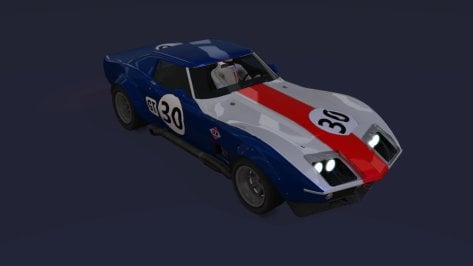
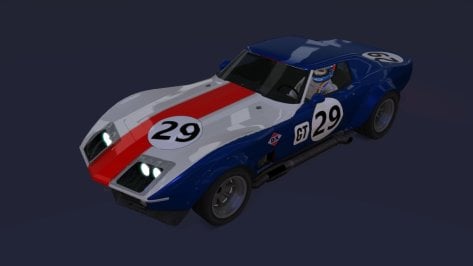
I decided to create two Corvette skins (DX Sunray Oil Co.) in a simple way.
The version of the Corvette (by Bazza) for the 1968 24 Hours of Daytona (it's 1967 for car number 31).

The cars (29 and 30) are from the (1969 C3) version.

It will do for now. I hope someone does it better.
 

Attachments

  • __custom_showroom_1736299339.jpg
    __custom_showroom_1736299339.jpg
    40.7 KB · Views: 31
  • __custom_showroom_1736299319.jpg
    __custom_showroom_1736299319.jpg
    46.8 KB · Views: 29
  • livery.png
    livery.png
    7.6 KB · Views: 28
  • livery.png
    livery.png
    7.6 KB · Views: 35
Last edited:
whatisthislogo.png


Any chance someone can identify this decal or logo for me? I haven't had any success finding it. Thanks.
 
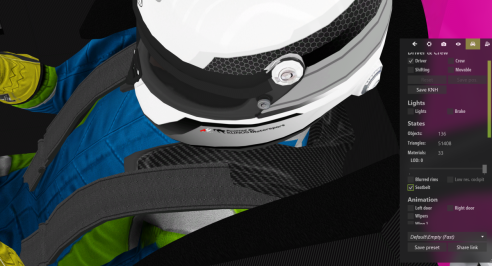
Whats the easiest way to adjust seabelt to driver?
Can I import the driver into Blender then adjust it?
As of now its quite painstaking to adjust - save - check in CM...
 

Attachments

  • Screenshot 2025-01-07 225341.png
    Screenshot 2025-01-07 225341.png
    239.1 KB · Views: 27
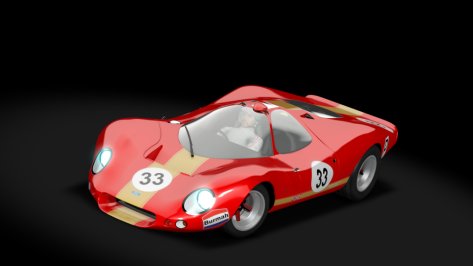
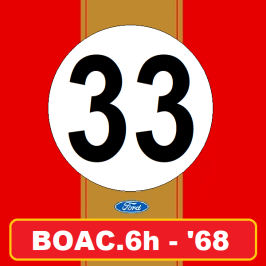
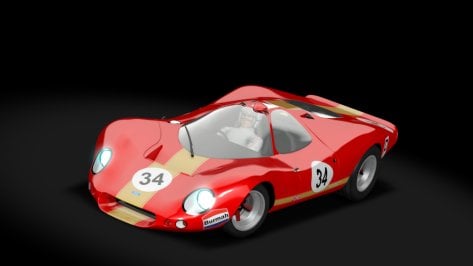
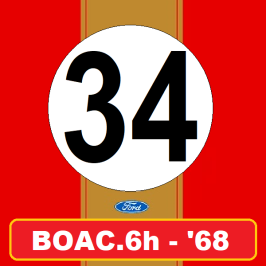
I hope everyone has this version of the Ford p68 (different from the Legion version with spoiler).

Skins from the 1968 BOAC 6h race (Team Alan Mann) to compose the grid.


Attachments

  • preview.jpg
    preview.jpg
    42.4 KB · Views: 38
  • livery.png
    livery.png
    11.4 KB · Views: 42
  • preview.jpg
    preview.jpg
    42.6 KB · Views: 39
  • livery.png
    livery.png
    11.5 KB · Views: 40
Last edited:
Sunset Peninsula (fictional track from Forza Motorsport 4) is available for Assetto Corsa for many years now. Unfortunately it is just a freeroam track:


Well... this is one big POS. (I originally downloaded this back in 2021 it seems)
It would need EXTENSIVE UV remaping and a ton of 3d work to even be presentable

Don't even need FM2023 for that one, FM4 would suffice. And there's plenty of tool to extract the tracks (xDelta, XISO, Forza Studios...)

I gave those FM3-4 tracks to rmi last year, maybe something will come out of it, maybe not !
Well, I still have the archive extracted in my dev folder. I could try again to have a look but if I recall the tracks did not look viable to produce anything of quality.
 
Kunming Competitors Kartclub(昆明竞速卡丁车俱乐部)
A real kart track in Kunming, Yunnan province, China(中国云南省昆明市).
Made by me.
Grassfx, rainfx and lights added, csp 1.79 or higher needed.
1 layout, 1 camera.
bgr03.png

Screenshot_trkg_kart225_kunming_competitors_kartclub_8-0-125-18-49-15.jpg

Screenshot_hipole_rental_kart_kunming_competitors_kartclub_8-0-125-18-13-13.jpg

Screenshot_trkg_kart225_kunming_competitors_kartclub_8-0-125-18-47-59.jpg

Download link:https://mega.nz/folder/z8Il0KCK#sWqQ4VdeEDJGOVOJmhyJ8w
The track address: No. 8-1, Luolong Road, Chenggong District, Kunming City, Yunnan Province(云南省昆明市呈贡区洛龙路8-1号).
Welcome to our kart club.


-----------------------------------------------------------------------------------------------------------------------------------------------------


Kunming SK1 Kartclub(昆明SK1卡丁车俱乐部)
A real kart track in Kunming, Yunnan province, China(中国云南省昆明市).
The track has been closed on October 2024 because of legal issues of land use, really a pity.
Made by me.
Grassfx, rainfx and lights added, csp 1.79 or higher needed.
1 layout, 2 camera.
bgr00.png

bgr01.jpg

Download link:https://mega.nz/folder/z8Il0KCK#sWqQ4VdeEDJGOVOJmhyJ8w
 
Last edited:
shi
Piranema Winter Test Track v1.3

View attachment 1228889
Fictional circuit in Brazil.
Conversion from Grand Prix 4.

-CSP recommended
-32 pit/start
-AI, cam

Credits & Thanks;
Original Track by Gildoorf Rozencrantz, Ruboy, PrBlanco, Ricardo Lampert
-Thank you for gave me permission (Gildoorf)

AC Converted by @shi (shin956)
AI, sidelines and ai_hints.ini by IMEAN
.lua and font base by @gunnar333
ext_config by @slider666
logo.png by @Fanapryde
Crowds texture by Kniker97
some objects and textures by kunos
Test and Feedback by @Fanapryde , @slider666 , @Breathe , @Mike08, @twobegreen, @Masscot

Enjoy.
;;;;;;;;;;;;;;;;;;;;;;;;;;;;;;;;;;;;;;;;;;;;;;;
v1.01 changelog;

-Added new church building. https://www.cgtrader.com/free-3d-models/exterior/historic-exterior/old-little-church
(Thanks for the report by @twobegreen .)
-Smoothed edges of road surface and kerb.
-Fixed floating buildings.
(Thanks for the report by @Masscot .)
-The AI line was broken, so it was re-created.
-Other minor fixes.

v1.1 changelog;
-Extended pit lane entrance. (Thanks to Meatfraiche for the report.)
-Some textures were upscaled with AI.
-Fixed tree wall mapping.
-Changed background.
3D mountains from Chuck_CG's Landscape pack.
-Added Summer Mountain Skin.
-Updated preview.

v1.2 changelog;
New AI, sidelines and ai_hints.ini by IMEAN. (Thanks!)
Changed crowd textures by Kniker97. (Thanks)
Added garage doors that open and close.
Added grid and s/f line meshes.
Updated billboard mapping and textures.
Updated ext_config.ini.

v1.3 changelog;
Added white lines to pit lane. (Thanks Perico Lospa for the suggestion.)
Updated kerb texture.
Updated ext_config.ini.
Other minor fixes.


Piranema Winter Test Track v1.3
The link is in the quote.

v1.3 changelog;
Added white lines to pit lane. (Thanks Perico Lospa for the suggestion.)
Updated kerb texture.
Updated ext_config.ini.
Other minor fixes.

Screenshot_ks_abarth500_assetto_corse_piranema_winter_test_track_8-0-125-20-8-41.jpg
 
That does kind of help to deconstruct things. I think.
From this text...
Code:
; Shadow cascades for interior cameras. unfortunately, with only three splits,
; not much can be done, so if you want to increase quality or distance for shadows
; outside, you can go full Gran Turismo and set it to something like 25, 75, 200
; (that game has incredibly bad interior shadows, but with dark interiors, it’s not
; really noticeable). Also, if needed, original Kunos values are 1.3, 80, 250.
INTERIOR_SPLIT=1.3, 40, 200 ; Distances for interior; text; hidden with AUTOMATIC_SPLITS
... it seems that the first value was the distance in metres that the highest-quality shadow would be rendered (then cascading down to the second mid-quality split then the third lowest-quality split), which Kunos had at 1.3m but Polyphony Digital set at 25m.
So, with a beefy PC you should be able to set the first split distance quite high and get (probably totally unnecessarily) cockpit-quality shadows off into the environment at whatever distance you set. But this only seems to work if you have Custom Shadow Matrices ticked, and even then results aren't great, and cockpit shadows flicker. Seems I also need to have shadow resolution set to 4096x4096 in AC video settings to avoid reduce shadow banding in the environment.
During my long drawn out relationship with custom shadow tweaking, the conclusion about increased resolution was the most revelatory. I have ended up on 4096 but have had trips into the two (not recommended) resolutions with good results.

FWIW, which is very little when it comes to the dark arts of CSP shadows, the splits I have settled on (for now) are 1.3, 90, 250. Fourth cascade active and set to 2500m.
 
During my long drawn out relationship with custom shadow tweaking, the conclusion about increased resolution was the most revelatory. I have ended up on 4096 but have had trips into the two (not recommended) resolutions with good results.

FWIW, which is very little when it comes to the dark arts of CSP shadows, the splits I have settled on (for now) are 1.3, 90, 250. Fourth cascade active and set to 2500m.
Thanks, I'll try those.
At 4096 or higher?
Also, are all other Smart Shadow tick boxes at defaults?

These shadows have been driving me mad for a few days now. I can get them to a good place EXCEPT for striped shadow banding immediately in front of the car from cockpit view.
I was even starting to get decent results with automatic splits, apart from this one issue.

Edit: those stripes in front of the car are still there with 8k shadows... they're just thinner lines, closer packed. But still very visible.

Here's what I mean. Looks worse in action in the Reverb G2 HMD, and hard to see in a static image.
Seems to get worse the lower the sun angle.
1736337698769.png
 
Last edited:
Thanks, I'll try those.
At 4096 or higher?
Also, are all other Smart Shadow tick boxes at defaults?

These shadows have been driving me mad for a few days now. I can get them to a good place EXCEPT for striped shadow banding immediately in front of the car from cockpit view.
I was even starting to get decent results with automatic splits, apart from this one issue.

Edit: those stripes in front of the car are still there with 8k shadows... they're just thinner lines, closer packed. But still very visible.

Here's what I mean. Looks worse in action in the Reverb G2 HMD, and hard to see in a static image.
Seems to get worse the lower the sun angle
I have been having the same issues. Apart from rolling back to the last csp build i have found another setting that improves it for me. It kinda goes the opposite way with shadow res. I reduced the overhang multiplier to minimum 50%. Seems to soften the shadow and smooth things up for me. Lets put it this way, it is not so obvious to me since i did this. Oh and look direction = do not use in VR is helping i feel
 
CSP 0.2.6 resp. 0.2.7p1 (with rainfx) are available.

Changelog:​


  • CSP audio, such as rain or wipers audio, fixed;
  • FFB on gamepads is fixed;
  • Missing audio files for Mumble client (used in new PTT mode) are included, distortion used in that mode adjusted;
  • Trajectory straightening option for AIs reworked and no longer marked as experimental;
  • Tilted drivers don’t mess up motion blur anymore;
  • Just in case, tilted drivers and new head shaking are optional and can be disabled in Graphics Adjustments;
  • Updated logic for drivers and seatbelts rendering, should fix various issues occuring in some edge cases;
  • Grass wind works in VR with Single Pass Stereo disabled;
  • TyresFX look with Single Pass Stereo enabled fixed;
  • HUD brightness in VR with LCS fixed;
  • New KN5 loader no longer messes up GT86 online;
  • Issue with invisible traffic fixed;
  • Cosmic suspension updated with some fixes;
  • MoTeC logger: wind direction takes into account track heading angle, invalid laps are no longer skipped, new channels added (signs of camber/toe, turbo boost, surface grip, and collider wear);
  • Cosmic suspension: virtual elements (e.g. coilovers) now add to FFB properly when attached to hub;
  • Alternative script for second chase camera now works;
  • New hotkey to toggle H-shifter live;
  • Skidmarks no longer fade on major in-game date change done in the first few seconds of AC launching, rubber marks won’t fade on date changes in-game at all;
  • Skidmarks keep track of winter season adjustments and wouldn’t load if saved version is from a notably different value (affecting dirt- and gravel-style marks);
  • Trees cast shadows in fourth cascade again, this time the shadows are semi-transparent;
  • Semi-transparent shadows (SEMITRANSPARENT_SHADOWS=1) produce darker shadows when overlapping;
  • Track meshes with “groove” or “tyre” in their material name and alpha blending rendering no longer skip G-buffer causing SSLR to glitch out;
  • Skidmarks occlude SSLR reflections properly as well;
  • Issue with lamp covers (and other occasions where textures get misassigned) on Shuto fixed;
  • Track light series are cached now, improving Shuto loading speed;
  • A small issue with car dirt stopping resets from working fixed;
  • Currently playing music readout fixed, in particular misassigned album covers;
  • Fireworks no longer activate in showroom mode, firework smoke emitters limit increased;
  • Car stereos update time when music is not playing, album covers are drawn saving aspect ratio;
  • Issue with AC crashing on pressing “Tab” button in chat fixed;
  • Graphics offsets set in “suspensions.ini” no longer count as default (that was a mistake);
  • Audio volume app: transmission volume linking fixed;
  • CUSTOM_MOTION option for online now applies by default to servers requiring CSP 3266 or newer;
  • DISABLE_SURFACE_SNAPPING_ONLINE (both in “car.ini” and extended server options) fixed;
  • VR Variable Rate Shading: gaze latching, hidden options and API function to adjust gaze direction;
  • ReflectionsFX: cubemap prefiltering stops if resolution is above 512×512, motion extrapolation improved;
  • Cars too far from the ground no longer have fake shadow glued to them;
  • TyresFX effects going out of sync with wheels rotation with animated suspensions fixed;
  • Fireworks no longer mess up sky with WeatherFX disabled;
  • Default WeatherFX style: blue nights reworked and disabled by default, YEBIS replacement got proper bloom implementation and an option for dirty lens (disabled by default), film grain intensity can be adjusted, planets are fixed and now visible despite light pollution;
  • Earth texture uses bicubic interpolation;
  • Saturn got rings;
  • Issue with reduced tyre wear fixed;
  • Couple of physics experiments (alternate multithreading and physics objects motion) are moved to complete, enabled and available everywhere;
  • Track fix activating double-sided shadows for everything now works for tracks saved incorrectly as well;
  • If server stops sending UDP packets (with other cars connected) for a few seconds, CSP shows a warning;
  • WeatherFX: scene render callback malfunctioning in VR without SPS fixed;
  • Cars with animated suspensions also get their initial wheel rotations randomized;
  • Firm collisions (happening on exceptional collision depth which is now computed differently) are not bouncy and better configured, main car never gets simplified contacts computation to ensure collisions will remain stable even in the strangest of cases;
  • Distant headlights glare is reworked and brought back (activates further away to hide the fact that a lot of cars don’t have lights aligned with emissives, now works with other car lights too, still disabled by default for now);
  • Tyre spikes leave marks on the ground even if there are no ksTyres meshes (which is still not recommended at all);
  • Issue with F5 camera occasionally glitching out into black screen fixed;
  • A safety check to ensure camera wouldn’t end up in non-finite coordinates;
  • Warning message if player’s car is found in non-finite coordinates;
  • Very experimental trick to select a specific slot for online (for servers with multiple cars of different skins), CM support is coming soon;
  • Ice physics: FFB adjusted;
  • AC shutdown process updated to speed things up and improve stability;
  • Configs:
    • New DISTANCE_CLIP for track lights stopping light at certain distance, for extra optimization and to simulate some basic shadows without using shadow maps;
    • New [EMISSIVE_...] NO_FALLBACK_WHILE_BLINKING=1 for car configs, stops fallback values from activating in “off” stage of blinking of main input;
    • IS_VISIBLE for [MESH_ADJUSTMENT] and [SHADER_REPLACEMENT];
    • Debug side nets offset using DEBUG_OVERRIDE changing final offset amount (within limits);
    • DistantEmissive material now supports normal maps (used by light covers on Shuto, for example);
    • New PROHIBIT_AC_RESET for wearable colliders entirely stopping AC from resetting collider wear on session resets;
    • New DIM_EMISSIVE_IN_CUBEMAP for [SHADER_REPLACEMENT];
    • Side nets (and, for example, antenna of BMW E30 using the same mechanism for tilting) take high-frequency part of G-forces for a tiny bit of extra offset for more natural look;
    • Track configs will look for files next to configs if file names are starting with “./” (to keep things compatible);
  • Lua:
    • ui.imageState() fixed;
    • Function setting MIP bias for UI now can force bicubic interpolation as well;
    • Some Lua functions, such as io. and os., have been rewritten, so the standard library is 15% smaller now, and some features are loading on-demand;
    • Marking drivers as friends should work now;
    • New os.setCurrentFolder() affecting file search, including standard Lua functions, doesn’t affect AC itself or other scripts;
    • web.socket() fixed (previously received data would often come back mangled);
    • Lua preprocessor fixed and no longer produces invalid code in ENUM..somethingElse case;
    • Lua shaders: option to hint compiler to compile certain values in (should solve all problems with YEBIS replacement setting changes causing a lag, now all the settings are not compile-time, but apply as compile-time after some time running);
    • Audio events loaded from files without loop parameter now report as invalid once they’re finished playing, since they do become invalid;
    • :resetSkin() no longer affects dynamic car textures;
    • New ac.setHShifterActive() for Lua apps;
    • Lua Debug app: time stamps for log messages;
    • ui.drawCarIcon() got a parameter for a hint;
    • physics.resetWearPlanks() is deprecated (copy of ac.resetColliderWears());
    • New ac.getSim().timeSinceLastUDPPacket just in case;
    • New way of passing C++ API functions now processes nil when string is expected as an empty string, similar to old way (in 0.2.5 mistakenly it would show up as 'nil', functions such as ac.setMessage() were affected).
 
Last edited:
Sharing a mod? Host it on GTPlanet Downloads. Free, public hosting for files up to 10GB in size.
Back